A World Chain wallet is any wallet that holds the keys to a 0x address on World Chain, the Ethereum layer 2 built for World App and its WLD token. World App's own wallet is one of them. Keylo, MetaMask and other Ethereum-style wallets work too, because World Chain runs the same account model as Ethereum.
The difference shows up in fees and in how the account works. World App users don't usually pay gas, because the app funds it, and their wallet is a smart contract account managed by the app. In a regular wallet you hold your own recovery phrase and pay small fees in ETH. Everything below is current as of October 24, 2026.
World Chain at a glance#
Item | World Chain |
|---|---|
Built for | World App, World ID and WLD |
Network type | OP Stack layer 2 on Ethereum, part of the Superchain |
Chain ID | 480 |
Gas token | ETH (WLD can't pay gas) |
Address format |
|
Block time | 2 seconds |
Typical fee | Well under one cent for a transfer |
Main tokens | WLD, native USDC from Circle, WETH, WBTC |
Withdrawal to Ethereum | About 7 days through the native bridge, minutes through fast bridges |
Explorer | |
In Keylo | Send, receive, tokens, history, speed-up, read-only NFT view, swap and bridge through LI.FI. No testnet, no dapp connections |
World App vs your own World Chain wallet#
World App launched on OP Mainnet in 2023 and moved its activity to World Chain after the network went live on October 17, 2024. World says the app now mainly uses World Chain.
How World App's wallet works#
World App's wallet is a Safe, a smart contract account. Its address belongs to the contract, not to a recovery phrase you could type into another wallet. That is why importing a phrase into Keylo or MetaMask never shows your World App account.
A contract account also exists only on networks where it has been deployed. Send WLD to a World App address on World Chain and it arrives. Send it to the same address on a network where the account was never set up, and the app may not be able to reach it.
Who pays the gas#
World says World App users generally don't pay gas today. Tools for Humanity, the company behind the app, funds the gas for claims, swaps and other actions. World also says the app could start charging for some actions, for example transfers to other wallets.
World Chain itself is open to everyone. Any wallet can send transactions there, paying normal fees in ETH. The chain was designed so that verified humans get priority blockspace (PBH), meaning their transactions go ahead of bots at the top of a block. That perk comes through World ID, so a regular wallet such as Keylo uses ordinary blockspace and pays its own gas.
Your World Chain wallet address#
Your address on World Chain is the same 0x address you have on Ethereum, Base or OP Mainnet. It's derived from one key, so it can't differ by network. In Keylo every EVM network shares one address, on the standard path m/44'/60'/0'/0/0.
The balances are separate, though. WLD at your address on OP Mainnet isn't on World Chain, even though the address matches. There's no memo, no activation deposit and no minimum balance to keep the account open.
Keylo checks the address checksum when you paste one. It also warns when a recipient is a smart contract, which is exactly what a World App address is. That warning is expected when you pay a World App user on World Chain.
World Chain supported wallets: how to pick one#
Your choice depends on what you'll do with your WLD.
World App is the natural home if you use mini apps, World ID and the app's free gas. Your funds stay inside the app's contract account.
Extension and mobile wallets work too. World's docs say any EVM wallet where you can add a custom network will do, and they name MetaMask and Rabby. These also connect to World Chain apps.
Hardware wallets like Ledger keep keys offline and pair with one of those wallets, which suits large WLD holdings.
Exchanges hold the keys for you and decide which network they withdraw WLD on.
Web wallets run in a browser tab. Keylo is one.
A good World Chain wallet shows World Chain by name, so you can't confuse it with OP Mainnet. It displays token contracts and warns when a recipient is a contract. It should also let you move WLD across networks without a week's wait.
Keylo fits if you want WLD, ETH and USDC under your own recovery phrase, with swaps and bridges in the same app. It's the wrong choice for World App mini apps or apps that need a wallet connection, because Keylo has no WalletConnect or extension. It doesn't support hardware wallets or card purchases either.
Adding World Chain to MetaMask or Trust Wallet#
First check whether Trust Wallet or MetaMask already lists World Chain, because a built-in entry is safer than typing details. If you do add it by hand, use the values from World's network information page:
Field | Value |
|---|---|
Network name | World Chain |
RPC URL |
|
Chain ID | 480 |
Currency symbol | ETH |
Block explorer |
|
Keylo needs none of this, since World Chain is built in.
How to create a World Chain wallet in Keylo#
Keylo runs in a browser on phone or desktop, and World Chain is already in its network list.
Go to the Keylo registration page. Enter your full name, email, phone number and a password, then tap Create account.
If Keylo says "Check your inbox", confirm your email.
Choose Create a new wallet. Your browser makes a 12-word recovery phrase and encrypts it with your password before anything leaves the device.
Find World Chain in the asset list. Its address is your
0xaddress for every EVM network in Keylo.Open Settings, then Recovery phrase, enter your password and write the words on paper. Keylo asks you to confirm some of them.
Turn on Two-factor authentication and set an Anti-phishing code in the same menu.
The phrase is the only backup. A password reset restores your login, not your wallet, so keep the paper copy safe and offline.
Already have a MetaMask phrase? Choose Import a recovery phrase instead. Your first MetaMask account appears with its World Chain balance. Keylo has no World Chain testnet, so practice with a small amount of real ETH instead.
Get a World Chain address you control
Keylo creates the wallet in your browser, so only you hold the phrase. One 0x address covers World Chain and every other EVM network.
How to send WLD from World App to your own wallet#
Moving WLD, still named Worldcoin in its token contract, from World App to Keylo is a normal transfer on World Chain.
In World App, check where your WLD sits. The app can keep claimed WLD in a Vault instead of your Spending balance, and only Spending is described as ready for immediate use. Move it to Spending first.
In Keylo, tap Receive and choose World Chain. The screen reads "Receive on World Chain" and shows your address with a QR code.
Tap Copy. Then, in World App, choose to send WLD and paste the address.
If World App asks for a network, choose World Chain.
Send a small test amount first. When it appears in Keylo, send the rest.
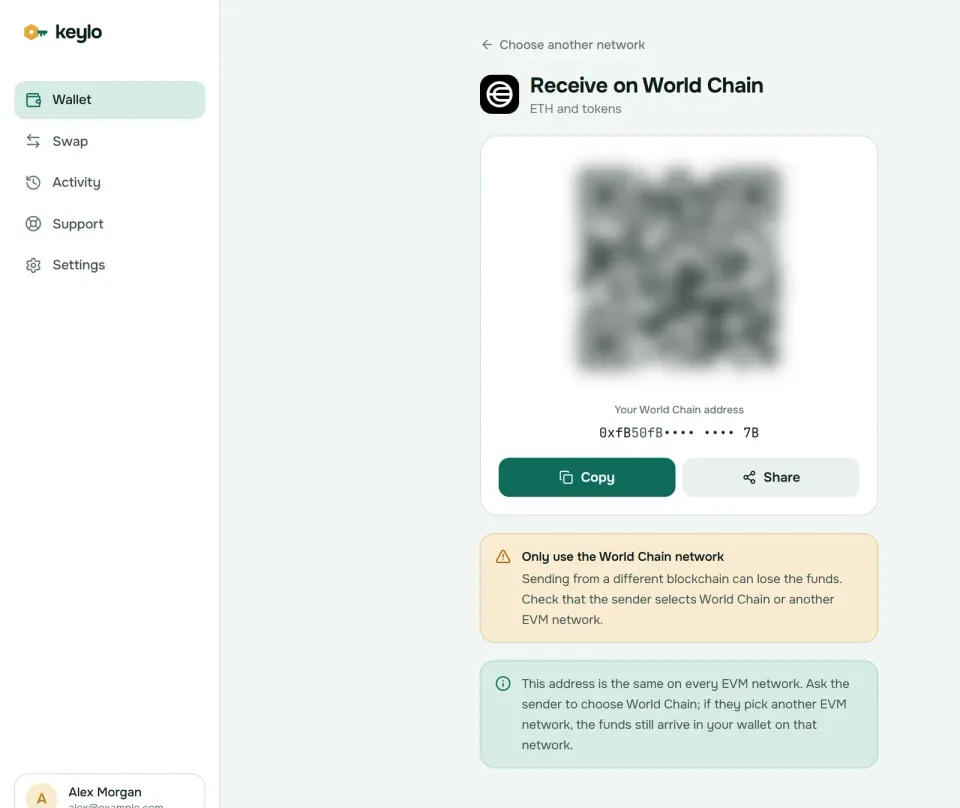
Send a little ETH too, or get some another way. Outside World App nobody covers your gas, and WLD can't pay it, so a Keylo wallet holding only WLD can receive it but can't move it.
Sending WLD to Binance or another exchange#
WLD exists on World Chain, OP Mainnet and Ethereum, as a separate contract on each. Exchanges differ in which of these they accept, so open the exchange's WLD deposit page and read its network list before you send anything.
If World Chain is on the list, send from World App or Keylo on World Chain. If it isn't, don't send on World Chain, because the deposit may never be credited. Send the WLD to your own wallet first. Then use Keylo's swap screen to bridge it to OP Mainnet or Ethereum, whichever the exchange accepts, and deposit from there.
Withdrawals work the other way round. Pick World Chain if the exchange offers it. If you choose OP Mainnet or Ethereum, the WLD still reaches your address, just on that network, and Keylo shows it under that network.
Sending ETH, WLD and USDC from Keylo#
Tap Send and choose ETH, WLD or USDC on World Chain.
Paste or scan the address in To. World usernames and ENS names don't work here, so ask for the
0xaddress.Enter the amount, or tap Max. For ETH, Max keeps back enough for the fee.
Tap Review and pick Slow, Normal or Fast. On World Chain they usually cost about the same.
Check the network, recipient and fee, then tap Send. You'll see "On its way", then "Sent", with a View on Worldscan link.
If a transfer stays pending, Keylo offers Speed up, which sends it again with a higher fee. On a chain with 2-second blocks you'll rarely need it.
Before the review screen, Keylo simulates the transfer. It stops sends to a token's own contract and warns when the recipient is a contract. When you have no ETH on World Chain, it tells you that you need ETH there to pay the fee.
World Chain gas fees#
World Chain fees have two parts, both paid in ETH. The first is execution on World Chain, priced by a base fee that moves with demand. The second covers posting your transaction to Ethereum. World's fee documentation explains both.
On October 24, 2026, World Chain's gas price was about 0.0015 gwei. A plain ETH transfer cost roughly 0.00000003 ETH, a tiny fraction of a cent, and token transfers cost a little more. Keylo reads the Ethereum part from the network and shows the full total before you sign. It adds no fee of its own.
The part that costs real money is leaving through the native bridge. A withdrawal to Ethereum waits about seven days, then needs transactions on Ethereum, paid in mainnet ETH. Fast bridges skip that wait for a fee.
WLD, USDC and other tokens on World Chain#
Tokens on World Chain are ERC-20 contracts. Keylo shows the ones your address holds once the explorer has indexed them. If one is missing, add it by contract under Settings, Networks, Custom tokens.
Token | Contract on World Chain | Notes |
|---|---|---|
WLD |
| World's token, also on OP Mainnet and Ethereum |
USDC |
| Issued by Circle on World Chain |
WETH |
| Wrapped ETH, standard on OP Stack chains |
WLD on Ethereum, where the original contract lives, uses 0x163f8C2467924be0ae7B5347228CABF260318753. On OP Mainnet, World calls 0xdC6fF44d5d932Cbd77B52E5612Ba0529DC6226F1 a legacy bridged version. They represent the same token, but a wallet treats each as a separate balance.
WLD also dominates the chain's value. L2BEAT counted about $433 million secured on World Chain in late October 2026, and nearly 90% of it was WLD.
Swap WLD and bridge off World Chain#
Keylo's swap screen gets World Chain routes from LI.FI. When we checked on October 24, it quoted WLD to USDC on World Chain and WLD from World Chain to OP Mainnet and Ethereum through Relay. ETH moved between World Chain and Ethereum or Base through Across, with estimates under a minute.
Tap Swap and choose the token you pay on World Chain.
Under You receive, choose a token on World Chain, or a token on another network to bridge.
Compare routes by amount, time and fees.
Open the details. Check Minimum you receive and Delivered to, your own address on the destination network.
Confirm. If you're spending WLD or USDC, Keylo first asks you to approve that exact amount.
Swaps fill at no worse than your slippage limit, 0.5% by default. Any Keylo service fee shows as a separate line, and the swap and bridge page explains refunds when a route can't finish.
The native route is slower. World's docs list Alchemy's bridge interface and Superbridge for the native bridge, which takes about seven days to Ethereum. They recommend Across for moving WLD between networks. Their bridge list has the rest.
World Chain scams and safety#
WLD attracts scams because so many people hold small amounts and many are new to crypto.
Fake WLD claims and grants. Real WLD grants happen inside World App. A website that promises a claim and asks you to connect a wallet or sign a message is a drainer.
Fake verification. Nobody can verify your World ID through a web form. Ignore offers to "verify" or reactivate an account for a fee.
Copycat tokens. Anyone can deploy a token called WLD. Compare the contract with the table above or with Worldscan.
Approval traps. A blanket approval lets a contract spend your tokens later. Keylo's own swaps approve only the amount you swap, and Keylo can't sign requests from websites at all.
Fake support. Keylo staff never ask for your recovery phrase or password. Reach the team through Keylo support.
The chain has its own trust assumptions too. As of October 2026, L2BEAT doesn't rate World Chain even Stage 0 while it reviews the node software, and files it under "Others" because fewer than five outside parties can challenge its state. Only whitelisted proposers publish state, and a multisig can upgrade its contracts with no delay. That's common for young layer 2s, but it matters for large balances.
Read how Keylo protects your wallet for two-factor and anti-phishing settings, and see the networks page for everything Keylo supports. If your WLD ends up on another network, the Optimism wallet guide and the Ethereum wallet guide cover those.
Hold WLD in a wallet only you control
Keylo keeps your recovery phrase encrypted on your device. Send, swap and bridge WLD from one place.
World Chain wallet FAQ#
How do I send WLD from World App to another wallet?
Copy your wallet's World Chain address, open World App, choose to send WLD and paste it. Pick World Chain if the app asks for a network. Send a small test first and wait for it to arrive. Remember that outside World App you pay gas in ETH, so send or buy a little ETH on World Chain as well.
Is there a Worldcoin wallet app or browser extension?
World App is the official app for WLD and World ID, and it runs on phones. On a computer, any EVM wallet that supports World Chain can hold WLD, such as the MetaMask and Rabby browser extensions that World's docs name. Keylo is a web wallet: you log in from any browser, nothing to install, and can add it to your home screen like an app.
Which network is WLD on?
WLD exists on three networks, each with its own contract: Ethereum, where the original contract lives, World Chain, which World App uses, and OP Mainnet, which World calls a legacy bridged version. Exchanges may accept only some of them, so before you send WLD to Binance or any other exchange, check which networks its deposit page lists. Your 0x address is the same on all three, but the balances are separate.
Can I import my World App wallet into MetaMask or Keylo?
Not directly. World App's wallet is a Safe smart contract account, so its address belongs to a contract rather than to a recovery phrase you can type into another app. To use another wallet, send your WLD and other tokens from World App to that wallet's address on World Chain.
Do I need ETH to send WLD on World Chain?
Yes, in any wallet other than World App. World Chain charges gas in ETH, and WLD can't pay it. A transfer cost a tiny fraction of a cent as of October 2026, so a few dollars of ETH covers a long time. World App users usually don't pay gas, because the app funds it.
Is World Chain the same as Optimism?
No. Both run on the OP Stack and belong to the Superchain, but they are separate networks. World Chain uses chain ID 480, and OP Mainnet uses chain ID 10. WLD exists on both as different contracts. Sending on the wrong one doesn't lose funds sent to your own wallet, but they land on that other network.
How long does it take to bridge from World Chain to Ethereum?
Through the native bridge, about seven days, plus transactions on Ethereum to finish the withdrawal. Fast bridges are much quicker. On October 24, 2026, LI.FI, which Keylo uses, quoted ETH from World Chain to Ethereum through Across, and WLD to Ethereum through Relay, both with estimates under a minute.
What is priority blockspace for humans?
It's World Chain's design for giving people verified with World ID priority over bots. Their transactions are meant to be included at the top of a block, so busy periods don't squeeze them out. It works through World ID and World App. Regular wallets like Keylo use ordinary blockspace and pay normal fees.
Is World Chain safe to use?
World Chain posts its data to Ethereum and inherits much of its security, but it isn't fully decentralized yet. As of October 2026, L2BEAT notes that only whitelisted parties can propose and challenge its state, and that a multisig can upgrade contracts with no delay. For large balances, weigh those trust assumptions before you move funds there.