An X Layer wallet is any EVM wallet that holds OKB and tokens on X Layer, the Ethereum layer 2 that the exchange OKX built and runs. It uses the same 0x address you have on Ethereum, and it pays every fee in OKB rather than ETH. Fees are a tiny fraction of a cent, and blocks arrive every second.
Three details trip people up. X Layer has its own address style with an XKO prefix instead of 0x, and you may meet it in X Layer tools. Stablecoins come in several versions that share a name: USDT and USDT0, plus three different USDC contracts. And OKB on the wrong network can't pay X Layer gas. This page explains all three, plus how to move funds between OKX and your own wallet. Figures are as of October 2026.
X Layer at a glance#
Item | X Layer |
|---|---|
Built by | OKX |
Network type | OP Stack layer 2 on Ethereum, connected to Polygon's Agglayer |
Gas token | OKB (fixed supply of 21 million) |
Chain ID | 196 |
Address format |
|
Typical fee | About 0.000001 OKB for a token transfer, around a hundredth of a cent |
Block time | 1 second, with 200 ms preconfirmations for apps that use Flashblocks |
Stablecoins | USDT0, USDT, Circle's native USDC, two bridged USDC versions and USDG |
Explorer | OKX's explorer, also known as OKLink |
In Keylo | Send, receive, ERC-20 tokens, speed-up, swap and bridge through LI.FI. Activity lists only transfers sent from Keylo. No staking, NFT view, dapp connections or testnet |
How an X Layer wallet works#
X Layer is EVM-equivalent, so the key behind your Ethereum account controls the same account on X Layer. Keylo derives it on m/44'/60'/0'/0/0, the path MetaMask and most EVM wallets use for their first account. There's no activation deposit, memo or minimum balance.
Your X Layer wallet address and the XKO format#
X Layer supports a second way of writing addresses. OKX's address format page says an XKO address is your normal address with XKO in place of 0x, followed by the same 40 characters. Both point to the same account on chain, and the prefix can be written in any case.
Keylo shows and accepts only the 0x form, so an XKO address won't pass its address check. Converting is a prefix swap: replace XKO with 0x and leave the 40 characters exactly as they are. Then compare the start and end with the original. Never combine the two prefixes, because XKO0x... is never valid.
OKB is the only gas coin#
OKB is X Layer's native coin, and OKX's docs describe its supply as fixed at 21 million after burns and upgrades. Two other things to know:
ETH on X Layer is a token. WETH can't pay fees, and neither can stablecoins.
OKB on another chain doesn't help. OKX's docs say the Ethereum version of OKB has been phased out, so if you still hold ERC-20 OKB, it can't pay X Layer gas.
How to choose an X Layer wallet for OKB#
Any EVM wallet can hold X Layer tokens once it knows the network.
OKX Wallet. OKX's own self-custody wallet comes as a browser extension and a mobile app, and OKX's X Layer tutorials use it to connect to apps. It's separate from your OKX exchange account.
Other extension and mobile wallets. MetaMask can add X Layer with chain ID 196 and the RPC
https://rpc.xlayer.tech. With Trust Wallet, check the app's network list first, because X Layer wasn't in Trust Wallet's public network registry when we looked in October 2026.Hardware wallets. A device such as a Ledger keeps keys offline and signs through a software wallet.
Exchange accounts. Your OKX balance is custodial: OKX holds the keys until you withdraw.
Web wallets. These run in a browser tab with nothing to install, and Keylo is one.
On X Layer, look for a wallet that shows token contract addresses, because the main stablecoins come in several versions. It should also show the OKB fee before you sign.
Keylo suits people who want their own keys for OKB and stablecoins on X Layer, with sends, swaps and bridges from one phrase. It has no extension and no app-store app, but you can add it to your phone's home screen. However, it can't connect to X Layer DeFi or payment apps, so pair it with a connecting wallet if you need those.
How to create an X Layer wallet in Keylo#
X Layer is built into Keylo, so there's no network to add.
Open Keylo's sign-up page and fill in Full name, Email, Phone number, Password and Confirm password. Agree to the terms and tap Create account.
If "Check your inbox" appears, confirm your email.
Choose Create a new wallet on "Set up your wallet". Your browser creates a 12-word phrase, then encrypts it with a key derived from your password before saving it to Keylo.
On the home screen, type X Layer into the "Find a network or coin" box and open it. Your
0xaddress and OKB balance are there.Write the phrase down: open Settings, then Recovery phrase, enter your password and tap Show my phrase. Copy the 12 words in order on paper, tap I wrote them down and confirm the three words Keylo asks for.
After that, set up Two-factor authentication and an Anti-phishing code in Settings.
Your phrase is the real backup. Keylo never sees it, so a password reset can't decrypt the wallet, and nobody at Keylo can restore it for you.
Importing an OKX Wallet or MetaMask phrase#
Choose Import a recovery phrase and enter your words (Keylo accepts 12, 15, 18, 21 or 24). Keylo uses the standard EVM path, so the first EVM account from a wallet that follows that path shows up with the same address. Compare the address with your old wallet before moving funds. Extra accounts sit on other paths and won't appear in Keylo.
Get your X Layer address in a minute
Sign up with email and a password. Keylo builds the wallet in your browser, with one 0x address for X Layer and every other EVM network.
How to receive OKB and stablecoins from OKX#
In Keylo, tap Receive and select X Layer. You'll see "Receive on X Layer", a QR code and "Your X Layer address".
Tap Copy. The address starts with
0x.In OKX, start a withdrawal of OKB, USDT or USDC and paste your Keylo address.
Choose X Layer as the network if OKX offers it for that coin. Picking another network sends the funds to that chain instead.
Watch your X Layer balance. Activity here lists only transfers sent from Keylo, so open your address on OKLink to see the deposit itself.
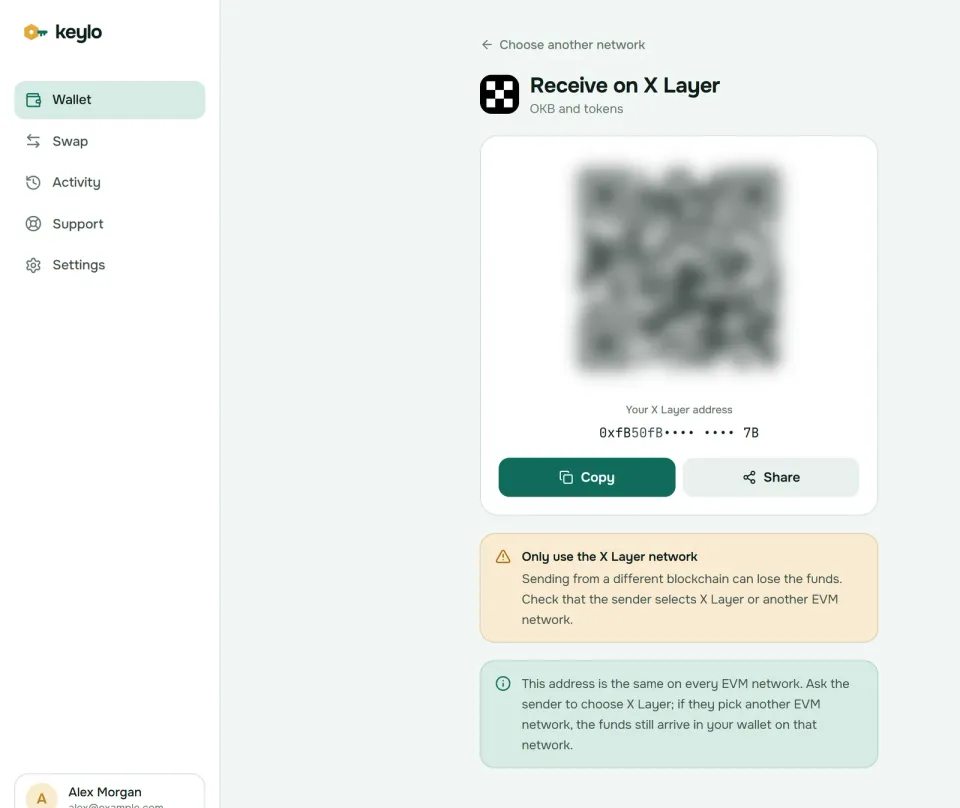
Keylo's Receive screen notes that this address is the same on every EVM network. If OKX sends on Ethereum or another supported network instead, the funds are safe at your address there, and Keylo shows them under that network.
For stablecoins, check which contract OKX sends, because X Layer has two kinds of USDT and three USDC contracts (see the table further down). Ask for the version you plan to use, so you don't need a swap later. If it's USDT0 or USDG, add it as a custom token first so the balance shows up.
How to send OKB and tokens on X Layer#
Tap Send and choose OKB or a token on X Layer.
Paste or scan a
0xaddress into To. Keylo checks the format and checksum, and it rejects XKO addresses, so convert those first.Enter the amount or tap Max, which keeps back enough OKB for the fee.
Tap Review, then choose Slow, Normal or Fast.
Check the network, the full recipient address (its first and last six characters are in bold) and the fee in OKB.
Tap Send. The status moves from "On its way" to "Sent", and View on OKLink opens the transaction.
What Keylo checks#
Before the review screen, Keylo test-runs each X Layer transfer against the network. If your balance is short or the token contract would reject the transfer, you see the reason and the send button stays off. It also warns you about:
A contract as recipient. Tokens sent to a contract that doesn't expect them are usually lost.
The token's own contract. Keylo blocks sending USDT to the USDT contract address.
An address from another chain. Bitcoin, Solana and other non-EVM addresses get an error naming the network they belong to.
No OKB for gas. A token transfer stops with the message above.
To send back to OKX, copy your OKX deposit address for that coin, then confirm the deposit page lists X Layer and the same contract you're sending. Other exchanges may not support X Layer at all, so check before you send.
X Layer gas fees#
X Layer prices gas the OP Stack way, in OKB: gas used times a base fee plus a priority tip. The separate Ethereum data fee that many OP Stack chains add was set to zero on X Layer as of October 2026, so you pay only the layer 2 part.
The base fee has a floor of 0.02 gwei, and on October 24, 2026, it sat right at that floor with a tip of almost nothing. With OKB near $109, a plain OKB transfer cost about 0.0000004 OKB, roughly five thousandths of a cent, and a token transfer around 0.000001 OKB. If the network gets busy, the base fee climbs above the floor, and your cost in dollars always moves with OKB's price.
Since the suggested tip is close to zero, Slow, Normal and Fast cost almost the same and usually confirm within a second or two. If a transfer stays pending, Speed up on its status screen resends it with a higher fee. Keylo charges nothing extra on normal sends.
Stablecoins and tokens on X Layer#
Stablecoins make up almost all the value on X Layer: L2BEAT put them at 99.5% of about $168 million in October 2026, with USDT0 alone near $131 million. This table combines OKX's X Layer contract list with Circle's USDC address page:
Token | X Layer address |
|---|---|
USDT0 |
|
USDT |
|
USDC (Circle native) |
|
USDC (bridged, in OKX's list) |
|
USDC.e |
|
USDG |
|
WOKB (wrapped OKB) |
|
WETH |
|
Circle lists 0xB6CE... as its own native USDC on X Layer and says X Layer's bridged USDC.e isn't issued or backed by Circle. OKX's older docs point instead to 0x74b7..., a bridged token built to Circle's Bridged USDC Standard, and recommend it over USDC.e. All three contracts report the symbol USDC on chain, so the name alone can't tell them apart.
USDT0 travels between chains over LayerZero, while USDT came in through X Layer's own bridge. They're different contracts, so a recipient expecting one may not credit the other.
As of October 2026, Keylo looks for USDT, both USDC contracts from Circle and OKX's list, WETH, WBTC and DAI by itself. USDT0, USDG and USDC.e need adding: open Settings, find Custom tokens under Networks, tap Add token, pick X Layer, then paste the address from the table with its symbol and 6 decimals.
How to bridge to and from X Layer#
For many people, OKX itself is the bridge: deposit on X Layer, then withdraw on the network you need, or the other way round. OKX's bridge page also lists third-party bridges. Its docs describe a canonical route through Agglayer, where a withdrawal to Ethereum finalizes only after a proof is verified there.
Keylo's swap screen gets routes from LI.FI, which compares bridges and exchanges:
Tap Swap and choose what you're spending under You pay.
Under You receive, pick X Layer and OKB, or a stablecoin.
Compare routes by amount, time, fees and the least you'll get.
Open the details for each step, Minimum you receive and Delivered to, your own X Layer address.
Confirm and follow the progress until the funds arrive.
The default slippage is 0.5%, and any Keylo service fee appears separately in the quote. A bridge either delivers or returns your funds, sometimes as a different token that still reaches your wallet. Read Keylo's swap and bridge overview for more.
When bridging in, ask for some OKB in the output, because a route that delivers only USDT leaves you without gas.
What Keylo doesn't do on X Layer#
No dapp connections. Keylo has no browser extension and no WalletConnect, so it can't use X Layer DeFi, payment or launch apps.
No XKO addresses. Keylo works with the
0xform only.No deposit history. Activity lists only what you send from Keylo.
No staking. Keylo stakes only on Cosmos SDK chains, so it has nothing for OKB.
No NFT view, hardware wallets, testnet or card purchases. Buy OKB on OKX, then withdraw it on X Layer.
Keylo is non-custodial, unlike your OKX account. If you lose both your password and your recovery phrase, nobody can recover the wallet, Keylo included. The Keylo networks overview lists what else your phrase covers.
X Layer scams and risks#
Fake OKX promotions. Sites and DMs offering OKB airdrops or "X Layer rewards" ask you to connect and sign, then drain your tokens. Keylo can't sign for websites, and no real promotion asks for your recovery phrase.
Lookalike stablecoins. Anyone can deploy a token called USDT, and even the genuine USDC contracts share one name. Match contracts against the table above.
Address poisoning. Scammers send tiny transfers from addresses that match the start and end of yours. Copy addresses from the source, never from your history.
Fake support. Real support never asks for your phrase, and Keylo staff never will. Contact Keylo through its support page and see how Keylo keeps keys on your device.
The network's trust model matters too. L2BEAT lists X Layer under "Others" because fewer than five outside parties can challenge its state; in October 2026 there was a single whitelisted challenger. OKX runs the sequencer, and a 2-of-3 multisig can upgrade most contracts without delay. So you hold your own keys, but you still rely on OKX to run the chain honestly. Size long-term savings with that in mind.
Before your first real transfer:
Your phrase is on paper and confirmed in Keylo.
You hold a little OKB on X Layer.
The address starts with
0x.The stablecoin contract matches what the recipient expects.
You sent a small test first.
For other exchange-linked and EVM networks, see the BNB Smart Chain wallet guide and the Polygon wallet guide.
Keep OKB and stablecoins in a wallet you control
Keylo encrypts your recovery phrase on your device and never sees it. Send, swap and bridge on X Layer and many other networks.
X Layer wallet FAQ#
What is the gas token on X Layer?
OKB. Every transaction on X Layer, including USDT and USDC transfers, pays its fee in native OKB. WETH and stablecoins can't pay gas, and OKX's docs say the Ethereum version of OKB has been phased out. Keep a small amount of OKB on X Layer; at October 2026 fees, a fraction of an OKB covers thousands of transfers.
What is an XKO address?
It's an X Layer way of writing a normal EVM address, with XKO in place of 0x and the same 40 characters after it. Both forms point to the same account. Keylo shows and accepts only the 0x form, so swap the prefix back to 0x, keep every other character as it is, and compare both ends before you send.
Is X Layer the same as OKX Wallet?
No. X Layer is a blockchain, OKX's Ethereum layer 2. OKX Wallet is OKX's self-custody wallet app and extension, which can hold assets on X Layer and many other chains. Your OKX exchange account is a third thing, held by OKX. To move funds from that account, withdraw on the X Layer network to your own 0x address.
Can I use MetaMask or Trust Wallet with X Layer?
MetaMask works once you add a network with chain ID 196, symbol OKB and the RPC https://rpc.xlayer.tech, as OKX's docs describe. For Trust Wallet, look for X Layer in the app's network list or a custom network option, because its public network registry didn't include X Layer in October 2026. A MetaMask phrase imported into Keylo shows the same X Layer address.
Is there an OKB wallet app?
OKB is X Layer's native coin, so any X Layer wallet is an OKB wallet. OKX Wallet has a mobile app and a browser extension, and the OKX exchange app holds OKB for you in a custodial account. Keylo is a web wallet with no app-store download, but you can add it to your phone's home screen and open it like an app.
What is the difference between USDT and USDT0 on X Layer?
They're two separate token contracts, both meant to track the US dollar. USDT0 at 0x779Ded0c9e1022225f8E0630b35a9b54bE713736 moves between chains over LayerZero and held most of X Layer's stablecoin value in October 2026. USDT at 0x1E4a5963aBFD975d8c9021ce480b42188849D41d came in through X Layer's own bridge. A recipient may credit only one, so check first.
How much are X Layer gas fees?
Very low. X Layer's base fee has a floor of 0.02 gwei and sat there on October 24, 2026, so a token transfer cost about 0.000001 OKB, around a hundredth of a cent with OKB near $109. The dollar cost moves with OKB's price and rises if the network gets busy. Keylo shows the fee before you sign and adds no charge.
Is X Layer a ZK rollup or an optimistic rollup?
Today it's an OP Stack chain with optimistic-style proofs. X Layer began as a zero-knowledge chain built with Polygon's CDK and moved to the OP Stack in late 2025. Since June 30, 2026, it has used OP Succinct Lite, which assumes results are valid and brings in a zero-knowledge proof only when someone challenges one. It also stays connected to Polygon's Agglayer.
Is X Layer safe to use?
For everyday payments it works well, but OKX controls a lot. L2BEAT lists X Layer outside its rollup stages because few parties can challenge its state, OKX runs the sequencer and a small multisig can upgrade contracts instantly. Holding funds in your own X Layer wallet still beats an exchange balance for custody, so keep your recovery phrase backed up.