A Solana wallet is the app that holds the keys to your Solana address, where SOL and tokens like USDC live. Solana is fast and cheap, but two of its rules surprise almost everyone at first. Every account has to keep a small refundable deposit called rent, and every transaction pays its fee in SOL, even when you only move USDC.
Get those two rules right, pick Solana as the network whenever an exchange asks, and most of the risk is gone. What's left is scams, which on Solana usually arrive as fake tokens and lookalike addresses. All figures below are as of October 2026.
Solana at a glance#
Item | Solana |
|---|---|
Native coin | SOL (1 SOL = 1,000,000,000 lamports) |
Address format | Base58 public key, 32 to 44 characters (usually 43 or 44), no |
Base fee | 5,000 lamports (0.000005 SOL) per signature, plus an optional priority fee |
Account minimum (rent) | About 0.00065 SOL per wallet and 0.0015 SOL per token account in October 2026, with further cuts planned |
Speed | 200 ms slots; Alpenglow consensus targets about 150 ms finality |
Token standard | SPL tokens (the Token program and Token-2022) |
Stablecoins | USDC from Circle and USDT from Tether, both issued directly on Solana |
Explorer | |
In Keylo | Send, receive, SPL tokens, history, swap and bridge through LI.FI, Solana Devnet. No staking, NFTs or dapp connections |
How a Solana wallet works#
A wallet doesn't store coins. The network keeps the balances, and your wallet keeps the private key that moves them.
Your Solana wallet address#
Your address is your public key, 32 bytes written in base58. It looks like 43 or 44 letters and digits with no prefix. Base58 leaves out 0, O, I and l to avoid mix-ups, and capital letters matter.
Solana addresses have no built-in checksum, so a mistyped address usually still looks valid. Never type one by hand. Paste or scan it, then compare the start, the middle and the end.
Keylo derives your Solana address from your recovery phrase on the path m/44'/501'/0'/0'. Phantom uses the same path for its first account, so importing a Phantom phrase normally shows the same address and balance. To find your address in Keylo, open Solana in your asset list or tap Receive.
Token accounts and rent#
Tokens don't sit in your main account. Each token you hold lives in its own token account owned by your address, one per token type (called a mint). The standard one is the associated token account, and wallets find it automatically.
Every account must also hold a minimum balance to stay on chain. Solana calls this rent, but it works like a deposit: close the account and you get it back. As of October 2026, a plain wallet account needs about 0.00065 SOL and a token account about 0.0015 SOL.
Those numbers are coming down. Under SIMD-0437, Solana is cutting rent by 90% in five steps. The first two went live on mainnet on September 3 and September 11, 2026, a 27% cut so far. The other three were scheduled for the Agave 4.4 release, which the Solana Foundation expected in November 2026, so check the reduced rent page for where things stand. Keylo reads the minimum from the network, so its messages show the figure in force when you send.
In practice, rent means three things for you:
The first SOL sent to a brand-new address must be at least the minimum, or the network rejects it.
You can empty an account completely, but you can't leave a balance between zero and the minimum.
Sending a token to someone who has never held it creates their token account, and the sender pays that deposit.
How to choose a Solana wallet: app, extension or web#
Solana wallets come in four broad kinds.
Solana-first apps and extensions. Phantom runs as a Chrome extension and an iOS and Android app. It also covers Ethereum, Bitcoin, Base, Polygon and HyperEVM, and it supports SOL staking and Ledger. Solflare has an extension and mobile apps, SOL staking and its own Shield hardware wallet. Both connect to Solana apps.
Hardware wallets. A Ledger or similar device signs inside the device, so the key never touches your computer. It's the safer home for savings you rarely touch.
Exchange accounts. Buying is easy, but the exchange holds the keys and sets the withdrawal rules.
Web wallets. Nothing to download: the wallet opens in a browser tab, and on a phone you can pin it to the home screen. Keylo works this way.
A good Solana wallet warns you before a transfer fails on rent and shows what a recipient's token account will cost. It identifies tokens by mint address, not by name, and uses the standard derivation path so you can move your phrase later.
Keylo suits people who want to hold and send SOL and stablecoins, then swap or bridge them from the same recovery phrase. It's a weaker fit for using Solana apps, staking or collecting NFTs, because Keylo doesn't do those things.
How to create a Solana wallet in Keylo#
Keylo is a website, so a phone or laptop browser is all you need.
Go to the sign-up page. Fill in Full name, Email, Phone number, Password and Confirm password, tick the terms box and press Create account.
If "Check your inbox" appears, open the email Keylo sent and confirm your address.
Under "Set up your wallet", pick Create a new wallet. A 12-word recovery phrase is made right in your browser and locked with a key from your password (Argon2id, then AES-256-GCM). Keylo's servers get the locked copy and nothing else.
Tap Solana in your asset list. Your address appears there, and the same phrase has already produced addresses on Keylo's other networks.
Write the phrase down. In Settings, choose Recovery phrase, type your password and press Show my phrase. Copy all 12 words in order onto paper, press I wrote them down, then pick the right word for the three positions Keylo asks about.
Finish in Settings by switching on Two-factor authentication and choosing an Anti-phishing code.
That paper copy is your only way back in. Keylo can't decrypt your wallet, and resetting your password restores the login, not the keys.
Importing a wallet from Phantom or Solflare#
Pick Import a recovery phrase on the setup screen and enter the 12 or 24 words. A first account on the standard path opens with the same Solana address. Phantom accounts you added later, such as Account 2, use other paths, so Keylo won't show them; their SOL stays safe and reachable from Phantom.
Practice on Solana Devnet first#
Open Settings, go to Networks and switch on Testnet mode. Solana Devnet then appears in your list, with a link to the Solana Devnet faucet for free test SOL that has no value. A Devnet address looks identical to a mainnet one, so read the network name before you share it.
Get your Solana address in a minute
Sign up with email and a password. Your Solana wallet is created on your device, along with addresses on every other network Keylo supports.
How to receive SOL, USDC and other SPL tokens#
Press Receive and choose Solana. The page is headed "Receive on Solana", with a QR code above "Your Solana address".
Use Copy or Share, or hold up the QR code for the sender.
When you withdraw from an exchange, select Solana (sometimes shown as SOL) as the network, for USDC and USDT just as for SOL.
Watch your Solana activity. Transfers usually land within seconds, each with a Solscan link.
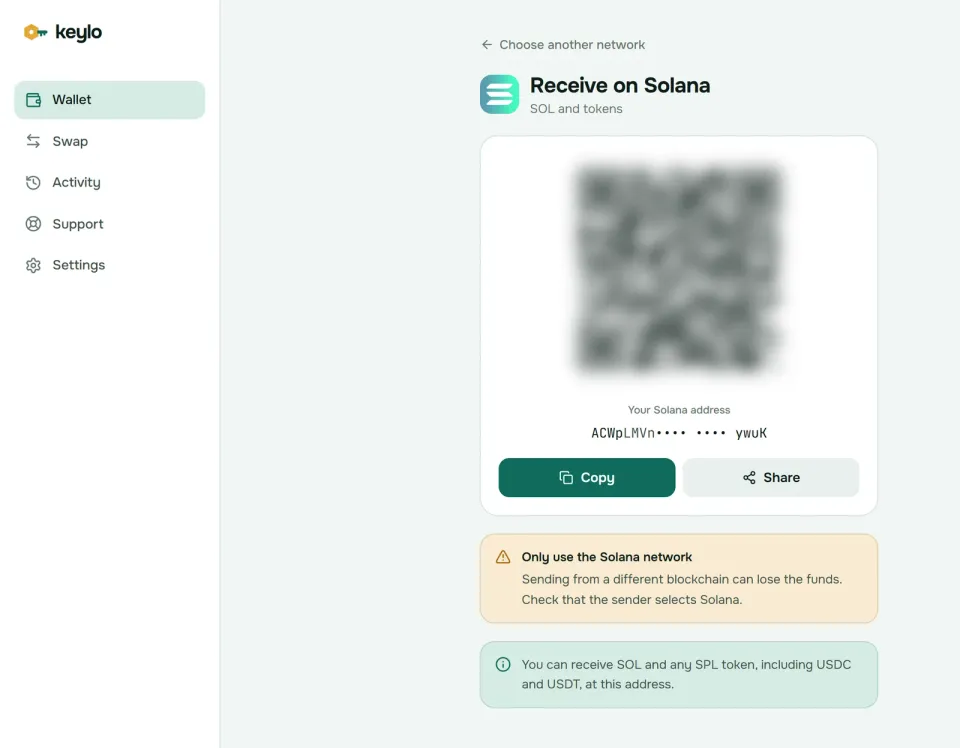
One Solana address takes SOL and every SPL token. Nothing needs preparing for a new token, because whoever sends it creates your token account and pays its deposit.
How to send SOL or tokens on Solana#
Press Send and choose SOL or a Solana token.
Fill in To by pasting or scanning. Keylo checks the Solana format, and if you paste a
0xaddress it says that looks like an EVM address and goes no further.Type an amount or press Max. On SOL, Max moves everything except the fee and leaves the account at zero, which Solana allows.
Press Review and pick Slow, Normal or Fast. Each shows a price in dollars and an expected wait.
Read the review: the network, the recipient with its opening and closing six characters in bold, and the fee in SOL.
Press Send. Your browser signs the transfer, the status moves from "On its way" to "Sent", and View on Solscan opens it.
When Keylo warns you or stops a transfer#
Keylo test-runs each Solana transfer before you sign, so rent and balance problems show up on the review screen instead of failing on chain. The common ones:
Leaving too little behind. Keylo stops a send that would leave less than the minimum. Send the maximum, or leave at least the minimum.
Activating a new address. SOL sent to an empty address must be at least the rent minimum.
No SOL for a token transfer. Sending USDC needs SOL for the fee plus your own account's minimum.
A recipient without a token account. Keylo shows the one-time deposit and includes it in the fee.
Token-2022 extras. Keylo shows any transfer fee a token charges. It can't yet send tokens that need a transfer hook.
Wrong kind of address. Keylo blocks SOL sends to a program and warns when the address is a token account.
Keylo's Solana send screen has no memo field. Most exchanges give you a personal Solana deposit address, but if yours asks for a memo with the deposit, use another wallet for that transfer.
Solana network fees and rent explained#
Every transaction from a Solana wallet pays a base fee of 5,000 lamports per signature, and a simple transfer has one signature. The network burns half, and the validator that includes the transaction keeps the rest.
You can add a priority fee on top: the compute units your transaction requests, times a price you choose, all paid to the validator. When the network is quiet it's close to zero. During a busy token launch, however, it decides whose transaction lands first.
Keylo test-runs the transaction to size its compute limit. Then it sets Slow, Normal and Fast from the low, middle and high end of what recent transactions on the same accounts paid, and adds no fee of its own.
Action | What you pay (as of October 2026) |
|---|---|
Send SOL to an existing wallet | 0.000005 SOL plus a small priority fee |
Send SOL to a brand-new address | The same fee, but the amount must be at least 0.00065 SOL |
Send USDC or USDT to someone who already holds it | 0.000005 SOL plus a small priority fee |
Send USDC or USDT to someone who never held it | The fee plus about 0.0015 SOL for their token account |
Swap or bridge | The network fee plus the route's fees, all listed in the quote |
Solana got faster twice in October 2026. Slot time dropped from 400 ms to 200 ms on October 9. Then Alpenglow replaced the old consensus on October 21, cutting the finality target from about 12.8 seconds to roughly 150 ms.
Keylo can't speed up a Solana transfer after you send it, so choose Fast before you sign if timing matters. The Solana fee documentation has the full formula.
Swap and bridge from your Solana wallet#
Keylo gets Solana swap routes from LI.FI, which compares decentralized exchanges on Solana and bridges to other networks. You can turn SOL into USDC, or move value to Ethereum, Base, Arbitrum and other networks in one flow.
Press Swap. Under You pay, choose SOL or a Solana token and type the amount.
Under You receive, pick the network and token. Search by name or paste a mint address.
Look through the routes. Each card shows what you'd get, the tool behind it, the expected minutes, the fees and an "At least" figure.
Select a route to see each step and fee, Minimum you receive and Delivered to.
Confirm with the Swap or Bridge button, then follow progress on the tracking screen.
Bridged funds arrive at your own Keylo address on the destination network, so there's nothing to paste. Slippage defaults to 0.5%, and if the price moves further than that, the swap doesn't go through at the worse rate.
If a bridge can't finish, LI.FI returns your funds, occasionally as another token, but always to your wallet. Keylo lists any service fee of its own as a separate line in the quote. Routes and refunds are explained on the swap and bridge page.
What Keylo doesn't do on Solana#
Staking. Keylo's staking works only on Cosmos SDK chains, so use a wallet with stake accounts, such as Phantom or Solflare, to stake SOL natively. Keylo doesn't stake, but liquid staking tokens like JitoSOL and mSOL are plain SPL tokens that it can hold and send.
Dapps. Keylo has neither a browser extension nor WalletConnect, so Solana apps can't connect to it. In exchange, it signs only the transfers and swaps you start on its own screens.
NFTs. Solana NFTs don't show in Keylo, and it can't send them, so keep them in a wallet built for collectibles.
Hardware wallets and card purchases. Neither is supported. Buy SOL on an exchange and withdraw it over the Solana network.
Because Keylo never holds your keys, nobody can rescue a wallet whose password and recovery phrase are both lost, Keylo included. The networks page lists every chain your phrase covers.
Solana scams and mistakes to avoid#
Low fees make spam cheap, so Solana wallet scams look a little different from those on other chains.
Fake tokens. Anyone can create a token called USDC with the real logo, and only the mint address proves which is which. Circle's USDC on Solana is
EPjFWdd5AufqSSqeM2qN1xzybapC8G4wEGGkZwyTDt1v. Keylo recognizes a short list of well-known mints, USDC and USDT among them, and shows other tokens under whatever name their creator chose.Airdrop bait. Tokens and NFTs you never asked for often carry a website in their name. Those sites ask you to connect a wallet and sign, and so do sites that promise to reclaim your rent. That's how drainers empty accounts, so ignore the token and never visit the link.
Address poisoning. Scammers send tiny transfers from addresses that share the first and last characters with ones you use, hoping you'll copy theirs from your history next time. So copy an address from its original source every time.
Fake support. Nobody from Keylo will ever ask for your recovery phrase or password. Reach the real team through the Keylo support page, and see how Keylo protects your wallet for the two-factor and anti-phishing settings.
Before your first real transfer, check these five things:
The phrase is written down, and Keylo has confirmed your copy.
At least 0.01 SOL sits in the wallet for fees and rent.
The exchange's withdrawal network reads Solana.
You pasted or scanned the address, then compared its middle characters too.
A small test transfer arrived before the big one.
Your Keylo phrase works on other chains too. The Ethereum wallet guide and the Base wallet guide explain their rules.
Hold SOL and USDC in a wallet only you control
Your recovery phrase is encrypted on your own device, and Keylo never sees it. Send, swap and bridge SOL from one screen.
Solana wallet FAQ#
What is the best Solana wallet?
It depends on what you want to do. To use Solana apps, stake SOL or collect NFTs, pick a Solana-first wallet such as Phantom or Solflare. To hold, send, swap and bridge SOL and stablecoins without installing anything, a web wallet like Keylo works. For large long-term balances, add a hardware wallet.
Is there a Keylo Solana wallet app or extension?
No. Keylo is a web wallet, so there's no app-store download and no browser extension. It runs in any modern browser on a phone or computer, and you can add it to your home screen so it opens like an app. If you need an extension to connect to Solana apps, Phantom and Solflare both offer one.
Can I use my Phantom recovery phrase in Keylo?
Yes. Pick Import a recovery phrase and type the 12 or 24 words. Keylo derives Solana on m/44'/501'/0'/0', the path Phantom uses for its first account, so the same address and balance should appear. Accounts you added later in Phantom sit on other paths and won't show in Keylo, but their funds stay safe in Phantom.
Why do I need SOL to send USDC on Solana?
Every Solana transaction pays its fee in SOL, whichever token it moves. Your own account must also keep its rent minimum, about 0.00065 SOL as of October 2026. If the recipient has never held USDC, your transfer pays about 0.0015 SOL more to create their token account. Keeping around 0.01 SOL next to your stablecoins covers many transfers.
How much does it cost to send SOL?
A simple transfer pays a base fee of 0.000005 SOL plus a priority fee that is usually tiny when the network is quiet. Keylo shows Slow, Normal and Fast options with their dollar cost before you sign. Sending a token to someone without a token account adds a refundable deposit of about 0.0015 SOL as of October 2026.
How long does a Solana transaction take?
Usually a second or two before your wallet shows it as confirmed. Solana moved to 200 ms slots on October 9, 2026, and its Alpenglow consensus, live since October 21, 2026, targets finality of roughly 150 ms. Exchanges often wait longer before crediting a deposit, so allow a few extra minutes there.
Can I stake SOL in a web wallet?
Not in Keylo, which offers staking only on Cosmos SDK chains. On Solana it holds, sends, swaps and bridges SOL and SPL tokens. To stake natively, use a wallet with stake accounts, such as Phantom or Solflare. Keylo doesn't stake, but it can hold liquid staking tokens like JitoSOL, which are ordinary SPL tokens.
What happens if I send SOL to the wrong address?
Solana transfers are final, and nobody can reverse them. If the address belongs to someone else, only they can send the funds back. Keylo catches many mistakes before you sign: invalid addresses, addresses from other networks, program addresses and balances that would break the rent rule.