An Optimism wallet is a wallet that holds ETH, OP and other tokens on OP Mainnet, the rollup most people still call Optimism. It runs Ethereum's software, so your existing 0x address already works there. You pay gas in ETH, not in OP, and each fee includes a small charge for storing your transaction on Ethereum.
Two points confuse newcomers more than anything else. The chain changed its name in 2023, so exchanges list it under several labels. Also, the official route back to Ethereum takes about a week. Numbers below are as of October 2026.
OP Mainnet at a glance#
Item | OP Mainnet |
|---|---|
Also called | Optimism, OP, Optimistic Ethereum (the old name) |
Network type | Optimistic rollup on Ethereum, the first chain built on the OP Stack |
Gas token | ETH. OP is a governance token and can't pay fees |
Chain ID | 10 |
Address format |
|
Speed | Blocks about every 2 seconds, 200 ms subblock preconfirmations |
Typical fee | About $0.0001 for a token transfer on October 24, 2026 |
Withdrawal to Ethereum | About 7 days through the standard bridge, minutes through fast bridges |
Tokens | ERC-20, including OP, native USDC and bridged USDC.e |
Explorer | |
In Keylo | Receive and send ETH and ERC-20 tokens, full activity history, automatic token detection, speed-up, a read-only NFT view, swaps and bridges via LI.FI, OP Sepolia for testing |
Optimism, OP Mainnet and the Superchain#
The names overlap, so here is what each one means.
Optimism is the project. The Optimism Collective governs it, and the Optimism Foundation supports it.
OP Mainnet is the chain itself. Until June 2023 it was simply called Optimism, and many exchanges still use that label.
The OP Stack is the open-source code behind OP Mainnet. Unichain, Ink, Soneium and other networks run on it too.
The Superchain is the group of OP Stack chains that share upgrades and a Security Council and send part of their revenue back to the Collective.
Which name to pick on an exchange#
Optimism, OP Mainnet, OP and OPTIMISM on a withdrawal screen all mean chain ID 10, so pick that one. Don't pick "ERC20" or "Ethereum" when you want OP Mainnet, because those send to Ethereum's main network, where fees are much higher.
Your OP Mainnet wallet address on other Superchain networks#
Your OP Mainnet wallet address is simply your Ethereum 0x address, and Keylo shows it on the Receive screen for OP Mainnet. Every OP Stack chain uses the same format, so your Optimism wallet address also exists on Unichain, Ink and Soneium. But it has a separate balance on each. Optimism plans native interop between OP Mainnet and Unichain, targeted for December 15, 2026 and subject to governance approval. In Keylo, moving funds between Superchain networks is a bridge route on the Swap screen either way.
Base, once the biggest Superchain member, announced its own codebase in February 2026 and left Superchain governance in March. Your address still works there, so nothing changes for you.
The OP token: what it does and what it doesn't#
OP is an ERC-20 token native to OP Mainnet at 0x4200000000000000000000000000000000000042, with a supply of about 4.29 billion. It has one main job: governance. Holders, or the delegates they choose, vote in the Collective's Token House on protocol upgrades and on how the governance fund is spent.
However, OP can't pay for gas. You can hold, send and swap it like any other token, but every transaction still needs ETH. A wallet full of OP and empty of ETH can't move anything.
The token's economics changed in 2026. Governance approved a 12-month program, starting in February 2026, that spends half of the revenue Superchain chains pay to Optimism on buying OP each month. The bought OP goes to the token treasury. That has no effect on how you send OP, but it explains much of the news you'll see about the token.
Delegating and voting with OP#
To vote, you delegate your OP to yourself or to someone else on Optimism's governance site, which needs a wallet that connects to websites. Keylo can't do that, so delegate from a connecting wallet. Your tokens also stay where they are while you delegate.
Picking an Optimism wallet#
Any EVM wallet works on OP Mainnet, so what matters is whether it handles the parts specific to this chain.
Extension and mobile wallets such as MetaMask connect to OP Mainnet apps and to governance voting.
Hardware wallets such as Ledger keep the key off your computer and sign through a companion app.
Exchange accounts are easy for buying OP, but the exchange holds the keys.
Web wallets open in a browser tab. Keylo is one.
A good Optimism wallet adds the L1 data fee to the price it shows, so you never see one fee and pay another. It should show token contracts, so you can tell USDC from USDC.e. It also helps if it shows the NFTs you hold.
Keylo is a good fit for holding and moving ETH, OP and stablecoins on OP Mainnet, and for bridging to other networks. You can also see your NFTs there. It isn't right for DeFi apps or for voting, because Keylo doesn't connect to websites.
How to create an Optimism wallet in Keylo#
There's nothing to download. Keylo opens in any current browser, and OP Mainnet is already listed.
Open Keylo's registration form. Enter your full name, email and phone number, type a password twice, accept the terms and press Create account.
Confirm your email if a "Check your inbox" message appears.
Choose Create a new wallet on the "Set up your wallet" screen. A 12-word recovery phrase is generated on your device and encrypted there with a key from your password, using Argon2id and AES-256-GCM.
Select OP Mainnet from the asset list to find your
0xaddress.Back up the words. In Settings, open Recovery phrase, re-enter your password, write the words on paper and pass the short check that follows.
Add Two-factor authentication and an Anti-phishing code in Settings, so a fake Keylo email is easy to spot.
Keylo never sees that phrase, so it holds no copy it can read. If you forget your password, the phrase is the only way back into the wallet.
Importing an existing Optimism wallet#
Pick Import a recovery phrase and enter the words from MetaMask or another app, from 12 to 24 of them. Keylo derives EVM addresses on m/44'/60'/0'/0/0, the path most wallets use for their first account, so the same OP Mainnet address appears. Other accounts from your old wallet won't show up, but their funds are untouched.
Trying OP Sepolia first#
In Settings, open Networks and turn on Testnet mode. OP Sepolia joins your network list. Its ETH is free and worthless, so you can claim some from any public OP Sepolia faucet and practice a send.
Get your OP Mainnet address in a minute
Create an account with your email and a password. The wallet is generated in your browser, and its 0x address works on OP Mainnet and every other EVM chain Keylo lists.
How to receive ETH, OP and USDC on OP Mainnet#
Press Receive and select OP Mainnet. You'll see "Receive on OP Mainnet", a QR code and "Your OP Mainnet address".
Press Copy or Share, or show the code to the sender.
On an exchange, choose Optimism or OP Mainnet as the network, not Ethereum.
Check your activity list. OP Mainnet includes a transfer within about 2 seconds of broadcast, though exchanges often take longer to send it.
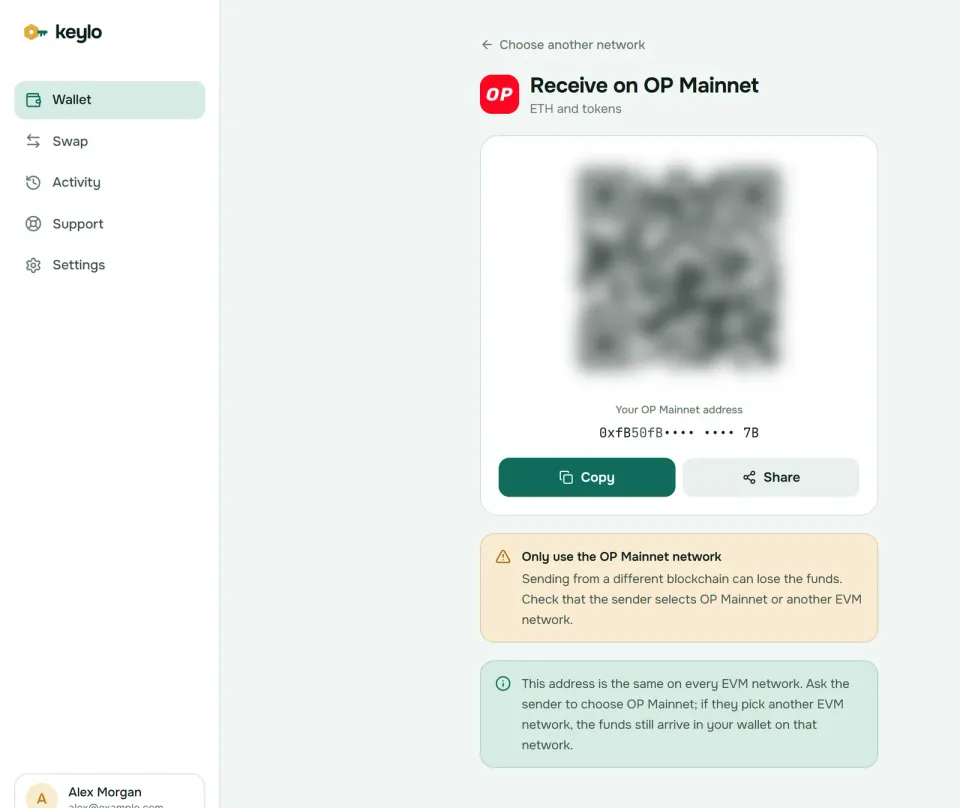
Under the address, Keylo notes that EVM networks share it. That's a safety net: if a sender chooses Base or Arbitrum by mistake, the money still reaches you, just on that network, and you can bridge it over later.
USDC and USDC.e on OP Mainnet#
Two stablecoins on OP Mainnet look alike. Circle issues native USDC at 0x0b2C639c533813f4Aa9D7837CAf62653d097Ff85, and exchanges deposit and credit this one. USDC.e at 0x7F5c764cBc14f9669B88837ca1490cCa17c31607 is the older copy bridged from Ethereum. Its contract still uses the name USD Coin and the symbol USDC, so wallets add ".e" to tell the two apart.
Keylo reads OP Mainnet's explorer index, so it finds every token your address holds, both USDC versions included, and lists incoming transfers in Activity. If a token still doesn't appear, add it under Settings, Networks, Custom tokens with its contract address, symbol and decimals. If you hold USDC.e, swap it for native USDC before sending to an exchange that lists only USDC.
How to send from your Optimism wallet#
Press Send and choose ETH, OP or another token on OP Mainnet.
Paste or scan the address in To. Keylo validates the checksum and warns if the address looks like it belongs to another kind of network.
Enter the amount, or use Max, which holds back the fee when you send ETH.
Press Review and pick Slow, Normal or Fast. Each one also shows its price.
Read the summary: network, recipient and fee in ETH and dollars.
Press Send. After "On its way" and "Sent", View on Optimism Explorer shows the transaction.
Keylo simulates each transfer before you sign. If the token contract would reject it, you see the reason and pay nothing. You also get a warning when the recipient is a contract, and a block when you try to send a token to its own contract address. Pending transfers can be resent with a higher fee using Speed up.
Optimism gas fees and the L1 data fee#
Every OP Mainnet fee has up to three parts, all paid in ETH.
Execution fee. Gas used times the base fee plus any tip, the same formula Ethereum uses. The sequencer generally puts higher tips first, which only matters when blocks are full.
L1 data fee. The cost of publishing your compressed transaction to Ethereum. It follows Ethereum's blob and base fees, and you can't set a cap on it.
Operator fee. A charge that chain operators have been able to add since the Isthmus upgrade in May 2025.
All of it was tiny in October 2026. OP Mainnet's base fee sat below 0.000001 gwei, so the 0.001 gwei tip that the network suggests to wallets made up nearly all of the execution cost. Ethereum blob space was cheap as well, which kept the data fee to a sliver of the total. On October 24, Etherscan's gas tracker priced a token transfer at about $0.0001, and a plain ETH transfer cost around 0.00000002 ETH.
Because the data fee can't be capped, Keylo reads it from the chain's fee contract while it prepares your transaction. It then adds a small margin and includes it in each speed option. The OP Stack fee documentation gives the full formula.
Unlike Ethereum, OP Mainnet doesn't burn base fees. They collect in fee vaults on the chain instead.
How to withdraw from OP Mainnet to Ethereum#
Deposits to OP Mainnet are quick, but the standard bridge back is a three-step process:
Start the withdrawal with a transaction on OP Mainnet.
Prove it on Ethereum once the chain posts a state root covering your block, usually within about an hour.
Finalize it on Ethereum after a seven-day wait, during which anyone can dispute a false claim.
Proving and finalizing are both Ethereum transactions, so you pay mainnet gas twice. Keylo can't run those steps, because they happen on bridge websites. The withdrawal flow docs explain the details.
Instead, Keylo finds fast bridge routes through LI.FI. A bridge pays you from its own liquidity on Ethereum or another network, usually within minutes, and absorbs the wait itself. Press Swap, choose ETH or a token on OP Mainnet under You pay, and set the destination under You receive. Then compare the routes and check Minimum you receive and Delivered to before you press Bridge.
The same screen swaps tokens on OP Mainnet, for example OP to USDC, with a default slippage limit of 0.5%. If a bridge can't complete, LI.FI's routes send the value back to you, though it may return as a different token. A Keylo service fee, when there is one, sits on its own line in the quote, and the swap and bridge page covers the rest.
NFTs and other limits in Keylo on OP Mainnet#
Open OP Mainnet in Keylo and any NFTs you own appear under Collectibles, with their image, name and collection. But the view is read-only. Keylo can't send, list or mint NFTs, so move them with a wallet that connects to marketplaces.
Anyone can airdrop an NFT to your address, including fakes of real collections. Keylo reminds you below the grid not to visit links or claim rewards that appear in an NFT's name or image.
Other things Keylo doesn't do on OP Mainnet:
No dapps or voting. There's no browser extension or WalletConnect, so lending apps, DEX sites and governance votes need another wallet.
No staking. Staking in Keylo exists only on Cosmos SDK chains.
No card purchases or hardware wallets. Buy ETH or OP on an exchange and withdraw it to OP Mainnet.
Keylo is self-custodial, which means nobody can rescue the wallet if both the password and the phrase are lost. The list of networks shows where else your phrase works.
Staying safe with an Optimism wallet#
Most thefts on OP Mainnet start with a fake website or a signature, not with a flaw in the chain. Since June 2024, OP Mainnet has run permissionless fault proofs, so anyone can challenge an invalid withdrawal claim. But a Security Council still holds upgrade powers.
Fake OP airdrops. Airdrops of OP to early users did happen, and copycat "claim" sites still trade on that history. A real claim never asks for your phrase.
Delegation and permit traps. A drainer can dress a token approval up as a voting step. Read what a wallet asks you to sign, and remember that delegating never moves your OP.
Look-alike tokens. Check OP against the
0x4200...0042contract and USDC against Circle's address.Poisoned addresses. Scammers send dust from addresses that mimic yours at both ends. Copy from the original source, not from history.
Impersonators. Keylo support never asks for your phrase or password. Use the Keylo support page, and read Keylo's security overview.
Quick check before your first transfer:
The phrase is written down and confirmed in Keylo.
Some ETH sits on OP Mainnet for gas.
The exchange network reads Optimism or OP Mainnet.
The token contract matches what the recipient expects.
A small test went through first.
Next, see how the same address works on the Unichain wallet guide and the Ethereum wallet guide.
Hold ETH and OP in a wallet you control
The recovery phrase is encrypted before it leaves your device, so Keylo can't read it. Move ETH, OP and USDC on OP Mainnet whenever you need to.
Optimism wallet FAQ#
Is Optimism the same as OP Mainnet?
Yes. OP Mainnet is the chain that used to be called Optimism, renamed in June 2023. Optimism now refers to the wider project and the Collective that governs it. Exchanges use Optimism, OP Mainnet or OP as the network name, and all of them mean chain ID 10. Choose any of those, not Ethereum, when you withdraw.
What is an OP Mainnet wallet address?
It's the 0x address, 42 characters long, that receives ETH and tokens on OP Mainnet. It's identical to your Ethereum address because both chains use the same account system, so any EVM wallet gives you one. Copy it from your wallet's receive screen, and tell senders to pick Optimism or OP Mainnet as the network.
Do I need OP tokens to pay gas on Optimism?
No. Every fee on OP Mainnet is paid in ETH. OP is a governance token, so it can vote and be sent or swapped, but it can't cover gas. Keep a small amount of ETH on OP Mainnet next to your OP and stablecoins, or you won't be able to move them.
Why is there an L1 fee on Optimism?
OP Mainnet stores a compressed copy of every transaction on Ethereum, so anyone can rebuild and check the chain. The L1 data fee pays for that storage and follows Ethereum's prices, so it grows when Ethereum is busy. In October 2026 blob space was cheap, and it was a tiny part of an already tiny fee. Keylo includes it in the fee it shows.
How long does it take to withdraw from Optimism to Ethereum?
About seven days through the standard bridge. You start the withdrawal on OP Mainnet, prove it on Ethereum roughly an hour later, then finalize it after a seven-day wait. Fast bridges, like the routes Keylo finds through LI.FI, usually pay out within minutes because they cover the wait with their own funds.
What is the difference between USDC and USDC.e on Optimism?
Native USDC is issued on OP Mainnet by Circle at 0x0b2C...Ff85, and it's what exchanges credit. USDC.e at 0x7F5c...1607 is the older version bridged from Ethereum, and its contract still names itself USD Coin. Both target a dollar, but they're separate tokens, so check which one a recipient accepts.
What is the Superchain?
The Superchain is the group of OP Stack networks, led by OP Mainnet, that share upgrades and a Security Council and send part of their revenue to the Optimism Collective. Unichain, Ink and Soneium are members. Your 0x address works on all of them, but each has its own balance, and in Keylo you move between them with a bridge route.
Can I see my OP Mainnet NFTs in Keylo?
Yes, as a read-only view. Open OP Mainnet in Keylo and NFTs you hold appear under Collectibles with their image and collection name. Keylo can't send, sell or mint NFTs, so use a wallet that connects to marketplaces for that. Ignore NFTs that arrive unasked and carry a website or reward offer.
How do I delegate my OP tokens?
Delegation happens on Optimism's governance site, where you connect a wallet and pick yourself or a delegate. Your OP never leaves your address. Keylo can't connect to websites, so it can't delegate. Import your phrase into a connecting wallet such as MetaMask, delegate there, and keep using Keylo for sending and bridging.