A Celo wallet is the app that holds the keys to your address on Celo, where CELO and a large set of stablecoins live. Celo began in 2020 as a payments blockchain for phones. Since March 26, 2025, it has been an Ethereum layer 2, but your address, balances and contracts came across unchanged.
Most people use Celo to move dollars rather than CELO. USDT, USDC and Mento's USDm move between phones for a fraction of a cent, and Celo lets some wallets pay those fees in the stablecoin itself. That last part depends on the wallet, which is the first thing to check before you choose one. Figures below are as of October 24, 2026.
Celo at a glance#
Item | Celo |
|---|---|
Native coin | CELO, which is also an ERC-20 token (token duality) |
Network type | OP Stack layer 2, data on EigenDA, settled on Ethereum |
Chain ID | 42220 |
Address format |
|
Block time | 1 second |
Typical fee | A fraction of a cent, in CELO or an approved stablecoin |
Stablecoins | USDT, USDC, USDm and Mento's local-currency coins |
Withdrawal to Ethereum | About 7 days through the native bridge |
Explorer | |
In Keylo | Send, receive, tokens, history, speed-up, read-only NFT view, Celo Sepolia testnet. Swap and bridge stablecoins and other tokens through LI.FI, but not CELO itself. Gas is paid in CELO |
What changed when Celo became an Ethereum layer 2#
Before 2025, Celo ran its own validators and produced blocks every five seconds. Since then, a sequencer orders transactions into 1-second blocks, transaction data goes to EigenDA, and state roots settle on Ethereum. The Celo protocol overview describes the full design.
For holders, almost nothing had to happen, because addresses and balances carried over. Nobody needed to claim or migrate tokens. Any message asking you to "upgrade" your CELO to the layer 2 was a scam then, and it still is.
A few things did change for wallets:
Speed. Transfers confirm in about a second, then become final on Ethereum later.
Exits. A native bridge now connects Celo to Ethereum. Withdrawals through it take about a week.
Security model. L2BEAT rates Celo Stage 0 and classes it as an optimium, because its data lives on EigenDA rather than Ethereum. Since December 2025, its dispute games use zero-knowledge proofs.
Staking. CELO holders still lock CELO and vote for validator groups, but those validators now run community RPC nodes instead of producing blocks.
In 2026 Celo also became a landing spot for another network's projects. When Lisk announced the shutdown of its own layer 2, it offered projects an optional migration path to Celo. The Lisk wallet guide covers that shutdown.
How a Celo wallet works#
Your Celo wallet address#
A Celo address looks exactly like an Ethereum one, 0x followed by 40 hex characters. It doesn't need activating, and there's also no memo. If you hold an Ethereum address, the same key gives you the same address on Celo.
In Keylo, every EVM network shares that address, derived on m/44'/60'/0'/0/0. The Receive screen says so, and it reminds you that funds sent on another EVM network still reach you, on that network.
Old Celo wallets and the legacy path#
Here's the catch for long-time users. Early Celo wallets derived addresses on Celo's own path, with coin type 52752, while Ethereum wallets use coin type 60. Celo's command-line tool now defaults to Ethereum's path, and keeps a celoLegacy option for older accounts.
So the same recovery phrase can open two different addresses. If you import an old Celo phrase into Keylo and see an empty balance, your funds are most likely still safe at the legacy address. Open that address in the original wallet app, then send the funds to your Keylo address.
CELO token duality#
CELO is both the native coin and an ERC-20 token, but there is only one shared balance. The token contract, 0x471EcE3750Da237f93B8E339c536989b8978a438, reads your native balance instead of keeping its own. That lets apps treat CELO like any token without wrapping it.
It also means an explorer or wallet can list CELO twice with the same amount. That's one balance seen through two interfaces, and you can't spend it twice.
Choosing a Celo wallet#
The biggest difference between Celo wallets is whether they can pay gas in stablecoins. Celo calls this fee abstraction, and a wallet only gets it if it builds a special transaction type (CIP-64).
MiniPay, Opera's non-custodial wallet, pays gas in the stablecoin you hold most of. Celo's docs count more than 20 million activated MiniPay wallets, and it lets you pay contacts by phone number.
Valora is a non-custodial mobile wallet with WalletConnect and phone-number payments. It pays gas in CELO when you hold enough, and otherwise in the stablecoin you hold most of.
MetaMask works on Celo, but Celo's docs say it drops the fee currency field, so it always charges gas in CELO.
Ledger hardware wallets work with Ledger Live (version 4.8 or later), whose own send screen can pay gas in a Celo fee currency of your choice.
Keylo is a web wallet. Like MetaMask, it pays gas in CELO.
So if you want to hold only dollars and never think about CELO, MiniPay or Valora fit better. Keylo suits people who want Celo stablecoins under the same phrase as their other networks, with stablecoin swaps and bridges built in, and who are fine keeping a little CELO. Keylo doesn't connect to Celo apps, support hardware wallets or offer card purchases.
Adding the Celo network to Trust Wallet or MetaMask#
Many wallets already list Celo, so search the network list before adding anything by hand. If you need to add it, take the values from Celo's network information page:
Field | Value |
|---|---|
Network name | Celo Mainnet |
RPC URL |
|
Chain ID | 42220 |
Currency symbol | CELO |
Block explorer |
|
Celo notes that Forno is a rate-limited public endpoint, which is fine for a personal wallet. In Keylo you skip this step, because Celo is built in.
How to create a Celo wallet in Keylo#
Open Keylo's sign-up page, enter your full name, email, phone number and a password, and tap Create account.
Confirm your email if you see "Check your inbox".
Tap Create a new wallet. The 12-word phrase is generated and encrypted in your browser, so Keylo only ever stores a locked copy.
Choose Celo in your asset list to see your
0xaddress and CELO balance.Back the phrase up: Settings, then Recovery phrase, then your password. Write the words down and confirm the ones Keylo asks for.
While you're in Settings, switch on two-factor authentication and an anti-phishing code.
To bring an existing wallet instead, tap Import a recovery phrase and enter your 12 or 24 words. A MetaMask phrase shows the same address. An old Celo phrase may not, for the reason explained above.
Practice on Celo Sepolia#
Turn on Testnet mode under Settings, Networks. Keylo adds the Celo Sepolia Testnet, where CELO has no value, and you can get test CELO from the Celo faucet. Testnet addresses look like mainnet ones, so check the network name before you share one.
Get your Celo address in a minute
Keylo creates the wallet in your browser and never sees your phrase. The same 0x address works on Celo and every other EVM network.
How to receive CELO and stablecoins#
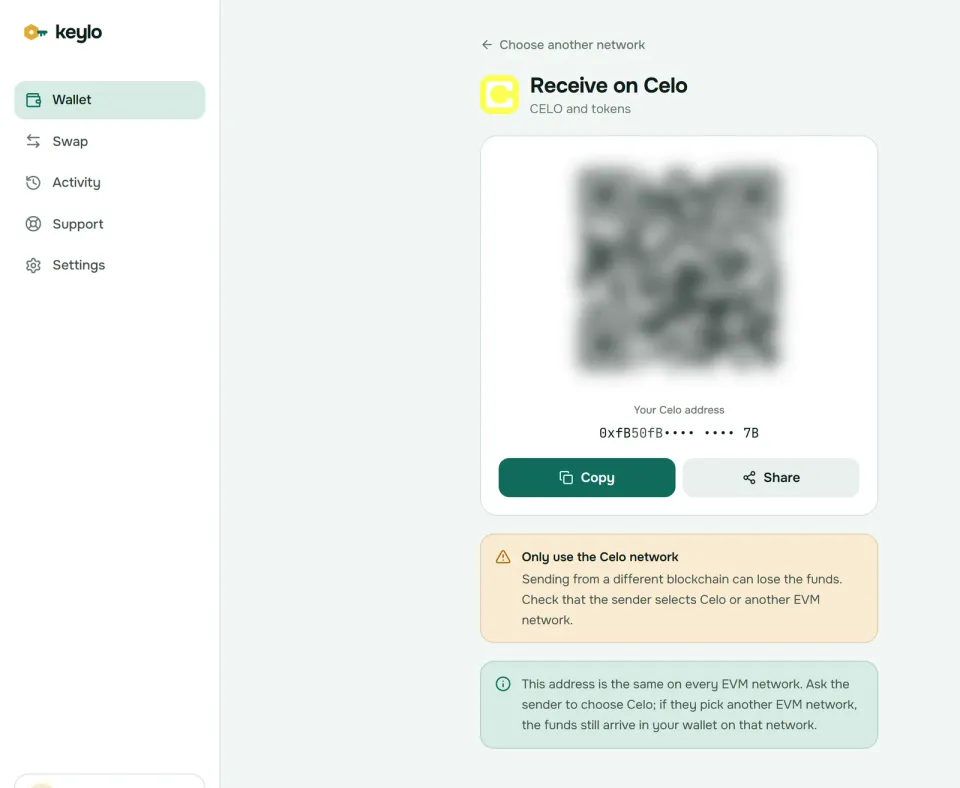
Tap Receive and choose Celo. You'll see "Receive on Celo", a QR code and "Your Celo address".
Tap Copy or Share, or let the sender scan the code.
Ask the sender, or the exchange, to choose the Celo network. For USDT and USDC, double-check this, since both exist on dozens of chains.
Look for the transfer under Celo. It usually lands within a couple of seconds.
Exchange support for Celo varies by coin. An exchange may offer the Celo network for CELO but not for USDT or USDC. If yours doesn't, withdraw on a network Keylo supports, such as Base, and bridge across from Keylo.
How to send on Celo#
Tap Send and choose CELO or a stablecoin on Celo.
Paste or scan the recipient's
0xaddress into To. Phone numbers don't work in Keylo, so ask for the address.Type the amount, or tap Max. For CELO, Max holds back the fee.
Tap Review and choose Slow, Normal or Fast. The review shows the network, recipient and fee in CELO.
Tap Send. The status moves from "On its way" to "Sent", and View on Celo Explorer opens the transaction on Celoscan.
Keylo tests each transfer before you sign, so most mistakes surface on the review screen. It warns when the recipient is a contract and blocks sends to a token's own contract address. When you hold no CELO, it tells you that you need some on Celo to pay the fee. Stuck transfers get a Speed up button.
Paying a MiniPay or Valora user works the same way, so you just send to their 0x address. Their phone-number lookup lives inside those apps instead.
How to withdraw from a Celo wallet#
To cash out through an exchange, open its deposit page for the coin you hold and check that it lists the Celo network. Copy the deposit address, send a small test from Keylo, and send the rest once the exchange credits it. If Celo isn't listed for that coin, bridge to a network the exchange accepts first.
To turn stablecoins into local money directly, Celo's docs list ramp providers, and which ones work depends on your country. Keylo has no cash-out feature of its own, so you'd send to the provider like any other recipient.
Celo network fees and gas#
Celo uses EIP-1559 pricing with a floor, so the base fee can't drop below a set minimum of 200 gwei. On October 24, 2026, the base fee sat right at that floor. A plain CELO transfer used 21,000 gas, so it cost about 0.0043 CELO, a few hundredths of a cent at the day's CELO price.
Celo also turns off the extra charge other OP Stack chains add for posting data to Ethereum. Its data goes to EigenDA instead, so what you see is the whole fee. Celo's fee specification explains the floor and where the fees go.
With fee abstraction, wallets that support it can pay that same fee in USDm, USDC, USDT or another allowlisted token. Keylo doesn't build that transaction type, so every Keylo transaction on Celo pays in CELO. That's the whole reason to keep a CELO balance. Keylo adds no fee of its own to a normal send.
Stablecoins on Celo#
Celo has a wide stablecoin lineup, because Mento issues dollar, euro and local-currency coins, and Tether, Circle and others issue their own.
Stablecoin | Issuer | Contract on Celo |
|---|---|---|
USDm (formerly cUSD) | Mento |
|
EURm (formerly cEUR) | Mento |
|
USD₮ | Tether |
|
USDC | Circle |
|
Mento renamed its coins with an "m" suffix, so cUSD became USDm and cREAL became BRLm. The contracts didn't change, so old apps and new ones can show different names for one token. Mento also issues KESm, NGNm, PHPm and others, and Celo keeps the full stablecoin contract list.
Each coin also carries its issuer's risk. Mento coins hold their peg through Mento's reserve and exchange, while USDT and USDC are backed by their companies. So in practice, hold the one your recipients use.
Keylo finds tokens your address holds through Celo's explorer index. If one doesn't show up, add it by contract under Settings, Networks, Custom tokens. Always compare the address with the issuer's list, since anyone can deploy a coin called USDm.
Swap and bridge stablecoins on Celo#
Keylo's swap screen uses LI.FI, which compares exchanges and bridges for Celo. On October 24 it quoted USDm to USDC on Celo through SushiSwap, and USDC from Base to Celo and USDT from Celo to Arbitrum in under a minute.
CELO itself is the exception. LI.FI rejects the native-coin request Keylo sends for CELO, so you can't currently swap or bridge CELO in Keylo, in either direction. Buy or sell CELO on an exchange, and use Keylo for the stablecoins.
Tap Swap. Under You pay, pick a token and network.
Under You receive, choose the token and network you want.
Compare routes by output, time and fees.
Check the details, including Minimum you receive and Delivered to.
Approve the exact amount if Keylo asks, then confirm and follow the progress screen.
Default slippage is 0.5%, and any Keylo service fee appears as its own line. If a bridge can't complete, it returns your funds, sometimes as a different token that still lands in your wallet. The swap and bridge page has the details.
Celo's native bridge to Ethereum runs through Superbridge, but its withdrawals are slow. You prove the withdrawal on Ethereum, wait seven days (the delay Celo's docs give for mainnet), then claim it on Ethereum, paying mainnet gas both times. For USDT, Celo's docs point to USDT0, which moves Tether's coin between chains one to one.
Celo scams and mistakes to avoid#
Fake upgrades and claims. The 2025 move to a layer 2 needed nothing from holders, so "migrate your CELO" or "claim USDm" links are phishing.
Copycat stablecoins. A token named USDT or USDm with the right logo proves nothing, because anyone can copy a logo. Match the contract against the table above.
Wrong network. Sending USDT on Ethereum instead of Celo puts it on a network where you may have no ETH for gas. Choose Celo on the exchange, every time.
Address poisoning. Scammers send tiny transfers from addresses that resemble ones you use. Copy addresses from the source, never from your history.
Fake support. Keylo staff never ask for your phrase or password. Use Keylo support, and read how Keylo protects your wallet.
A quick check before your first payment:
Your phrase is written down and confirmed in Keylo.
You hold a little CELO for gas.
The sender or exchange chose the Celo network.
The stablecoin contract matches the issuer's.
You tried a small amount first.
The networks page lists every network Keylo supports. For the same address on other chains, see the Ethereum wallet guide and the Base wallet guide.
Keep your Celo dollars in a wallet you control
Keylo encrypts your recovery phrase on your device. Send, swap and bridge stablecoins from one place.
Celo wallet FAQ#
What is the best wallet for Celo?
It depends on how you pay. MiniPay and Valora can pay gas in stablecoins and support phone-number payments, which suits people who hold only dollars. MetaMask and Keylo charge gas in CELO. Keylo adds token swaps and bridges across many networks under one recovery phrase, with nothing to install. For large balances, a Ledger hardware wallet adds protection.
Is Celo an Ethereum layer 2 now?
Yes. Celo completed its move from an independent layer 1 to an Ethereum layer 2 on March 26, 2025. It runs the OP Stack, posts its data to EigenDA and settles state on Ethereum. Addresses, balances and contracts carried over unchanged, so holders didn't need to do anything. Blocks now arrive every second.
Do I need CELO to pay gas on Celo?
Only in wallets without fee abstraction. Celo lets wallets that build CIP-64 transactions pay gas in approved tokens like USDm, USDC and USDT. MiniPay and Valora do this. MetaMask and Keylo don't, so they charge gas in CELO. In those wallets, keep a small CELO balance next to your stablecoins.
What happened to cUSD?
Mento renamed it USDm, part of a switch to names with an "m" suffix. cEUR became EURm and cREAL became BRLm. The contract addresses stayed the same, so your balance didn't move or change. Some apps still show the old names. Check the contract, 0x765DE816845861e75A25fCA122bb6898B8B1282a for USDm, if you're unsure.
Why does my old Celo phrase show a different address?
Early Celo wallets derived addresses on Celo's own path, coin type 52752, while MetaMask and Keylo use Ethereum's path, coin type 60. The same phrase therefore opens two different addresses, and your funds are most likely still at the legacy one. Open the old wallet app and send them to your new address on Celo.
How much does a Celo transaction cost?
Very little. On October 24, 2026, Celo's base fee sat at its 200 gwei floor, so a plain CELO transfer cost about 0.0043 CELO, a few hundredths of a cent. Token transfers use more gas but still cost well under a cent. Celo charges no extra data fee, because its data goes to EigenDA.
Is there a Celo wallet app or browser extension?
Celo has no single official wallet. MiniPay runs inside Opera Mini and as an Android and iOS app, and Valora is a mobile app, both listed in Celo's docs. MetaMask and Rabby are browser extensions that support Celo. Keylo is a web wallet instead: you log in with email and password in any browser and can add it to your home screen, with nothing to download.
How do I withdraw from my Celo wallet?
To cash out, send your coins to an exchange deposit address on the Celo network, after checking that the exchange lists Celo for that coin, and test with a small amount first. To move funds to Ethereum, Celo's native bridge takes about seven days plus two Ethereum transactions. Third-party bridges, like the routes Keylo's swap screen finds through LI.FI, usually take minutes for stablecoins.
Can I swap CELO in Keylo?
Not at the moment. Keylo's swaps and bridges on Celo run through LI.FI, which rejects the native-coin request Keylo sends for CELO, so CELO can't be swapped or bridged in either direction. Stablecoins and other tokens on Celo still work, for example USDm to USDC on Celo or USDC from Base to Celo. To get CELO for gas, withdraw some from an exchange on the Celo network.