A Bitcoin wallet is the app that holds the private key to your Bitcoin address and signs payments with it. The coins themselves stay on the Bitcoin network, and the key proves they're yours. Bitcoin is simpler than most chains: there are no tokens to approve, no separate gas coin and no memos to remember.
It still has traps. People lose money by choosing the wrong network on an exchange, by guessing at fees, and by restoring a recovery phrase into a wallet that checks different addresses. Fee figures and dates were checked on October 24, 2026.
Bitcoin at a glance#
Item | Bitcoin |
|---|---|
Native coin | BTC (1 BTC = 100,000,000 satoshis, or sats) |
Your address in Keylo | Native SegWit, starts with |
Fee unit | Sats per virtual byte (sat/vB), set by demand for block space |
Typical fee | 1 to 2 sat/vB on October 24, 2026, about 11 to 23 cents for a simple payment |
Block time | About 10 minutes on average, but irregular |
Supply | Capped at 21 million BTC; 3.125 BTC per block since the April 2024 halving |
Explorer | |
In Keylo | Send, receive, history, Speed up (RBF), swaps from BTC through THORChain, BTC delivered by LI.FI from EVM networks and Solana, Testnet4 and Signet. No Lightning, no Ordinals and no hardware wallets |
How a Bitcoin wallet works#
Bitcoin doesn't keep one running balance per account. Your balance is a pile of separate coins called unspent outputs (UTXOs), one for each payment you received. To pay someone, the wallet spends whole coins, sends the recipient their share, then returns the rest to you as change.
That's why the fee depends on how many coins a payment spends, not on how much BTC it moves. A wallet holding forty small deposits costs more to empty than one holding a single large coin.
Your Bitcoin wallet address#
Keylo gives you a native SegWit address, also called Bech32 or P2WPKH. It starts with bc1q, has 42 characters and uses only lowercase letters and digits. A built-in checksum catches nearly every typo, so a mistyped address fails the check instead of sending coins somewhere random.
Keylo derives this address from your recovery phrase on m/84'/0'/0'/0/0. That's the BIP84 path, and it's the first receiving address that most modern native SegWit wallets create from the same phrase.
Bitcoin address types you'll run into#
Starts with | Type | Can you send to it from Keylo? |
|---|---|---|
| Native SegWit (P2WPKH or P2WSH) | Yes. Your own Keylo address has this format |
| Taproot (P2TR) | Yes |
| Script hash (P2SH), often multisig or wrapped SegWit | Yes |
| Legacy (P2PKH) | Yes |
| Testnet or Signet | Only in Testnet mode |
| A Lightning invoice, not an address | No |
All of them hold the same bitcoin, and payments between formats work normally. Older formats just take more space when spent, so they cost a little more in fees.
How to choose the best Bitcoin wallet for you#
Bitcoin wallets come in a few types, and plenty of people use two: one for savings and one for spending.
Hardware wallets. Trezor, Ledger and Coldcard keep the key on a separate device that signs offline. They suit large balances you rarely move.
Desktop wallets. Sparrow and Electrum are long-running desktop apps for people who want detailed control over coins and fees. Electrum uses its own seed format instead of BIP39, which matters if you ever switch wallets.
Mobile wallets. BlueWallet is a Bitcoin-only app for phones, aimed at everyday spending.
Exchange accounts. The exchange holds the keys and decides when you can withdraw.
Web wallets. These run in a browser tab with nothing to install. Keylo is one, with no app-store app or browser extension to download.
Whichever you pick, look for native SegWit addresses, a choice of fee speeds, Replace-By-Fee, and a standard recovery phrase you can move to another app. For privacy, the Bitcoin.org privacy page also recommends a new address for every payment you receive.
Keylo covers the first four but not the last: it shows one fixed bc1q address and sends change back to it. It also doesn't accept a custom sat/vB rate. Keylo suits people who want BTC next to their other coins under one phrase, with simple sends and swaps. It's the wrong tool for Lightning payments, detailed coin control or hardware signing.
How to create a Bitcoin wallet in Keylo#
Keylo works in any modern browser on a phone or computer. You can add it to your home screen, and it then opens like an app.
Go to the sign-up page and fill in Full name, Email, Phone number, Password and Confirm password. Tick the terms box and tap Create account.
If Keylo shows "Check your inbox", confirm your email from the message.
On "Set up your wallet", choose Create a new wallet. Your browser creates a 12-word recovery phrase, then encrypts it with a key derived from your password (Argon2id, then AES-256-GCM). Keylo's server only ever stores that encrypted copy.
Tap Bitcoin in your asset list. Your
bc1qaddress, balance and history appear there.Write down the phrase. Open Settings, then Recovery phrase, enter your password and copy the 12 words onto paper. Keylo then asks you to confirm some of them.
Still in Settings, set up Two-factor authentication and an Anti-phishing code.
Treat the paper as the real wallet. A forgotten password can be reset by email, but the reset can't decrypt anything. Only the 12 words bring your bitcoin back.
Importing a phrase from another Bitcoin wallet#
Choose Import a recovery phrase and enter 12, 15, 18, 21 or 24 words. If your old wallet used native SegWit on the BIP84 path, Keylo shows its first receiving address and that address's balance.
Many Bitcoin wallets hand out a fresh address for every payment and keep change on separate addresses. Keylo only reads the first one. If you import a phrase from such a wallet, the balance may look low or empty, but nothing is lost. The coins sit on other addresses that your old wallet still sees.
Electrum seeds aren't BIP39 phrases, so Keylo rejects them or derives a different, empty wallet. In both cases, the reliable move is to send the bitcoin from your old wallet to your Keylo address.
Practice on Testnet4 or Signet#
Turn on Testnet mode under Settings, then Networks. Keylo adds Bitcoin Testnet4 and Bitcoin Signet, whose tb1 addresses hold test coins with no value. Each one links to a free faucet, so you can try a send and a fee bump before spending real sats.
Get your bc1q address in a minute
Sign up with email and a password. Keylo creates the wallet in your browser and shows your Bitcoin address right away.
How to receive bitcoin#
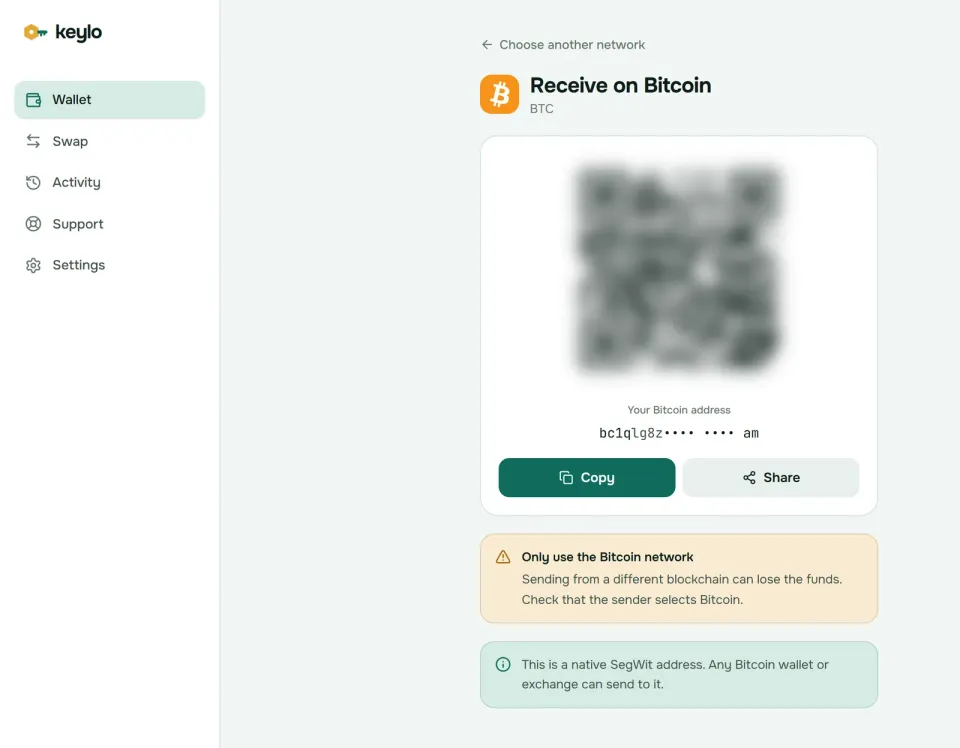
Tap Receive and choose Bitcoin. The screen reads "Receive on Bitcoin" and shows a QR code above "Your Bitcoin address".
Tap Copy or Share, or let the sender scan the code.
On an exchange withdrawal page, pick the network called Bitcoin or BTC, sometimes labeled "BTC (SegWit)".
Watch the asset's history. The payment shows up once it's broadcast, then confirms when a miner adds it to a block.
Blocks arrive every 10 minutes on average, but a 30-minute gap isn't unusual. Exchanges set their own confirmation count before crediting, so check their deposit page if a transfer seems slow.
For a large first withdrawal, send a small test, wait for it to arrive, then send the rest. The test costs one extra fee, which was under 25 cents in October 2026.
How to send bitcoin#
Tap Send and pick BTC.
In To, paste the address or scan its QR code.
Type the amount, or tap Max to send your whole balance minus the fee.
Tap Review, then pick Slow, Normal or Fast. Each shows the fee and a rough wait.
Check the review screen: network, recipient (first and last six characters in bold) and fee. Compare the whole address with the one you were given, not just the ends.
Tap Send. Keylo signs in your browser and shows "On its way", then "Sent", with a View on mempool.space link.
What Keylo checks before you sign#
Bitcoin payments can't be undone once confirmed, so Keylo stops the common mistakes first:
Wrong network. Paste a Litecoin or Dogecoin address and Keylo answers "This looks like an address for Litecoin, not Bitcoin" (or Dogecoin) instead of building a send. A
tb1testnet address is refused on mainnet.Tiny amounts. Keylo won't send less than 546 sats, the highest standard dust limit, so no node refuses the payment as dust.
A heavy fee. If the fee would be more than 10% of what you're sending, Keylo warns you.
Unconfirmed coins. When a payment spends coins that haven't confirmed yet, Keylo warns that it may take longer.
Too many small coins. A payment that would combine more coins than fit in a standard transaction is stopped. Send a smaller amount.
Bitcoin network fees explained#
A Bitcoin fee is a rate times a size. The size is the payment's weight in virtual bytes (vB), and the rate is what you offer per vbyte, in sats. A simple payment from a bc1q address, with one coin in and two outputs, weighs about 141 vB.
On October 24, 2026, mempool.space suggested 2 sat/vB for the next block and 1 sat/vB for within an hour. With BTC near $80,500, that put a simple payment at about 141 to 282 sats, or 11 to 23 cents. Every fee goes to the miner, and Keylo adds nothing to a normal send.
Keylo turns the network's estimates into three speeds:
Speed in Keylo | Target | Rough wait |
|---|---|---|
Fast | Within 2 blocks | About 20 minutes |
Normal | Within 6 blocks | About an hour |
Slow | Within 24 blocks | About 4 hours |
When demand is low, as it was in October 2026, Normal and Slow often land on the same 1 sat/vB rate. During a fee spike, Slow can save real money if you can wait.
Some wallets now offer rates below 1 sat/vB, because Bitcoin Core lowered its default relay minimum to 0.1 sat/vB in 2025. Keylo never goes below 1 sat/vB, so its payments relay through older nodes too. The trade-off is a few sats more on very quiet days.
How to speed up a stuck Bitcoin transaction#
A low fee during a busy spell can leave a payment unconfirmed for hours. Keylo marks every Bitcoin payment as replaceable, so you can fix it with Replace-By-Fee (RBF).
Open the payment from the done screen ("Taking too long?") or from your activity list.
Tap Speed up. The "Speed up this transaction" window shows the Current fee and the New fee.
Tap Pay higher fee. Keylo signs a new version of the same payment with a fast rate.
The two versions spend the same coins, so the network keeps only one and you can't pay twice. If you sent your whole balance with Max, the extra fee comes out of the amount, and Keylo shows what the recipient will get. After one confirmation, a payment is final and can't be replaced.
Full RBF has been the default in Bitcoin Core since version 28.0, which is why a careful seller waits for a confirmation before treating a payment as done.
Swap and bridge BTC from your Bitcoin wallet#
When you pay with BTC, the routes come from THORChain. It swaps native BTC for native coins on other chains, such as ETH, LTC, DOGE or XRP, with no wrapped tokens in between. LI.FI only works in the other direction: it can deliver BTC to your Bitcoin address when you swap from an EVM network or Solana.
Tap Swap. Under You pay, choose BTC and enter an amount.
Under You receive, choose the network and the coin or token you want.
Compare the routes. Each one lists the amount, the estimated time and the fees.
Open the details to check every step, Minimum you receive and Delivered to, which is your own Keylo address on the other network.
Confirm, then follow the progress screen until the funds arrive.
Keylo builds the Bitcoin deposit for you, with the instructions the route needs, so you never paste a vault address or memo. It pays the Fast fee on that deposit so the swap isn't held up. THORChain still waits for Bitcoin confirmations, and for more of them on bigger amounts: in October 2026 it quoted about 10 minutes for 0.002 BTC and about 23 minutes for 1 BTC.
Default slippage is 0.5%. If a THORChain swap can't complete, it's refunded to your Bitcoin address minus network fees. Any Keylo service fee shows as its own line in the quote. The swap and bridge page explains routes and refunds.
What Keylo doesn't do on Bitcoin#
Keeping Bitcoin simple means leaving some things out:
No Lightning. Keylo can't pay or receive Lightning invoices. Use a Lightning wallet for small instant payments, then move savings on-chain.
One address only. There's no new address per payment and no coin control, so anyone who knows your address can see its whole history. Privacy-minded users should prefer a wallet that rotates addresses.
No Ordinals, Runes or BRC-20. Keylo doesn't show these, and it treats every coin as plain BTC. Never send inscriptions to your Keylo address, because a later payment could spend one like ordinary sats.
No hardware wallets and no card purchases. Buy BTC on an exchange and withdraw it on the Bitcoin network.
No staking or dapp connections. Bitcoin has no native staking, and Keylo doesn't connect to websites.
Keylo is non-custodial: if you lose both your password and your recovery phrase, nobody can open the wallet, Keylo included. The list of supported networks shows what else the same phrase covers.
Bitcoin scams and mistakes to avoid#
The Bitcoin network is rarely the weak point. Losses almost always come from tricks aimed at the person holding the keys.
Clipboard malware. Some malware watches for a copied address and swaps in the attacker's. Compare the address on the review screen with the original, character by character in the middle as well as the ends.
Lookalike addresses. Address poisoning is rarer on Bitcoin than on account-based chains, but scammers still send tiny amounts from addresses that start and end like yours. Copy addresses from the source, not from your history.
Giveaways and "doubling". Nobody sends back twice the BTC you send them. Live streams and posts promising this are always scams.
Recovery and support scams. People offering to recover lost bitcoin for a fee usually take the fee or your phrase. Keylo staff never ask for your recovery phrase or password. Use the Keylo support page and read how Keylo secures your wallet.
Before your first real payment, check these four things:
Your recovery phrase is on paper and confirmed in Keylo.
The exchange withdrawal network says Bitcoin, not Lightning or BEP20.
The address starts with
bc1qand matches the one on your Receive screen.You've sent a small test before a large amount.
Bitcoin's closest relatives work the same way in Keylo. See the Litecoin wallet guide and the Dogecoin wallet guide, or the Ethereum wallet guide if you plan to swap BTC for ETH.
Keep your bitcoin in a wallet only you control
Keylo encrypts your recovery phrase on your device and never sees it. Receive, send and swap BTC from one browser tab.
Bitcoin wallet FAQ#
What is the best Bitcoin wallet for beginners?
It depends on how you'll use it. For savings, a hardware wallet such as Trezor or Ledger is the safest option. For spending on a phone, a Bitcoin-only mobile wallet works well, and for Lightning you need a Lightning wallet. To hold BTC next to other coins and send or swap it without installing anything, a web wallet like Keylo fits.
Where do I find my Bitcoin wallet address?
In Keylo, tap Receive and choose Bitcoin, or open Bitcoin from your asset list. Your address starts with bc1q and has 42 characters. You can copy it, share it or show the QR code. The address stays the same, so you can reuse it, but anyone who has it can look up its full history on a block explorer.
How much does it cost to send bitcoin?
The fee is the payment's size in virtual bytes times a rate in sats per vbyte. A simple payment is about 141 vB. On October 24, 2026, rates of 1 to 2 sat/vB were enough, so it cost about 11 to 23 cents. Spending many small coins makes the payment bigger, and busy periods push rates up.
How long does a Bitcoin transaction take?
It appears within seconds of sending, then confirms when a miner includes it in a block. Blocks average about 10 minutes, though gaps vary. In Keylo, Fast targets the next 2 blocks, Normal 6 and Slow 24. Exchanges usually wait for one or more confirmations before crediting a deposit, so allow extra time there.
How do I speed up a stuck Bitcoin transaction?
Open the pending payment in Keylo and tap Speed up. Keylo shows the current fee and a new, higher fee, then signs a replacement of the same payment through Replace-By-Fee. The network keeps only one version, so you can't pay twice. Once a payment has one confirmation, it's final and can no longer be replaced.
Which network do I pick to withdraw BTC from an exchange?
Pick the Bitcoin network, sometimes shown as BTC or BTC (SegWit). Lightning, BNB Smart Chain (BEP20) and Ethereum are different networks that don't deliver native bitcoin to a bc1q address. Keylo can't receive Lightning payments. If the withdrawal page is confusing, send a small test first and wait for it to arrive.
Why does my imported recovery phrase show no bitcoin?
Most often, your old wallet kept coins on other addresses or another path. Keylo reads only the first native SegWit address on m/84'/0'/0'/0/0, while many wallets rotate addresses and use separate change addresses. Electrum seeds are a different format altogether. Your coins are still safe in the old wallet, so send them to your Keylo address from there.
Is a Bitcoin wallet traceable?
Largely, yes. Every Bitcoin address and payment is public, so anyone can paste an address into an explorer such as mempool.space and see its balance and history. The address doesn't carry your name, but an exchange that sent you coins knows it's yours. Keylo uses one fixed address, so treat its history as public, and use a wallet that rotates addresses if privacy matters.