A Telos EVM wallet holds TLOS and tokens at a 0x address on Telos, a layer 1 that makes a block every half second. TLOS pays gas at a fixed price, so a transfer costs the same at any hour. The EVM side works with any Ethereum-style wallet.
But Telos has a second side, and that's where people lose track of funds. Telos Zero, the native chain, uses 12-character account names, and Telos's own exchange guide describes TLOS deposits there with a memo. Your 0x address and a native account are different places, even when the same person owns both. Figures below are as of October 2026.
Telos EVM at a glance#
Item | Telos EVM |
|---|---|
Native coin | TLOS, the gas token (18 decimals on Telos EVM) |
Address format |
|
Chain ID | 40 |
How it runs | An EVM smart contract on Telos Zero, the native Antelope-based chain |
Block time | 0.5 seconds, with Savanna instant finality |
Gas price | Fixed by the network, about 5,254 gwei on October 24, 2026 |
Typical fee | About 0.11 TLOS for a TLOS transfer |
Token standard | ERC-20 |
Explorer | |
In Keylo | Send, receive, popular tokens found by default (others added by contract), history of transfers sent from Keylo, swap and bridge through LI.FI. No staking, Telos Zero accounts or dapp connections |
How a Telos EVM wallet works#
Telos EVM is a smart contract running on Telos Zero. An RPC layer translates standard Ethereum calls, so MetaMask and other EVM tools work unchanged. You sign Ethereum-style transactions, and the native chain executes them in its own runtime.
Your Telos EVM address vs a native Telos account#
On Telos EVM you have a 0x address, the same one you use on Ethereum, Polygon or any other EVM network. In Keylo, every EVM network shares that address, derived on m/44'/60'/0'/0/0, the path MetaMask uses for its first account.
A native Telos Zero account is a name, exactly 12 characters, made of the letters a to z and the digits 1 to 5. It also has its own keys and its own balance. Telos lets you link the two, and the Telos Web Wallet moves TLOS between them, but a transfer from one to the other always takes a step in that web wallet or a bridge.
Keylo only holds the 0x side. It can't create, show or sign for a native Telos account.
Why exchanges ask for a memo#
Telos's exchange guide describes deposits on the native chain. You send TLOS to the exchange's account name and add a memo that identifies you. If you leave out the memo, the exchange can't tell whose deposit it is.
Keylo's Telos EVM send has no memo field, because EVM transfers don't use one. So don't send TLOS from Keylo to an exchange's native deposit account, because the memo would be missing. Use a network the exchange lists for EVM addresses, or move the TLOS to a native account first.
How to choose a Telos wallet#
Telos's docs name two tools, one for each side, but there's also a web wallet that spans both.
MetaMask. A browser extension and mobile app for Telos EVM. Teloscan's connect button adds the network.
Anchor. A signer for native Telos Zero accounts, used with the Telos Web Wallet.
Telos Web Wallet. At
wallet.telos.net, it handles native accounts, moves TLOS between Zero and EVM, and runs sTLOS staking.Web wallets like Keylo. These run in a browser tab with nothing to install, on the EVM side only.
Look for three things in a Telos wallet. It should say which side a balance is on, Zero or EVM. It needs a memo field if you plan to deposit to an exchange from a native account. And it should connect to the Telos Web Wallet, so you can move TLOS between the sides.
Keylo works as a Telos EVM wallet for people who keep TLOS and tokens there and want to send them, or swap and bridge across EVM networks, with one recovery phrase. However, it's the wrong tool for native accounts, exchange memos or staking. For those, pair the Telos Web Wallet with Anchor or MetaMask.
How to set up a Telos EVM wallet in Keylo#
Keylo already lists Telos EVM, so you don't add chain ID 40 by hand.
Open the sign-up page for Keylo, enter your full name, email, phone number and a password, check the terms box and tap Create account.
Confirm your email if Keylo shows "Check your inbox".
Tap Create a new wallet. The browser builds your 12-word recovery phrase, then encrypts it with a key stretched from your password by Argon2id and AES-256-GCM. What Keylo stores is that encrypted copy, nothing more.
Open Telos EVM in your asset list to find your
0xaddress.Write down the phrase. Go to Settings, then Recovery phrase, enter your password and tap Show my phrase. Copy the words on paper, tap I wrote them down, then confirm three of them.
Set up Two-factor authentication and an Anti-phishing code in Settings as well.
Keylo can't rescue a wallet whose phrase is gone, since it never had a readable copy. Resetting the password won't open the old vault.
Bringing over a MetaMask phrase#
Pick Import a recovery phrase and enter your 12 or 24 words. Your first MetaMask account appears with the same Telos EVM address and balance, since both apps use the standard path. But a native account's private key from Anchor won't work here, because it isn't a recovery phrase for the EVM side.
Get your Telos EVM address in a minute
Sign up with email and a password. Keylo creates the wallet in your browser, with one 0x address for Telos EVM and every other EVM network.
How to receive TLOS on Telos EVM#
Tap Receive and choose Telos EVM. The screen says "Receive on Telos EVM" and shows a QR code.
Tap Copy or Share, or let the sender scan the code.
Ask the sender to choose Telos EVM. A native Telos transfer can't go straight to a
0xaddress from a normal wallet.Then watch your TLOS balance, or open your address on Teloscan. On Telos EVM, Keylo's Activity list shows only transfers you send from Keylo, so a deposit appears as a higher balance rather than as a new entry.
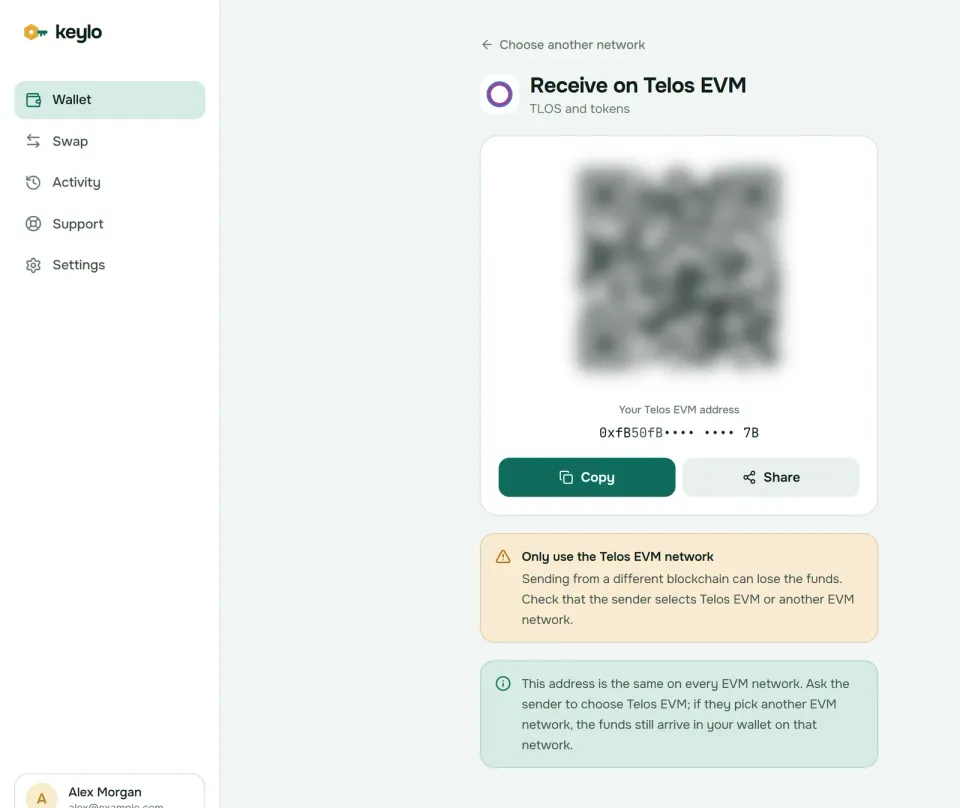
The Receive screen also points out that every EVM network shares your Telos EVM wallet address. TLOS also exists as a LayerZero token on Ethereum, BNB Chain, Base, Polygon, Arbitrum and Avalanche. If someone sends you TLOS on one of those, it reaches your address on that network instead, so you'd bridge it to Telos EVM after it arrives.
Getting TLOS from an exchange#
Telos's exchange guide covers TLOS on two kinds of network: the native Telos chain, with an account name and a memo, for exchanges such as KuCoin, Gate.io and MEXC, and Ethereum or BNB Chain, where TLOS is a token. It doesn't list Telos EVM as an exchange network, so check your exchange's own list. That leaves these routes into Keylo:
Withdraw to a native Telos account in the Telos Web Wallet, then use its deposit to EVM button to send the TLOS to your Keylo
0xaddress.Withdraw TLOS on Ethereum or BNB Chain to your
0xaddress, then bring it to Telos EVM through the Telos Bridge, or through Keylo when the swap screen finds a route.Or withdraw USDC or ETH on another EVM network, then swap or bridge it to TLOS on Telos EVM inside Keylo.
How to send TLOS on Telos EVM#
Tap Send and choose TLOS or a token on Telos EVM.
In To, paste or scan a
0xaddress. A native account name such asexampleuser1is rejected, because it isn't an EVM address.Enter an amount, or tap Max to send all your TLOS minus the fee.
Tap Review. Choose Slow; the reason is in the fees section below.
Check the network, the full address with its first and last six characters in bold, and the fee in TLOS.
Tap Send. Keylo signs on your device, shows "On its way" and then "Sent", and links to View on Teloscan.
What Keylo checks first#
Keylo runs a simulation before you sign, so a transfer that would fail stops on the review screen and costs nothing. It also flags:
No TLOS for gas. Sending USDC without TLOS shows "You need some TLOS on Telos EVM to pay the network fee."
A contract as recipient. Keylo warns you, because tokens sent to a contract that doesn't expect them are usually lost.
The token's own contract. Sending a token to its own address is blocked.
Non-EVM addresses. Native Telos names and Bitcoin or Solana addresses get a clear message instead of a send.
Telos EVM gas fees explained#
Telos EVM gas works differently from most EVM chains, because the price never moves. The network sets one gas price, and there's no bidding. Telos's docs say you can offer more, but you'll only be charged the set price. Offer less and the transaction is rejected without any charge.
On October 24, 2026, the set price was about 5,254 gwei. A plain TLOS transfer uses 21,000 gas, so it cost about 0.11 TLOS. A token transfer uses more, roughly 50,000 to 60,000 gas, so it costs about 0.3 TLOS.
Action | What you pay (October 24, 2026) |
|---|---|
Send TLOS | About 0.11 TLOS |
Send USDC or another ERC-20 | About 0.3 TLOS |
Swap or bridge in Keylo | Network fee plus route fees, all shown in the quote |
Move TLOS between Zero and EVM | Done in the Telos Web Wallet, not in Keylo |
So in Keylo, Slow already pays the full set price. Normal and Fast offer 10% and 30% more, and Keylo shows those higher amounts. Telos would only charge the set price anyway, but Slow avoids the guesswork. For the same reason, Speed up can't make a Telos transfer faster, and with half-second blocks it rarely sits pending. Keylo adds no fee to a normal send from your Telos EVM wallet.
Under governance proposal TIP35, the gas fees Telos EVM collects are burned on a monthly schedule. The Telos gas fee docs explain the formula.
Blocks arrived every 0.5 seconds in a 2,000-block sample on October 24, 2026. Telos runs Savanna finality: the 21 elected block producers also vote on blocks, and 15 of their votes finalize one. Once that happens, your transfer can't be reversed.
Swap and bridge from your Telos EVM wallet#
Keylo gets Telos EVM swap and bridge routes from LI.FI, which compares DEXs and bridges. You can swap TLOS for a stablecoin, or bring value in from Polygon, Base or Ethereum.
Tap Swap. Under You pay, pick a token on Telos EVM or on the network you're coming from.
Under You receive, choose the network and token. Search by name or paste a contract address.
Compare the routes by amount, time and fees.
Open the details for every step, Minimum you receive and Delivered to, which is your own address on the other network.
Confirm and follow the progress screen until the funds arrive.
The default slippage limit is 0.5%. A bridge either delivers your funds or returns them, sometimes as a different token that still lands in your wallet. Any Keylo service fee is listed separately. Telos EVM also has thinner liquidity than larger chains, so check the quote's minimum before you confirm. The swap and bridge page explains routes and refunds.
Tokens on Telos EVM#
Keylo checks a built-in list of popular tokens on Telos EVM, which on October 24, 2026 covered USDC, USDT, WETH and WBTC. Any other token stays hidden until you add it under Settings, Networks, Custom tokens, Add token. Telos's contract list gives the two you're most likely to want, both with 18 decimals:
WTLOS, wrapped TLOS for DeFi:
0xD102cE6A4dB07D247fcc28F366A623Df0938CA9EsTLOS, the liquid staking token:
0xB4B01216a5Bc8F1C8A33CD990A1239030E60C905
Telos EVM also has several stablecoin contracts from different bridges, including Stargate's bridged USDT, so confirm which contract the other side uses before you send.
What Keylo doesn't do on Telos#
No native Telos accounts. Keylo can't create a 12-character account, send with a memo or move TLOS between Zero and EVM. Use the Telos Web Wallet for that.
No staking. TLOS staking on the EVM side runs through sTLOS, a liquid staking token, with a 10-day unstaking period. Keylo stakes only on Cosmos SDK chains, so stake in the Telos Web Wallet or on Teloscan. Keylo can still hold sTLOS once you add its contract, listed above.
No dapp connections. There's no browser extension and no WalletConnect.
No NFT view, testnet, hardware wallets or card purchases.
Keylo has no way into your wallet without you. Lose both the password and the recovery phrase, and the wallet can't be recovered by anyone, including Keylo. The Keylo network list shows every chain the same phrase opens.
Telos scams and mistakes to avoid#
Missing or wrong memos. A native deposit to an exchange without the right memo can sit unclaimed until support traces it. Copy the memo exactly, and never add one to an EVM transfer.
Fake web wallets. Lookalike Telos Web Wallet or bridge sites ask for your private key or a signature. Type
wallet.telos.netandbridge.telos.netyourself.Fake tokens. Anyone can mint a token called TLOS or USDC, so compare the contract with Teloscan and Telos's contract list before you add it.
Address poisoning. Scammers send dust from addresses that copy the start and end of yours. Paste from the original source.
Fake support. Keylo staff never ask for your phrase or password. Contact them through the Keylo support page, and read how Keylo secures wallets.
Before the first real transfer from your Telos EVM wallet:
Your recovery phrase is written down and confirmed in Keylo.
You hold some TLOS on Telos EVM for gas.
The sender chose Telos EVM, not the native chain.
You pasted a
0xaddress, not an account name.A small test transfer arrived first.
Bridging in from elsewhere? The Polygon wallet guide and the Base wallet guide cover two common starting points.
Keep TLOS on Telos EVM in a wallet only you control
Keylo encrypts your recovery phrase on your device and never sees it. Send, swap and bridge from one place.
Telos EVM wallet FAQ#
What is the difference between Telos EVM and Telos Zero?
They're two sides of one network. Telos Zero is the native Antelope-based chain with 12-character account names, memos and resource staking. Telos EVM is an Ethereum-compatible smart contract running on top of it, with 0x addresses and fixed-price gas in TLOS. Balances on one side don't appear on the other until you move them in the Telos Web Wallet.
How do I move TLOS from a native account to Telos EVM?
Log in to the Telos Web Wallet at wallet.telos.net with your native account, for example through Anchor. Use the deposit to EVM option, enter the amount and sign. The TLOS appears at the linked EVM address, which you can then send to your Keylo 0x address. Test with a small amount first, because the steps differ from a normal transfer.
Can I withdraw TLOS from an exchange to Telos EVM?
Usually not directly. Telos's exchange guide covers TLOS on the native chain, with an account name and memo, and as a token on Ethereum or BNB Chain. Withdraw to a native account and move it to EVM in the Telos Web Wallet, or withdraw bridged TLOS and bring it over with the Telos Bridge. You can also swap or bridge another asset to TLOS in Keylo.
How much is the gas fee on Telos EVM?
Telos sets a fixed gas price. On October 24, 2026, it was about 5,254 gwei, so a TLOS transfer cost about 0.11 TLOS and a token transfer about 0.3 TLOS. Offering more doesn't buy priority, and offering less gets the transaction rejected. Telos burns the collected fees on a monthly schedule under TIP35.
Can I speed up a Telos EVM transaction?
Not in any useful way. Telos charges only its set gas price, whatever you offer, so a higher bid doesn't move you ahead. Blocks arrive every half second and Savanna finalizes them quickly, so transfers rarely stay pending. In Keylo, choose Slow, which already pays the full set price, and Normal or Fast only show higher estimates.
How do I add Telos EVM to MetaMask?
Use the connect button on Teloscan, or add a network called Telos with chain ID 40, currency TLOS, RPC https://rpc.telos.net and explorer https://www.teloscan.io. Keylo needs no setup, because Telos EVM is built in. A MetaMask phrase imported into Keylo shows the same Telos EVM address and balance.
How do I stake TLOS?
On the EVM side, stake through the Telos Web Wallet or Teloscan and receive sTLOS, a liquid staking token whose value grows as rewards compound every 30 minutes. Unstaking takes 10 days. Keylo can't stake TLOS, since its staking covers Cosmos SDK chains only, but it can hold and send sTLOS once you add the token.
Is TLOS on Ethereum or BNB Chain the same as TLOS on Telos EVM?
It's the same asset in a different place. Telos bridges TLOS to Ethereum, BNB Chain, Base, Polygon, Arbitrum and Avalanche as a LayerZero token, and it can only pay gas on Telos itself. To use bridged TLOS on Telos EVM, bridge it back through the Telos Bridge, or through a LI.FI route in Keylo when the quote screen finds one.