A Polygon wallet holds the keys to a 0x address on Polygon, the low-fee network that Polygon Labs now calls Polygon Chain and most exchanges still list as Polygon or Polygon PoS. It is the same address you already have on Ethereum. You pay fees in POL, the coin that replaced MATIC, and a token transfer costs a fraction of a cent.
Most money lost on Polygon comes from three mix-ups: the old MATIC name, two different kinds of USDC, and picking the wrong network on an exchange. Once those are clear, Polygon is one of the cheapest places to hold and move stablecoins. Figures below are as of October 2026.
Polygon at a glance#
Item | Polygon |
|---|---|
Network | Polygon PoS, branded Polygon Chain: an EVM sidechain that checkpoints to Ethereum |
Chain ID | 137 |
Gas coin | POL (replaced MATIC on September 4, 2024) |
Address format |
|
Typical fee | About $0.0005 to send POL and $0.002 to send a token, on October 24, 2026 |
Speed | A block about every 1.5 seconds, final within a few seconds |
Token standard | ERC-20 |
Stablecoins | Native USDC from Circle, older bridged USDC.e, and USDT0 |
Explorer | |
In Keylo | Send, receive, ERC-20 tokens, speed-up, swap and bridge through LI.FI, Polygon Amoy testnet. No staking, NFT view or dapp connections |
How a Polygon wallet works#
Polygon runs the same accounts and smart contracts as Ethereum, but its own validators secure it. They stake POL, produce a block roughly every 1.5 seconds and post regular checkpoints of the chain to Ethereum. Because Ethereum doesn't check Polygon's transactions, people usually call it a sidechain rather than a rollup.
Your Polygon wallet address#
Your Polygon wallet address is your 0x address. Ethereum, Base, Arbitrum and other EVM networks derive it from the same key, so it looks identical on all of them. Keylo derives it on m/44'/60'/0'/0/0, which is also the path of MetaMask's first account.
The address is shared, but each network keeps its own balance. USDC on Polygon only shows under Polygon. When an exchange asks for a "USDT Polygon", "USDC Polygon" or old "MATIC" address, it wants this same 0x address. There's no memo to add, no activation deposit and no minimum balance to keep.
MATIC became POL#
On September 4, 2024, POL took over from MATIC as Polygon's gas and staking coin. Balances on Polygon switched automatically at 1 to 1, and by September 2025 Polygon reported that 99% of MATIC had moved over.
MATIC held as a token on Ethereum is a separate case. It stays MATIC until you upgrade it, and Polygon's support site says there's no deadline for that. You can upgrade through the Polygon Portal or swap MATIC for POL on a DEX. MATIC left on an exchange depends on that exchange's own rules, so check its announcements.
Polygon Chain, Polygon PoS and the closed zkEVM#
Polygon's own docs now say Polygon Chain, while exchanges show Polygon, Polygon PoS, POL or the old MATIC label. All of them mean chain ID 137, the network Keylo supports.
Polygon zkEVM was a different chain, a rollup, and its sequencer shut down on July 3, 2026. Former users can claim balances that sat in an ordinary wallet on Ethereum until December 31, 2027, but funds held in smart contracts there can't be claimed that way. So never pick "Polygon zkEVM" as a network today.
How to choose a Polygon wallet#
Every EVM wallet can be a Polygon wallet, so the real question is what you plan to do on the chain.
Extension and mobile wallets. MetaMask has a browser extension and a mobile app, and Rabby is a browser extension built for EVM networks. Both connect to Polygon apps such as DEXs, games and prediction markets.
Hardware wallets. A Ledger or Trezor device keeps the key off your computer and pairs with a software wallet. That suits large balances you rarely touch.
Exchange accounts. The exchange holds the key. It's handy for buying POL, but the exchange decides when you can withdraw.
Web wallets. These open in a browser tab with nothing to install. Keylo is one.
On Polygon, look for a wallet that shows fees in POL and dollars, not only in gwei. It should tell native USDC from USDC.e by contract address, and warn you before a token transfer fails for lack of POL.
Keylo fits people who hold POL and stablecoins, pay or get paid on Polygon, and swap or bridge between networks. If you want to use Polygon dapps, an extension wallet is the better tool.
What Keylo doesn't do on Polygon#
No dapp connections. Keylo has no browser extension and no WalletConnect, so it can't sign in to Polygon DEXs, games or prediction markets. Its own Swap screen handles swaps and bridges.
No POL staking. Polygon staking runs through contracts on Ethereum, and Keylo stakes only on Cosmos SDK chains. You can still hold and send POL.
No NFTs. Keylo has no NFT view on Polygon and can't send NFTs, so keep collectibles in a wallet that shows them.
No hardware wallets and no card purchases. Buy POL or USDC on an exchange, then withdraw on Polygon.
Keylo is also non-custodial. Lose both your password and your recovery phrase and nobody can open the wallet, Keylo included. The list of supported networks shows what else the same phrase covers.
How to create a Polygon wallet in Keylo#
There's no Polygon wallet app or APK to download. Keylo runs in a browser on your phone or computer, and you can add it to your home screen. Polygon is already in the list, so there's no RPC or chain ID to add by hand.
Open Keylo's sign-up page and fill in your full name, email, phone number and a password twice. Tick the terms box and tap Create account.
If you see "Check your inbox", open the link in the email Keylo sent.
On "Set up your wallet", tap Create a new wallet. Your browser makes a 12-word phrase, then locks it with a key from your password (Argon2id, then AES-256-GCM). Keylo's server only ever stores the locked copy.
Tap Polygon in your asset list. Your
0xaddress and POL balance sit there.Go to Settings, then Recovery phrase. Enter your password, tap Show my phrase and copy the words onto paper. Tap I wrote them down and confirm three of them.
Still in Settings, turn on Two-factor authentication and pick an Anti-phishing code.
Skip the paper backup, and a forgotten password can cost you the wallet. A reset by email gets you back into the account, but only the 12 words can open the wallet itself.
Moving over from MetaMask#
Tap Import a recovery phrase instead and type your 12 or 24 words. Because Keylo uses the standard EVM path, your first MetaMask account appears with the same address and the same Polygon balance. Any second or third MetaMask account lives on another path and won't show, but its funds stay safe in MetaMask.
Practice on Polygon Amoy#
Turn on Testnet mode under Settings, then Networks. Keylo adds Polygon Amoy, Polygon's test network, and links to Polygon's faucet for free test POL. Amoy uses the same 0x address, so check the network name before you share it.
Open a Polygon wallet in your browser
Sign up with email and a password. Keylo makes the wallet on your device, with one 0x address for Polygon and every other EVM network.
How to receive POL and USDC on Polygon#
Tap Receive and choose Polygon. The screen says "Receive on Polygon" and shows your address as text and as a QR code.
Tap Copy or Share, or let the sender scan the code.
On an exchange, choose Polygon as the withdrawal network. It may read Polygon PoS, POL or MATIC. Don't pick Ethereum, and don't pick Polygon zkEVM.
Wait a few seconds. Your balance updates once the deposit lands, and the PolygonScan button next to your address lists the transaction.
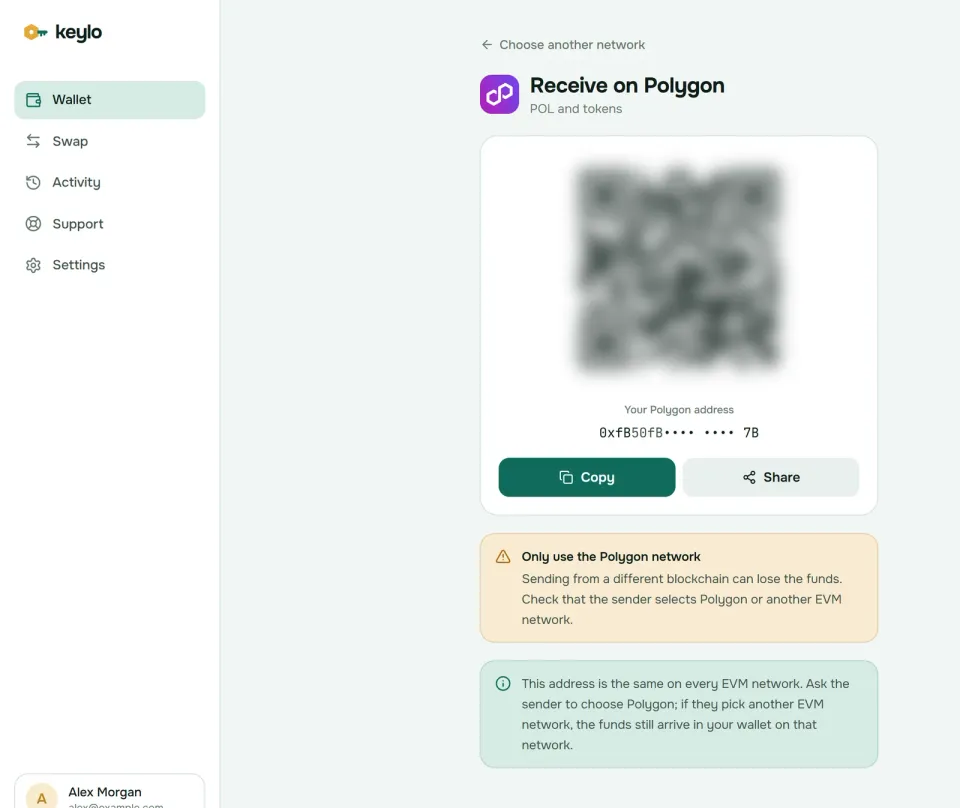
Keylo's Receive screen reminds you that this address works on every EVM network. If a sender picks Ethereum or Base by mistake, the funds still reach you, but on that network. You'll find them under that network in Keylo, and moving them off Ethereum costs far more gas than Polygon does.
How to send POL and tokens on Polygon#
Tap Send and pick POL or a token on Polygon.
Paste or scan the address into To. Keylo checks the format and the checksum.
Type an amount or tap Max. For POL, Max holds back enough to pay the fee.
Tap Review and pick Slow, Normal or Fast.
Read the review screen: network, the full recipient address with its first and last six characters in bold, and the fee in POL and dollars.
Tap Send. Keylo signs in your browser and shows "On its way", then "Sent", with a link to PolygonScan.
What Keylo catches on Polygon#
Keylo simulates each transfer before you sign, and stops one that would fail so you don't pay for nothing. It also flags these:
A token send with no POL. You'll see "You need some POL on Polygon to pay the network fee."
A contract as recipient. Keylo warns that tokens sent to a contract that doesn't expect them are usually lost.
The token's own contract. Sends to a token's contract address are blocked, since funds there are usually gone.
An address from another chain. A Solana or Tron address gets a clear message instead of a send.
Polygon blocks come quickly, but a busy moment can leave a low-fee transfer pending. In that case the status screen offers Speed up, which resends it with a higher fee.
Polygon network fees and gas explained#
Polygon prices gas like Ethereum, with a base fee that the network burns and a priority fee that goes to validators. Both are paid in POL. A plain POL transfer uses 21,000 gas, and token transfers use more.
The gwei numbers look alarming. Polygon's docs require a priority fee of at least 25 gwei, and on October 24, 2026 PolygonScan showed a total gas price near 270 gwei. But POL traded around $0.09 that day, so a POL transfer cost about 0.006 POL, roughly $0.0005. A token transfer cost about $0.002 and a swap about $0.005. Judge the fee in POL or dollars, never in gwei.
Keylo shows Slow, Normal and Fast with their real cost before you sign, and it adds nothing to a normal send. With blocks every 1.5 seconds the three choices rarely differ by much. The Polygon gas documentation explains the minimum tip.
USDC, USDT0 and other tokens on Polygon#
Polygon tokens follow the ERC-20 standard. Keylo checks for popular ones on its own, such as USDC, USDC.e, USDT, DAI, WETH and WBTC. To add anything else, go to Settings, Networks, Custom tokens, tap Add token and enter the contract address, symbol and decimals.
Names and logos are free to copy, so match the contract address instead:
USDC
0x3c499c542cEF5E3811e1192ce70d8cC03d5c3359is Circle's native USDC on Polygon. Circle's address list confirms it.USDC.e
0x2791Bca1f2de4661ED88A30C99A7a9449Aa84174is older USDC bridged from Ethereum through the Polygon bridge. Circle doesn't issue it, and many exchanges credit only native USDC. The contract still calls itself USDC on chain, so go by the address, not the name.USDT0
0xc2132D05D31c914a87C6611C10748AEb04B58e8Fis the omnichain version of Tether's USDT. Polygon's USDT became USDT0 on August 27, 2025 at the same address, and holders didn't need to do anything.
USDC and USDC.e are both worth about a dollar, but an exchange expecting one may not credit the other. Check what you hold before you deposit, and swap USDC.e to USDC if needed.
Swap and bridge on Polygon#
Keylo finds Polygon swap and bridge routes through LI.FI, which compares DEXs on Polygon and bridges to networks like Ethereum, Arbitrum and Base.
Tap Swap and choose POL or a Polygon token under You pay.
Under You receive, pick a network and token, or paste a contract address.
Compare routes by amount, time and fees.
Open the details to see every step, Minimum you receive and Delivered to, your own address on the other network.
If you pay with a token, Keylo first asks you to approve exactly that amount, then to confirm.
Tap Swap or Bridge and watch the progress screen.
Default slippage is 0.5%, so a swap won't fill if the price slips further than that. A bridge either delivers your funds or returns them, sometimes as a different token in your wallet. Any Keylo service fee shows as its own line. More on routes and refunds is on the Keylo swap and bridge page.
Polygon's official PoS bridge works differently on the way out. A withdrawal to Ethereum waits until a checkpoint reaches Ethereum, which Polygon's docs say happens roughly every 30 minutes, and then needs a claim on Ethereum paid in ETH. Keylo can't connect to the Polygon Portal to make that claim. LI.FI routes pay out from their own liquidity instead, usually within minutes.
On your first move to Polygon, make POL the token you receive, or bridge a little POL before your stablecoins, so you can pay gas on arrival.
Polygon scams and mistakes to avoid#
Cheap gas makes Polygon cheap for scammers too, so spam is common.
Address poisoning. Scammers send tiny or zero-value transfers from addresses that copy the start and end of ones you use. Copy addresses from the original source, never from your history.
Junk tokens. Tokens you never asked for often carry a website in their name. Those sites ask you to connect and sign, which is how drainers empty wallets. Ignore them.
Fake migrations. Upgrading MATIC to POL never needs your recovery phrase. A site or "support agent" that asks for it is stealing.
Fake USDC. Anyone can deploy a token named USDC. Only the contract address above is Circle's.
Fake support. Keylo staff never ask for your phrase or password. Reach the team on the Keylo support page, and read how Keylo secures your wallet.
Before your first real Polygon transfer, check:
Your recovery phrase is on paper and confirmed in Keylo.
You hold some POL on Polygon for gas.
The exchange network says Polygon, not Ethereum or zkEVM.
The token contract is the one the recipient expects.
A small test transfer arrived before the big one.
The same 0x address also works on other networks. See the Ethereum wallet guide, the Arbitrum wallet guide and the Base wallet guide.
Keep POL and USDC in a wallet only you control
Keylo encrypts your recovery phrase on your device and never sees it. Send, swap and bridge on Polygon from one place.
Polygon wallet FAQ#
Is MATIC the same as POL?
POL replaced MATIC as Polygon's gas and staking coin on September 4, 2024, and balances on Polygon converted automatically at 1 to 1. MATIC held as a token on Ethereum stays MATIC until you upgrade it through the Polygon Portal or swap it, and Polygon has set no deadline. Some exchanges still use the MATIC label for the Polygon network.
Is a Polygon wallet the same as an Ethereum wallet?
Usually, yes. Most EVM wallets, MetaMask and Keylo included, use one key for both, so your 0x address is identical on Polygon, Ethereum and other EVM networks. The balances are separate, though. USDC sent on Ethereum stays on Ethereum and needs ETH for gas, while USDC sent on Polygon shows under Polygon and needs POL. Always check which network a sender picks.
Can I send USDC on Polygon to an Ethereum wallet?
You can send it to the same 0x address, but it arrives on Polygon, not on Ethereum. A personal EVM wallet still holds it and shows it once you open Polygon. An exchange that credits only Ethereum deposits may not see it, and recovery is up to them. To move funds to Ethereum itself, bridge them first.
Do I need POL to send USDC on Polygon?
Yes. Every Polygon transaction pays its gas in POL, including token transfers. With no POL in the wallet, your USDC can't move, and Keylo tells you so before you sign. At October 2026 prices, a token transfer costs about $0.002, so one POL covers a few dozen of them. Withdraw a little POL from an exchange, or make POL the output of a swap.
Why are Polygon gas prices so high in gwei?
Polygon requires a priority fee of at least 25 gwei, and the base fee floats on top, so totals near 270 gwei were normal in October 2026. Gwei here means billionths of a POL, though, and POL traded near $0.09. A plain POL transfer therefore cost about $0.0005. Keylo shows each fee option in POL and dollars, which is what matters.
What is the difference between USDC and USDC.e on Polygon?
Circle issues USDC directly on Polygon at 0x3c499c542cEF5E3811e1192ce70d8cC03d5c3359, and it's the version most exchanges support. USDC.e is older USDC bridged from Ethereum through the Polygon bridge, and Circle doesn't issue it. Both aim to be worth a dollar, but they're different contracts. Check which one a recipient accepts before sending.
How long does it take to withdraw from Polygon to Ethereum?
Through Polygon's official PoS bridge, a withdrawal waits until a checkpoint reaches Ethereum, which Polygon's docs put at roughly every 30 minutes. You then claim the funds with a second transaction on Ethereum that costs ETH gas. Bridges routed through LI.FI in Keylo pay out from their own liquidity, so they usually finish within minutes. Each quote in Keylo shows its estimated time.
What happened to Polygon zkEVM?
Polygon zkEVM was a separate rollup, not the main Polygon chain. Its sequencer shut down on July 3, 2026. Balances held in an ordinary wallet at that moment can be claimed on Ethereum through Polygon's claims page until December 31, 2027. Funds locked in smart contracts there aren't covered. Keylo never supported zkEVM, and your Polygon balance in Keylo is unaffected.
Can I stake POL from my wallet?
No. POL staking runs through Polygon's staking contracts on Ethereum, and Keylo offers staking only on Cosmos SDK chains. On Polygon, Keylo lets you hold, send and receive POL and tokens, swap, bridge and speed up pending transfers. To stake, use Polygon's staking portal with a wallet that connects to dapps, such as MetaMask.