A Gnosis wallet, in the sense most people search for, is a wallet for Gnosis Chain: an Ethereum-compatible network where the gas coin is xDAI, a stablecoin worth about one US dollar. Your Gnosis Chain address is the same 0x address you have on Ethereum. Tokens like EURe, GNO and USDC.e live there too, and a transfer costs far less than a cent.
The name causes some confusion. Safe, the multisig wallet once called Gnosis Safe, and the Gnosis Pay card both work on Gnosis Chain, but each is a smart-contract account, not a wallet app with a recovery phrase. An ordinary key-based wallet can still send funds to either one. Figures are as of October 2026.
Gnosis Chain at a glance#
Item | Gnosis Chain |
|---|---|
Network type | EVM layer 1 run by GNO validators, built like Ethereum |
Chain ID | 100 |
Gas coin | xDAI, a dollar stablecoin bridged from Ethereum |
Validator coin | GNO (1 GNO per validator) |
Address format |
|
Typical fee | A few millionths of a dollar for an xDAI transfer on October 24, 2026 |
Speed | 5-second blocks, finalized in a few minutes |
Token standard | ERC-20 |
Common tokens | EURe and GBPe from Monerium, USDC.e, GNO, WXDAI |
Explorer | |
In Keylo | Send, receive, every ERC-20 at your address found automatically, full incoming and outgoing activity, read-only collectibles, speed-up, swap and bridge through LI.FI. No GNO staking, dapp connections or testnet |
How a Gnosis wallet works#
Gnosis Chain copies Ethereum's design closely. A beacon chain of proof-of-stake validators orders the blocks, and an EVM execution layer runs the contracts. Its chain specs list the same Osaka patchset that Ethereum uses, so Ethereum wallets and tools work here unchanged.
Your Gnosis wallet address#
Your Gnosis wallet address is a regular 0x address made from the same key as your Ethereum one. Keylo derives it on m/44'/60'/0'/0/0, the standard Ethereum path that MetaMask's first account also uses, so every EVM network in Keylo shows the same string.
But balances never cross on their own. xDAI on Gnosis appears only under Gnosis, and DAI or USDS on Ethereum stays on Ethereum. There's no activation step, no memo and no minimum balance.
xDAI pays gas, GNO secures the chain#
Gnosis splits the jobs that one coin does on most chains. xDAI pays for every transaction. The xDAI bridge mints it on Gnosis when someone locks USDS (and earlier DAI) on Ethereum, and burns it on the way back, so it tracks the dollar.
GNO secures the network. A validator needs just 1 GNO, about $112 in October 2026, which keeps running a validator within reach of people staking from home. Holding GNO doesn't pay for gas, though. You still need xDAI to move GNO or anything else.
Gnosis wallet vs Safe and Gnosis Pay accounts#
Safe, which used to be called Gnosis Safe, is a smart-contract account controlled by one or more owner keys. You log in to it through the Safe{Wallet} web or mobile app by connecting an owner's wallet. A Safe has its own 0x address, created by a contract rather than derived from a phrase, so you can't import a Safe into Keylo. A Keylo address could be listed as a Safe owner, but approving Safe transactions means signing in the Safe app, which Keylo can't connect to.
Gnosis Pay works the same way. Each Gnosis Pay account is a Safe that the card spends from. Keylo can send funds to it like any other address, which is how you top it up from a self-custody wallet.
How to choose a Gnosis wallet#
Since Gnosis is an EVM chain, most Ethereum wallets support it. The choice depends on what you'll use it for.
Extension and mobile wallets. MetaMask and Rabby add Gnosis as a network and connect to its DEXs and the Safe app.
Safe. A multisig smart account managed in the Safe{Wallet} app. It's a strong choice for shared or very large balances, because several keys must approve each transaction.
Gnosis Pay. A card account, not a general wallet. It holds the stablecoins you spend.
Hardware wallets. A Ledger or Trezor can sign Gnosis transactions through a software wallet, or act as a Safe owner.
Web wallets. Keylo runs in a browser with nothing to install. Instead of an extension or a store app, you can pin it to your phone's home screen.
For Gnosis, look for a wallet that shows the fee in xDAI, lets you add EURe and other tokens by contract, and warns when a recipient is a contract such as a Safe.
Keylo fits people who hold xDAI and euro or dollar stablecoins, top up a Gnosis Pay card, and swap or bridge to other networks. Pick something else for Gnosis DeFi apps, Safe ownership or GNO staking.
How to create a Gnosis wallet in Keylo#
Gnosis is built into Keylo, so you don't add an RPC or chain ID yourself. It works in any modern browser on phone or desktop.
Head to the Keylo sign-up form. Give your full name, email and phone number, choose a password, confirm it and tick the terms box. Then select Create account.
Confirm your email when Keylo shows "Check your inbox".
Select Create a new wallet on the "Set up your wallet" screen. Your browser creates 12 words and seals them with a key from your password (Argon2id, then AES-256-GCM). Keylo receives only the sealed copy.
Open Gnosis from the asset list. Your
0xaddress, xDAI balance and activity sit there.Save the phrase: in Settings, choose Recovery phrase, type your password, select Show my phrase and write the words on paper. After I wrote them down, Keylo quizzes you on three.
Add Two-factor authentication and an Anti-phishing code in Settings too.
That paper is the only way to restore the wallet. An email password reset brings back the account, but it can't decrypt the phrase.
Importing an existing wallet#
Choose Import a recovery phrase and enter 12 or 24 words from MetaMask, Rabby or another EVM wallet. The first account appears with the same address and the same Gnosis balance. Keylo has no Gnosis testnet, so for practice send yourself a small real amount, which costs almost nothing here.
Get a Gnosis Chain address in a minute
Sign up with email and a password. Keylo creates the wallet on your device, with one 0x address for Gnosis and every other EVM network.
How to receive xDAI and tokens on Gnosis#
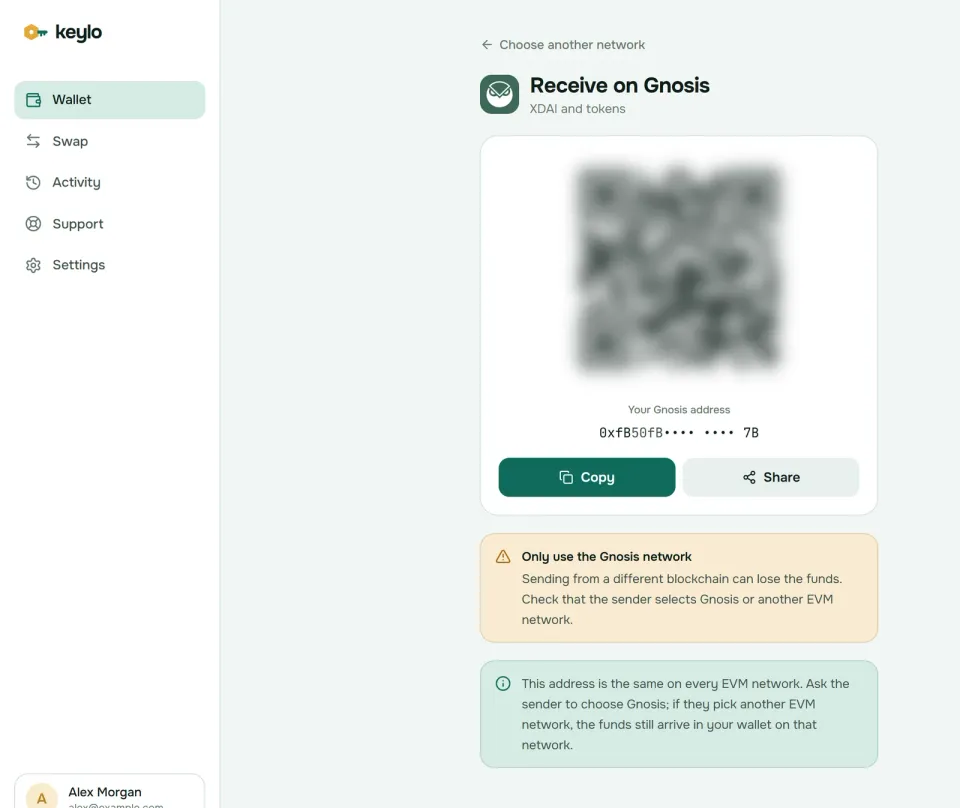
Tap Receive and choose Gnosis. You'll see "Receive on Gnosis", your address and a QR code.
Tap Copy or Share, or let the sender scan the code.
Ask the sender to use the Gnosis network, which exchanges may list as Gnosis, Gnosis Chain or xDAI.
Watch the Gnosis activity list. The deposit appears there shortly after it lands, with a link to Gnosisscan.
Keylo finds Gnosis tokens through the chain's explorer, so any token sent to your address shows up on its own, including EURe and GNO. Unfortunately, that also includes spam. A token you don't recognize is safest left alone.
How to send xDAI, EURe and other tokens#
Tap Send and choose xDAI or a Gnosis token.
Paste or scan the recipient into To. Keylo checks the address and its checksum.
Enter an amount or tap Max, which leaves enough xDAI for the fee.
Tap Review, then pick Slow, Normal or Fast.
Check the network, the recipient with its first and last six characters in bold, and the fee.
Tap Send. After you confirm, Keylo signs in your browser and moves from "On its way" to "Sent", linked to Gnosisscan.
Keylo simulates every transfer first, so a send that would fail stops before you pay. With no xDAI, a token send shows "You need some XDAI on Gnosis to pay the network fee." Keylo also blocks sends to a token's own contract and stops addresses from other chains.
Topping up a Gnosis Pay card#
Gnosis Pay's docs list three tokens for accounts on Gnosis Chain: EURe 0x420CA0f9B9b604cE0fd9C18EF134C705e5Fa3430, GBPe 0x8E34bfEC4f6Eb781f9743D9b4af99CD23F9b7053 and USDCe 0x2a22f9c3b484c3629090FeED35F17Ff8F88f76F0. Send one of those, on Gnosis Chain, to your Gnosis Pay account address.
Keylo will warn that the recipient is a smart contract. That's expected, because a Gnosis Pay account is a Safe, so check the address and go ahead. Don't send xDAI or other tokens unless Gnosis Pay says your card uses them.
Gas fees on Gnosis Chain#
Gnosis prices gas with the same EIP-1559 model as Ethereum: a base fee that follows demand plus a priority tip for validators. The difference is the unit. Fees come out of your xDAI, so their dollar cost hardly moves.
They're also very low. On October 24, 2026, the base fee was about 14 wei, and the gas tracker on Gnosis's Blockscout explorer suggested 0.05 to 1.31 gwei including tips, with 0.14 gwei as average. A plain xDAI transfer uses 21,000 gas, so at the average it cost about 0.000003 xDAI, a few millionths of a dollar. Token transfers cost a few times more and still round to zero.
Blocks come every 5 seconds. Gnosis groups them into 16-slot epochs and finalizes after about two of them, a little under three minutes. Most services credit deposits sooner. Keylo shows Slow, Normal and Fast before you sign, adds nothing to a normal send, and offers Speed up if a transfer stays pending.
Tokens on Gnosis: GNO, EURe and USDC.e#
Most Gnosis tokens came over from Ethereum through bridges, so they share names with Ethereum tokens but use different contracts. Compare addresses rather than logos:
GNO
0x9C58BAcC331c9aa871AFD802DB6379a98e80CEdbis the staking token on Gnosis Chain.EURe and GBPe are euro and pound tokens issued by Monerium, with the addresses listed above.
USDC.e
0x2a22f9c3b484c3629090FeED35F17Ff8F88f76F0is bridged USDC and the dollar token Gnosis Pay uses. An older bridged token also called USDC exists at another address, so check which one a recipient wants.WXDAI
0xe91D153E0b41518A2Ce8Dd3D7944Fa863463a97dis wrapped xDAI, the token form that DEX pools use.
Keylo lists every ERC-20 at your address automatically, and you can also add a token under Settings, Networks, Custom tokens. Gnosis is one of the networks where Keylo shows a read-only Collectibles view of NFTs at your address. You can look at them, but Keylo can't send them.
Swap and bridge on Gnosis#
Keylo gets Gnosis routes from LI.FI, which compares Gnosis DEXs with bridges to networks like Ethereum, Base and Arbitrum. Useful moves include buying xDAI for gas, swapping xDAI into EURe for a card, or bringing USDC from another chain.
Tap Swap and choose what you pay with under You pay.
Under You receive, pick the network and token, for example EURe on Gnosis.
Compare routes by amount, time and fees.
Open the details: each step, each fee, Minimum you receive and Delivered to, your own address.
Confirm. A token payment first asks you to approve exactly that amount.
Follow the progress screen until the funds land.
Slippage defaults to 0.5%. A bridge either delivers or returns the funds, sometimes as a different token that still lands in your wallet, and any Keylo service fee is its own line. The Keylo swap and bridge page covers routes and refunds.
The native xDAI bridge also exists. Deposits arrive fast, because bridging to Gnosis now needs only one block confirmation under its Fast Confirmation Rule. Withdrawals work in two steps: you burn xDAI on Gnosis, then someone executes the release on Ethereum, which costs ETH gas. Keylo can't connect to the bridge app for that second step, so use a LI.FI route instead.
When you bridge in for the first time, make part of it xDAI, so the tokens that arrive can move.
What Keylo doesn't do on Gnosis#
No GNO staking. Running a validator takes 1 GNO and a node, and Keylo stakes only on Cosmos SDK chains. You can still hold and send GNO.
No dapp connections. There's no browser extension and no WalletConnect, so Keylo can't open the Safe app or Gnosis DEX sites.
No NFT sending. The Collectibles view on Gnosis is read-only.
No Gnosis Pay card controls. Keylo can fund the account address, but card settings and spending live in the Gnosis Pay app.
No testnet, hardware wallets or card purchases.
Keylo is non-custodial. If you lose both the password and the recovery phrase, nobody can restore the wallet, Keylo included. The Keylo network list shows every chain your phrase covers.
Gnosis scams and mistakes to avoid#
Running out of xDAI. It's not a scam, but it's an easy way to get stuck. Keep a little xDAI beside your EURe.
Spam tokens. Because Keylo lists every token at your address, junk with website names in it will appear. Never visit those sites or sign anything they ask.
Fake Gnosis Pay or Safe pages. Phishing sites copy both. Type the address yourself, and remember that no real top-up asks for your recovery phrase.
Address poisoning. Scammers send dust from addresses that copy the first and last characters of yours. Paste addresses from the source.
Fake support. Keylo staff never ask for your phrase or password. Reach them on the Keylo support page, and set up the protections on the Keylo security page.
Before your first real Gnosis transfer:
The phrase is written down and confirmed in Keylo.
Your wallet holds some xDAI for gas.
The sender picked Gnosis, not Ethereum.
For a card top-up, the token is EURe, GBPe or USDCe on Gnosis Chain.
You tried a small amount first.
Your 0x address works on other networks too. The Ethereum wallet guide covers the chain where xDAI's backing sits, and the Celo wallet guide covers the other network Gnosis Pay runs on.
Hold xDAI and EURe in a wallet only you control
Keylo encrypts your recovery phrase on your device and never sees it. Send, swap, bridge and top up from one place.
Gnosis wallet FAQ#
What is xDAI?
xDAI is the gas coin of Gnosis Chain. It's a stablecoin worth about one US dollar, minted on Gnosis when USDS is locked in the xDAI bridge on Ethereum and burned when it's bridged back. Before USDS, the bridge used DAI. Because gas is priced in xDAI, the dollar cost of a Gnosis transaction stays steady and very small.
Is xDAI the same as DAI?
Not quite. xDAI is the native coin on Gnosis Chain, while DAI and USDS are ERC-20 tokens on Ethereum. The xDAI bridge connects them, now with USDS as its default token on the Ethereum side. All three track the dollar, but they live on different chains, so pick the right network whenever you withdraw or bridge them.
Is a Gnosis wallet the same as Safe?
No. Safe, formerly Gnosis Safe, is a smart-contract account that one or more owner keys control, and it has no recovery phrase of its own. A regular Gnosis wallet like Keylo, MetaMask or Rabby is a key-based account. Keylo can send funds to a Safe, but it can't approve Safe transactions as an owner, because it can't connect to the Safe app.
How do I top up my Gnosis Pay card from Keylo?
Send EURe, GBPe or USDCe on Gnosis Chain to your Gnosis Pay account address, which you'll find in the Gnosis Pay app. Those are the three tokens Gnosis Pay's docs list for Gnosis Chain. Keylo will warn that the address is a smart contract, which is normal for a Safe-based account. Keep some xDAI in Keylo to pay the gas.
Do I need GNO to use Gnosis Chain?
No. GNO is the staking token that validators lock up, 1 GNO per validator. To send transactions you need xDAI, which pays the gas. You can hold and send GNO in Keylo like any other token, but it never pays fees, so a wallet holding only GNO still needs a little xDAI before it can move anything.
How do I add Gnosis Chain to MetaMask?
Add a network with chain ID 100, the RPC address https://rpc.gnosischain.com, xDAI as the currency symbol and https://gnosisscan.io as the explorer. Your MetaMask address works on Gnosis right away, because it's the same 0x address you use on Ethereum. In Keylo there's nothing to add: Gnosis is built in, and the same address appears under Gnosis in your asset list.
How do I get xDAI for gas?
Withdraw xDAI from an exchange that lists the Gnosis network, or swap into it. In Keylo, open Swap and pick xDAI on Gnosis under You receive, paying from another network if you need to. Gnosis's docs also list an official faucet that gives out small amounts for free. A few cents of xDAI covers thousands of transfers at October 2026 fees.
How much are gas fees on Gnosis Chain?
Tiny. On October 24, 2026, Gnosis's Blockscout gas tracker suggested about 0.14 gwei on average, so a plain xDAI transfer cost about 0.000003 xDAI, a few millionths of a dollar. Fees are paid in xDAI, a dollar stablecoin, so their cost in dollars barely changes with markets. Keylo shows each fee option before you sign.
How long does it take to bridge xDAI back to Ethereum?
The burn on Gnosis takes seconds, but the native xDAI bridge then needs a second transaction on Ethereum to release the USDS, and that one costs ETH gas. Keylo can't sign in to the bridge app, so it can't complete that step. Bridges found through LI.FI in Keylo deliver to Ethereum directly, usually within minutes, with the time shown in the quote.
How long do Gnosis Chain transactions take?
A block arrives every 5 seconds, so a transfer usually shows as sent within a few seconds. Full finality comes after about two 16-slot epochs, a little under three minutes. Exchanges and bridges may wait for that before crediting large deposits, which explains a short delay even when the explorer already shows the transaction.