A Cronos wallet holds CRO and tokens on Cronos EVM, the Ethereum-compatible chain that grew up alongside Crypto.com. It uses a normal 0x address, the same one you have on Ethereum, but it pays every fee in CRO. Transfers settle in about a second and cost a small fraction of a cent.
The trouble, however, is the name. Cronos EVM, Cronos POS and Cronos zkEVM are three different chains, and CRO exists on all of them. Withdraw on the wrong one and your CRO lands at an address your wallet can't see. Figures below are as of October 2026.
Cronos EVM at a glance#
Item | Cronos EVM |
|---|---|
Network type | Layer 1 built with the Cosmos SDK and Ethermint, running the EVM |
Chain ID | 25 |
Gas coin | CRO |
Address format |
|
Typical fee | About 0.008 CRO (under $0.001) for a CRO transfer on October 24, 2026 |
Speed | A block about every half second, final once committed |
Token standard | ERC-20 (sometimes called CRC-20) |
Stablecoins | Native USDC from Circle (since June 2026), bridged USDC.e, USDT |
Explorer | |
In Keylo | Send, receive, popular ERC-20 tokens plus any you add, activity for transfers sent from Keylo, speed-up, swap and bridge through LI.FI. No Cronos POS, staking, NFT view or testnet |
How a Cronos wallet works#
Cronos EVM is built from Cosmos parts, the Cosmos SDK and a consensus derived from Tendermint, with Ethermint on top so it runs Ethereum smart contracts. Its validators join by invitation only, and a committed block is final. As a result, Ethereum wallets, tools and token contracts work on it with little or no change.
How to find your Cronos wallet address#
Your Cronos wallet address is a 0x address. It comes from the same key as your Ethereum address, so the two look identical. Keylo derives it on m/44'/60'/0'/0/0, the standard Ethereum path that MetaMask also uses for its first account. To see it, open Cronos in Keylo's asset list: the address sits below your balance, next to a link to Cronos Explorer.
But each network keeps its own balance. CRO on Cronos EVM shows only under Cronos in Keylo. CRO also exists as an ERC-20 token on Ethereum, and that counts as a separate Ethereum balance. No memo or activation deposit applies on Cronos EVM.
Cronos EVM vs Cronos POS#
Cronos POS Chain, formerly Crypto.org Chain, is a separate Cosmos proof-of-stake chain. It also uses CRO, but its addresses start with cro1, like cro1y8ua5laceufhqtwzyhahq0qk7rm87hhugtsfey. Its wallets derive keys on coin type 394 rather than Ethereum's 60.
That difference matters when you import a phrase. One recovery phrase gives you a 0x account on Cronos EVM and a cro1 account on Cronos POS, with different balances. But Keylo only knows the 0x one. CRO staking with validators happens on the POS side, and Cronos POS also powers Crypto.com Pay.
Cronos zkEVM is closing#
Cronos zkEVM was a third network, an Ethereum layer 2 that paid gas in zkCRO. Its own docs say it's being sunset and ask users to bridge out before it shuts down. Bridging out also takes roughly 48 hours or more. So don't choose it for new deposits.
How to choose a Cronos wallet#
Your choice depends on whether you need Cronos POS, Cronos apps, or just a safe place for CRO on the EVM chain.
Crypto.com Onchain. Crypto.com's self-custody wallet, once called DeFi Wallet, with a mobile app, a browser extension and a desktop app. It has the Cronos Bridge built in for moving CRO over from Cronos POS. The mobile app now opens as Ult, a smart wallet from Cronos Labs with no recovery phrase, and Ult's Settings switch back to Onchain Wallet mode with the same keys.
MetaMask and other EVM wallets. They add Cronos as a network and connect to Cronos DEXs and lending apps. But they can't see Cronos POS.
Hardware wallets. Cronos' docs say Ledger Live can add a Cronos (CRO) account, which suits large balances.
The Crypto.com App or another exchange. Good for buying CRO, but it's custodial: the exchange holds the keys.
Web wallets. Keylo opens in a browser with nothing to install. You won't find it in an app store, but a home-screen shortcut makes it feel like one.
Whatever you pick, it should show which Cronos network you're on, label native USDC and USDC.e by contract, and refuse a cro1 address on the EVM chain.
Keylo suits people who move CRO off an exchange, hold it with stablecoins, and swap or bridge to other chains. It's the wrong choice for staking CRO, using Cronos POS, or signing in to Cronos DeFi sites.
How to create a Cronos wallet in Keylo#
Keylo already lists Cronos, so you won't type an RPC URL or chain ID anywhere.
Start on Keylo's account page. It asks for your full name, email, phone number and a password, entered twice. Accept the terms and press Create account.
When the "Check your inbox" message shows, click the link in Keylo's email.
Under "Set up your wallet", press Create a new wallet. Your browser creates the 12 words and encrypts them with a key from your password (Argon2id, then AES-256-GCM). Only that encrypted copy reaches Keylo.
Find Cronos in the asset list. Tap it to see your
0xaddress and CRO balance.Back up: Settings, Recovery phrase, your password, Show my phrase. Write the words down in order, press I wrote them down, then confirm three.
Before funding, add Two-factor authentication and an Anti-phishing code in Settings.
The paper copy is your only way back in if you forget the password. Resetting it by email restores the account, not the wallet.
Importing from Crypto.com Onchain or MetaMask#
Choose Import a recovery phrase and type your 12 or 24 words. If your old app put its first Cronos EVM account on the standard Ethereum path, as MetaMask does, the same 0x address and CRO balance appear. Your cro1 balance on Cronos POS won't, because it sits on a different path and chain. Those funds stay safe in the original app. Ult's smart wallet has no phrase to import, so send from it instead.
Keylo has no Cronos testnet, so send a small real amount first.
Get a Cronos EVM address for your CRO
Sign up with email and a password. Keylo creates the wallet in your browser, with one 0x address for Cronos and every other EVM network.
How to receive CRO and withdraw it from Crypto.com#
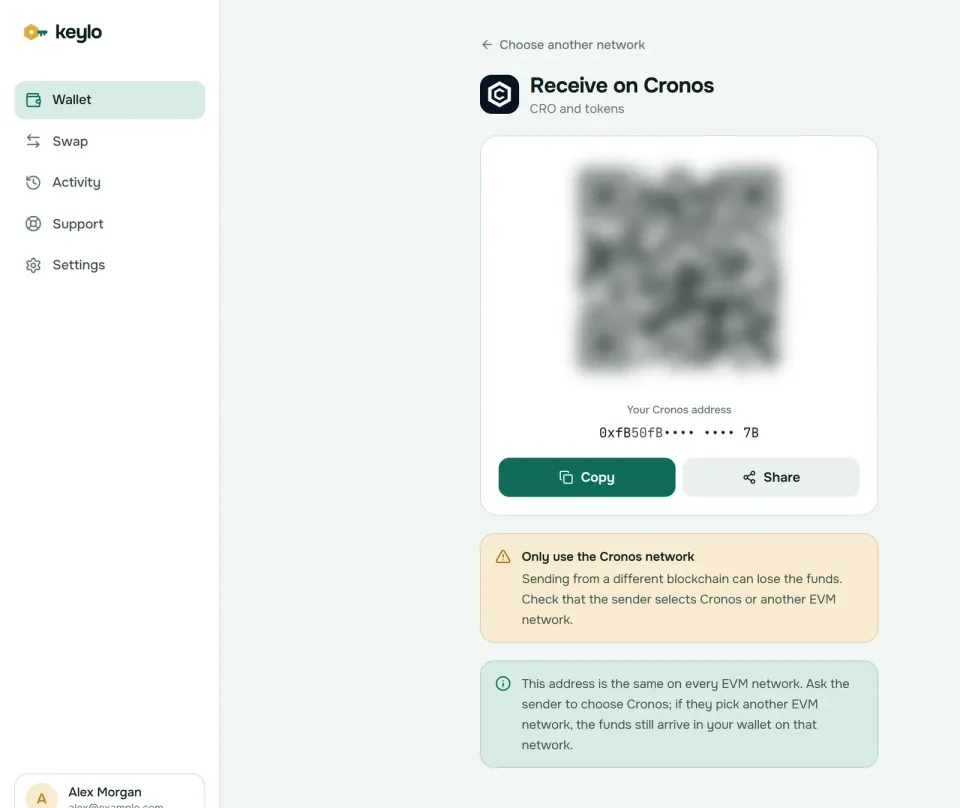
In Keylo, tap Receive and pick Cronos. The screen says "Receive on Cronos" and shows your
0xaddress with a QR code.Tap Copy, or Share it to your phone if the exchange runs there.
In the Crypto.com App, open CRO, tap Transfer, then Withdraw, then External Wallet. Other exchanges have a similar withdrawal page.
Whitelist the address and pick the Cronos network, which may appear as Cronos, Cronos EVM or CRC20. No memo is needed. If the form wants a
cro1address, you're on Cronos POS, so switch.Send a small test first, confirming with your password and 2FA code if asked, then send the rest.
Check your Cronos balance in Keylo. Keylo's activity list on Cronos shows only transfers you send from Keylo, so use the Cronos Explorer link next to your address to see the deposit.
Exchanges also set their own withdrawal minimums and fees, often higher than the network fee itself. A delay at this stage almost always comes from the exchange, because Cronos itself commits blocks in about half a second.
How to send CRO and tokens on Cronos#
Tap Send and choose CRO or a token on Cronos.
Fill in To by pasting or scanning. Keylo checks the format and checksum.
Type an amount or tap Max, which keeps the fee back.
Tap Review and choose Slow, Normal or Fast.
Look over the review: the network, the recipient with its first and last six characters in bold, and the fee in CRO and dollars.
Tap Send. Keylo signs in your browser, then shows "On its way" and "Sent" with a link to Cronos Explorer.
Mistakes Keylo catches on Cronos#
Keylo simulates each Cronos transfer before you sign, and stops any that would fail on chain. It also flags:
A
cro1address. Keylo rejects it and usually says it looks like an address for a Cosmos chain, not Cronos, and that sending across networks loses funds.No CRO for gas. Sending USDC from a wallet without CRO shows "You need some CRO on Cronos to pay the network fee."
A contract recipient. Keylo warns that tokens sent to a contract that doesn't expect them are usually lost.
The token's own contract. Keylo also blocks a send to it outright.
When you send to an exchange, use the deposit address it shows for Cronos EVM. That matters because exchanges only credit the networks they list. If a transfer ever sits pending, Speed up on the status screen resends it with a higher fee.
Cronos gas fees explained#
Every Cronos EVM transaction pays gas in CRO, priced with an EIP-1559 style fee market from Ethermint. A base fee adjusts each block and an optional tip helps when blocks are full. Unlike Ethereum, Cronos doesn't burn the base fee. It goes to the chain's Cosmos fee distribution instead.
The minimum has also come down. Cronos' own docs say the floor once sat at the starting base fee of 3,750 gwei, and governance votes have lowered it since. On October 24, 2026, the base fee was 375 gwei with a suggested tip of 3.75 gwei.
So a plain CRO transfer, which uses 21,000 gas, cost about 0.008 CRO, roughly $0.0004 with CRO near $0.055. Token transfers use more gas and cost around a tenth of a cent, and a typical swap costs a few tenths. The Cronos gas mechanics page has the formula.
Blocks arrive about every half second, so Slow, Normal and Fast in Keylo usually confirm almost together. Keylo adds no fee of its own to a normal send.
USDC, USDT and other tokens on Cronos#
Cronos tokens follow ERC-20, sometimes labeled CRC-20 in older apps. Keylo checks for popular ones such as USDC, USDC.e, USDT, WETH and WBTC. Add others under Settings, Networks, Custom tokens with the contract, symbol and decimals.
Cronos got native USDC in 2026, so there are now two dollars with similar names:
USDC
0x3D7F2C478aAfdB65542BCB44bCeeC05849999d2Dis Circle's native USDC, live on Cronos since June 22, 2026.USDC.e
0xc21223249CA28397B4B6541dfFaEcC539BfF0c59is the older bridged USDC. Cronos Explorer relabeled it from USDC to USDC.e, but the contract stayed the same and still calls itself USDC.USDT
0x66e428c3f67a68878562e79A0234c1F83c208770is USDT on Cronos EVM, per the Cronos docs.WCRO
0x5C7F8A570d578ED84E63fdFA7b1eE72dEae1AE23is wrapped CRO, which DEXs use in pools.
If you held "USDC" on Cronos before June 2026, you most likely hold USDC.e. It keeps working, but check which version an exchange credits before you deposit. A second, smaller token from Stargate also uses the USDC.e label, so match contracts, not names. The Cronos token list shows current addresses.
Swap and bridge CRO#
Keylo routes Cronos swaps and bridges through LI.FI. It compares DEX prices on Cronos with bridges to networks like Ethereum, BNB Smart Chain and Arbitrum, so you can turn CRO into USDC or move it off Cronos without an exchange.
Tap Swap and choose CRO or a Cronos token under You pay.
Under You receive, pick a network and token, or paste a contract.
Compare routes by amount, time and fees.
Open the route to check every step, Minimum you receive and Delivered to, your own address on the destination.
Confirm. A token payment asks for an approval of exactly that amount first.
Watch it on the progress screen until it lands.
The default slippage is 0.5%. If a bridge can't finish, it returns your funds, sometimes as a different token in your wallet. A Keylo service fee, if any, shows as its own line, and the swap and bridge explainer has the details.
Moving CRO between Cronos POS and Cronos EVM is a separate job that Keylo doesn't do. Cronos' docs point to the Cronos Bridge web app, which they label beta, and to Crypto.com Onchain, and they recommend a small test first.
What Keylo doesn't do on Cronos#
No Cronos POS. Keylo can't show or move
cro1balances.No CRO staking. Validator staking for CRO happens on Cronos POS, which Keylo doesn't support. Keylo can't stake on Cronos at all: its staking covers Cosmos networks such as the Cosmos Hub.
No dapp connections. There's no browser extension and no WalletConnect, so Keylo can't sign in to Cronos DEXs or games. Use the built-in Swap instead.
No NFTs. Keylo has no NFT view on Cronos and can't send NFTs.
No testnet, hardware wallets or card purchases.
Keylo is non-custodial, too. If you lose the password and the recovery phrase together, nobody can reopen the wallet. See every network the phrase covers on the Keylo networks list.
Cronos scams and mistakes to avoid#
Fake CRO giveaways and staking boosts. Messages promising extra CRO for a deposit, or a "Crypto.com" agent asking you to verify your wallet, are scams.
Lookalike tokens. Anyone can deploy a token called USDC or CRO. Check the contract on Cronos Explorer against the list above.
Unlimited approvals on unknown DEX sites. A drainer only needs one approval. Keylo can't sign website requests, and its own swaps approve only the amount you swap.
Address poisoning. Tiny transfers from addresses that mimic yours make your history unsafe to copy from.
Fake support. Keylo staff never ask for your phrase or password. Contact the team through Keylo support, and turn on the protections described on the Keylo security page.
Run this check before your first big transfer:
The phrase is on paper and confirmed in Keylo.
You hold a little CRO on Cronos EVM for gas.
The withdrawal network says Cronos or Cronos EVM, not POS or zkEVM.
The token contract matches what the recipient expects.
A test amount arrived first.
Your 0x address also works on other EVM chains. The Ethereum wallet guide and the BNB Smart Chain wallet guide cover two common destinations for CRO bridges.
Take your CRO into a wallet only you control
Keylo encrypts your recovery phrase on your device and never sees it. Send, swap and bridge CRO from one place.
Cronos wallet FAQ#
What is the difference between Cronos EVM and Cronos POS?
They're separate chains that both use CRO. Cronos EVM runs Ethereum smart contracts, uses 0x addresses and has chain ID 25. Cronos POS, formerly Crypto.org Chain, is a Cosmos proof-of-stake chain with cro1 addresses, used for staking and payments. Balances don't move between them on their own, so withdraw to the chain that matches your address.
Which network should I choose to withdraw CRO from Crypto.com?
For a 0x address like the one Keylo gives you, choose Cronos or Cronos EVM. Pick Cronos POS only when sending to a cro1 address. If the withdrawal form expects cro1 or a memo, you've chosen the wrong network for a Keylo address. Send a small test first, and expect the exchange's own fee and minimum to apply.
Is my Cronos address the same as my Ethereum address?
Yes, on Cronos EVM. The same key gives the same 0x address on Cronos, Ethereum and other EVM networks, but each keeps its own balance. CRO sent on Cronos shows under Cronos, while CRO sent as a token on Ethereum shows under Ethereum. Your Cronos POS address is different and starts with cro1.
How do I send CRO to a Ledger?
In Ledger Live, add a Cronos (CRO) account, as Cronos' docs describe, and copy its address. It should start with 0x; a cro1 address belongs to Cronos POS. Then send CRO from Keylo on the Cronos network to it, after a small test. Keylo can't pair with a Ledger, but it can send to a Ledger's address like any other.
Do I need CRO to send USDC on Cronos?
Yes. Every transaction on Cronos EVM pays gas in CRO, token transfers included. Without CRO, Keylo stops the send and tells you to add some. A CRO transfer cost about 0.008 CRO in October 2026, and token transfers cost a little more, so a few CRO cover many sends. Withdraw some CRO along with your stablecoins.
How much are Cronos gas fees?
On October 24, 2026, the Cronos EVM base fee was 375 gwei with a tip of about 3.75 gwei. A plain CRO transfer cost about 0.008 CRO, roughly $0.0004, and a token transfer cost around a tenth of a cent. Cronos sends the base fee to its fee distribution instead of burning it. Keylo shows each fee option before you sign.
What is the difference between USDC and USDC.e on Cronos?
Circle launched native USDC on Cronos EVM on June 22, 2026, at 0x3D7F2C478aAfdB65542BCB44bCeeC05849999d2D. The older bridged token at 0xc21223249CA28397B4B6541dfFaEcC539BfF0c59 was renamed USDC.e on Cronos Explorer. Both aim to be worth one dollar but are separate contracts. Check which one an exchange or app accepts before you send.
What is happening to Cronos zkEVM?
Cronos zkEVM, an Ethereum layer 2 that paid gas in zkCRO, is being sunset. Its documentation asks users to bridge assets out before the network shuts down, which takes roughly 48 hours or more. Keylo never supported zkEVM. Your CRO on Cronos EVM isn't affected, but don't pick zkEVM as a withdrawal network.
How do I move CRO from Cronos POS to Cronos EVM?
Keylo can't do this, because it doesn't support Cronos POS. Cronos points users to the Cronos Bridge web app or Crypto.com Onchain, which has the bridge built in. Send a small amount first, since Cronos labels the bridge beta. Once the CRO reaches your 0x address on Cronos EVM, it appears in Keylo.