A HyperEVM wallet is an Ethereum-style wallet that holds HYPE and tokens on HyperEVM, the smart contract layer of Hyperliquid. It uses your ordinary 0x address and pays gas in HYPE. Blocks arrive about once a second, and every fee you pay is burned.
The confusing part is that Hyperliquid has two sides. HyperCore runs the order book and trading accounts, while HyperEVM runs contracts. They share your address, but not your balance, so HYPE can sit in your name on one side and look missing on the other. Figures below are as of October 2026.
HyperEVM at a glance#
Item | HyperEVM |
|---|---|
Native coin | HYPE (18 decimals), a native balance rather than an ERC-20 |
Address format |
|
Chain ID | 999 (the testnet is 998) |
Blocks | Small blocks about every second (3M gas), big blocks every minute (30M gas) |
Fees | EIP-1559 style; base fee and priority fee are both burned |
Typical fee | Around 0.000002 HYPE for a HYPE transfer, well under a cent |
Token standard | ERC-20 |
Stablecoin | USDC issued by Circle |
Explorer | |
In Keylo | Send, receive, ERC-20 tokens, speed-up, swap and bridge through LI.FI and Activity for sends made in Keylo, but no HyperCore balances, staking, testnet, dapp connections or NFT view |
How a HyperEVM wallet works#
Hyperliquid is a layer 1 secured by HyperBFT consensus. HyperEVM isn't a separate chain: the Hyperliquid docs describe it as part of the same system, secured by the same validators as HyperCore. Contracts on HyperEVM can even read from HyperCore's order books.
One address, two balances#
When you trade on Hyperliquid, your account lives on HyperCore under your 0x address. When you hold HYPE in an EVM wallet, it lives on HyperEVM under that same address. But the two balances don't mix. HYPE in your HyperCore spot account isn't on HyperEVM until you move it, and EVM wallets, Keylo included, can't display it.
That's why people say their HYPE "disappeared". Usually it arrived on HyperCore, but the wallet they're checking only reads HyperEVM.
Your HyperEVM wallet address#
Your HyperEVM wallet address is a standard 0x address, the same one you have on Ethereum or Arbitrum. Keylo derives it on m/44'/60'/0'/0/0, the default MetaMask path, so every EVM network in Keylo shows it.
If you trade on Hyperliquid with MetaMask and import that phrase into Keylo, the address matches your trading account. Keylo still shows only the HyperEVM side, though. HyperEVM also needs no activation, memo or minimum balance.
Moving HYPE between HyperCore and HyperEVM#
Assets cross between the two sides through system addresses. The protocol watches them for transfers, then credits the other side.
HYPE goes from HyperEVM to HyperCore when you send it to
0x2222222222222222222222222222222222222222. Hyperliquid credits it to the HyperCore account of whoever sent it.Other linked tokens each have their own system address:
0x20, then zeros, then the token's index. Token index 200, for example, maps to0x20000000000000000000000000000000000000c8.From HyperCore to HyperEVM, you send a transfer action on HyperCore to that system address, usually from the Hyperliquid app. The transfer docs give the details. The funds arrive as HYPE or the linked ERC-20 on HyperEVM, at your address. That direction is charged as 200,000 gas at the next block's base price.
Keylo only signs HyperEVM transactions. Technically you could send HYPE from Keylo to the 0x2222... address, and it would move to your HyperCore account. But Keylo can't sign HyperCore actions, so you'd need another wallet with the same phrase to trade it or bring it back.
How to choose a HyperEVM wallet#
Your choice depends on whether you want to trade on Hyperliquid or just hold assets on HyperEVM.
Extension wallets. MetaMask and Rabby are browser extensions that work with HyperEVM once you add it. They also connect to the Hyperliquid app, so one key can trade on HyperCore and use HyperEVM apps.
Hardware wallets. A Ledger or similar device keeps the key offline and signs through an extension. So it's the safer choice for a large HYPE position.
Exchange accounts. They let you buy HYPE quickly, but you don't hold the keys.
Web wallets. Keylo opens in a browser tab, with no install needed.
A good HyperEVM wallet labels the network clearly and shows chain ID 999. It also warns when a recipient is a contract and shows token contracts, because linked tokens and lookalikes are common here.
Keylo works well if you want to hold HYPE and USDC on HyperEVM, send them, and swap or bridge with the phrase you use elsewhere. But it's not a trading wallet. For Hyperliquid perps, HyperCore spot, staking or HyperEVM lending apps, use an extension wallet.
Adding HyperEVM to MetaMask, Rabby or another wallet#
Hyperliquid's docs say you add HyperEVM to a wallet by entering its RPC URL and chain ID. In any wallet that accepts a custom network, use chain ID 999, RPC URL https://rpc.hyperliquid.xyz/evm, currency symbol HYPE and explorer https://hyperevmscan.io. However, a wallet set up this way shows only your HyperEVM balance, because your Hyperliquid trading balance stays on HyperCore, inside the Hyperliquid app.
How to create a HyperEVM wallet in Keylo#
HyperEVM already sits in Keylo's network list, so you don't paste RPC details.
On the sign-up page, give your full name, email and phone number, set a password and confirm it. Accept the terms and tap Create account.
Click the link in the confirmation email if Keylo asks you to.
At "Set up your wallet", tap Create a new wallet. A 12-word phrase is generated in your browser and encrypted there with a key from your password (Argon2id, then AES-256-GCM). Keylo stores only the encrypted version.
Open HyperEVM from the asset list. Your HYPE balance and
0xaddress are there.Write the phrase down. In Settings, choose Recovery phrase, enter your password, copy the 12 words onto paper and confirm the ones you're asked for.
Turn on Two-factor authentication and pick an Anti-phishing code.
Keep that paper safe. Keylo never has the means to open your wallet, and a password reset won't open it either, so the phrase is what restores access.
Using the phrase from your Hyperliquid wallet#
Tap Import a recovery phrase and enter 12 or 24 words. A MetaMask phrase shows its first account at the same address you trade with, along with that address's HyperEVM balance. Extra accounts made in MetaMask won't appear, but their funds aren't affected.
Keylo doesn't offer the HyperEVM testnet. So for a first deposit, send a small amount on mainnet and check that it lands before moving more.
Get your HyperEVM address in a minute
Sign up with email and a password. Keylo creates the wallet in your browser, with one 0x address for HyperEVM and every other EVM network.
How to receive HYPE on HyperEVM#
Tap Receive and select HyperEVM. You'll see "Receive on HyperEVM" with a QR code.
Copy or share "Your HyperEVM address", or let the sender scan it.
On an exchange, choose HyperEVM as the withdrawal network. Hyperliquid's docs note that exchanges and bridges may offer withdrawals via HyperCore or via HyperEVM, so read the label.
Watch your HYPE balance, which updates quickly because HyperEVM blocks land about once a second. Keylo's Activity on HyperEVM lists only transfers sent from Keylo, so HyperEVMScan is where you'll see the incoming one.
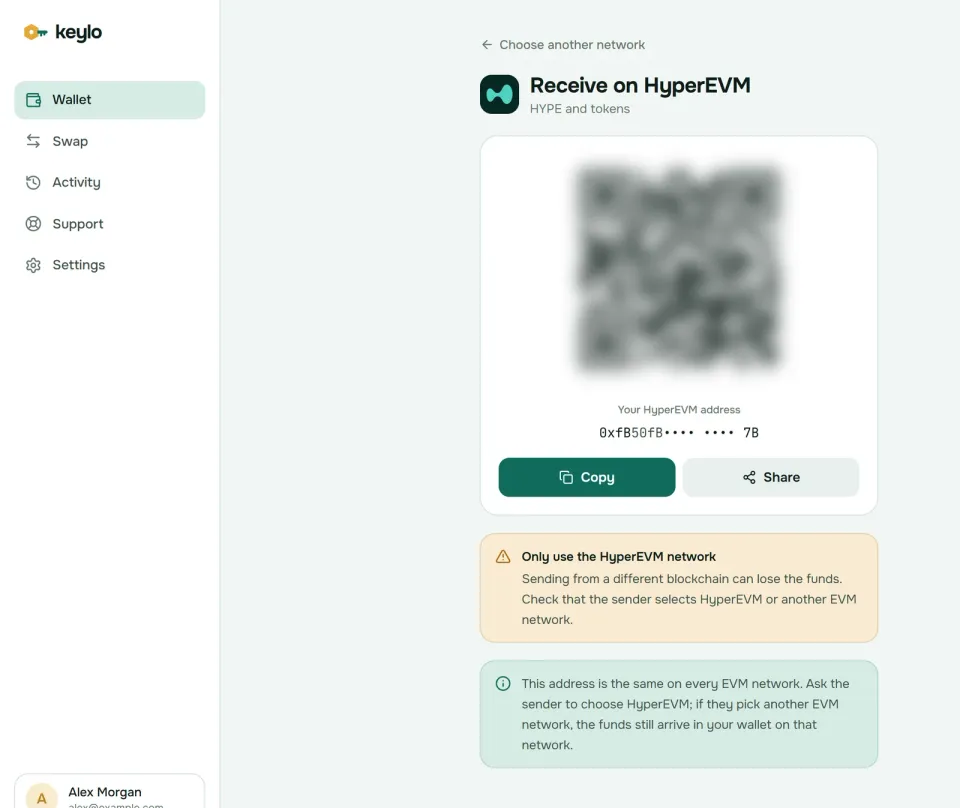
Keylo's Receive screen points out that your address is shared across EVM networks. A sender who picks Ethereum or Arbitrum instead still pays you, on that network, and Keylo shows it there. HyperCore is the exception: Keylo can't see it at all.
Coming from Arbitrum is the classic trap. Hyperliquid's deposit flow takes USDC from Arbitrum, Ethereum, Base or Polygon and credits it as USDC on HyperCore, not HyperEVM. If you want USDC in Keylo, use a withdrawal or bridge whose destination is HyperEVM itself.
How to send HYPE and HyperEVM tokens#
Tap Send and choose HYPE or a HyperEVM token.
Paste or scan the address into To. Keylo checks it's a valid
0xaddress with a correct checksum.Enter the amount. Max sends your HYPE minus the fee.
Tap Review and choose a level: Slow, Normal or Fast.
Confirm the network, recipient and fee shown in HYPE.
Tap Send. The status goes from "On its way" to "Sent", with a HyperEVMScan link.
Keylo simulates every transfer, so one that would fail stops before you spend gas. It warns when a recipient is a smart contract, which on HyperEVM is a useful pause. It blocks a token sent to that token's own contract. And if you try to move USDC with no HYPE, it says you need HYPE on HyperEVM for the fee.
A pending transfer can get Speed up, which resends it with a higher fee. With one-second blocks you'll rarely need it.
HyperEVM gas fees: two block sizes, all fees burned#
HyperEVM uses EIP-1559: a base fee that moves with demand plus a priority fee, both paid in HYPE. Unlike almost every other EVM chain, it burns both parts. The base fee is burned as on Ethereum, and the priority fee is burned too, which Hyperliquid's docs tie to its HyperBFT consensus. So every HYPE spent on gas leaves the supply.
Capacity comes in two block types. Small blocks arrive about every second with a 3 million gas limit, and normal transfers and swaps go there. Big blocks come once a minute with 30 million gas, for heavy jobs like deploying large contracts. An account lands in big blocks only after opting in through a HyperCore action, so ordinary Keylo sends use small blocks. If you once switched this address to big blocks with another tool, switch it back there, or its transfers will wait for the once-a-minute block.
Fees stay tiny as long as blocks aren't full. On October 24, 2026, the network's gas price sat at about 0.1 gwei. A 21,000-gas HYPE transfer then cost about 0.000002 HYPE, around $0.00016 with HYPE near $75. Small blocks hold only 3 million gas, so in busy moments they fill up and the base fee climbs. Keylo shows the exact fee before you sign and adds none of its own.
Stablecoins, swaps and bridges on HyperEVM#
Tokens on HyperEVM are ERC-20 contracts. Circle issues USDC directly on HyperEVM at 0xb88339CB7199b77E23DB6E890353E22632Ba630f. Liquid staking tokens for HYPE and other dollar tokens exist as well, each with its own contract.
Hyperliquid warns that a HyperEVM token linked to a HyperCore asset can contain arbitrary code, and that the two versions aren't always perfectly interchangeable. So check any token's contract on HyperEVMScan against the project's own site before you buy or accept it.
Keylo finds common tokens such as USDC automatically. Others go under Settings, Networks, Custom tokens by contract address.
Swaps and bridges in Keylo use LI.FI, which searches HyperEVM DEXs and bridges to other chains:
Tap Swap. In You pay, choose HYPE, a HyperEVM token, or a coin elsewhere.
In You receive, choose the network and token, or paste a contract.
Compare routes by amount, fees and time.
Check Minimum you receive and Delivered to, which is your own address on the far side.
Confirm, then follow the tracker.
These routes touch HyperEVM only, so moving funds into HyperCore for trading is a separate step in Hyperliquid's own app. Slippage defaults to 0.5%, and a bridge that can't finish returns the funds, sometimes as a different token in your wallet. Any Keylo service fee is listed separately. Details are on the Keylo swap and bridge page.
HyperEVM scams and mistakes to avoid#
Withdrawing to the wrong side. A HyperCore withdrawal won't appear in an EVM wallet. Pick HyperEVM, and test with a small amount.
Fake HYPE and USDC. Anyone can deploy a token with these names. Only the contract address counts.
Points checkers and wallet trackers. Looking up an address never needs your signature. Sites that ask you to connect and sign are the usual drainer route, and Keylo can't sign website requests, so it can't be tricked that way.
System addresses in a transaction list. A
0x2222...entry on HyperEVMScan or in your Keylo activity is a transfer to HyperCore, not a person. Don't copy it as a payment address.Fake support. Neither Keylo nor Hyperliquid asks for your phrase. Reach Keylo through the support page, and see how Keylo keeps keys on your device.
Keylo has hard limits here. Staking HYPE happens on HyperCore, with a 7-day queue to unstake, and Keylo stakes only on Cosmos SDK chains. Keylo has no extension and no WalletConnect, so Hyperliquid's app and HyperEVM dapps can't connect to it. It shows no NFTs, pairs with no hardware wallet and sells no crypto by card. It's also non-custodial: lose your password and your phrase together, and nobody can recover the wallet. The network list shows everything Keylo covers.
Before your first real transfer:
The phrase is written down and confirmed.
You hold some HYPE on HyperEVM for gas.
The exchange network says HyperEVM, not HyperCore.
You know the recipient isn't a system address.
A small test arrived first.
Most HyperEVM money arrives from other EVM chains. The Arbitrum wallet guide, the Ethereum wallet guide and the Monad wallet guide cover them.
Keep HYPE in a wallet only you control
Keylo encrypts your recovery phrase on your device and never sees it. Send, swap and bridge on HyperEVM from one screen.
HyperEVM wallet FAQ#
What is the difference between HyperCore and HyperEVM?
Both are parts of Hyperliquid, secured by the same HyperBFT validators. HyperCore runs the order book, perps and spot trading accounts. HyperEVM runs Ethereum-style smart contracts, with HYPE as the gas coin. They share your 0x address but keep separate balances, and assets move between them through system addresses. EVM wallets, Keylo included, read only the HyperEVM side.
Is a HyperEVM wallet the same as a Hyperliquid wallet?
Partly. Hyperliquid's two sides share one 0x address. A "Hyperliquid wallet" usually means the account you trade with on HyperCore through the Hyperliquid app, while a HyperEVM wallet holds HYPE and tokens on the smart contract side. One phrase controls both, but EVM wallets such as Keylo show only the HyperEVM balance, and Keylo can't trade or sign HyperCore actions.
Why doesn't my HYPE show up in my wallet?
Most likely it landed on HyperCore rather than HyperEVM. Exchanges and bridges may offer both routes, and Hyperliquid's own deposit flow credits HyperCore. Your HYPE is safe in the trading account at your address, but EVM wallets can't see it. Move it to HyperEVM from the Hyperliquid app, and next time pick HyperEVM as the withdrawal network.
How do I move HYPE from HyperCore to HyperEVM?
Send it from your HyperCore spot balance to the HYPE system address, 0x2222222222222222222222222222222222222222, using the Hyperliquid app or another wallet that signs HyperCore actions. It then arrives on HyperEVM at your own address. This direction is charged as 200,000 gas at the next block's base price. Keylo can't sign HyperCore actions, so it can't start this transfer.
What is the HyperEVM chain ID?
HyperEVM mainnet uses chain ID 999, and its testnet uses 998. Keylo connects to mainnet for you, so you never type these numbers. They matter when you add the network to another wallet by hand, or when you want to confirm a site or tool points at the real network rather than the testnet.
Are HyperEVM fees burned?
Yes, all of them. HyperEVM burns the base fee, as Ethereum does, and also the priority fee, which most EVM chains pay to validators instead. Every HYPE spent on gas leaves circulation. You still choose a fee level in Keylo, and the review screen shows the exact cost in HYPE before you sign.
Which network should I choose to withdraw HYPE from an exchange?
Choose HyperEVM if you want the HYPE in an EVM wallet such as Keylo. A network labeled Hyperliquid or HyperCore credits your trading account instead, which EVM wallets can't display. Paste your 0x address, send a small test, and confirm it shows under HyperEVM before you withdraw the rest. Check the exact network names on your exchange first.
Can I stake HYPE?
Yes, but staking happens on HyperCore, not HyperEVM. You move HYPE from your spot balance to your staking balance and delegate to a validator. Each delegation locks for a day, and unstaking goes through a 7-day queue. Keylo can't stake HYPE, because it only stakes on Cosmos SDK chains. Use the Hyperliquid app with an extension wallet.
Is USDC on HyperEVM native?
Yes. Circle issues USDC directly on HyperEVM, and its contract address is 0xb88339CB7199b77E23DB6E890353E22632Ba630f. Other dollar tokens and bridged versions exist too, and they carry different risks, so always check the contract rather than the name. Keylo looks for Circle's USDC at your address on its own. Keep a little HYPE beside it for gas.