A Flare wallet holds the keys to your address on Flare, an EVM layer 1 known for its built-in data protocols and for FXRP, a version of XRP that can be used in DeFi. You keep FLR, the coin that pays gas, plus tokens such as WFLR, FXRP and USDT0, all at one 0x address that also works on Ethereum.
Most questions about Flare wallets come down to rewards. FlareDrops ended in January 2026, and the rules for delegation and staking changed in April 2026. Those actions happen in Flare's own tools, not in every wallet. Below you'll find what a wallet needs to do on Flare, where Keylo fits, and where to go for the rest. Figures are as of October 2026.
Flare at a glance#
Item | Flare |
|---|---|
What it is | EVM layer 1 with enshrined data protocols (FTSO price feeds and the Flare Data Connector) |
Native coin | FLR, 18 decimals |
Address format |
|
Chain ID | 14 |
Consensus | Snowman++, proof of stake, single-slot finality |
Blocks | About 1.8 seconds according to Flare's docs |
Fees | Paid in FLR and always burned; base fee 500 gwei since the 2026 fee change |
Key tokens | WFLR (wrapped FLR), FXRP, USDT0 |
Explorer | |
In Keylo | No delegation, staking or dapp connections; send, receive, tokens, history, speed-up, a read-only NFT view, and swap and bridge through LI.FI |
How a Flare wallet works#
Flare runs several chains under one network, and a wallet usually only needs the one with smart contracts. So knowing which part your wallet shows avoids most "missing balance" scares.
C-chain and P-chain#
Your tokens, swaps and everyday transfers live on the C-chain, which is Ethereum-compatible. Validator staking happens on the P-chain, which has its own address format and its own balances. FLR you stake on the P-chain doesn't show at your C-chain address, so a wallet that only reads the C-chain will show it as gone.
Keylo shows the C-chain only. So if you staked FLR on the P-chain through another wallet, it's still there; check it in that wallet or in Flare's portal.
Your Flare wallet address#
On the C-chain, your Flare wallet address is the same 0x string your recovery phrase gives on Ethereum and every other EVM network. Keylo derives it on m/44'/60'/0'/0/0, MetaMask's path for its first account. But balances still differ per network, because FLR lives only on Flare.
To look up an address, paste it into the Flare Explorer. It shows the FLR balance, tokens, NFTs and every transaction. Flare also runs a separate Systems Explorer for validators and data providers, which you only need if you delegate or stake.
Songbird is a different network#
Songbird is Flare's canary network, with its own coin, SGB, and chain ID 19. It uses the same 0x format, so an SGB withdrawal to your address arrives on Songbird, not Flare. Keylo doesn't support Songbird, so SGB sent there won't appear in Keylo. Always choose Flare as the network for FLR.
How to choose a Flare wallet#
In October 2026, Flare's official wallet page listed Luminite, Ledger, Bifrost Wallet, SolidiFi, D'CENT, SafePal, MetaMask, Trezor, Rabby, Oxen Flow and Xaman, an XRP Ledger wallet included for FAssets minting. It also notes that any EVM-compatible wallet works once you add Flare's network settings. Most fall into a few types:
Mobile wallets built for Flare. Bifrost Wallet, SolidiFi and Luminite handle wrapping, delegation, staking and claiming inside the app. If you searched how to stake FLR on Bifrost, this is that group.
Hardware wallets. Ledger and Trezor keep the key offline. Flare lists Ledger for wrapping, staking, delegation and claiming, and Trezor through the Flare Portal.
Browser extension wallets. MetaMask and Rabby connect to Flare apps and use the Flare Portal for rewards.
Web wallets. Keylo runs in a browser tab with nothing to install.
Trust Wallet and Tangem aren't on Flare's list as of October 2026. A general EVM wallet can usually still hold FLR after you add chain ID 14 and an RPC address, but check the wallet's own documentation before relying on it.
Then choose by what you'll do. For example, to earn rewards, use a wallet that can wrap, delegate and claim, or pair one with the Flare Portal. To hold FLR and FXRP, send them and swap or bridge between networks, Keylo is a simple fit. But it won't delegate, stake or connect to Flare apps.
What Keylo doesn't do on Flare#
No delegation, wrapping, claiming or staking. Keylo stakes only on Cosmos SDK chains, so use the Flare Portal or a Flare wallet.
No P-chain view. Keylo reads the C-chain only.
No dapp connections. There's no browser extension and no WalletConnect, so Flare DeFi apps, FAssets minting and Firelight are out of reach.
No Songbird, no testnet, no NFT transfers, no hardware wallets and no card purchases.
Keylo is non-custodial. If you lose both your password and your recovery phrase, nobody can open the wallet, including Keylo. The networks page lists everything Keylo supports.
How to create a Flare wallet in Keylo#
Flare is built into Keylo, so you won't paste any network settings.
Go to Keylo's sign-up page and complete Full name, Email, Phone number, Password and Confirm password. Check the terms box and hit Create account.
Confirm the email Keylo sends if you're shown "Check your inbox".
On "Set up your wallet", hit Create a new wallet. A 12-word phrase is generated in your browser and encrypted there with a password-derived key (Argon2id, then AES-256-GCM), and Keylo stores only that encrypted copy.
Next, open Flare in your asset list. You'll see FLR, any tokens Keylo finds at your address, and the
0xaddress itself.Back up the phrase in Settings under Recovery phrase. Enter your password, hit Show my phrase, copy the 12 words onto paper, hit I wrote them down and confirm three of them.
Turn on Two-factor authentication and choose an Anti-phishing code before you fund the wallet.
Keylo can't recover a wallet for you, because it never holds the phrase. A password reset lets you sign in again, but only the phrase decrypts the wallet.
Importing from Bifrost, MetaMask or another wallet#
Choose Import a recovery phrase and enter your 12 or 24 words. Wallets that use Ethereum's standard path show the same first address and C-chain balance in Keylo. But if a wallet derived Flare on a different path, Keylo shows a new address instead. Your funds stay at the original address, and any WFLR delegation or P-chain stake keeps running there.
Get a Flare address in a minute
Sign up with email and a password. Keylo creates the wallet in your browser and gives you one 0x address for Flare and every other EVM network.
How to receive FLR and Flare tokens#
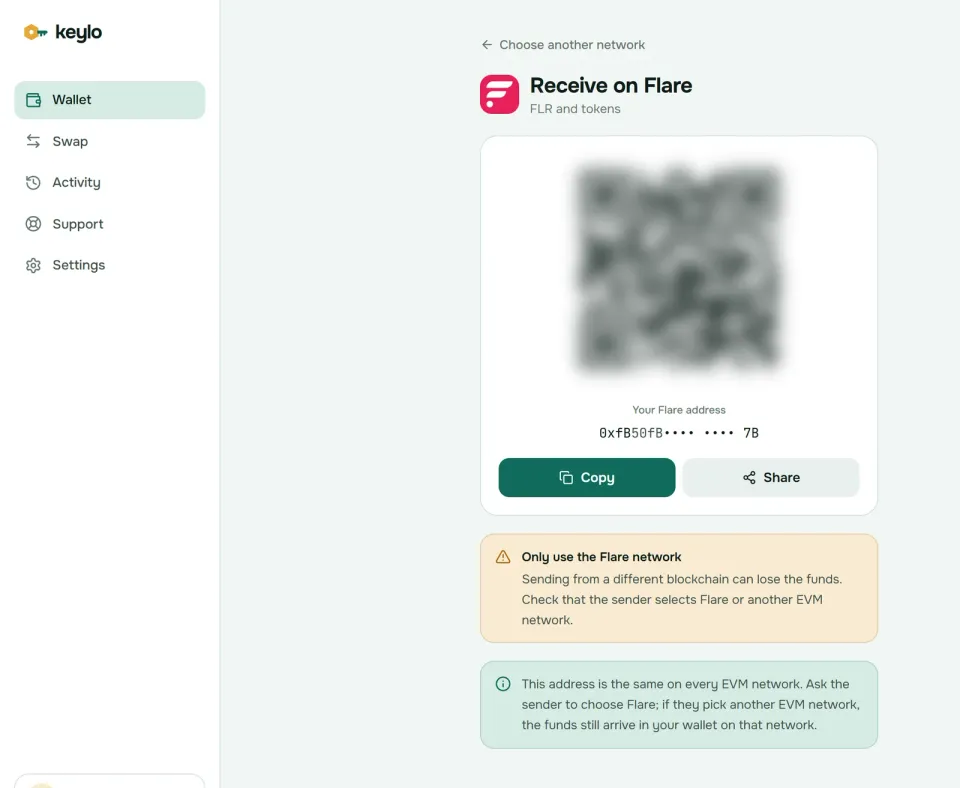
Tap Receive and choose Flare. You'll see "Receive on Flare", a QR code and "Your Flare address".
Tap Copy or Share, or let the sender scan the code.
On the exchange, choose the Flare network for FLR, not Songbird or a wrapped FLR on another chain.
Watch the activity list. Flare blocks are final as soon as they're accepted, usually within a couple of seconds.
If an exchange marks a withdrawal as sent but nothing shows up, search the transaction hash on the Flare Explorer. If it only exists on another network's explorer, then the exchange used that network, and the funds sit at your address there instead.
How to send FLR and tokens on Flare#
Tap Send and choose FLR or a Flare token.
Paste or scan the recipient in To. Keylo checks the format and checksum, and it catches addresses from non-EVM networks.
Enter the amount or tap Max, which keeps back enough FLR for the fee when you send FLR.
Tap Review and choose Slow, Normal or Fast.
Check the network, the recipient and the fee in FLR, then tap Send.
The status changes from "On its way" to "Sent", with a link to the Flare Explorer.
Before you sign, Keylo simulates the transfer and stops it if it would fail. You'll see "You need some FLR on Flare to pay the network fee." when gas is missing, and a warning whenever the recipient is a contract.
That contract warning matters on Flare. Sending FLR to the WFLR contract is how wrapping works, but sending tokens to most other contracts loses them. Wrapping in Keylo isn't a supported action, so if you want WFLR for delegation, do it in the Flare Portal or a Flare wallet.
Flare network fees explained#
Flare supports Ethereum's EIP-1559 format, with a base fee and an optional priority tip, as well as older legacy transactions. Unlike Ethereum, Flare burns all of it, tip included. Validators earn from inflation and their data-provider work instead, so fees never reach them.
The fee level changed in 2026. Under FIP.16, which passed with 98% of the vote on April 24, 2026, the base fee rose from 25 gwei to 500 gwei. The same proposal also cut annual inflation from 5% to 3%. The FIP.16 text explains the reasoning: more burning, less new supply.
Even at the higher level, fees stay tiny. On October 24, 2026, the base fee was 500 gwei and the typical gas price about 650 gwei, with FLR near $0.006:
Action | Gas | Cost (October 24, 2026) |
|---|---|---|
Send FLR | 21,000 | About 0.014 FLR, under a hundredth of a cent |
Send USDT0 or WFLR | About 45,000 to 60,000 | About 0.03 to 0.04 FLR |
Send FXRP | About 150,000, because FAssets tokens do more checks | About 0.1 FLR |
Swap or bridge | Varies | Network fees plus route fees, all listed in the quote |
Because blocks take under two seconds and finality is immediate, Slow, Normal and Fast rarely change much. If a send ever stays pending, Speed up on the finished screen resends it with a higher fee. Keylo adds no fee of its own to a normal send.
Delegation, staking and rewards on Flare#
FLR holders earn rewards in two main ways, and Keylo doesn't run either of them.
Delegating WFLR. You wrap FLR into WFLR and delegate its vote power to FTSO data providers. The tokens stay in your wallet, and you claim rewards after each reward period.
Staking on the P-chain. You move FLR to the P-chain and stake it with a validator, which locks it for the staking period.
FIP.16 also shifted rewards toward P-chain staking: under it, P-chain stake starts at five times the weight of WFLR delegation. FlareDrops, the monthly distribution to WFLR holders, also finished on January 30, 2026, after 36 months.
To delegate or stake, use the official Flare Portal with a supported wallet, or a Flare mobile wallet such as Bifrost. Keylo can hold your FLR and WFLR, but it can't wrap, delegate, claim or stake on Flare.
FXRP, USDT0 and other Flare tokens#
Flare tokens follow ERC-20 and need FLR for gas. Keylo picks up tokens at your Flare address on its own, but if one is missing, add it in Settings, Custom tokens by contract address. These are the ones most people hold:
WFLR
0x1D80c49BbBCd1C0911346656B529DF9E5c2F783d, wrapped FLR, backed one to one.FXRP
0xAd552A648C74D49E10027AB8a618A3ad4901c5bE, XRP brought to Flare through FAssets, with 6 decimals.USDT0
0xe7cd86e13AC4309349F30B3435a9d337750fC82D, Tether's USDT0 on Flare.
FXRP launched on September 24, 2025. It's minted only after Flare's data protocols verify an XRP Ledger payment, and it's backed by overcollateralized agents. Since FAssets v1.3 in April 2026, a single XRPL transaction with a destination tag or memo can mint it, and XRPL wallets such as Xaman offer that flow. About 143 million FXRP existed on October 24, 2026.
Your XRP Ledger address in Keylo starts with r and is separate from your Flare address. You can't send XRP straight to a 0x address: FXRP comes from the FAssets minting flow, which Keylo doesn't run, or from a swap.
Keylo also shows NFTs at your Flare address in a read-only view, but it can't send or mint them.
Swap and bridge from your Flare wallet#
Keylo gets Flare routes from LI.FI, which compares Flare DEXs and bridges to other networks. You might swap FLR for USDT0, trade FXRP, or bridge stablecoins to Ethereum or Arbitrum.
Tap Swap. Choose FLR or a Flare token under You pay.
Choose the token and network you want under You receive, or paste a contract address.
Compare routes by amount, time and fees.
Open one to check every step and fee, Minimum you receive and Delivered to, your own address on the other side.
Confirm and follow the tracker until the funds land.
The default slippage limit is 0.5%. A bridge either delivers or returns your funds, sometimes as a different token that still lands in your wallet. Keylo lists any service fee as its own line. See the swap and bridge page for routes and refunds.
Flare scams and mistakes to avoid#
Fake FlareDrop and reward claims. FlareDrops ended in January 2026. So messages promising a new drop, or sites that ask you to connect and "claim", are drainers.
Delegation that asks for your coins. Real delegation never sends your FLR to anyone, so a provider promising high rewards if you transfer FLR is a scam.
Impostor FXRP and USDT0. Copies with the same name and logo exist, so only the contract addresses above prove which is real.
The wrong network. FLR on Songbird, BNB Smart Chain or any other network doesn't arrive on Flare.
Fake support. Keylo staff never ask for your phrase or password. Use Keylo support, and read how Keylo protects your wallet.
Before you move a real amount:
Your recovery phrase is on paper, and Keylo has confirmed it.
You hold a little FLR for gas.
The exchange network says Flare.
The token contract matches the list above.
A small test arrived first.
Coming to Flare for FXRP? The XRP wallet guide covers your XRP address, and the Avalanche wallet guide covers another chain built on the same consensus family.
Hold FLR and FXRP in a wallet only you control
Keylo encrypts your recovery phrase on your device and never sees it. Send, swap and bridge from one place.
Flare wallet FAQ#
What is the best Flare wallet?
It depends on your plan. To delegate, stake and claim rewards, use a wallet on Flare's official list that supports them, such as Bifrost Wallet on mobile or Ledger with the Flare Portal. To hold FLR, FXRP and stablecoins, send them, and swap or bridge between networks without installing anything, a web wallet like Keylo works. Large balances belong on a hardware wallet.
How do I find my Flare wallet address?
In Keylo, tap Receive and choose Flare. Your address is the 0x string under "Your Flare address", the same one you have on other EVM networks. You can paste it into the Flare Explorer to see your FLR, tokens and history. If you staked on the P-chain, that balance uses a different address format and won't show there.
What is the difference between FLR and WFLR?
FLR is Flare's native coin and pays every fee. WFLR is wrapped FLR, an ERC-20 token backed one to one by FLR in a contract. Delegation to FTSO data providers and many DeFi apps use WFLR. You can unwrap it back to FLR in the Flare Portal. Keylo holds and sends both, but it doesn't wrap or unwrap.
Are FlareDrops still paid?
No. FlareDrops finished on January 30, 2026, after the 36 monthly distributions set out in FIP.01. WFLR and staked FLR no longer earn a FlareDrop component. Holders can still earn protocol rewards by delegating WFLR to FTSO providers or staking on the P-chain, and FIP.16 shifted a larger share of rewards to P-chain stakers.
How much are Flare network fees?
Very low in dollars. On October 24, 2026, the base fee was 500 gwei, so an FLR transfer cost about 0.014 FLR and a token transfer about 0.03 to 0.1 FLR, all well under a cent. Flare burns every fee instead of paying validators. Keylo shows the exact amount in FLR before you sign and adds nothing to it.
Why can't I stake or delegate FLR in Keylo?
Keylo offers staking only on Cosmos SDK chains, and it can't wrap FLR, delegate WFLR or claim Flare rewards. Hold your FLR in Keylo if you like, then use the Flare Portal with a supported wallet, or a Flare mobile wallet such as Bifrost, when you want to earn. Real delegation never asks you to send FLR to anyone.
What is FXRP and how do I get it?
FXRP is XRP brought to Flare through the FAssets system. It's minted one to one after Flare verifies an XRP Ledger payment, and overcollateralized agents back it. Since April 2026, one XRPL transaction with a destination tag or memo can mint it, through Flare's apps or XRPL wallets such as Xaman. You can also buy FXRP on a Flare DEX, and Keylo's Swap screen can quote that trade from FLR.
Why doesn't Keylo connect to Flare apps through WalletConnect?
Keylo has no browser extension and doesn't support WalletConnect, so it can't connect to Flare dapps, the Flare Portal or FAssets apps. Keylo signs only the sends and swaps you start in it. For apps, MetaMask, Rabby and the Flare mobile wallets on Flare's list can connect, and you can move funds between them and Keylo freely.