An XRP wallet is the app that holds the key to your address on the XRP Ledger, the network where XRP lives. Payments settle in about four seconds and cost a tiny fraction of a cent. Two rules catch out nearly everyone, though, and both can cost real money.
First, a new address doesn't exist until it receives at least 1 XRP, and that 1 XRP stays locked as a reserve. Second, exchanges share one address among many customers and tell deposits apart with a number called a destination tag. Leave it out and your XRP can land at the exchange without reaching your account. Figures below are as of October 2026.
XRP Ledger at a glance#
Item | XRP Ledger |
|---|---|
Native coin | XRP (1 XRP = 1,000,000 drops) |
Address format | Classic address starting with |
Reserve | 1 XRP per account, plus 0.2 XRP per object you own, such as a trust line |
Fee | 0.00001 XRP minimum per transaction, destroyed rather than paid to anyone |
Speed | A new ledger closes about every 4 seconds; payments are final when it does |
Tokens | Issued currencies held through trust lines, such as RLUSD |
Explorer | |
In Keylo | Send and receive XRP, destination tags, X-addresses, history, swaps through THORChain, XRP Testnet; no XRPL tokens, NFTs or DEX |
How an XRP wallet works#
The ledger records every balance. Your wallet stores the secret that signs payments from your address, so whoever has that secret controls the XRP.
Your XRP wallet address#
A classic XRP address starts with a lowercase r and runs 25 to 35 letters and digits. It has a checksum, so a mistyped one fails the check instead of sending XRP into the void.
You may also meet X-addresses, which start with X. An X-address packs a classic address and a destination tag into one string, which saves you copying two separate values. Keylo accepts both, so use whichever the recipient gives you. If you paste an X-address and also type a different tag, Keylo stops and asks you to pick one.
Keylo derives your XRP address on m/44'/144'/0'/0/0, the standard path for XRP recovery phrases. A phrase from another BIP-39 wallet on the same path shows the same r address.
The 1 XRP reserve#
The XRP Ledger makes every account lock a small amount of XRP so that nobody can fill it with millions of empty accounts. As of October 2026, the base reserve is 1 XRP. On top of that, each object you own on the ledger, like a trust line, an open offer or an escrow, adds an owner reserve of 0.2 XRP.
That has three practical effects:
The first payment to a new address must be at least 1 XRP, or the ledger refuses it.
You can never send your last 1 XRP while the account exists, so your spendable balance is always a bit lower than your total.
Validators can vote reserves down, and they have done so more than once. Keylo reads the live figure from the network each time.
You can get most of the reserve back by deleting the account, which burns 0.2 XRP and returns the rest. Keylo can't send that transaction, so you'd need another wallet for it.
Destination tags: the detail that loses the most XRP#
A destination tag is a whole number from 0 to 4,294,967,295 attached to a payment. The ledger ignores it, but the business receiving the payment reads it to know whose money arrived. Exchanges rely on this, because one exchange address can serve millions of customers.
Leave the tag out, or type the wrong one, and the payment still succeeds on chain. The XRP reaches the exchange, which can't tell it's yours. Some exchanges credit it after a support ticket with the transaction hash, others take weeks, and some have refused outright.
Accounts can switch on a setting called RequireDest, which makes the ledger reject untagged payments. Many exchanges use it, and Keylo also checks it. If the recipient requires a tag and you haven't entered one, Keylo stops the send before you sign.
Your own Keylo address is yours alone, so you never need a tag to receive. If an exchange's withdrawal form insists on one, its "no tag" option or an empty field is fine. The XRP Ledger docs on tags explain the mechanics.
How to choose the best XRP wallet#
XRP wallets come in a few shapes:
Xaman (formerly Xumm) is a mobile app built for the XRP Ledger. Its site lists support for every XRPL asset, swaps on the ledger's own exchange, sign-in and signing for XRPL websites, and Tangem cards for cold storage.
Hardware wallets such as Ledger hold the key on a device and pair with an app. They make sense for XRP you plan to keep for years.
Multi-chain apps hold XRP alongside other coins, usually with lighter XRPL features.
Exchange accounts keep the key for you, so the exchange controls withdrawals.
Before you pick one, look for three things. The wallet should show your spendable balance after the reserve, check whether a recipient requires a destination tag, and accept X-addresses.
Keylo fits people who want to hold and send XRP, swap it for Bitcoin or Ether, and keep their other coins under the same recovery phrase. It's the wrong choice for RLUSD or other XRPL tokens, the XRPL DEX or NFTs, because Keylo doesn't support them.
How to create an XRP wallet in Keylo#
Keylo opens in any current browser, on a phone or a computer, and there's no app store step.
Visit the Keylo sign-up form and enter your Full name, Email, Phone number and a Password twice. Accept the terms and choose Create account.
Confirm your email if Keylo shows "Check your inbox".
At "Set up your wallet", pick Create a new wallet. Your device creates a 12-word recovery phrase and locks it with a key derived from your password (Argon2id, then AES-256-GCM). Keylo's server stores that sealed copy and nothing readable.
Select XRP Ledger in your asset list to see your
raddress. It shows a zero balance until the address is activated.Back up the words: Settings, Recovery phrase, your password, then paper. Keylo asks you to confirm a few of them.
Turn on Two-factor authentication and choose an Anti-phishing code in the same menu.
The phrase matters more than the password here, because a password reset by email can't open the encrypted wallet. The 12 words are the only way to restore it.
Importing from another XRP wallet#
Choose Import a recovery phrase and enter the 12 to 24 words from a BIP-39 wallet. Hardware wallets and most multi-chain apps use this kind of phrase.
But Xaman is different. New Xaman accounts use Secret Numbers, eight rows of six digits, and imported ones may rely on a family seed starting with s. Neither is a word phrase, so Keylo can't import them. Instead, send the XRP from Xaman to your new Keylo address, keeping at least the reserve behind in Xaman.
Practice on XRP Testnet#
Switch on Testnet mode under Settings, Networks. Keylo adds XRP Testnet, and the XRP faucets page hands out free test XRP. It's a safe place to try the reserve and destination tags before you use real XRP.
Get an XRP address in a minute
Create a Keylo account with email and a password. The wallet is built in your browser, with an XRP address ready to activate.
How to receive XRP#
Choose Receive, then XRP Ledger. The screen reads "Receive on XRP Ledger", with a QR code and "Your XRP Ledger address".
Use Copy or Share, or show the QR code to the sender.
When withdrawing from an exchange, pick the XRP Ledger network (often just labeled XRP). Leave the tag empty, or tick the box saying your wallet doesn't need one.
Check your activity. Payments arrive within seconds and link to the XRPL Explorer.
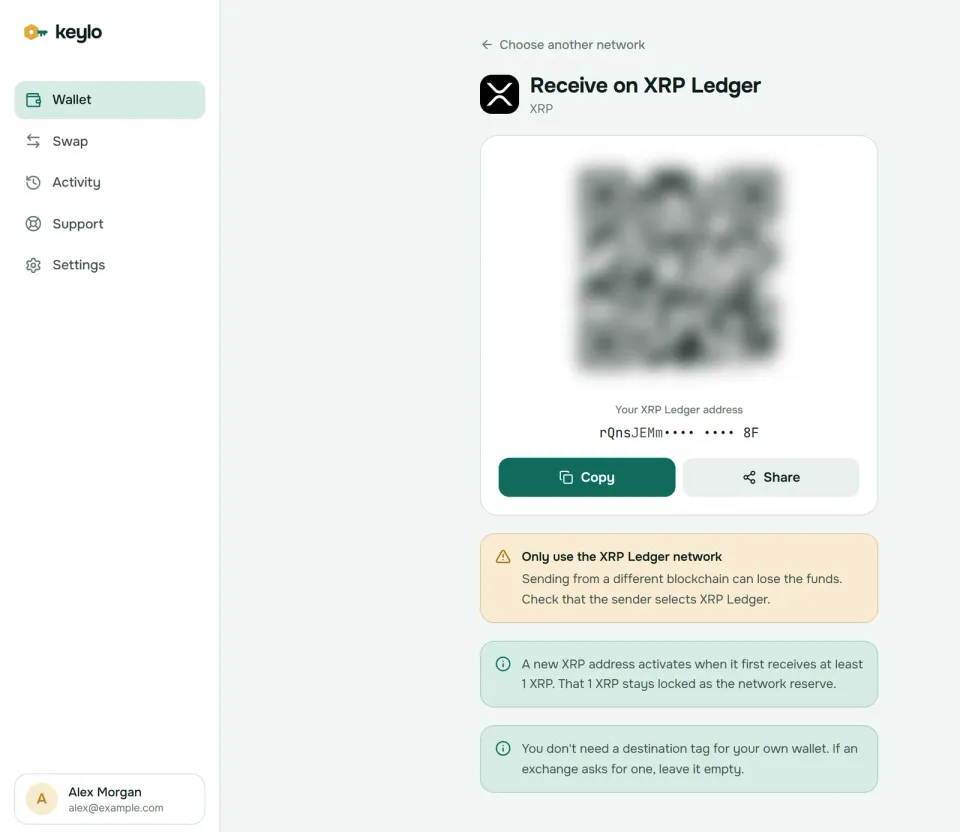
Keylo's Receive screen also reminds you about activation: the first 1 XRP your address gets stays locked as the reserve. If you're starting from zero, withdraw at least 2 XRP so you have some to spend after activation.
How to send XRP#
Choose Send, then XRP.
Paste or scan the recipient into To. A classic
raddress or an X-address both work.If you're paying an exchange, copy its number into Destination tag. Keylo only accepts digits there, up to 10 of them.
Type an amount or press Max. Max sends everything above your reserve, minus the fee.
Press Review and pick Slow, Normal or Fast. On the XRP Ledger they all cost a tiny fraction of a cent.
Check the network, the recipient (first and last six characters in bold), the tag and the fee, then press Send. The status moves from "On its way" to "Sent", and View on XRPL Explorer opens the payment.
Checks Keylo runs on XRP payments#
Before you sign, Keylo looks up both accounts on the ledger:
Missing tag. If the recipient has RequireDest switched on, the send stops until you add the tag.
New address. Paying an address that doesn't exist yet shows that 1 XRP of your payment becomes its reserve. Anything under 1 XRP is refused.
Reserve. If your amount would dig into your own reserve, Keylo tells you how much is locked and the most you can send.
Unwelcome payments. Some accounts flag that they don't want XRP, or only accept payments from approved senders. Keylo warns you, because those payments may fail or arrive unwanted.
Two more limits: you can't pay your own address, and there's no Speed up. On a ledger that closes every four seconds, it's rarely needed.
XRP network fees and speed#
Every transaction pays a cost in XRP that the ledger destroys rather than paying it to a validator. The minimum is 10 drops, or 0.00001 XRP. At about $1.28 per XRP on October 24, 2026, that's far below a hundredth of a cent.
The cost only rises when the ledger gets busy, so most days you pay the minimum. Under load, each server raises the fee it needs to put a transaction in the current ledger, and cheaper ones wait for the next. Keylo's Slow option bids the minimum, Normal bids a little over the going rate, and Fast doubles it. Even Fast usually costs well under 0.0001 XRP.
On October 24, 2026, new ledgers closed about every 3.9 seconds. A payment counts as final once its ledger is validated, with no extra confirmations to wait for. After that, exchanges usually credit XRP deposits within a minute or two.
The reserve isn't a fee, but it behaves like one at the start. Budget 1 XRP for activating a new address, and 0.2 XRP more for each trust line or offer if you use other XRP apps.
Swap XRP to Bitcoin, Ether or TRX#
Keylo routes XRP swaps through THORChain, which trades native coins across chains without wrapping them. You can swap XRP for BTC, ETH, TRX and other coins THORChain supports, and back again.
Choose Swap, and under You pay select XRP.
Under You receive, pick the network and coin.
Compare the quote: the route, each fee, the expected time and Minimum you receive.
Check Delivered to, which is your own Keylo address on the destination network.
Confirm. Keylo sends the XRP to THORChain with the instructions it needs and tracks the swap until the coins arrive.
THORChain has a minimum swap size, and Keylo flags amounts below it. Also remember the reserve: you can't swap the 1 XRP your account must keep.
If a swap can't finish, THORChain refunds your XRP minus network fees. A Keylo service fee, if any, appears as its own line in the quote. The swap and bridge page has more on routes, timing and refunds.
What Keylo doesn't do on the XRP Ledger#
No XRPL tokens. Keylo can't add trust lines or send issued currencies, so RLUSD and other XRPL tokens need a wallet such as Xaman.
No DEX, AMM or NFTs. Keylo can't place offers, join liquidity pools or show XRPL NFTs.
No account deletion. To reclaim most of your reserve, use another wallet that supports AccountDelete.
No app connections. There's no extension, no WalletConnect and no Xaman-style sign requests, so XRPL apps can't ask Keylo to sign.
No XRPL EVM Sidechain, no hardware wallets and no card purchases. Buy XRP on an exchange and withdraw it on the XRP Ledger.
Keylo can't see or recover your keys. If both the password and the recovery phrase are lost, the wallet is gone for good. The networks page lists every chain Keylo supports.
XRP scams and mistakes to avoid#
Most XRP losses start on social media rather than on the ledger. In May 2026, Ripple's David Schwartz and the XRP Ledger Foundation warned of a sharp rise in fake XRP giveaways, airdrops and impersonators.
Giveaways and deepfakes. Videos of Ripple executives promising to double your XRP are fakes, so ignore them. Ripple doesn't run giveaways, and anything you send is gone.
Fake RLUSD airdrops. In May 2026, bot accounts on X posed as the XRPL Foundation and Xaman to push an RLUSD airdrop that doesn't exist. The linked sites ask you to sign transactions that add hidden trust lines or drain the account.
Missing destination tags. Copy the tag from the exchange's deposit page every time.
Lookalike addresses. Copy the address from the exchange or the recipient, never from your activity list, and check the middle characters as well as the ends.
Fake support. Keylo staff never ask for your phrase or password. Use the Keylo help page, and see Keylo's security settings for two-factor and anti-phishing codes.
Before your first XRP withdrawal:
The recovery phrase is written down and confirmed in Keylo.
You've chosen the XRP Ledger network on the exchange.
The first deposit is at least 1 XRP, ideally 2 or more.
You've copied the destination tag for any exchange you send to.
A small test payment arrived before the big one.
The same Keylo phrase also gives you a Stellar wallet and a Bitcoin wallet, handy if you swap XRP for BTC.
Hold XRP in a wallet you alone control
Keylo checks tags and reserves before every payment, signs in your browser and never sees your recovery phrase.
XRP wallet FAQ#
What is the best XRP wallet?
For XRPL tokens like RLUSD, the DEX or signing into XRPL apps, a specialist such as Xaman is the natural pick. For simply holding XRP, sending it and swapping it for other coins from a browser, Keylo works, and it checks tags and reserves for you. For large long-term holdings, use a hardware wallet. Many people use two of these.
Why does the XRP network require 1 XRP to activate a wallet?
The XRP Ledger requires each account to hold a base reserve, 1 XRP as of October 2026, so that empty accounts can't clog the ledger. Some apps call it a one-time fee, but nothing is spent: the 1 XRP stays in your balance, locked while the account exists. Your address becomes an account the first time it receives at least that much. Each trust line or offer adds 0.2 XRP.
What is my XRP wallet address?
In Keylo it's the address starting with r on the Receive screen for XRP Ledger, with a QR code and Copy and Share buttons. It runs 25 to 35 characters and comes from your recovery phrase on m/44'/144'/0'/0/0. To check its balance or history, paste it into the XRPL Explorer. Until it receives 1 XRP, the ledger has no record of it.
What happens if I send XRP without a destination tag?
If the exchange's account requires tags, Keylo stops you before signing, and the ledger would refuse the payment anyway. If it doesn't, the XRP arrives at the exchange but isn't credited to you. Contact the exchange's support with the transaction hash, amount and time. Many can credit it manually, but it can take weeks, so always add the tag.
Do I need a destination tag to receive XRP in my own wallet?
No. Your Keylo XRP address belongs only to you, so every payment to it is yours, tag or not. Tags matter only for shared addresses at exchanges and payment services. If an exchange withdrawal form asks for one, choose its no-tag option or leave the field empty. Entering a random number won't hurt either.
How much does it cost to send XRP?
The minimum transaction cost is 0.00001 XRP, and the ledger destroys it. At around $1.28 per XRP in October 2026, that rounds to nothing. Fees rise only when the ledger is busy, and Keylo shows Slow, Normal and Fast with their exact cost first. The reserve isn't a fee, but a new recipient needs at least 1 XRP.
Can I get my XRP reserve back?
Partly. Deleting an account with the AccountDelete transaction sends the remaining XRP to another address, minus a special cost of 0.2 XRP, so you recover about 0.8 XRP of the base reserve. The account must be old enough and free of objects you can't remove, such as escrows. Keylo can't send AccountDelete, so use another wallet for it.
Can I import my Xaman account into Keylo?
Usually not directly. Keylo imports 12- to 24-word recovery phrases, while Xaman accounts are normally backed up with Secret Numbers or a family seed starting with s. The simple route is to send your XRP from Xaman to your Keylo address, keeping the reserve behind. If your account came from a word phrase, importing that phrase should work.
Which network should I choose to withdraw XRP from an exchange?
Choose the XRP Ledger network, often labeled simply XRP. Some exchanges also offer XRP on BNB Smart Chain or the XRPL EVM Sidechain, which use 0x addresses, and those can't reach an r address. Leave the destination tag empty for your own wallet, and make the first withdrawal at least 1 XRP so the address activates.