A Stellar wallet is the app that keeps the key to your Stellar account, a G... address that holds lumens (XLM) and assets issued on Stellar, such as Circle's USDC. Stellar is built for payments: a ledger closes every five seconds, and a transfer costs a sliver of a cent.
It also has three rules that trip up newcomers. An account must hold at least 1 XLM to exist. Exchanges usually need a memo with every deposit. And you can't receive an asset like USDC until your account has a trustline for it. Each rule is simple once you know why it exists. Figures below were checked in October 2026.
Stellar at a glance#
Item | Stellar |
|---|---|
Native coin | XLM, or lumens (1 XLM = 10,000,000 stroops) |
Address format | 56 characters starting with |
Minimum balance | 1 XLM for an account, plus 0.5 XLM for each trustline, offer or other subentry |
Fee | 100 stroops (0.00001 XLM) per operation, higher only under surge pricing |
Speed | A ledger closes about every 5 seconds, and payments are final when it does |
Assets | Issued by accounts and held through trustlines; USDC comes from Circle |
Explorer | |
In Keylo | Send and receive XLM and assets your account already trusts, memos, muxed addresses, history, Stellar Testnet; no trustline setup, swaps or dapps |
How a Stellar wallet works#
Stellar keeps balances on its ledger. Your wallet holds the secret key that authorizes payments, and that secret, or the recovery phrase that produces it, is what you need to protect.
Your Stellar wallet address#
Your public address, which Stellar calls an account ID, starts with G and is 56 characters long. It includes a checksum, so a typo produces an invalid address instead of someone else's. The matching secret key starts with S. Never paste the S key anywhere a stranger can see it.
Keylo derives your account from your recovery phrase on m/44'/148'/0'. That path comes from SEP-5, Stellar's standard for turning a word phrase into accounts, so other wallets that follow SEP-5 open the same G address from the same phrase.
The minimum balance#
A Stellar account only exists once someone funds it, and it must keep a minimum balance from then on. The unit behind the rule is the base reserve, 0.5 XLM as of October 2026. An account needs two of them, so 1 XLM, then one more for every subentry it owns.
What the account has | Minimum balance |
|---|---|
A plain account | 1 XLM |
Plus a USDC trustline | 1.5 XLM |
Plus two trustlines and one open offer | 2.5 XLM |
The minimum isn't a fee. It stays in your balance, and you get the subentry part back when you remove the trustline or offer. You just can't spend it. The lumens page in Stellar's docs walks through the maths.
Stellar memos and muxed addresses for exchange deposits#
Exchanges usually receive every customer's XLM at one shared address. To know whose deposit arrived, they ask you to add a memo: a short note attached to the transaction. Forget it, and your lumens reach the exchange without reaching your account.
Stellar has four memo types, and two matter to most people:
ID memos are whole numbers, up to 18,446,744,073,709,551,615. Most exchanges hand out a number.
Text memos hold up to 28 bytes of text, about 28 plain letters.
Keylo picks the type for you. When you type only digits it sends an ID memo, which is what exchanges expect, and anything else goes as text. Copy the memo exactly as the exchange shows it, then check it again on the review screen.
Some services now give you a muxed address instead, a longer string starting with M. It folds the shared account and your customer number into one address, so there's no separate memo to forget. Keylo accepts M addresses in the To field.
Receiving into your own Keylo wallet never needs a memo, because the G address belongs to you alone.
Trustlines, USDC and other Stellar assets#
Every asset on Stellar other than XLM has two parts: a short code like USDC and the issuer account that created it. Anyone can issue an asset called USDC, so the issuer is what tells you it's the real one. Circle's USDC on Stellar comes from GA5ZSEJYB37JRC5AVCIA5MOP4RHTM335X2KGX3IHOJAPP5RE34K4KZVN, as Circle lists it.
An account can only hold an asset after it opts in with a trustline to that exact code and issuer. Each trustline adds 0.5 XLM to the minimum balance. Without one, a USDC payment to you fails and the sender keeps the funds.
Keylo can't add trustlines. It finds every asset your account already trusts, shows the balance and lets you send it. So if you imported an account that already holds USDC, everything works. On a brand-new Keylo account, add the trustline in a wallet that manages trustlines and imports recovery phrases first, such as Freighter. Check that it shows the same G address before you rely on it.
How to choose the best Stellar wallet#
The main kinds of Stellar wallet:
LOBSTR offers mobile apps, a web wallet and a signer extension, covers Stellar and the XRP Ledger, and lists card purchases, swaps and multisig.
Freighter, from the Stellar Development Foundation, is a browser extension and mobile app. Its site lists swaps on the Stellar DEX, NFTs, trustline management and scam warnings.
Hardware wallets keep the secret key on a device, a good fit for larger amounts.
Exchanges hold lumens on your behalf, which suits trading but leaves the keys with them.
When you compare them, look at how each one shows the minimum balance, whether it checks for memo-required accounts, and whether it shows the issuer next to every asset code.
Keylo suits people who want to keep and send XLM, and assets they already trust, alongside coins on other chains under one phrase. If you want to trade on Stellar's DEX, connect to Stellar apps or start holding new assets, a Stellar-first wallet is the better tool for that part.
How to create a Stellar wallet in Keylo#
Keylo is a web wallet, so it opens in a phone or desktop browser. Add it to your home screen if you'd like an app icon.
Start at Keylo registration. Type your Full name, Email, Phone number, Password and Confirm password, agree to the terms and select Create account.
Follow the link in your inbox if Keylo asks you to confirm the email.
Select Create a new wallet on "Set up your wallet". The 12-word phrase is generated on your device, then sealed with a key derived from your password using Argon2id and AES-256-GCM. Keylo keeps only that sealed copy.
Open Stellar from your asset list. Your
Gaddress is there, but the account won't exist on the ledger until it receives at least 1 XLM.Write down the phrase. In Settings, choose Recovery phrase, enter your password, copy the words to paper and confirm the ones Keylo asks for.
Also in Settings, switch on Two-factor authentication and set an Anti-phishing code.
Nobody at Keylo can restore a lost phrase. Resetting your password doesn't decrypt the wallet, which is why the paper copy matters.
Importing an existing Stellar account#
If your current wallet gave you a 12- or 24-word phrase, choose Import a recovery phrase. A SEP-5 wallet's first account appears with the same G address, trustlines and balances. Accounts that only exist as an S secret key can't be imported, because Keylo takes word phrases only. Send the lumens across instead, and leave behind whatever minimum balance the old account needs.
Test lumens on Stellar Testnet#
Turn on Testnet mode in Settings, Networks, and Keylo adds Stellar Testnet. Stellar's Laboratory funds test accounts for free, so you can create an account, try a memo and see the minimum balance at work. The test network gets wiped from time to time, so keep nothing there you care about.
Get a Stellar address in a minute
Sign up with an email and a password. Keylo builds your wallet in the browser and gives you a G address ready for its first XLM.
How to receive XLM#
Select Receive, then Stellar. You'll see "Receive on Stellar", a QR code and "Your Stellar address".
Pass on the address with Copy or Share, or let the sender scan it.
On an exchange, withdraw on the Stellar network, often labeled XLM. If the form insists on a memo, any short value is fine for your own wallet.
Look for the payment in your Stellar activity. It usually lands within seconds, with a link to StellarExpert.
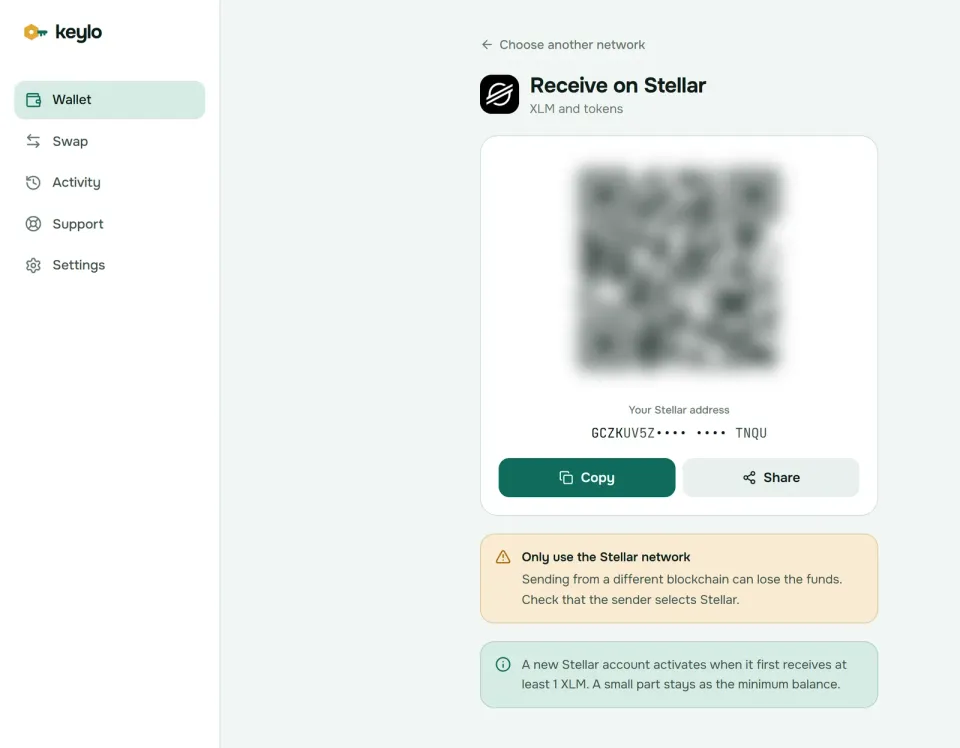
Keylo's Receive screen notes that a new account activates with its first 1 XLM. A smaller first payment fails, and so does any other asset sent before the account exists.
How to send XLM and Stellar assets#
Select Send and choose XLM or an asset you hold on Stellar.
Paste or scan the recipient into To. Keylo accepts
GandMaddresses.For an exchange, enter its Memo exactly as shown. Numbers go out as an ID memo, anything else as text.
Type an amount or select Max, which sends everything above your minimum balance and the fee.
Select Review, then Slow, Normal or Fast.
Check the network, the recipient with its bold first and last six characters, the memo and the fee. Then select Send, and follow "On its way" to "Sent" and View on StellarExpert.
What Keylo checks before you sign#
Keylo reads both accounts from the network first, so most failures surface before you pay a fee.
Memo-required accounts. Exchanges can flag their account as needing a memo. If yours is missing, Keylo stops the send.
New accounts. Sending XLM to an address that doesn't exist creates it, and Keylo refuses anything under 1 XLM. Other assets can't go to an account that doesn't exist yet.
Missing trustlines. Before sending an asset, Keylo checks that the recipient trusts it, that the issuer has authorized them and that their limit has room.
Your own minimum. If the amount dips into your locked balance, Keylo tells you how much is locked and the most you can send.
Stellar network fees#
Stellar charges per operation, and a simple payment is one operation. The base fee is 100 stroops, or 0.00001 XLM. Fees don't go to validators; Stellar moves them to a locked account that nobody can spend from.
Surge pricing starts when more operations arrive than a ledger can hold, then the highest bids get in first. When the ledger isn't full, everyone pays the base fee whatever they bid. Keylo's three options bid around the low, middle and high end of recent fees, so the choice only matters during a surge. On October 24, 2026, at about $0.17 per XLM, the median fee was the 100-stroop minimum, a tiny fraction of a cent. The fees documentation explains surge pricing in full.
In a sample on October 24, 2026, ledgers closed every 5 seconds, and a payment is final once its ledger closes. There's no Speed up on Stellar, and it's rarely needed.
What Keylo doesn't do on Stellar#
No trustline setup. Keylo can hold and send assets your account already trusts, but it can't add or remove a trustline.
No swaps or DEX trading. Keylo doesn't offer Stellar path payments, offers or liquidity pools, and its swap routes don't include XLM. Use an exchange or a Stellar wallet with DEX access.
No Soroban apps. There's no extension or WalletConnect, so Keylo can't sign for Stellar smart contracts or websites.
No account merge. To close an account and reclaim the minimum, use another Stellar wallet.
No claimable balances, NFTs, hardware wallets or card purchases.
Keylo can't recover your wallet for you. If you lose both the password and the phrase, the account is out of reach. See the full network list for every chain Keylo supports.
Stellar scams and mistakes to avoid#
Stellar's fees are so low that spam costs almost nothing, and scammers know it.
Copycat assets. A token called USDC from an unknown issuer is worthless. Check the issuer against Circle's on StellarExpert before you accept or trade one.
Spam payments and claimable balances. Tiny payments or claimable balances that carry a website in the memo or asset name often lead to phishing sites. Ignore them.
Missing or wrong memos. Copy the exchange's memo fresh each time, because some services change them.
Secret key phishing. Fake wallet sites ask for your
Skey or recovery phrase to "verify" the account. No real service needs either.Fake support. Keylo staff never ask for your phrase or password. Reach the team through Keylo support, and set up two-factor and an anti-phishing code as described on the security page.
A quick check before your first exchange withdrawal:
The recovery phrase is on paper and confirmed in Keylo.
The exchange withdraws on the Stellar network.
The first deposit is at least 2 XLM.
You've copied the memo for any exchange you send back to.
A small test arrived before the full amount.
The same phrase also covers the XRP Ledger and Solana. The XRP wallet guide explains a similar reserve system, and the Solana wallet guide covers USDC on another network.
Keep XLM in a wallet only you can open
Keylo checks memos, trustlines and minimum balances before each payment, and your recovery phrase never leaves your device unencrypted.
Stellar wallet FAQ#
What is the best Stellar wallet?
It depends on what you need. LOBSTR and Freighter are built for Stellar; Freighter, for example, lists trustline management, DEX swaps and Stellar NFTs. Keylo suits holding and sending XLM, and assets you already trust, next to coins on other networks, from any browser. For large balances, add a hardware wallet. Whatever you pick, make sure it shows the issuer of every asset.
Why do I need 1 XLM to activate a Stellar wallet?
Stellar requires each account to keep a minimum balance of two base reserves, which is 1 XLM as of October 2026. The account appears on the ledger only when a payment of at least that much creates it. The lumen stays in your balance, but you can't send it while the account exists. Trustlines and offers add 0.5 XLM each.
What happens if I forget the memo when sending XLM to an exchange?
If the exchange has flagged its account as memo-required, Keylo stops the payment before you sign. Otherwise the XLM reaches the exchange's shared account, which can't tell it belongs to you. Contact the exchange's support with the transaction hash, amount and time. Most can credit it by hand, but it's slow, so always copy the memo.
What is a trustline on Stellar?
A trustline is your account's opt-in to hold a specific asset, identified by its code and issuer, such as USDC from Circle. Without it, payments of that asset to you fail. Each trustline adds 0.5 XLM to your minimum balance, which you get back if you remove it. Keylo can use existing trustlines but can't create new ones.
How much does a Stellar transaction cost?
The base fee is 100 stroops, or 0.00001 XLM, per operation, and a simple payment is one operation. With XLM around $0.17 in October 2026, that's far below a cent. Fees climb only during surge pricing, when the ledger is full. Keylo shows Slow, Normal and Fast with their exact cost before you send.
What is my Stellar USDC wallet address?
It's the same G address that holds your XLM, because Stellar has no separate USDC address. USDC can only arrive after your account adds a trustline to Circle's USDC, which adds 0.5 XLM to your minimum balance. Keylo shows and sends USDC once that trustline exists but can't create it, so add it first in a wallet that manages trustlines, such as Freighter.
What is an M address on Stellar?
An M address is a muxed account: one Stellar account plus a number that identifies a customer, packed into a single address. Exchanges and payment services use them so you don't need a separate memo. Payments to an M address land in the underlying G account, tagged with your number. Keylo accepts M addresses as recipients.
Can I import a Stellar secret key into Keylo?
No. Keylo imports 12- to 24-word recovery phrases, not secret keys starting with S. If your old wallet only gave you a secret key, keep using it to send your XLM and assets to your Keylo address. Remember that an asset can only arrive if your Keylo account already has a trustline for it.
Why can't I send all my XLM?
Your account must keep its minimum balance: 1 XLM, plus 0.5 XLM for each trustline or offer. Max in Keylo sends everything above that and the fee. To reclaim the rest, you would have to close the account with an account merge, which Keylo doesn't support, so use another Stellar wallet if you ever want to shut an account down.