A Dogecoin wallet holds the private key for your DOGE address and uses it to sign payments. Dogecoin began in 2013 as a joke built on Litecoin's code, and it has stayed close to that old design. There's no SegWit, no smart contracts and nothing to stake, just one coin that moves quickly and cheaply.
That simplicity also makes the rules easy to learn. Your address starts with D, a new block comes about once a minute, and payments under 0.01 DOGE won't go through. Most losses come from choosing the wrong network on an exchange or from giveaway scams. Every fee figure below was checked on October 24, 2026.
Dogecoin at a glance#
Item | Dogecoin |
|---|---|
Native coin | DOGE (1 DOGE = 100,000,000 koinu) |
Your address in Keylo | Starts with |
Other mainnet format | Script addresses starting with |
Block time | About 1 minute |
Fee | Charged per kilobyte; Dogecoin Core recommends 0.01 DOGE per kB |
Dust limit | 0.01 DOGE |
Supply | No cap; a fixed 10,000 DOGE per block, about 5.26 billion a year |
Mining | Scrypt proof of work, merged-mined with Litecoin |
Explorer | |
In Keylo | Send, receive, history and swaps through THORChain. No speed-up, no testnet and no hardware wallets |
How a Dogecoin wallet works#
Dogecoin inherited Bitcoin's coin model. Your balance is the sum of separate unspent outputs, one for each payment you've received. A send uses up whole outputs, pays the recipient and returns the difference to you as change.
Because of this, the fee follows the payment's size in bytes, and size grows with the number of outputs you spend. A balance built from one big deposit is cheaper to move than the same balance built from a hundred small tips.
Your Dogecoin wallet address#
Keylo derives a classic Dogecoin address from your recovery phrase on m/44'/3'/0'/0/0, the BIP44 path with Dogecoin's coin type 3. Your Dogecoin wallet address begins with a capital D and is 34 characters long.
It uses base58, so it skips look-alike characters such as 0, O, I and l. Capitals matter, but a checksum inside the address catches typing errors.
Addresses beginning with A or 9 are also real Dogecoin addresses. They're script addresses, used by multisig setups and some exchanges, and Keylo can pay them. Dogecoin never adopted SegWit, so a doge1-style address isn't something a Dogecoin wallet should hand you, and Keylo refuses that format.
How to choose the best Dogecoin wallet#
The dogecoin.com wallet list groups the options well, and it notes that the project hasn't audited them.
Dogecoin Core. The reference desktop wallet and full node. Version 1.14.9, released in December 2024, was still the latest in October 2026. It downloads the whole chain and backs up to a
wallet.datfile rather than a recovery phrase.Hardware wallets. Ledger and Trezor support DOGE, so the key stays on a separate device.
Mobile and multi-coin apps. Many phone and desktop wallets hold DOGE beside other coins. Before you pick one, check that it gives you a recovery phrase you can write down.
Exchange accounts. Simple for trading, but you don't hold the key, and withdrawals depend on the exchange.
Web wallets. No install, just a browser tab. Keylo is one of these.
For DOGE, look for a wallet that enforces the 0.01 DOGE dust limit, shows the fee in DOGE before you sign, and uses the standard BIP44 path so you can move your phrase later. Most people also want an easy way to swap DOGE.
Keylo suits holding DOGE next to Bitcoin, Ethereum and other coins, with quick sends and native swaps. Keylo can't run a full node, can't sign with a hardware device and can't speed up a slow DOGE payment, so pick Dogecoin Core or a hardware wallet if those matter to you.
How to create a Dogecoin wallet in Keylo#
Keylo is a web wallet you sign up for and log in to with an email and a password, so there's no app to download.
Visit the Keylo registration page. Type your full name, email and phone number, choose a password and repeat it, tick the terms box, then tap Create account.
Confirm your address from the email if you see "Check your inbox".
Pick Create a new wallet on the "Set up your wallet" screen. Your browser generates a 12-word recovery phrase and encrypts it with a key made from your password (Argon2id, then AES-256-GCM). The readable phrase never reaches Keylo.
Tap Dogecoin in the asset list. Your D address and balance are there.
Back up the words. In Settings, choose Recovery phrase, re-enter your password, copy the 12 words onto paper and confirm the ones Keylo asks for.
Turn on Two-factor authentication and set an Anti-phishing code in the same menu.
The paper copy is what counts. A password reset by email lets you sign in again, but it can't decrypt the wallet. Only the recovery phrase brings your DOGE back.
Bringing DOGE from another wallet#
Choose Import a recovery phrase and enter its 12 to 24 words. If the old app used the standard Dogecoin path, the same D address and balance appear in Keylo. If it used another path or many rotating addresses, you may see a different or empty address, while the coins stay safe in the old app.
Dogecoin Core has no recovery phrase to import, so send the DOGE from Dogecoin Core to your Keylo address instead. Keylo has no Dogecoin test network, so try a small amount first.
Get your D address in a minute
Register with email and a password. Keylo builds your Dogecoin wallet in the browser and encrypts it before anything is saved.
How to receive DOGE#
Tap Receive and choose Dogecoin. The page says "Receive on Dogecoin" and shows a QR code with "Your Dogecoin address" below it.
Tap Copy or Share, or have the sender scan the code.
On the exchange's withdrawal page, set the network to Dogecoin (DOGE).
Look at your Dogecoin history. Deposits show up once broadcast and usually confirm within a minute or two.
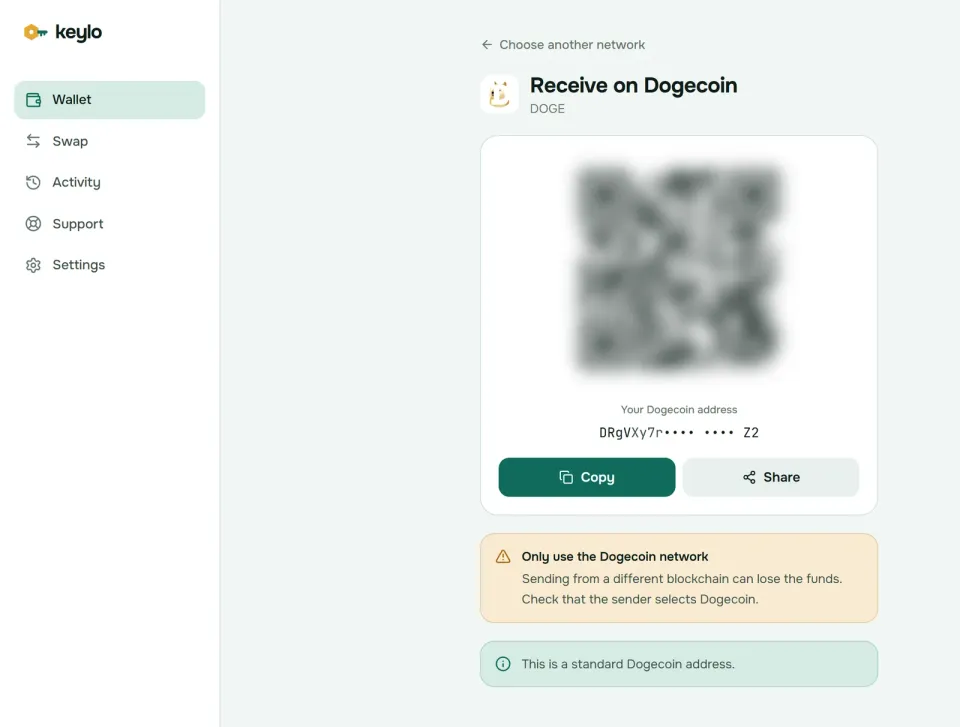
Keylo notes on this screen that it's a standard Dogecoin address. Tipping is part of Dogecoin culture, and plenty of people post an address to collect it. Anyone can paste that address into Blockchair and see its full balance and history, though, so keep public tips separate from savings.
How to send DOGE#
Tap Send and choose DOGE.
Paste the address or scan its QR code into To.
Enter at least 0.01 DOGE, or tap Max to send everything minus the fee.
Tap Review and choose Slow, Normal or Fast.
Check the network, the address (its first and last six characters are in bold) and the fee in DOGE.
Tap Send. Keylo signs the payment in your browser and shows "On its way" until it confirms, then "Sent", with a View on Blockchair link.
Mistakes Keylo stops on Dogecoin#
Bitcoin or Litecoin addresses. A
1...orL...address gets a message that it belongs to Bitcoin or Litecoin, not Dogecoin.SegWit-style addresses. Dogecoin has none, so Keylo refuses them.
Amounts under 0.01 DOGE. Keylo blocks them because nodes treat such outputs as dust. Leftover change smaller than that goes to the miner instead of back to you.
A fee bigger than it should be. If the fee would pass 10% of the amount, Keylo warns you first.
A pile of tiny tips. A payment that would combine more coins than fit in a standard transaction is stopped, so send a smaller amount.
Dogecoin transaction fees and the dust limit#
Dogecoin charges by size, like Bitcoin, but people usually quote the rate per kilobyte. The Dogecoin Core fee recommendation is 0.01 DOGE per kB, with a 0.01 DOGE dust limit. A simple payment, one coin in and two out, is about 226 bytes, so the recommended fee is roughly 0.0023 DOGE.
Keylo uses live fee estimates and never goes below that 0.01 DOGE per kB floor. On October 24, 2026, its three speeds for a simple payment came to roughly:
Speed | Approximate fee | Wait Keylo shows |
|---|---|---|
Slow | 0.02 DOGE | About 24 minutes |
Normal | 0.11 DOGE | About 6 minutes |
Fast | 0.46 DOGE | About 2 minutes |
With DOGE near $0.08, even Fast cost under 4 cents. The estimator runs well above Dogecoin Core's recommendation, and the network had only a handful of waiting payments that day, so Slow was plenty. Every koinu of the fee goes to miners; Keylo adds none.
The amount you send never changes the fee. What does change it is spending many small coins at once, which is common for anyone who collects tips. Keylo shows the exact DOGE fee on the review screen before you sign.
No speed-up on Dogecoin#
Keylo can't speed up a Dogecoin payment once it's sent, so choose the speed before you tap Send. That's rarely a problem: on October 24, 2026, even Slow paid about eight times the recommended rate.
A Dogecoin payment counts as confirmed once it's in a block, usually within a minute or two. Exchanges set their own confirmation count before crediting DOGE, and their deposit page shows it.
Swap DOGE through THORChain#
Keylo swaps DOGE through THORChain, which trades native DOGE for native coins on other chains, such as BTC, LTC, ETH or XRP. No wrapped coins or exchange accounts are involved.
Tap Swap and put DOGE under You pay with the amount.
Pick the network and coin under You receive.
Compare what each route offers: the amount, the time and the fees.
Look at Minimum you receive and Delivered to, which shows your own Keylo address on the other network.
Confirm, and follow the progress until the coins arrive.
Keylo builds the Dogecoin deposit with THORChain's instructions already inside, so there's no vault address to copy. It pays the Fast fee on that deposit, which matters here because Keylo can't speed up a Dogecoin payment afterward. THORChain waits for Dogecoin confirmations before paying out, and for more of them on bigger amounts. In October 2026 it quoted about 2 minutes for 1,000 DOGE and about 11 minutes for 100,000 DOGE.
Slippage defaults to 0.5%. If THORChain can't complete a swap, it refunds the DOGE to your address minus network fees. Any Keylo service fee appears on its own line. The swap page explains how THORChain refunds work.
What Keylo doesn't do on Dogecoin#
No fee bumping. A sent DOGE payment can't be sped up in Keylo.
No test network. Keylo has no Dogecoin testnet, so start real use with a small amount.
No Doginals or DRC-20. Keylo shows plain DOGE only and could spend an inscribed coin like any other, so keep inscriptions in a wallet built for them.
No hardware wallets, no card purchases, no dapp connections. Buy DOGE on an exchange and withdraw on the Dogecoin network.
Keylo is non-custodial, which cuts both ways. Nobody else can move your DOGE, but if both your password and your recovery phrase are lost, Keylo can't help you open the wallet. The supported networks page shows what else your phrase covers.
Dogecoin scams and mistakes to avoid#
DOGE's fame makes it a favorite for scams that target newcomers rather than the network.
Giveaway streams. Fake live videos and posts use famous faces and promise to send back double whatever DOGE you send. Every one is a scam, and the DOGE you send never comes back.
The wrong network. BEP20 DOGE and native DOGE share a name but not a network. Read the network label on every withdrawal.
Swapped addresses. Clipboard malware can replace a copied D address with a lookalike. Compare the address on the review screen with the original, middle included.
"Wallet sync" and support scams. Sites and chat accounts offering to fix, sync or recover your wallet want your phrase. Keylo staff never ask for it or for your password. Reach the team through Keylo support, and see Keylo's security features.
Before your first real payment:
The recovery phrase is written down and confirmed in Keylo.
The exchange network says Dogecoin, not BEP20.
The address starts with D, A or 9.
The amount is at least 0.01 DOGE.
You tried a small test first.
Dogecoin's merge-mining partner is covered in the Litecoin wallet guide, and the Bitcoin wallet guide explains the coin most people swap DOGE into.
Keep your DOGE in a wallet only you control
Keylo encrypts your recovery phrase on your device and never sees it. Receive, send and swap Dogecoin from one browser tab.
Dogecoin wallet FAQ#
What is the best Dogecoin wallet?
It depends on how you use DOGE. Dogecoin Core is the reference wallet and full node for desktop users who want to verify everything. Ledger or Trezor hardware suits larger savings. For tips and everyday payments next to other coins, a phone or web wallet works, and Keylo adds native swaps to BTC, LTC and other coins.
What does a Dogecoin wallet address look like?
A standard Dogecoin address starts with a capital D and has 34 letters and digits, like the one on your Keylo Receive screen. Script addresses start with A or 9 and are also valid. Dogecoin has no SegWit, so it has no bc1-style addresses. Before you send, paste or scan the address rather than typing it.
How much does it cost to send Dogecoin?
Fees depend on size, not amount. Dogecoin Core recommends 0.01 DOGE per kilobyte, about 0.0023 DOGE for a simple payment. Keylo's fee estimates ran higher on October 24, 2026: about 0.02 DOGE on Slow and 0.46 DOGE on Fast, still under 4 cents. Spending many small tips at once makes a payment bigger and pricier.
What is the Dogecoin dust limit?
Dogecoin Core treats outputs under 0.01 DOGE as dust. Its relay rules reject outputs below 0.001 DOGE and charge 0.01 DOGE extra for each output under 0.01 DOGE, which makes tiny payments pointless. Keylo won't send less than 0.01 DOGE, and change smaller than that goes to the miner rather than back to you.
I withdrew DOGE on BEP20. Is it lost?
Not necessarily. BEP20 DOGE lives on BNB Smart Chain, so the exchange would have needed a 0x address, not a D address. If you gave it your own 0x address, the token sits there on BNB Smart Chain. You can send it back to an exchange that accepts BEP20 DOGE and withdraw again on the Dogecoin network.
Can I send Dogecoin to a Bitcoin wallet?
No. Dogecoin and Bitcoin are separate networks, and a Bitcoin address can't receive DOGE. Keylo recognizes Bitcoin and Litecoin addresses in the To field and won't send to them. The same goes for 0x addresses, which can only hold wrapped DOGE on networks like BNB Smart Chain. To turn DOGE into BTC, swap it through THORChain in Keylo instead.
Can I import my Dogecoin Core wallet into Keylo?
No. Dogecoin Core backs up to a wallet.dat file instead of a recovery phrase, and Keylo only imports 12- to 24-word phrases. Keep Dogecoin Core open, copy your Keylo D address, and send the DOGE across. For a large balance, send a small test first, then the rest once it shows up in Keylo.
Can I speed up a stuck Dogecoin transaction?
Not in Keylo. Keylo sends Dogecoin payments as final, so there's no fee bump afterward. Keylo never pays less than Dogecoin Core's recommended rate and usually pays more, so payments rarely wait long. If one ever stalls, it either confirms later or nodes drop it, and the coins become spendable again.
Does Dogecoin have a maximum supply?
No. Dogecoin has no cap. Each block creates a fixed 10,000 DOGE, which adds about 5.26 billion coins a year. Because that number never changes, the yearly inflation rate keeps shrinking as the total supply grows. The schedule doesn't affect how your wallet works or what you pay in fees.