A Unichain wallet is any wallet that holds ETH and tokens on Unichain, the Ethereum layer 2 that Uniswap Labs built for fast, cheap trading. Your usual 0x address already works there, a block lands every second, and gas is paid in ETH. But UNI, Uniswap's token, plays a different role on the chain, explained below.
Many people first hear of Unichain in the Uniswap app. Then they learn that Unichain is a network, not an exchange, and that funds on it need a wallet like any other chain. Figures below are as of October 2026.
Unichain in one table#
Item | Unichain |
|---|---|
Built by | Uniswap Labs, live on mainnet since February 2025 |
Network type | OP Stack rollup on Ethereum, part of the Superchain |
Gas token | ETH. UNI can't pay fees |
Chain ID | 130 |
Address format |
|
Block time | 1 second, with Flashblocks preconfirmations in about 200 ms |
Typical fee | Well under a cent; Uniscan priced a token transfer at $0.00008 of gas on October 24, 2026 |
Exit to Ethereum | Roughly a week via the canonical bridge |
Token standard | ERC-20, with native USDC from Circle |
Explorer | |
In Keylo | Sending, receiving, automatic token detection and full history; speed-up; NFTs to view (read-only); LI.FI swaps and bridges; Unichain Sepolia testnet |
Why Unichain exists and who uses it#
Uniswap is the decentralized exchange; Unichain is the blockchain Uniswap Labs built so that trading costs less and settles faster. Uniswap's app works on many networks, and Unichain is one of them. You can also use Unichain without ever touching Uniswap.
Unichain runs on the OP Stack and belongs to the Superchain, the group of OP Stack networks that share upgrades and a Security Council. It's also a Stage 1 rollup on L2BEAT's scale, with permissionless fault proofs. That means anyone can challenge a false claim about the chain's state.
Speed is the selling point. Unichain makes a block every second, and its Flashblocks stream partial blocks about every 200 milliseconds, so a trade shows up almost as soon as you send it. That speed is why Uniswap Labs pitches the chain at traders.
Your Unichain wallet address#
Because Unichain uses Ethereum's account system, your Unichain wallet address matches the 0x one you hold on Ethereum or OP Mainnet. It comes from the path m/44'/60'/0'/0/0, which is the default first account in MetaMask and similar wallets.
But balances don't travel with the address. UNI that you withdrew to Ethereum stays on Ethereum, even though the same address exists on Unichain. Also, nothing needs activating, and there's no memo or minimum balance.
ETH pays the gas, UNI gets burned#
UNI is Uniswap's governance token, and it can't pay for gas on Unichain. Every transaction, including one that moves UNI, costs a little ETH. So the first thing any new Unichain wallet needs is ETH.
UNI does have a link to the chain, though. In December 2025 Uniswap governance executed the UNIfication proposal, with about 125 million UNI voting for it and 742 against. Among other changes, it sends Unichain's sequencer fees to a mechanism that burns UNI. That happens after the chain pays its Ethereum data costs and a 15% share to Optimism.
So in practice, every fee you pay on Unichain helps reduce the UNI supply a little. You don't do anything differently as a user, and you still pay in ETH.
Choosing a Unichain wallet: apps, extensions and web wallets#
Unichain is EVM-compatible, so most Ethereum wallets support it or can add it by chain ID 130.
Uniswap Wallet comes from Uniswap Labs, the team behind Unichain. It's a self-custody app for iOS and Android, plus a Chrome extension.
MetaMask and other extension wallets can add Unichain as a network and connect to Uniswap and other apps.
Hardware wallets sign through a companion app and suit larger balances.
Web wallets such as Keylo open in a browser with nothing to install.
For trading, the swap screen matters most, because that's where costs hide. It should show the route, every fee and the minimum you'll receive, and it should approve only the amount you're trading. It should also include Unichain's Ethereum data fee in the price, so the quote matches what you pay.
Keylo fits people who want to hold ETH and tokens on Unichain, send them and swap or bridge from one screen. It doesn't connect to the Uniswap website or any other app, so it can't provide liquidity on Uniswap or use other Unichain apps. If that's your plan, use Uniswap Wallet or another connecting wallet for those tasks.
Making a Unichain wallet with Keylo#
Keylo needs no download, because it runs in the browser. Unichain is already one of its networks.
Visit Keylo's sign-up page and give your full name, email and phone number. Choose a password, repeat it, agree to the terms and select Create account.
If you're told to check your inbox, follow the confirmation link in Keylo's email.
Select Create a new wallet. Your browser creates a fresh 12-word recovery phrase and seals it with a key derived from your password (Argon2id, then AES-256-GCM) before anything is saved.
Find Unichain in the asset list and select it. Your address and balance show there.
Back up now. Under Settings, choose Recovery phrase, type your password, copy the words onto paper and complete the quick confirmation.
Turn on Two-factor authentication and set an Anti-phishing code, also in Settings.
Without that paper backup, a forgotten password ends your access. That's because Keylo's servers keep only the sealed copy and can't read it.
Using a phrase from Uniswap Wallet or MetaMask#
Select Import a recovery phrase and enter your 12 or 24 words. Since Keylo follows the common Ethereum path, the first account from your old wallet appears with the same Unichain address. Other accounts in that wallet won't appear, but they stay where they are.
Practicing on Unichain Sepolia#
Switch on Testnet mode in Settings, under Networks, and Unichain Sepolia joins your list. Its test ETH is free from public faucets and worthless, so it's a good place to try your first send.
Get your Unichain address in a minute
All you need is an email and a password. Your device generates the keys, and the resulting 0x address is ready on Unichain right away.
How to get ETH into your Unichain wallet#
There are two ways in. Some exchanges let you withdraw directly on Unichain, but support varies by exchange and by asset. If yours doesn't list Unichain for the token you want, withdraw on Ethereum, Base or Arbitrum and bridge across in Keylo.
To receive on Unichain directly:
Select Receive and choose Unichain. The screen says "Receive on Unichain", with a QR code and "Your Unichain address".
Use Copy or Share. A sender standing next to you can scan the QR code instead.
On the exchange, pick Unichain as the network. "ERC20" or "Ethereum" would send it to Ethereum instead.
Look for the transfer in your activity. With one-second blocks, it appears almost as soon as the exchange broadcasts it.
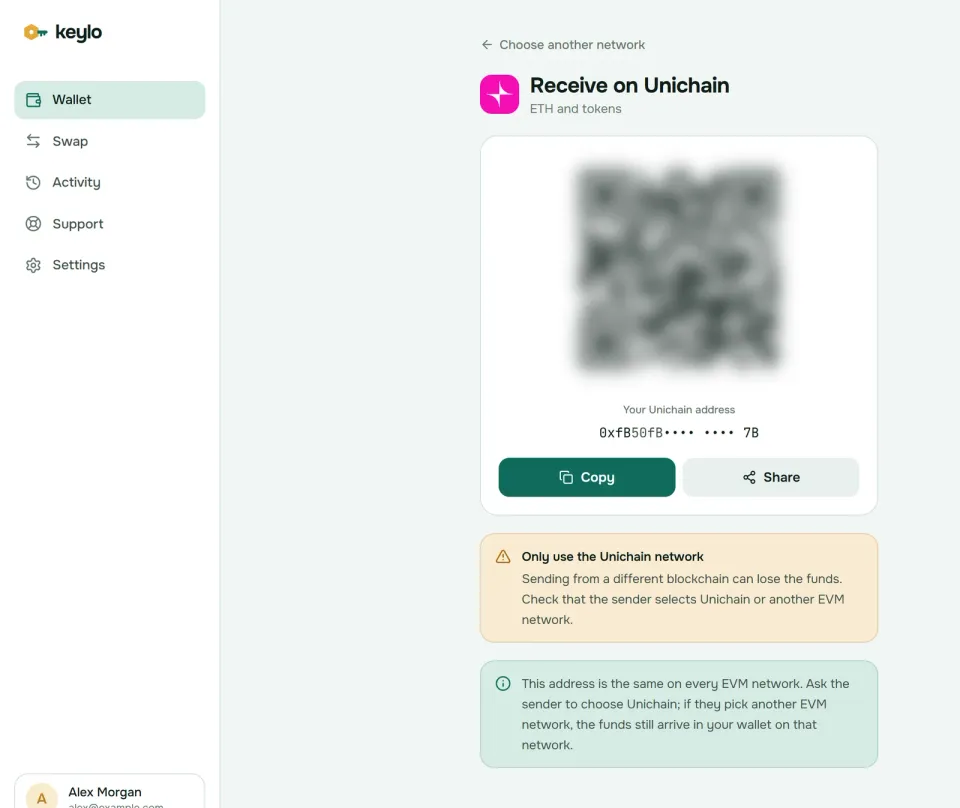
Keylo reads Unichain's explorer index, so deposits appear in Activity and any token you receive shows up on its own. It also notes under the address that EVM networks share it. So if UNI arrives on Ethereum instead of Unichain, it isn't gone. It sits at your address on Ethereum, and you can bridge it over, though moving it from Ethereum costs Ethereum's higher gas.
Sending from your Unichain wallet#
Select Send and pick ETH or a Unichain token.
Fill in To by pasting or scanning. Keylo checks the checksum and flags addresses from other kinds of networks.
Enter an amount, or use Max, which leaves room for the fee when sending ETH.
Select Review and pick a speed: Slow, Normal or Fast.
Read the review: Unichain as the network, the whole recipient address, and the fee.
Select Send. You'll see "On its way", then "Sent", with View on Uniscan for the record.
Keylo test-runs the transfer before it asks for your signature, so a send that would fail stops on the review screen instead of costing gas. A recipient that is a contract triggers a warning, because tokens sent to the wrong contract are usually lost. Sending a token to its own contract address is blocked outright.
Before sending to an exchange, check that its deposit page lists Unichain for that exact token. An exchange that accepts ETH on Unichain might not credit every Unichain token.
Unichain fees and one-second blocks#
Unichain fees have the usual OP Stack shape. You pay for execution on Unichain, priced by a base fee and an optional tip, plus an L1 data fee for posting your transaction to Ethereum. All of it is in ETH.
On October 24, 2026, Uniscan's gas tracker showed 0.0005 gwei. That put the execution cost of a token transfer at $0.00008 and a swap at $0.00024. Wallets that add the 0.001 gwei tip the network suggests, Keylo included, pay a little more. Real transactions on Uniscan that morning cost between about $0.00002 and $0.003.
Keylo calls Unichain's fee contract to price the data part, adds a margin for Ethereum's price swings and folds it into each speed option. The number on the review screen is therefore the whole fee. Keylo charges nothing extra on a normal send.
Fast blocks also make the speed choice matter less than on Ethereum. Normal usually confirms in a second or two. If a transfer ever hangs, Speed up replaces it with a higher fee. The Unichain docs describe the block and Flashblocks timing.
Swapping and bridging from a Unichain wallet#
Keylo's swap screen gets quotes from LI.FI, which compares decentralized exchanges and bridges. So you don't need the Uniswap website for a simple trade.
Select Swap. In You pay, choose a token on Unichain and an amount.
In You receive, choose a Unichain token for a swap, or a token on another network for a bridge. You can search by name or paste a contract address.
Compare the routes. Each shows the amount, the time, the fees and the tool it uses.
Open the details: every step, every fee, Minimum you receive and Delivered to.
If you're spending a token, approve exactly that amount first, then confirm the trade.
Slippage defaults to 0.5%, so the trade won't fill at a much worse price if the market moves. Bridged funds arrive at your own address on the other network, and Keylo tracks them until they land. Should a bridge fail, the funds come back to you, sometimes in another token, and a Keylo service fee would show as its own item. The swap and bridge page has more.
Withdrawing to Ethereum#
The canonical bridge from Ethereum to Unichain is quick, and deposits arrive within a few minutes. But the way back is slow. According to L2BEAT, a withdrawal must wait seven days after you prove it on Ethereum before you can claim it, so plan on about a week. Bridges like the ones Keylo quotes pay you on Ethereum within minutes instead.
Native transfers between Unichain and OP Mainnet are planned. Optimism targets December 15, 2026 for interop between the two chains, subject to governance approval. In Keylo, moving funds between them stays a bridge route on the Swap screen.
Uniswap positions, NFTs and other limits#
Keylo shows NFTs on Unichain in a read-only Collectibles view. Uniswap liquidity positions are NFTs too, so a position you opened from the same address can appear there. Keylo can't add liquidity, collect fees or close a position. Use the Uniswap app with a connecting wallet for that.
Here's what else Keylo leaves out on Unichain:
No dapp connections. There's no browser extension and no WalletConnect, so Uniswap's website and other Unichain apps won't see your Keylo wallet.
No NFT transfers. You can look at collectibles but not send them.
No staking. That feature exists in Keylo only for Cosmos SDK networks.
No hardware wallets or card purchases. Buy ETH on an exchange and withdraw or bridge it to Unichain.
Only you hold the keys, so a lost password plus a lost phrase means nobody, Keylo included, can restore the wallet. You'll find every network Keylo supports on the networks page.
Unichain scams to watch for#
Unichain inherits the scams that follow Uniswap around. Almost all of them try to get a signature or your recovery phrase.
Fake Uniswap sites. Search ads and lookalike domains copy the Uniswap app, then ask you to connect and sign. Type the address yourself or use a bookmark.
Signature drainers. A request to sign a permit can hand over your tokens without a visible transfer. Keylo never signs website requests, and its swaps approve only the amount you trade.
Free UNI. Unasked tokens and NFTs with a website in their name lead to drainers, so ignore them.
Address poisoning. A lookalike sender drops a dust transfer into your activity, hoping you'll paste its address next time.
Fake helpers. Anyone in your messages offering to fix a stuck swap is a scammer. Keylo's team works only through the support page, and Keylo's security features are listed on their own page.
Run through this before your first real transfer:
The phrase is written down and confirmed in Keylo.
Your Unichain balance includes some ETH for gas.
The exchange network says Unichain, not Ethereum.
USDC matches Circle's contract
0x078D...7AD6.A small test arrived first.
The same address also works on OP Mainnet and Base. See the Optimism wallet guide and the Base wallet guide.
Trade and hold on Unichain from a wallet you control
Keys stay on your device, encrypted with your password. Swap, send and bridge on Unichain from any browser tab.
Unichain wallet FAQ#
Is Unichain the same as Uniswap?
No. Uniswap is a decentralized exchange that runs on many networks. Unichain is a separate Ethereum layer 2 that Uniswap Labs built, with its own blocks and balances. You can use Uniswap without Unichain, and Unichain without Uniswap. A wallet holds your funds on Unichain, while the Uniswap app is just one place to trade them.
How do I add Unichain to my wallet?
Many wallets list Unichain already. If yours doesn't, add a network with chain ID 130, currency ETH, RPC https://mainnet.unichain.org and explorer https://uniscan.xyz. In Keylo there's nothing to add: Unichain is in the network list, and your address is the same 0x address you use on Ethereum.
Is there a Unichain wallet extension?
Unichain has no wallet of its own, but browser extensions work with it. Uniswap Wallet, from the team behind Unichain, has a Chrome extension as well as phone apps, and MetaMask's extension can add Unichain by chain ID 130. Keylo has no extension: it runs in a normal browser tab, so it can hold and move funds but can't connect to apps.
Do I need UNI to pay gas on Unichain?
No. Gas on Unichain is paid in ETH, even when you send or swap UNI. UNI is Uniswap's governance token. Since December 2025, Unichain's sequencer fees, after Ethereum data costs and Optimism's 15% share, go toward burning UNI, but you still pay every fee in ETH. Keep a little ETH beside your tokens.
How do I bridge ETH to Unichain?
Withdraw ETH on Unichain from an exchange that supports it, or bridge from another network. In Keylo, open Swap, choose ETH on Ethereum, Base or Arbitrum under You pay and ETH on Unichain under You receive, then pick a route. Bridged ETH usually arrives within minutes at your own Unichain address.
How long does it take to withdraw from Unichain to Ethereum?
About seven days through the canonical bridge. You start the withdrawal on Unichain, prove it on Ethereum, and then, as L2BEAT describes it, wait seven days before you can claim the funds there. Fast bridges, including the LI.FI routes Keylo shows, pay you on Ethereum within minutes because they front the funds.
How much are Unichain gas fees?
Fractions of a cent. On October 24, 2026, Uniscan's gas tracker priced the execution part of a token transfer at about $0.00008, and real transactions that day cost up to about $0.003 including the Ethereum data fee. Keylo shows the full fee for Slow, Normal and Fast before you sign.
Can I see my Uniswap positions in Keylo?
Possibly, as pictures only. Uniswap liquidity positions are NFTs, and Keylo shows NFTs on Unichain in a read-only Collectibles view. Keylo can't manage those positions, though. To add liquidity, collect fees or withdraw, use the Uniswap app with a wallet that connects to websites, such as Uniswap Wallet.
Is Unichain safe?
Unichain is a Stage 1 rollup on L2BEAT's scale. It posts its data to Ethereum and uses permissionless fault proofs, so anyone can challenge an invalid state. A Security Council and a single sequencer remain trust points, and upgrades can happen without delay. Most user losses come from phishing and bad signatures, not from the chain itself.