A Katana wallet is an EVM wallet that holds ETH and tokens on Katana, an Ethereum layer 2 built for DeFi and connected to Polygon's Agglayer. You use the same 0x address you have on Ethereum, and you pay every fee in ETH. Transactions cost a small fraction of a cent and land in about a second.
What surprises people is the money itself. The USDC, USDT, WETH and WBTC that most Katana apps use are Vault Bridge tokens, whose contracts carry the symbols vbUSDC, vbUSDT, vbETH and vbWBTC. They work like the familiar coins, but they're separate contracts with their own bridge behind them. Figures below are as of October 2026.
Katana at a glance#
Item | Katana |
|---|---|
Network type | ZK rollup on Ethereum (Stage 0 on L2BEAT), built on Agglayer's CDK OP Stack |
Gas token | ETH (KAT can't pay fees) |
Chain ID | 747474 |
Address format |
|
Typical fee | About 0.0000001 ETH for a token transfer, a fraction of a cent |
Block time | 1 second |
Main tokens | Vault Bridge USDC, USDT, WETH and WBTC, plus AUSD and KAT |
Core apps | Sushi (trading), Morpho (lending), Katana Perps (futures) |
Explorer | |
In Keylo | Send, receive, ERC-20 tokens, speed-up, swap and bridge through LI.FI. Activity lists only what you send from Keylo. No staking, NFT view, dapp connections or testnet |
How a Katana wallet works#
Katana runs op-geth, the same execution client many OP Stack chains use, so it handles accounts exactly like Ethereum. One recovery phrase gives one address across Katana, Ethereum, Base and every other EVM network. Keylo derives it on m/44'/60'/0'/0/0, MetaMask's path for its first account.
Your Katana wallet address#
Your address carries over, but balances stay on their own chains. ETH at your address on Ethereum or Base doesn't appear on Katana until it's bridged. There's no activation step, no memo and no minimum balance.
App deposits live elsewhere. A Morpho loan, a Sushi pool position or an open Katana Perps trade sits in that app's contracts, so Keylo won't show it. Close or withdraw the position in the app before you move the funds.
Why Katana is built around a few apps#
Most chains hope liquidity spreads across many projects. Katana does the reverse: it gathers trading, lending and futures into a small set of core apps, and other apps build on that shared liquidity. The network also puts part of its net sequencer fees into liquidity it owns and keeps deployed in those markets.
How to choose a Katana wallet#
Katana is EVM-equivalent, so any EVM wallet can work as a Katana network wallet. Your choice depends on whether you want to use its DeFi apps. Don't confuse it with Katana, the DEX on Ronin: that's a different chain, covered in the Ronin wallet guide.
Extension and mobile wallets. MetaMask is a browser extension and mobile app, and Rabby is a browser extension for EVM networks. Both can add Katana and connect to Sushi, Morpho and Katana Perps.
Hardware wallets. A Ledger or similar device keeps keys offline and signs through a software wallet. It's a good match for large positions.
Exchange accounts. The exchange holds your keys. Check whether yours lists Katana as a network at all before you plan around it.
Web wallets. These open in a browser tab with nothing to install, and Keylo is one.
On Katana, a good wallet shows token contract addresses so you can tell Vault Bridge USDC from other USDC versions. It should also show the full fee before you sign and let you review and revoke token approvals, because DeFi apps ask for many.
Keylo works as a Katana wallet for holding ETH and stablecoins, sending them, and swapping or bridging in and out with one phrase. It can't connect to dapps, so for lending, perps or providing liquidity, pair it with an extension wallet.
How to create a Katana wallet in Keylo#
Katana sits in Keylo's network list already, so you won't add an RPC or chain ID.
Go to the Keylo sign-up page and complete Full name, Email, Phone number, Password and Confirm password. Tick the terms checkbox and tap Create account.
Confirm your email address if Keylo shows "Check your inbox".
At "Set up your wallet", tap Create a new wallet. Your browser makes a 12-word recovery phrase and encrypts it with a key derived from your password, then uploads only the encrypted copy.
On the home screen, type Katana into Find a network or coin and open it to see your address and ETH balance.
Back up the phrase next: Settings, Recovery phrase, your password, then Show my phrase. Write the words on paper in order, tap I wrote them down and pass Keylo's three-word check.
Then turn on Two-factor authentication and pick an Anti-phishing code.
A password reset can't decrypt the wallet, so the paper phrase is your real backup.
Moving over from MetaMask or Rabby#
Choose Import a recovery phrase and enter your 12 or 24 words instead. Keylo uses the standard EVM path, so your first account appears with the same Katana balance. Extra accounts from your old wallet use other paths and won't show up, though their funds stay where they are.
Keylo doesn't offer Katana's testnet. Since Katana fees are tiny, a small real transfer is a cheap rehearsal.
Get your Katana address in a minute
Sign up with email and a password. Keylo builds the wallet in your browser, with one 0x address for Katana and every other EVM network.
How to receive ETH and tokens on Katana#
Tap Receive and select Katana. The screen shows "Receive on Katana", a QR code and "Your Katana address".
Tap Copy or Share, or let the sender scan the code.
Ask the sender to choose Katana as the network. If they're on an exchange that doesn't list Katana, they'll need to send on another network so you can bridge across.
Watch your Katana balance in Keylo, which refreshes every minute or two, or open your address on Katanascan. Incoming transfers won't appear under Activity, because on Katana that list shows only what you send from Keylo.
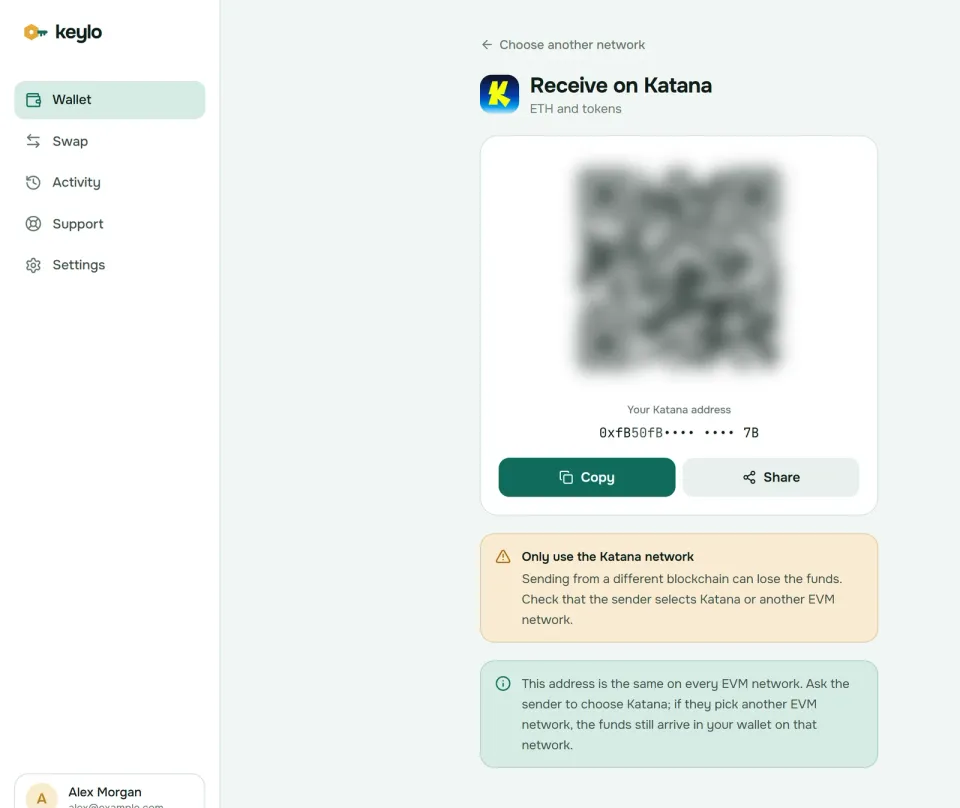
Keylo's Receive screen points out that this address is the same on every EVM network. So if ETH arrives on Ethereum or Base instead, it's safe at your address there. Open that network in Keylo, then bridge it to Katana.
If your exchange doesn't offer Katana withdrawals, fund the wallet by bridging. Withdraw ETH or USDC to a network your exchange supports, such as Ethereum or Base, and then use Keylo's swap screen to bridge into ETH on Katana.
How to send ETH and tokens on Katana#
Tap Send and choose ETH or a token on Katana.
Put the recipient in To by pasting or scanning. Keylo checks the format and checksum.
Enter the amount, or tap Max, which keeps enough ETH back for the fee.
Tap Review, then choose Slow, Normal or Fast.
Look over the network, the full address and the fee in ETH.
Tap Send. Keylo signs on your device, shows "On its way" and then "Sent", and links to the transaction on Katanascan.
What Keylo stops or flags#
Keylo test-runs each transfer before you sign. If the token contract would reject it, you see the reason instead of paying gas for a failed transaction. It also warns about:
Contracts as recipients. Morpho vaults, Sushi pools and token contracts may not handle a plain transfer, so tokens you send there often end up lost.
A token's own contract. Sending USDC to the USDC contract gets blocked.
Addresses from other chains. A Solana or Bitcoin address produces an error, not a send.
No ETH for gas. A token transfer stops with the gas message above.
Before you send USDC or USDT to an exchange, confirm it accepts Katana deposits for that exact contract. If it doesn't, bridge to a network it supports first.
Katana network gas fees#
Each Katana transaction pays in ETH for two things: execution on Katana, priced by an EIP-1559 base fee plus a small tip, and a share of the cost of posting data to Ethereum as blobs.
Fees are tiny. On October 24, 2026, Katana's network quoted a base fee of 0.001 gwei and a gas price of 0.002 gwei. At that rate a token transfer costs around 0.0000001 ETH, a few hundredths of a cent with ETH near $2,360. Even a swap that touches several contracts stays well below one cent.
Keylo's review screen shows the execution part. The Ethereum data share comes on top, but it added about 1% or less to the transactions checked that day.
At these prices, Slow, Normal and Fast differ by almost nothing, and all of them usually confirm within a second or two. If a transfer ever stays pending, Speed up on its status screen resends it with a higher fee. Keylo charges nothing on top of a normal send.
Vault Bridge tokens, AUSD and KAT#
Katana's tokens follow ERC-20, but a few of them work unusually. Here are the main contracts from Katana's address list:
Token | Also called | Katana address |
|---|---|---|
USDC | vbUSDC |
|
USDT | vbUSDT |
|
WETH | vbETH |
|
WBTC | vbWBTC |
|
AUSD | Agora dollar |
|
KAT | Katana token |
|
Vault Bridge is how those first four reach Katana. When you bridge USDC in through the canonical bridge, the USDC on Ethereum goes into Morpho vaults run by curators such as Gauntlet and Steakhouse Financial, and you get the Katana token. The yield goes to Katana's ecosystem, not to you, and holding vbTokens gives you no voting rights.
Katana's own risk page calls Vault Bridge "essentially a fractional reserve bridge." Not every dollar behind vbUSDC is instantly liquid, so withdrawals can slow down in a rush. That's the main reason to hold only what you need on Katana.
KAT became transferable on March 18, 2026, with a fixed supply of 10 billion. You can stake it as vKAT to vote on rewards, or as avKAT in a vault that votes for you. Leaving vKAT starts a 60-day cooldown with a 2.5% exit fee, as of October 2026. Keylo can hold and send KAT, but it can't stake it. Other tokens on Katana arrive through their own bridges, for example LBTC through Chainlink CCIP and jitoSOL through LayerZero.
As of October 2026, Keylo looks for USDT, WETH, WBTC and cbBTC on Katana by itself, but not for Vault Bridge USDC, AUSD or KAT. To add one, open Settings, find Custom tokens under Networks and tap Add token. Choose Katana, paste the address from the table, and enter the symbol and decimals (6 for USDC and AUSD, 18 for KAT). Do it before you bridge USDC in, so the balance shows up when it lands.
How to bridge to and from Katana#
Katana's canonical bridge is Agglayer's Unified Bridge, reached at bridge.katana.network. It handles Vault Bridge assets in and out of Ethereum, and Agglayer's proofs check that the bridge's books balance. Katana's docs warn that claims can be delayed, and "in extreme circumstances, the delay would be 7 days, or more," because Vault Bridge keeps only part of its assets liquid.
Liquidity bridges are the faster option. Katana's own docs note that routes like Relay support any token, since they only need liquidity on Sushi. Keylo gets quotes from LI.FI, which compares those bridges for you:
Tap Swap and choose what you're spending under You pay, for example ETH on Base.
Under You receive, pick Katana and ETH, or a token.
Compare routes by amount, tool, time, fees and the least you'll receive.
Open the details for every step, Minimum you receive and Delivered to, your own Katana address.
Confirm and follow the tracker until the funds arrive.
Slippage starts at 0.5%, and a Keylo service fee, when one applies, has its own line in the quote. A bridge either delivers or returns your funds, sometimes as a different token that still lands in your wallet. See how Keylo swaps and bridges for the details.
Leaving works best in reverse. Swap Vault Bridge USDC into ETH, or bridge it out as USDC on Base or Ethereum, so what lands on the other chain is something exchanges recognize.
What Keylo doesn't do on Katana#
No dapp connections. Keylo has no extension and no WalletConnect, so it can't use Sushi, Morpho, Katana Perps or the canonical bridge site.
No staking. Keylo stakes only on Cosmos SDK chains, so vKAT and avKAT are out of reach. Use Katana's staking page at
app.katana.network/stakewith a wallet that connects.No approval management. Keylo can't review or revoke approvals you gave to apps from another wallet.
No NFT view, hardware wallets, testnet or card purchases.
Keylo is non-custodial as well. If you lose both your password and your recovery phrase, no one can recover the wallet, Keylo included. The Keylo supported networks page lists every chain the phrase covers.
Katana risks and scams#
Losses on Katana mostly come from signing the wrong thing, sending the wrong token version or misjudging how the bridge works.
Approval phishing. Fake DeFi sites ask you to approve a token or sign a permit, then drain it. Keylo never signs for websites, and its own swaps approve exactly the amount you're swapping.
Fake KAT airdrops and rewards. Claim links in DMs and search ads lead to drainers. No real claim needs your recovery phrase.
Wrong token version. Vault Bridge USDC, AUSD and USDC bridged by other routes are separate contracts. Compare the address with the table above.
Fake support. Keylo staff never ask for your phrase or password. Reach them through Keylo's support page and read what Keylo does to protect your wallet.
The chain's design also adds trust. L2BEAT rates Katana a Stage 0 ZK rollup: its validity proofs are checked on Ethereum and its data goes there as blobs. However, one trusted operator orders transactions and proposes state roots, and Polygon's Security Council can remove the upgrade delay in an emergency, so users get no guaranteed window to exit before an upgrade. Katana's own admin multisig (Katana Foundation, GSR and Polygon Labs) works under a 10-day timelock, and a 13-member DeFi Security Council can veto its proposals.
Before you move real money with your Katana wallet:
Your phrase is on paper and confirmed in Keylo.
You hold some plain ETH on Katana for gas.
The token contract matches what the recipient expects.
You've closed any app positions you plan to move.
A small test transfer went through first.
The same phrase works on Katana's neighbors. The Polygon wallet guide and the Base wallet guide cover two networks you'll often bridge from.
Hold ETH and stablecoins on Katana in a wallet you control
Keylo encrypts your recovery phrase on your own device and never sees it. Send, swap and bridge on Katana from one place.
Katana wallet FAQ#
What is the gas token on Katana?
ETH. Every transaction on Katana pays its fee in plain ETH, whether you move ETH, USDC or KAT. WETH on Katana is a Vault Bridge token and can't pay gas, and neither can KAT. Keep a little ETH on Katana at all times, because without it your tokens can't move.
What is vbUSDC on Katana?
vbUSDC is Vault Bridge USDC, the main USDC on Katana, shown in many apps simply as USDC. When USDC enters through the canonical bridge, the Ethereum side goes into curated Morpho vaults and you receive vbUSDC. The yield goes to Katana's ecosystem rather than to you. It's a separate contract from Circle's USDC on other chains.
Can I send USDC from Katana to an exchange?
Only if the exchange accepts Katana deposits for that exact contract, which you should confirm on its deposit page first. Katana's main USDC is a Vault Bridge token, so an exchange that credits Circle's USDC elsewhere may not recognize it. The safer path is to bridge to a network your exchange lists, then send from there.
Do I need KAT to use Katana?
No. KAT is Katana's network token, transferable since March 18, 2026, and you stake it as vKAT or avKAT to vote on where rewards go. It doesn't pay fees, since gas on Katana is ETH. Keylo can hold and send KAT, but it can't stake it, so use a wallet that connects to app.katana.network/stake.
How long does it take to withdraw from Katana to Ethereum?
Through the canonical Agglayer bridge, withdrawals settle once a validity proof reaches Ethereum, and there's no seven-day optimistic window. Katana's docs warn that claims can be delayed, in extreme cases seven days or more, because Vault Bridge keeps only part of its assets liquid. Liquidity routes in Keylo's swap screen usually take minutes and show their time upfront.
How much are Katana network gas fees?
Very low. On October 24, 2026, Katana's gas price was about 0.002 gwei, so a token transfer cost around 0.0000001 ETH, a few hundredths of a cent. Fees include a small share for posting data to Ethereum, so they rise a little when Ethereum is busy. Keylo shows the execution fee before you sign, and that data share adds very little on top.
Can I use Morpho or Sushi on Katana with Keylo?
No. Keylo doesn't have a browser extension or WalletConnect, so it can't connect to Morpho, Sushi, Katana Perps or any other app. You can still swap and bridge inside Keylo through LI.FI. To lend, trade perps or provide liquidity, import your phrase into an extension wallet such as MetaMask or Rabby.
Is Katana the same as the Katana DEX on Ronin?
No. Katana network is an Ethereum layer 2 with chain ID 747474, where gas is paid in ETH. Katana is also the name of the decentralized exchange on Ronin, a separate gaming chain, which you use with a Ronin wallet. Keylo gives you an address on both chains from one recovery phrase, though it can't connect to apps on either, so pick the right network before you send.
Is Katana safe to use?
Katana posts its data to Ethereum and proves its state with zero-knowledge proofs, and L2BEAT rates it a Stage 0 ZK rollup. The weaker points are a single trusted operator, an emergency path that skips upgrade delays and Vault Bridge's fractional reserve, which can slow withdrawals in a rush. For everyday DeFi that's a common trade-off, but size long-term savings with care.