A Terra wallet holds LUNA, the coin of today's Terra blockchain, at an address that starts with terra1. This is the chain with the ID phoenix-1, often called Terra 2.0, which launched in May 2022 after the original Terra collapsed. You can hold LUNA there, send it with exchange memos, and stake it with validators.
The confusion comes from the old chain, which still runs as Terra Classic with its own coin, LUNC. Both chains use the same terra1 addresses from the same recovery phrase, but their balances never mix. Picking LUNC or Terra Classic by mistake is how many Terra users lose track of coins. Figures below are as of October 24, 2026, mostly read from the chains themselves.
Terra at a glance#
Item | Terra (what Keylo supports) | Terra Classic (not in Keylo) |
|---|---|---|
Chain ID |
|
|
Native coin | LUNA (1 LUNA = 1,000,000 uluna) | LUNC, the original LUNA |
Stablecoin | None of its own | USTC, the former UST |
Address |
| The same |
Derivation path |
| The same path |
Unbonding period | 21 days | 21 days |
Validators | 99 active of 100 slots (October 2026) | A separate set |
Block time | About 5.8 seconds | Separate chain |
Typical transfer fee in Keylo | About 0.002 to 0.003 LUNA | Not applicable |
Explorer | Separate explorers | |
In Keylo | Send and receive with memos, native tokens, history and staking | No support |
Keylo offers no swaps, bridges or dapp connections on Terra.
What a Terra wallet holds after the 2022 split#
In May 2022, Terra's algorithmic stablecoin UST lost its dollar peg, and LUNA collapsed with it. Terraform Labs halted the chain on May 13. On May 25, a governance vote approved a new chain without the stablecoin, and the new LUNA began trading within days.
The original chain kept running as Terra Classic. Its coin became LUNC (LUNA Classic) and its stablecoin USTC. So two chains now share a name, a history and an address format, but no balances. Terraform Labs filed for bankruptcy in January 2024, and co-founder Do Kwon received a 15-year prison sentence in December 2025. Both chains are now run by their own validators and governance.
Your Terra wallet address on both chains#
A Terra address is 44 characters long and starts with terra1. Keylo derives it on coin type 330, Terra's own number, on the path m/44'/330'/0'/0/0. Terra Classic also uses exactly the same prefix and coin type. Your recovery phrase therefore controls one terra1 address that exists on both chains, with two separate balances.
But that has a useful side. LUNC sent to your address on Terra Classic isn't lost, because you hold its key. Keylo just doesn't show Terra Classic, so you'd need a wallet that supports it to see or move those coins. The new LUNA was also airdropped to holders of the old tokens. If you held LUNA or UST before the crash, your old phrase may hold balances on both chains.
Keplr's second Terra path#
Keplr defaults to coin type 330 for Terra, but its chain settings also allow 118, the common Cosmos number. An account created on 118 has a different terra1 address. So if Keylo shows an address you don't recognize after an import, your old wallet probably used the other path, and the funds are still there.
How to choose a Terra wallet#
Several wallet types work for LUNA, but each has a trade-off.
Cosmos extension and mobile wallets. Keplr is a browser extension and mobile app that supports both Terra and Terra Classic, with staking and dapp connections. Station, the wallet Terraform Labs built, is still the wallet Terra's documentation points to.
Hardware wallets. A device such as a Ledger keeps the key offline and pairs with a software wallet, which suits long-term stakers.
Exchange accounts. The exchange holds the keys, and it may list LUNA and LUNC side by side.
Web wallets. Keylo runs in a browser tab on a phone or computer, with nothing to install.
A good Terra wallet makes the chain unmistakable. Look for the chain ID phoenix-1 or a clear "Terra" label, a memo field for exchanges, and staking that shows the 21-day unbonding period up front.
Keylo suits people who want LUNA on Terra next to their other coins, sent and staked from one phrase. It doesn't fit if you also manage LUNC or use Terra's DeFi apps, because Keylo doesn't support Terra Classic or dapp connections.
How to create a Terra wallet in Keylo#
On the sign-up page, enter your Full name, Email, Phone number, Password and Confirm password. Check the terms box and tap Create account.
Confirm your email if Keylo shows "Check your inbox".
Choose Create a new wallet at "Set up your wallet". Your browser generates a 12-word recovery phrase, then encrypts it with a key derived from your password (Argon2id, then AES-256-GCM) before anything reaches Keylo's server.
Tap Terra in your asset list to find your
terra1address and LUNA balance.Open Settings, choose Recovery phrase, enter your password, and copy the 12 words onto paper. Then confirm the words Keylo asks for.
Before you fund the wallet, turn on Two-factor authentication and set an Anti-phishing code.
The phrase is the only way to restore your Terra wallet, because a password reset lets you sign in again but can't decrypt anything. Store the paper somewhere safe.
Importing from Station or Keplr#
Choose Import a recovery phrase and enter the 12 or 24 words. Station and Keplr's default both use coin type 330, so your terra1 address and LUNA delegations should appear. Wallets from before the 2022 split used the same path too. Any LUNC on that address stays on Terra Classic, and Keylo won't list it.
Keylo has no Terra testnet, so make your first transfer a small one.
Get your terra1 address in a minute
Sign up with email and a password. Keylo creates the wallet in your browser and gives you a Terra address next to every other supported network.
How to receive LUNA on phoenix-1#
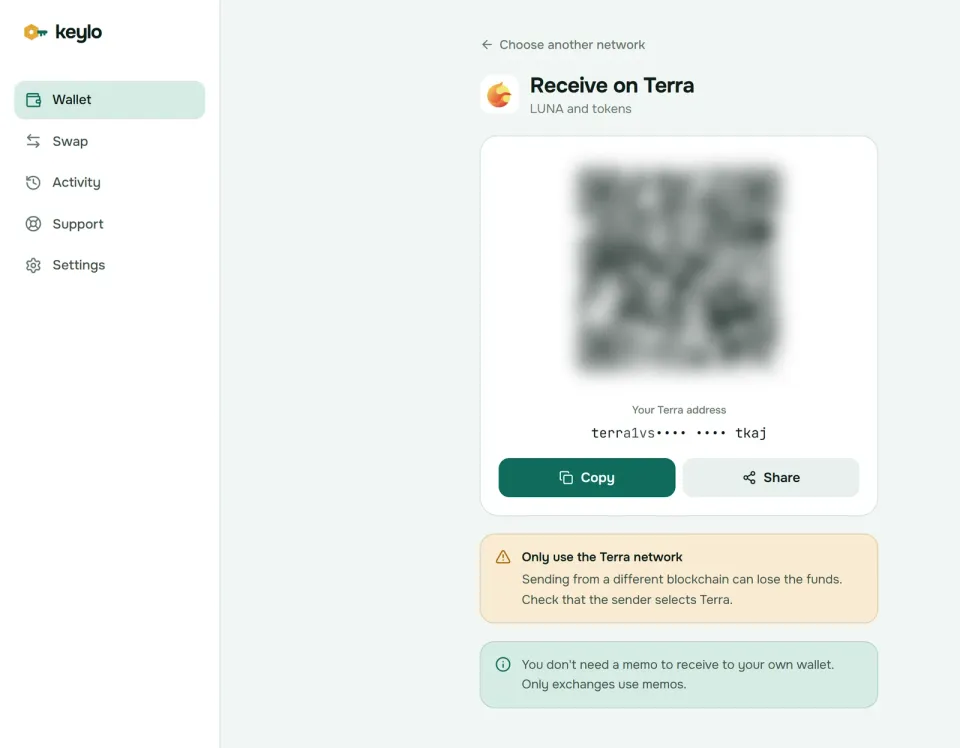
Tap Receive and choose Terra. The screen shows "Receive on Terra", a QR code and "Your Terra address".
Tap Copy or Share, or let the sender scan the QR code.
On the exchange, pick LUNA and the Terra network. Some exchanges call it Terra 2.0. Never pick LUNC or Terra Classic.
Leave the withdrawal's memo field empty, because your own wallet doesn't need one.
Check your activity list for the deposit, then tap it to open the transaction on Mintscan.
If an exchange's network names are unclear, open its network details and look for phoenix-1. LUNA also exists as an IBC token on other Cosmos chains, such as Osmosis. Those coins belong to your address on that chain until someone makes an IBC transfer to your terra1 address.
How to send LUNA#
Open Terra, tap Send and choose LUNA or another native token you hold on Terra.
Paste or scan the recipient into To. Keylo accepts only valid
terra1addresses.Enter an amount or tap Max, which holds back the fee.
For an exchange deposit, paste its memo into Memo.
Tap Review, pick Slow, Normal or Fast, and check the recipient, memo and fee.
Tap Send. Your browser signs it, and the status moves from "On its way" to "Sent", with a link to Mintscan.
Checks that matter on Terra#
Keylo sends only on phoenix-1, so you can't send LUNC from Keylo by accident. But the risk sits on the receiving end. An exchange's LUNC deposit address looks exactly like its LUNA one, so copy the address from the LUNA deposit page with Terra selected. A wrong product can mean weeks of support tickets, if the exchange can recover it at all.
Keylo also simulates each send before you sign. A balance that can't cover the amount plus the fee shows as an error, and a blank memo triggers a reminder that most exchanges need one. A terravaloper address in To is refused, because delegating happens on the Stake page.
Terra network fees#
A Terra transaction pays its gas limit times a price in uluna. The chain's floor is 0.015 uluna per unit of gas, and a plain transfer uses about 75,000 to 85,000 gas. Keylo adds a safety margin to the gas estimate, then pays the floor on Slow, 1.25 times on Normal and 1.75 times on Fast. So a typical send costs about 0.002 to 0.003 LUNA.
You pay for the gas limit, not the gas used, but that difference stays tiny. The review screen shows the exact amount before you sign, and Keylo adds no fee of its own. Fees go to Terra's validators and their delegators.
Terra Classic also has its own, separate fee rules. That's one more reason to keep the two networks apart in your head.
How to stake LUNA in Keylo#
Staking from a Terra wallet bonds your LUNA to a validator. The coins stay at your address, and only your key can release them.
Open Terra and tap Stake. The "Stake LUNA" page shows Available, Staked, Rewards and Unstaking.
Choose a validator from the list of active, unjailed ones. Each shows its voting power and commission, and Keylo flags commission above 20%.
Enter an amount or tap Max, then Review to see the fee and a reminder about the 21-day lock.
Tap Confirm to sign the delegation in your browser.
Come back to Move or Unstake a delegation. Rewards are collected with the Claim ... LUNA in rewards button, which appears once they build up.
Keep a little LUNA unstaked, because every claim, move or unstake pays a fee. About 0.05 LUNA covers several staking actions at October 2026 gas prices.
Rewards, unbonding and slashing on Terra#
Terra's mint setting is a fixed 7% inflation rate, and the new LUNA is paid out as staking rewards. Your yield therefore depends on how much LUNA is staked overall, about 300 million of roughly 1.29 billion in October 2026, minus your validator's commission. Mintscan shows the current rate.
Unstaked LUNA waits 21 days. During that time it earns nothing and can't move, then it returns to your balance by itself. Moving stake to another validator is instant, but the moved LUNA has to wait 21 days before it can move again.
Since an April 2026 governance vote, Terra allows 100 active validators, down from 130. A validator that double-signs loses 5% of its stake, and delegators share that loss. One that signs fewer than 5% of the last 10,000 blocks, about 16 hours, loses 0.01% and sits jailed for at least 10 minutes. Spreading stake over a few reliable validators limits the damage from any one of them.
What Keylo doesn't do on Terra#
No Terra Classic. Keylo doesn't show or send LUNC, USTC or anything else on
columbus-5.No swaps or bridges for Terra. Keylo's swap and bridge routes don't include it. To sell LUNA, send it with its memo to an exchange that lists LUNA on Terra.
No IBC transfers. Keylo moves LUNA within Terra only.
No dapp connections. There's no browser extension and no WalletConnect, so Terra's DeFi apps won't connect.
No governance votes. Your validator votes for your stake unless you vote yourself in another wallet.
No hardware wallets and no card purchases.
Keylo is also non-custodial. Lose both your password and your recovery phrase, and nobody can open the wallet, Keylo included. The list of Keylo networks shows what else your phrase covers.
Terra scams and mistakes to avoid#
Terra's history makes every Terra wallet a target, and many traps aim at people who lost money in 2022.
Fake proposals. Terra's governance has carried spam proposals titled with emoji, promising "LUNA airdrops" or a "Terra refund" for the UST collapse. Voters rejected them, and in June 2025 Terra raised the proposal deposit to 5,000 LUNA. A real proposal never asks you to claim anything by connecting a wallet.
Recovery services. Anyone offering to get back old UST or LUNC losses for a fee or your phrase is a scammer.
LUNA vs LUNC. Check the coin and the network on every deposit and withdrawal. The prices differ wildly, so a mix-up costs real money.
A missing memo. Exchange deposits usually need the memo to reach your account.
Fake support. Keylo staff never ask for your recovery phrase or password. Reach the team through the Keylo support page, and read what Keylo does to protect your wallet.
Before your first real transfer from your Terra wallet, confirm that:
Your recovery phrase is on paper and confirmed in Keylo.
The exchange says LUNA on the Terra network, not LUNC or Terra Classic.
You pasted the memo for any exchange deposit.
You keep a little LUNA unstaked for fees.
You tried a small test amount first.
The same phrase opens other Cosmos chains in Keylo. See the Osmosis wallet guide, the Cosmos Hub wallet guide and the Juno wallet guide. Terra's own documentation covers the chain itself.
Stake LUNA from a wallet only you control
Keylo encrypts your recovery phrase on your device and never sees it. Send, receive and stake LUNA on Terra in your browser.
Terra wallet FAQ#
Does Keylo support Terra Classic and LUNC?
No. Keylo supports the current Terra chain, phoenix-1, and its coin LUNA. Terra Classic, chain ID columbus-5, is a separate chain with LUNC and USTC. Both use the same terra1 address from your phrase, so you control your Terra Classic address too, but Keylo doesn't display or send Terra Classic balances. Use a wallet that supports Terra Classic for those.
I sent LUNC to my terra1 address. Is it lost?
No, it's on Terra Classic at the same terra1 address, and your recovery phrase controls it. Keylo just can't show it. To move it, import your phrase into a wallet that supports Terra Classic on coin type 330, such as Keplr. Never hand your phrase to anyone who offers to recover the coins for you.
What is the difference between LUNA and LUNC?
LUNA is the coin of today's Terra chain, phoenix-1, which launched in May 2022 without an algorithmic stablecoin. LUNC is the original LUNA on the old chain, renamed Terra Classic after UST collapsed. They trade at very different prices on separate chains. Sending one where the other is expected usually means a slow recovery request or a loss.
How long does it take to unstake LUNA?
21 days, as of October 2026. Unstaked LUNA earns no rewards and can't move for three weeks, then returns to your balance on its own. If you only want a different validator, move your stake instead. That happens in one transaction, although the moved LUNA can't move again for 21 days.
How do I recover a Terra Station wallet?
With its recovery phrase, in any wallet that derives Terra on coin type 330. In Keylo, choose Import a recovery phrase and enter the 12 or 24 words: Station uses the same path, so your terra1 address and LUNA delegations should appear. Accounts you created at other indexes won't match, but they stay reachable with the same phrase in a wallet that lets you pick the index.
Is there a Terra wallet app or extension?
Several. Keplr comes as a browser extension and a mobile app and supports both Terra chains. Station is the wallet Terra's documentation links to. Keylo has neither an extension nor an app store app: it runs in your browser, and you can add it to your phone's home screen so it opens like an app. On the default path, all three give the same terra1 address from one phrase.
Which network do I choose when withdrawing LUNA?
Choose LUNA on the Terra network, sometimes labeled Terra 2.0, and paste your terra1 address. Don't choose LUNC or Terra Classic, even though the address field accepts the same format. If the labels are unclear, look for the chain ID phoenix-1 in the network details. Leave the memo empty when withdrawing to your own wallet.
How much does it cost to send LUNA?
About 0.002 to 0.003 LUNA in Keylo as of October 2026. Terra's gas price floor is 0.015 uluna, and a transfer uses around 75,000 to 85,000 gas, so the network share is tiny. Keylo shows Slow, Normal and Fast options with the exact fee before you sign, and adds no fee of its own to the transfer.
Are LUNA airdrop and UST refund proposals real?
Treat them as scams. Terra's governance has carried proposals with emoji-filled titles promising LUNA airdrops or refunds for the UST collapse, and voters rejected them. They exist to send you to a site that asks you to connect a wallet or enter a phrase. Real governance votes happen on chain and never need your recovery phrase.