A Cosmos wallet holds the key to your cosmos1 address on the Cosmos Hub, where ATOM and any IBC tokens sent to you are recorded. You use it to stake ATOM, pay network fees and move coins to and from exchanges. People also call it an ATOM wallet or a Cosmos Hub wallet, and they all mean the same thing.
Two habits prevent most losses on the Hub. Add the exchange's memo every time you deposit, and remember that unstaked ATOM takes 21 days to come back. Every figure was checked on October 24, 2026.
Cosmos Hub at a glance#
Item | Cosmos Hub |
|---|---|
Native coin | ATOM (1 ATOM = 1,000,000 uatom) |
Address | Bech32, 45 characters, starts with |
Chain ID |
|
Typical transfer fee | About 0.001 ATOM (gas price floor of 0.005 uatom) |
Block time | About 5.7 seconds, and a transaction is final once it's in a block |
Tokens | IBC tokens from other chains ( |
Unbonding period | 21 days |
Active validators | 180 |
Explorer | |
In Keylo | Send, receive, memos, token balances, history, staking, ATOM swaps through THORChain (paused by THORChain as of October 24, 2026), Cosmos Hub Testnet. No IBC transfers, governance votes or dapp connections |
What ATOM does on the Cosmos Hub in 2026#
The Cosmos Hub launched in 2019 as the first chain of the Cosmos network, whose independent blockchains talk to each other over IBC (Inter-Blockchain Communication). ATOM is its coin. You pay fees with it, stake it to secure the chain, and staked ATOM carries a vote in governance.
For a few years the Hub also lent its validators to other chains through Interchain Security. Governance approved the Gaia v28 upgrade on September 1, 2026, which removed Interchain Security after its consumer chains were offboarded. The Hub now secures only itself, with 180 active validators.
In late September 2026 an attacker who took over contracts on Neutron moved about 1.7 million stolen ATOM to a Hub address. Validators halted the Hub for roughly a day, and the September 23 restart moved the 1,227,121 ATOM still there into a recovery multisig. No other account or delegation changed. On October 12, governance approved sending it on to Neutron's recovery multisig for return to the drained contracts. The Cosmos Hub forum update explains the steps.
How a Cosmos wallet works#
The chain keeps every balance, and your wallet keeps the private key that signs for your address.
Your Cosmos wallet address#
A Cosmos Hub address is 45 characters long and starts with cosmos1. The 38 characters after that prefix are lowercase letters and digits, never 1, b, i or o, which bech32 leaves out. It ends in a checksum, so a typo almost always makes it invalid instead of pointing at a stranger. Paste or scan addresses anyway, because a valid address copied from the wrong place is still a loss.
Mintscan doubles as a Cosmos wallet checker. Search any cosmos1 address there to see what it holds, stakes and has sent, with no login.
Keylo derives the key on m/44'/118'/0'/0/0, which uses coin type 118. Keplr and most other Cosmos wallets use the same default, so one recovery phrase shows the same cosmos1 address in each of them.
One key, several prefixes#
Osmosis, Celestia, Akash and Neutron also use coin type 118. Your key therefore produces osmo1, celestia1, akash1 and neutron1 addresses built from the same bytes. They're still separate accounts on separate chains. ATOM on the Hub never shows up at your osmo1 address unless someone moves it there over IBC.
IBC tokens at your address#
Tokens from other chains arrive as IBC vouchers named ibc/ plus a 64-character hash. Keylo looks up where each came from and lists it beside ATOM. Anyone can send you one, though, so a strange token isn't a payment. Look it up on Mintscan before touching it.
How to choose the best Cosmos wallet#
ATOM wallets come in four kinds.
Cosmos wallet extensions and apps. Keplr is a browser extension and mobile app made for Cosmos chains. Its site lists staking, governance voting and hardware wallet logins.
Hardware wallets. Devices such as Ledger keep the key offline and pair with a software wallet. They suit large balances you rarely move.
Exchange accounts. The exchange holds the ATOM, so it also decides when you can withdraw.
Web wallets. These run in a browser tab with nothing to install. Keylo is one of them.
Despite the name, Atomic Wallet is a separate multi-coin app, not a wallet made for ATOM. On the Hub, look for a memo field on every send, a staking screen that shows commission and unstake dates, IBC tokens labeled with their origin, and the standard 118 path so your phrase works elsewhere.
Keylo suits people who want to hold ATOM, stake it, deposit it to exchanges and, while THORChain's Cosmos route is open, swap it to other coins. It's the wrong tool for a few jobs:
IBC transfers. Keylo sends only within the Hub. To get ATOM onto Osmosis, withdraw it from an exchange on that network or use an IBC-capable wallet such as Keplr.
Voting. Keylo has no governance screen, so your validator's vote counts for your stake.
Apps. There's no browser extension and no WalletConnect, so Hub apps and liquid staking sites can't connect to Keylo.
Hardware wallets and card purchases. Neither is supported. Buy ATOM on an exchange, then withdraw it on the Cosmos network.
Keylo never holds your keys, so nobody can open the wallet if you lose both your password and your phrase. The networks page lists every chain your phrase covers.
How to create a Cosmos wallet in Keylo#
Keylo runs in any modern browser on a phone or computer, and you can add it to your home screen like an app.
Go to the Keylo sign-up page. Fill in Full name, Email, Phone number and Password, repeat the password, tick the terms box and choose Create account.
If you see "Check your inbox", confirm your email address first.
On "Set up your wallet", pick Create a new wallet. Your browser makes a 12-word recovery phrase and encrypts it with a key derived from your password (Argon2id, then AES-256-GCM). Keylo's server only ever receives the encrypted copy.
Open Cosmos Hub from your asset list. Your
cosmos1address, balance and history live there, next to a Stake button.Write the phrase down. In Settings, open Recovery phrase, enter your password and choose Show my phrase. Copy the 12 words onto paper, tap I wrote them down, then confirm three of them.
Before funding the wallet, turn on Two-factor authentication and set an Anti-phishing code in Settings.
An email password reset can't decrypt the wallet, so the paper copy is your only way back in.
Bringing your phrase over from Keplr#
Choose Import a recovery phrase and type your 12 or 24 words. Keplr's first account uses the same path, so its cosmos1 address appears with its balance. Your delegations come along too, since they live on chain rather than in an app.
Practice on the Cosmos Hub Testnet#
Turn on Testnet mode under Settings, then Networks. Keylo adds the Cosmos Hub Testnet, where ATOM has no value, and links to its faucet for free test coins. Try a memo send or a stake there first.
Get your cosmos1 address in a minute
Sign up with email and a password. Keylo creates the wallet in your browser and gives you a Cosmos Hub address ready to receive and stake ATOM.
How to receive ATOM#
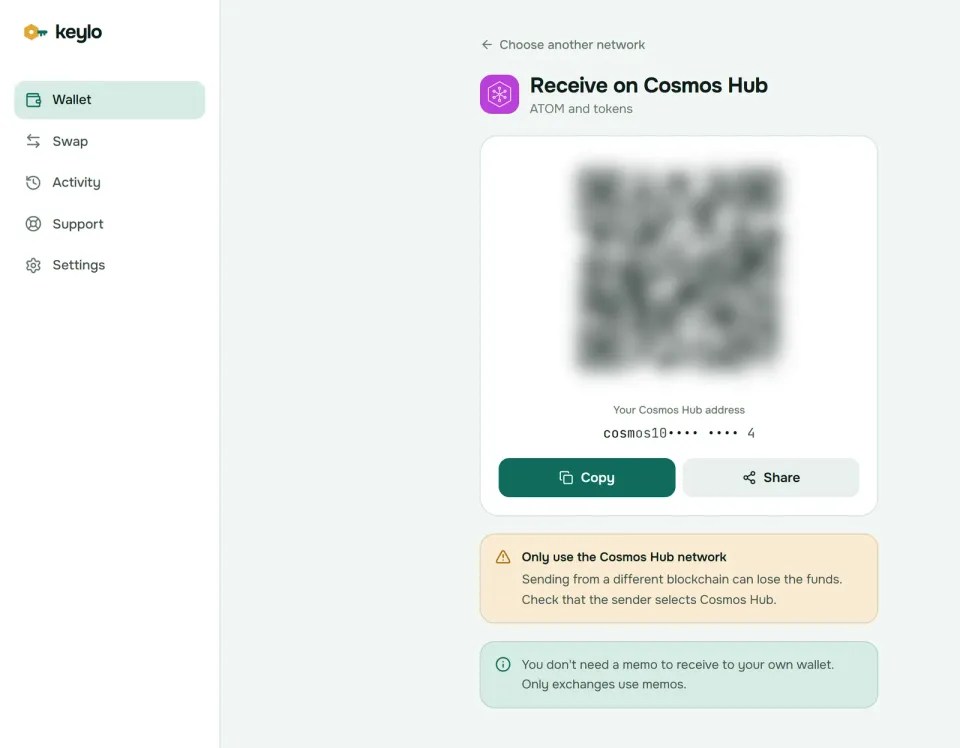
Tap Receive and choose Cosmos Hub. The screen reads "Receive on Cosmos Hub" and shows a QR code above "Your Cosmos Hub address".
Tap Copy or Share, or let the sender scan the code.
On an exchange, choose the Cosmos network for the withdrawal. Exchanges label it ATOM, Cosmos or Cosmos Hub.
If the withdrawal form has a memo box, leave it empty, because the address belongs to you alone.
Watch your activity list. A deposit usually appears within a few blocks, and each entry links to Mintscan.
How to send ATOM with a memo#
Tap Send and choose ATOM, or an IBC token you hold on the Hub.
In To, paste the address or scan its QR code. Keylo accepts only valid
cosmos1addresses.When sending to an exchange, copy its memo into the Memo field exactly. For a personal wallet, leave the field empty.
Enter an amount or tap Max. For ATOM, Max keeps back enough for the network fee.
Tap Review and choose Slow, Normal or Fast. The review lists the network, the recipient, the memo and the fee.
Tap Send. Keylo signs in your browser and shows "On its way", then "Sent", with a View on Mintscan link.
Why exchanges need the memo#
Most exchanges collect ATOM from every customer at one shared address, and the memo, usually a number, says whose deposit it is. Without it, support has to match the deposit by hand, which can take days. Some exchanges charge for that or refuse.
With the memo empty, Keylo's review shows "Sending to an exchange? Most exchanges need a memo to credit your deposit." Memos are public on chain, so never put anything private in one.
Other checks before you sign#
Pasting a validator address (
cosmosvaloper1...) stops the send and points you to staking instead.An address from another chain, such as
osmo1..., is rejected, because a plain Hub send only reachescosmos1addresses.Moving an IBC token still needs ATOM for the fee, and Keylo tells you when you have none.
Keylo simulates each transfer first, so most errors show on the review screen instead of costing you a fee.
Cosmos Hub fees explained#
Every Hub transaction sets a gas limit and pays that limit times a gas price, in uatom. The Hub runs a fee market, so the minimum price rises when blocks fill up and falls back when they're quiet. On October 24, 2026, it sat at its floor of 0.005 uatom per unit of gas.
A plain ATOM transfer uses about 100,000 to 120,000 gas. Keylo sets the gas limit about 50% above its simulation, and the Hub charges for the whole limit, so at the floor price a transfer from Keylo costs roughly 0.001 ATOM. Staking actions and multi-validator claims use more gas, but they stay small.
Keylo reads the live price before each transaction. Slow pays the current minimum, while Normal and Fast add 25% and 75% in case the price jumps. Cosmos chains don't refund unused gas, so the fee you approve is the fee you pay. Normal sends carry no Keylo fee.
How to stake ATOM from your Cosmos wallet#
Staking, also called delegating, bonds your ATOM to a validator. The coins never leave your address, and only you can unstake them.
Open Cosmos Hub from your asset list and tap Stake. The "Stake ATOM" screen shows what's Available, Staked, earning Rewards and Unstaking.
Browse the validator list. Each row shows the validator's share of voting power and its commission, and you can search by name. Jailed validators are left out.
Tap a validator, enter an amount or choose Max, then Review. Keep a little ATOM unstaked for later fees.
Check the amount and the network fee, then Confirm. Keylo signs on your device.
Return any time to Claim rewards, add more, Move stake to another validator or Unstake.
Picking validators#
The Hub has 180 active validators, and none may charge less than 5% commission. Keylo flags any that keep more than 20%. The list starts with the largest, but spreading stake beyond the top few keeps the Hub decentralized.
Your validator also votes for you, because delegators inherit their validator's vote unless they vote themselves. Check its voting record and uptime on Mintscan before you delegate.
Rewards and ATOM inflation#
New ATOM is minted every block at a yearly rate between 7% and 10%. The rate drifts toward whatever keeps two-thirds of all ATOM staked. On October 24, 2026, about 339 million of the 538 million ATOM in existence was staked, roughly 63%. That's below the target, so inflation sat at its 10% cap.
Stakers share that new ATOM after a 2% community pool tax. Spread over the staked supply, it works out to roughly 15% a year before your validator's commission. That sounds high, but staking mostly protects your share of the supply, because unstaked ATOM is diluted every block. Claim rewards when they're clearly worth more than the fee. Moving or unstaking also claims them automatically.
The 21-day unbonding period#
Unstaked ATOM spends 21 days unbonding. During that time it earns nothing, can't be moved, and can still be slashed for misbehavior that happened while it was staked. Keylo lists the date each unstake finishes, and the coins return to your available balance on their own. The Hub allows up to seven unstakes in progress per validator.
Moving stake (redelegation) is instant and keeps earning. The catch is that stake you just moved can't move again from its new validator for 21 days. Slashing on the Hub currently takes 5% for double-signing and 0.01% for long downtime, which also jails the validator.
Swap ATOM through THORChain#
ATOM is the one Cosmos coin Keylo can swap. Swaps go through THORChain, which trades native coins across chains without wrapped tokens. From ATOM you can reach native BTC, ETH, LTC, DOGE, XRP, TRX, BNB, AVAX and ETH on Base, and back again.
Tap Swap. Under You pay, choose ATOM and enter an amount of unstaked ATOM. Under You receive, pick the network and coin.
Compare the routes by amount, time and fees, then open the details: every step and fee, Minimum you receive, and Delivered to, your own Keylo address on the other network.
Confirm the swap and follow its progress until the funds land.
The default slippage limit is 0.5%. If a swap can't complete, THORChain refunds the ATOM to your sending address minus network fees. Any Keylo service fee appears as its own line in the quote. The swap and bridge page explains routes and refunds.
Cosmos Hub scams and mistakes to avoid#
Fake staker airdrops. Messages promise free tokens for ATOM stakers and link to a claim site that asks you to connect a wallet or enter your phrase. A real airdrop never needs it.
Spam IBC tokens. Tokens with a website in their name appear in balances unasked. Ignore them, and never visit the link.
Fake validators and support. Direct messages offering higher rewards through a "restake" link are phishing. Keylo staff never ask for your phrase or password. Use the Keylo support page instead, and see how Keylo protects your wallet.
Before your first real transfer:
The 12 words are on paper, and Keylo has confirmed your backup.
You hold some unstaked ATOM for fees.
The exchange withdrawal network says Cosmos or ATOM, not BNB Smart Chain.
Exchange deposits carry the exact memo the exchange gave you.
A small test amount arrived before the large one.
Your phrase also opens addresses on other Cosmos chains. The Osmosis wallet guide and the Celestia wallet guide explain them.
Stake ATOM from a wallet only you control
Keylo encrypts your recovery phrase on your device and never sees it. Send ATOM with memos and stake it from one place.
Cosmos Hub wallet FAQ#
What is the best Cosmos wallet for ATOM?
It depends on how you use ATOM. To vote, use Cosmos apps or move tokens over IBC, a Cosmos-native wallet such as Keplr fits best. To hold, stake and send ATOM with nothing to install, or swap it through THORChain when that route is open, a web wallet like Keylo works. For large long-term holdings, pair a hardware wallet with a software wallet.
Do I need a memo to send ATOM?
Only when the receiving side asks for one. Exchanges usually pool deposits at one address and use the memo to credit your account, so copy it exactly. Transfers between personal wallets need no memo. When you withdraw from an exchange to Keylo, leave its memo box empty, since your cosmos1 address belongs to you alone.
What happens if I send ATOM to an exchange without the memo?
The ATOM reaches the exchange's shared address, but the exchange can't tell whose it is. You'll need to contact its support with the transaction hash, amount and your account details so they can credit it by hand. That can take days, some exchanges charge a fee, and a few don't recover deposits at all. Keylo warns you when the memo is empty.
How long does it take to unstake ATOM?
21 days. Once you unstake, the ATOM earns no rewards and can't be moved for three weeks, then it returns to your available balance without any action from you. Keylo shows the date each unstake finishes. If you only want a different validator, use Move stake instead, which switches instantly and keeps earning.
How much does it cost to send ATOM?
About 0.001 ATOM for a plain transfer from Keylo as of October 2026. The Hub's fee market had a floor of 0.005 uatom per unit of gas, a transfer uses roughly 100,000 to 120,000 gas, and Keylo adds a safety margin to the gas limit. The price rises when blocks are busy. Keylo shows the exact fee for Slow, Normal and Fast before you sign and adds no fee of its own.
Can I use my Keplr recovery phrase in Keylo?
Yes. Choose Import a recovery phrase and enter the 12 or 24 words. Keylo uses the standard Cosmos path, m/44'/118'/0'/0/0, which matches Keplr's first account, so you'll see the same cosmos1 address, balance and delegations. Extra accounts made later from the same phrase use other paths and won't appear, but their funds stay where they are.
Is there a Cosmos wallet extension?
Yes. Keplr, for example, comes as a browser extension and a mobile app, and Cosmos apps commonly connect to it. Keylo isn't an extension: it runs in a browser tab, can be added to your home screen, and can't connect to Cosmos apps. Both open the same cosmos1 address from one recovery phrase.