A Juno wallet holds JUNO, the coin of Juno Network, at an address that starts with juno1. Juno is a community-run Cosmos chain for CosmWasm smart contracts, where anyone can upload a contract without asking permission. JUNO pays the fees, secures the chain through staking and carries votes in governance.
This page is about Juno Network's JUNO coin, not apps from other companies that share the Juno name. Most people looking for a Juno wallet want to do two things: move JUNO to and from exchanges, and stake it. Both are simple once you know Juno's two quirks. Unstaking takes 28 days, longer than on most Cosmos chains, and since March 2026 only 25 validators earn rewards. Figures below are as of October 24, 2026, taken from the chain itself where possible.
Juno at a glance#
Item | Juno |
|---|---|
Native coin | JUNO (1 JUNO = 1,000,000 ujuno) |
Chain ID |
|
Address format | Bech32 with a checksum, starts with |
Derivation path |
|
Typical transfer fee in Keylo | About 0.015 to 0.026 JUNO |
Block time | About 2.6 seconds, final once committed |
Unbonding period | 28 days |
Active validators | 25, the maximum since March 2026 |
Smart contracts | CosmWasm, open to any developer |
Token types | Native coins (JUNO, IBC and token factory assets) and CW20 contract tokens |
Explorer | |
In Keylo | Send and receive with memos, native tokens, history and staking. No CW20 tokens, swaps, bridges or dapp connections |
What makes a Juno wallet different#
The chain records every JUNO balance, and your wallet holds the key that signs for yours. Juno launched on October 1, 2021, with 47% of its genesis supply airdropped to Cosmos Hub stakers. There was never a token sale, and holders steer the chain through on-chain votes. Software upgrades pass the same way: v31, the version running in October 2026, was approved in proposal 379.
Your juno1 address#
A Juno address has 43 characters and begins with juno1. Bech32 encoding adds a checksum, so a mistyped character normally fails validation rather than sending JUNO somewhere else.
Keylo derives it on m/44'/118'/0'/0/0, the Cosmos default that Keplr also uses for Juno. The same key gives you cosmos1, osmo1 and axelar1 addresses, but each is a separate account on its own chain. JUNO sent on Juno to an osmo1 address won't arrive, which is why Keylo only accepts juno1 addresses on Juno.
Native coins vs CW20 tokens#
Juno has two kinds of token, and wallets treat them differently.
Native coins sit in your account's bank balance. They include JUNO, IBC tokens from other chains (their denoms start with
ibc/) and token factory assets (starting withfactory/). Keylo finds these automatically and lists them next to JUNO.CW20 tokens are smart contracts that keep their own ledger of who owns what. Your
juno1address can own them, but they don't appear in the bank balance.
Keylo reads only native balances, so it can't show or send CW20 tokens. They stay safe at your address, and a wallet that supports CW20 can still manage them with the same phrase.
How to choose a Juno wallet#
Juno wallets come in a few types, and the right one depends on how much you do on chain.
Cosmos extension and mobile wallets. Keplr is a browser extension and mobile app that stakes, votes and connects to Juno's CosmWasm apps. Juno's own site also lists Cosmostation.
Hardware wallets. A Ledger keeps the key offline and pairs with Keplr, a sensible choice for a large stake.
Exchange accounts. The exchange holds your keys and controls withdrawals, and fewer exchanges list JUNO than bigger coins.
Web wallets. Keylo runs in a browser tab, with no extension or app store download.
If you used Leap, its apps closed by May 28, 2026. Leap never held your coins, so your phrase still controls the same addresses in any wallet that uses the standard path.
A good Juno wallet shows the unbonding period before you unstake and makes moving stake easy. It also offers a memo field for exchanges and lists native IBC tokens without manual setup.
Keylo fits people who mainly hold, send and stake JUNO and want it next to their other coins. If you plan to use Juno's DeFi or NFT contracts, pick a wallet that connects to dapps, because Keylo can't.
How to create a Juno wallet in Keylo#
Visit the sign-up page and complete Full name, Email, Phone number, Password and Confirm password. Agree to the terms, then tap Create account.
When Keylo shows "Check your inbox", click the link in the email.
Pick Create a new wallet under "Set up your wallet". Your browser creates a 12-word phrase and encrypts it with a key derived from your password (Argon2id, then AES-256-GCM), so only an encrypted copy reaches Keylo.
Select Juno in the asset list to see your
juno1address and balance.Go to Settings and open Recovery phrase. After you re-enter your password, write the words on paper and confirm the ones Keylo picks.
Then switch on Two-factor authentication and set an Anti-phishing code.
Keylo can't recover your wallet for you. A password reset restores your login but can't decrypt the wallet, so only the recovery phrase can bring it back.
Coming from Keplr or Leap#
Choose Import a recovery phrase and enter your 12 or 24 words. Keylo derives Juno on the same path as Keplr, so your juno1 address, balance and delegations come across. Delegations to validators that have since left the active set also show up, and you can move them. Accounts on other indexes won't appear, but the phrase still controls them in the original wallet.
There's no Juno testnet in Keylo, so try a small transfer before a large one.
Get your juno1 address in a minute
Sign up with email and a password. Keylo creates the wallet in your browser, with a Juno address next to every other supported network.
How to receive JUNO#
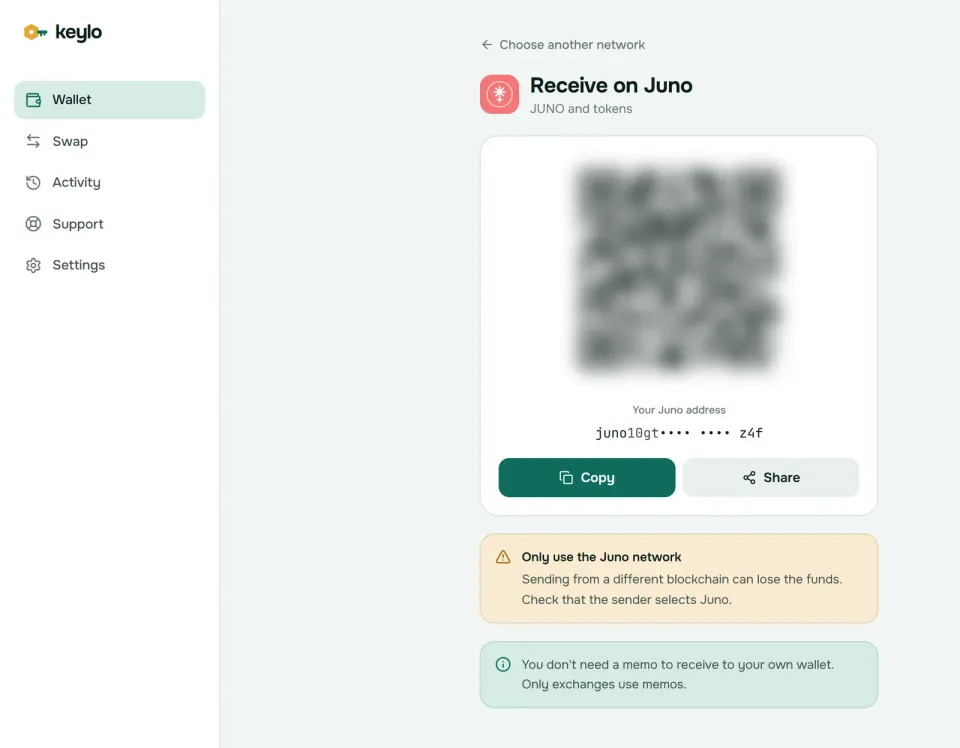
Tap Receive and select Juno. The screen reads "Receive on Juno", with a QR code and "Your Juno address".
Use Copy or Share, or show the QR code to the sender.
On an exchange, choose Juno as the withdrawal network. Don't substitute another network if Juno isn't offered.
Skip the memo on the withdrawal form, since your own wallet doesn't need one.
Look for the deposit in your activity list, where each entry links to Mintscan.
JUNO held on Osmosis is an IBC token at an osmo1 address. To bring it home, the sender makes an IBC transfer to your juno1 address from an Osmosis app or wallet. Once it arrives it's ordinary JUNO again, and you can stake it.
How to send JUNO with a memo#
Open Juno and tap Send, then choose JUNO or a native token you hold on Juno.
Paste or scan the address into To. Keylo checks that it starts with
juno1and passes the checksum.Type an amount or tap Max, which leaves enough JUNO for the fee.
For an exchange deposit, paste the memo into Memo. Sends between personal wallets don't need one.
Tap Review, choose Slow, Normal or Fast, and check the recipient, memo and fee.
Tap Send. Keylo signs in your browser and shows "On its way", then "Sent" with a Mintscan link.
Exchanges often receive JUNO at a shared address and match deposits by memo. If the field is blank, Keylo reminds you that most exchanges need one. Keylo also simulates the transfer first, so an amount you can't cover shows up as an error before you sign. It refuses a validator's junovaloper address in To as well, since stake has to go through the Stake page.
Juno network fees#
Every Juno transaction pays a gas limit times a gas price in ujuno. Keylo prices gas from 0.075 ujuno, the same price Keplr's Juno settings use. Normal pays 1.25 times that and Fast 1.75 times.
A plain JUNO transfer used about 130,000 gas in October 2026, more than a transfer on many other Cosmos chains. Keylo also adds a safety margin to its gas estimate, because you pay for the limit you set, not the gas you use. So a typical transfer costs about 0.015 JUNO on Slow and 0.026 JUNO on Fast, and the review screen shows the exact figure.
Staking actions pay fees the same way. Claiming rewards very often therefore wastes fees, and Keylo warns when a claim would cost more than it collects. Keylo adds no fee of its own to normal sends.
How to stake JUNO in Keylo#
Delegated JUNO stays in your account. The validator can't spend it, and only your key can undelegate it.
Open Juno and tap Stake to reach "Stake JUNO", with your Available, Staked, Rewards and Unstaking totals.
Choose a validator. Keylo lists only active, unjailed validators, with voting power and commission, and flags commission above 20%.
Enter an amount or tap Max, then Review. Keylo shows the fee and reminds you that unstaking takes 28 days.
Tap Confirm, and your browser signs the delegation.
Later, tap Move to change validator or Unstake on a delegation. Once rewards build up, a Claim ... JUNO in rewards button appears at the top.
Leave some JUNO unstaked, because every claim, move and unstake pays a fee. About 0.2 JUNO covers several of them at October 2026 gas prices.
Plan around the 28-day unbonding period#
Juno's unbonding period is 28 days, among the longest in Cosmos. Unstaked JUNO earns nothing for four weeks and can't move, then returns to your balance on its own. Keylo's staking page lists each pending amount with the date it becomes available.
So stake in layers. Keep what you might need this month liquid, stake the rest, and unstake in portions rather than all at once. Moving stake to another validator is instant, but the moved JUNO can't move again for 28 days. Juno also allows only seven pending unstake or move entries per validator.
Check that your validator is still active#
In March 2026, governance proposal 372 cut Juno's active set from 80 validators to 25. The proposal explained that network fees had fallen and rewards were spread too thin. Only the top 25 validators by stake now earn rewards, and delegators to anyone below that line earn nothing.
If you imported an older wallet, open the staking page and compare your delegations with the validator list. Keylo's list shows only active validators. If a delegation under "Your stake" shows a shortened address instead of a validator name, that validator has probably dropped out of the set. Tap Move and pick an active validator, which moves the stake at once with no 28-day wait.
Slashing on Juno#
Validators that misbehave lose part of their stake, and delegators share the loss. As of October 2026, double signing costs 5%. Missing more than 95% of the last 20,000 blocks, roughly 14 hours, costs 0.01% and jails the validator for at least 10 minutes. Mintscan shows each validator's uptime history.
What Keylo doesn't do on Juno#
No CosmWasm apps. Keylo has no browser extension and no WalletConnect, so it can't sign contract calls for Juno's DeFi, DAO or NFT apps.
No CW20 tokens. Keylo shows native coins only. Your CW20 balances stay at your address for another wallet to manage.
No IBC transfers. Keylo sends JUNO within Juno only, so it can't move JUNO to Osmosis.
No swaps or bridges for Juno. Keylo's swap and bridge routes don't include Juno. To sell, send JUNO with its memo to an exchange that supports the Juno network.
No governance votes. Your validator votes for your stake unless you vote yourself in another wallet.
No hardware wallets and no card purchases.
Keylo is non-custodial as well, so losing both your password and your recovery phrase means nobody can open the wallet, Keylo included. The list of networks Keylo supports shows where else the phrase works.
Juno scams and mistakes to avoid#
Most problems with a Juno wallet come from fake links and rushed staking decisions.
Fake airdrops for JUNO stakers. Tokens or messages promising rewards for stakers lead to sites that ask you to connect a wallet or type your phrase. Ignore them.
Lookalike tokens. Token names on Juno aren't unique. Check the full denom or contract address on Mintscan before you accept a token as payment.
Staking money you'll need soon. Twenty-eight days is a long time if prices move or a bill arrives. Keep a buffer unstaked.
A forgotten memo. Exchange deposits without the memo need a support ticket to recover.
Fake support. Keylo staff never ask for your recovery phrase or password. Use the Keylo support page, and set up two-factor and an anti-phishing code as described on Keylo's security page.
Before you stake or send a real amount, check that:
Your recovery phrase is on paper and confirmed in Keylo.
The exchange withdrawal network says Juno.
Any JUNO you might need within a month stays unstaked.
Your validator appears in Keylo's active list.
You sent a small test transfer first.
Your phrase also opens other Cosmos chains on the same path. The Osmosis wallet guide covers the DEX where JUNO trades, the Neutron wallet guide covers another CosmWasm chain, and the Cosmos Hub wallet guide covers ATOM. For the chain's own news and apps, start at junonetwork.io, and its software releases live on GitHub.
Stake JUNO from a wallet only you control
Keylo encrypts your recovery phrase on your device and never sees it. Send, receive and stake JUNO in your browser.
Juno wallet FAQ#
How long does it take to unstake JUNO?
28 days, as of October 2026. Once you unstake, the JUNO earns no rewards and can't move for four weeks, then it returns to your balance by itself. To change validators without waiting, move your stake instead. That takes effect immediately, although the moved JUNO can't move again for 28 days.
Why did my JUNO staking rewards stop?
Your validator has probably left the active set. In March 2026, Juno governance cut the set to 25 validators, and only those earn rewards. A jailed validator also stops earning. Open Stake in Keylo, compare your delegations with the active list, and tap Move to send the stake to an active validator. Moving is instant.
How many validators does Juno have?
Juno allows 25 active validators as of October 2026, and all 25 slots are filled. The limit was 80 after an April 2025 vote, then proposal 372 cut it to 25 in March 2026 because falling fees spread rewards too thin. Keylo's staking page lists only those active, unjailed validators, sorted by stake.
How much does it cost to send JUNO?
About 0.015 to 0.026 JUNO in Keylo as of October 2026, depending on whether you choose Slow, Normal or Fast. A plain transfer uses around 130,000 gas, and Keylo prices gas from 0.075 ujuno with a safety margin on the gas limit. The review screen shows the exact fee before you sign, and Keylo adds nothing to it.
Can I see CW20 tokens in my Juno wallet?
Not in Keylo. Keylo lists native coins on Juno, such as JUNO, IBC tokens and token factory assets, because those live in your bank balance. CW20 tokens are separate contracts with their own ledgers, so Keylo can't display or send them. They still belong to your juno1 address, and a CW20-aware wallet using the same phrase can manage them.
Do I need a memo to send JUNO to an exchange?
Usually, yes. Exchanges often collect JUNO at one shared address and use the memo to credit your account. Copy it from the exchange's deposit page into Keylo's Memo field. Without it, your JUNO still reaches the exchange, but support has to match it by hand. Transfers between personal wallets don't need a memo.
Can I import my Keplr or Leap Juno wallet into Keylo?
Yes. Choose Import a recovery phrase and enter your 12 or 24 words. Keylo derives Juno on m/44'/118'/0'/0/0, the standard path, so your juno1 address, balance and delegations should appear. Leap closed its apps by May 28, 2026, but it never held your funds, so its phrase works in any wallet that uses that path.
Is there an official Juno wallet app?
No. Juno Network doesn't make its own wallet. Its website points to interchain wallets such as Keplr, which comes as a browser extension and a mobile app, and Cosmostation. Keylo is another option: a web wallet you sign in to from any browser and can add to your phone's home screen, with no app store download. On the standard path, all of them give the same juno1 address from one phrase.
How do I move JUNO from Osmosis to Juno?
JUNO on Osmosis is an IBC token at your osmo1 address, so it needs an IBC transfer back to Juno. Make that transfer from an Osmosis app or a wallet that supports IBC, entering your juno1 address as the recipient. Keylo can't make IBC transfers, but once the JUNO arrives you can send or stake it from Keylo.