A Celestia wallet keeps the private key for your celestia1 address, which is where your TIA sits, earns staking rewards and gets sent from. Celestia is a data availability network: rollups pay TIA to publish their transaction data on it. As a holder, though, you mostly do three things with TIA. You send it, you stake it, and you move it to and from exchanges.
Three Celestia rules are worth knowing before you start. Unstaking takes 14 days and 1 hour. Every validator charges at least 20% commission. Exchange deposits need the memo the exchange gives you. All figures here were checked on October 24, 2026.
Celestia at a glance#
Item | Celestia |
|---|---|
Native coin | TIA (1 TIA = 1,000,000 utia) |
Address | Bech32, 47 characters, starts with |
Chain ID |
|
What the chain does | Data availability: rollups post data as blobs and pay for the space in TIA |
Transfer fee | Well under 0.001 TIA |
Block time | About 2.8 seconds, and a transaction is final once it's in a block |
Unbonding period | 14 days and 1 hour |
Validators | 100 slots, 97 active; minimum commission 20% |
Issuance | 2.32% a year on October 24, 2026, cut from 5% to 2.5% by the Matcha upgrade and falling toward 1.5% |
Explorer | |
In Keylo | Send, receive, memos, token balances, history, staking. No swaps, IBC transfers, blob submission, testnet or dapp connections |
What TIA pays for on a data availability chain#
Most chains run apps. Celestia instead stores data for other chains. A rollup bundles its users' transactions and posts the data to Celestia in blobs, so anyone can later check that the data was published. The rollup pays for that space in TIA, and the price grows with the number of bytes.
That's TIA's first job. It also pays the gas on every ordinary transaction, it's staked to secure the network, and staked TIA votes in governance. Your wallet only does the ordinary parts. Keylo signs transfers and staking actions, not blob submissions, so it isn't a tool for running a rollup.
Celestia keeps growing its capacity. The Matcha upgrade made room for blocks of up to 128MB, and in December 2025 governance raised the working limit to 32 MiB. Matcha also cut yearly issuance from 5% to 2.5%. That cut matters to stakers, and the staking section covers it.
Your Celestia wallet address#
A Celestia address is 47 characters long and begins with celestia1. Everything after that is lowercase letters and digits, and the last six characters are a checksum. Because of that checksum, a mistyped address is usually rejected rather than sent to a stranger.
Keylo derives the key on m/44'/118'/0'/0/0, Cosmos coin type 118. Keplr uses the same default, so your phrase shows the same celestia1 address in both. The same key also opens a cosmos1 address on the Cosmos Hub and an osmo1 address on Osmosis. They share bytes, but they're separate accounts with separate balances.
Look up your Celestia wallet on an explorer#
Paste your celestia1 address into Mintscan to see its balance, delegations and every transaction, without signing in. Each entry in Keylo's activity list also links straight to the matching Mintscan page. An explorer only reads public data, so it never needs your phrase. A site that asks for it isn't an explorer.
TIA on other chains#
TIA also travels to other Cosmos chains over IBC, Osmosis in particular. TIA there is an IBC voucher at your osmo1 address, not native TIA. You can't stake it with Celestia validators until someone sends it back to Celestia. Keylo can show that voucher on Osmosis, but it can't make the IBC transfer home. Use an IBC-capable wallet or an exchange for that.
How to choose a Celestia wallet#
Your options for holding TIA:
Cosmos-native wallets. Keplr is a browser extension and mobile app for Cosmos chains, Celestia included. Its site lists staking, governance voting and hardware wallet logins.
Hardware wallets. Devices like Ledger keep the key offline and pair with a software wallet, which suits large or long-term stakes.
Exchange accounts. The exchange holds the TIA. Some offer staking, but they set the terms and the payout.
Web wallets. These open in a browser tab with nothing to install. Keylo is one.
If you keep TIA in a multi-chain app such as Trust Wallet, check two things in that app's own documentation: that it holds TIA on the Celestia network itself rather than a wrapped version, and whether it can stake TIA or only store it.
A good Celestia wallet shows each validator's commission before you delegate, since that's where Celestia stakers lose the most. It should state the unbonding period and the date each unstake ends. It should also use the standard 118 path, and make memos easy to add.
Keylo fits people who want to hold TIA, stake it and handle exchange deposits from a browser. It's a poor fit if you want to vote yourself, move TIA to other chains over IBC or use rollup apps. Keylo has no voting screen, no IBC transfers and no dapp connections, and it has no hardware wallet support or card purchases either.
How to create a Celestia wallet in Keylo#
Nothing needs installing. Keylo opens in a phone or desktop browser, and you can pin it to your home screen.
Open the Keylo registration page. Enter your Full name, Email, Phone number and a Password twice, accept the terms and press Create account.
Confirm your email when Keylo shows "Check your inbox".
Under "Set up your wallet", choose Create a new wallet. A 12-word recovery phrase is generated in your browser and encrypted there with your password (Argon2id, then AES-256-GCM). The server stores only that encrypted copy.
Tap Celestia in your asset list to see your
celestia1address, your TIA balance and a Stake button.Back the phrase up today. Go to Settings, then Recovery phrase, re-enter your password and choose Show my phrase. Write the words in order on paper, tap I wrote them down and confirm three of them.
Add Two-factor authentication and an Anti-phishing code in Settings.
That paper copy is the wallet. Keylo can't decrypt your vault, and resetting your password doesn't bring it back. Only the phrase does.
Already staking TIA in Keplr?#
Pick Import a recovery phrase instead and enter your 12 or 24 words. Keplr's first account uses the same path, so your celestia1 address appears with its balance. Your delegations and pending rewards appear too, because they're recorded on chain. Any additional accounts made from that phrase use other paths and won't show here.
Keylo has no Celestia testnet, so practice with a small real amount instead. A test send costs a tiny fraction of a TIA.
Open a Celestia wallet in your browser
Sign up with email and a password. Keylo builds the wallet on your device and gives you a celestia1 address for TIA, plus addresses on every other network it supports.
Receiving TIA in your Celestia wallet#
Tap Receive and pick Celestia. You'll see "Receive on Celestia", a QR code and "Your Celestia address".
Send the address with Copy or Share, or show the QR code to the sender.
On an exchange, choose the Celestia network for your TIA withdrawal. Some exchanges call it TIA.
Leave any memo field on the withdrawal form blank, since the address is yours alone.
Watch your activity list. With blocks under three seconds apart, a transfer lands quickly once the exchange sends it.
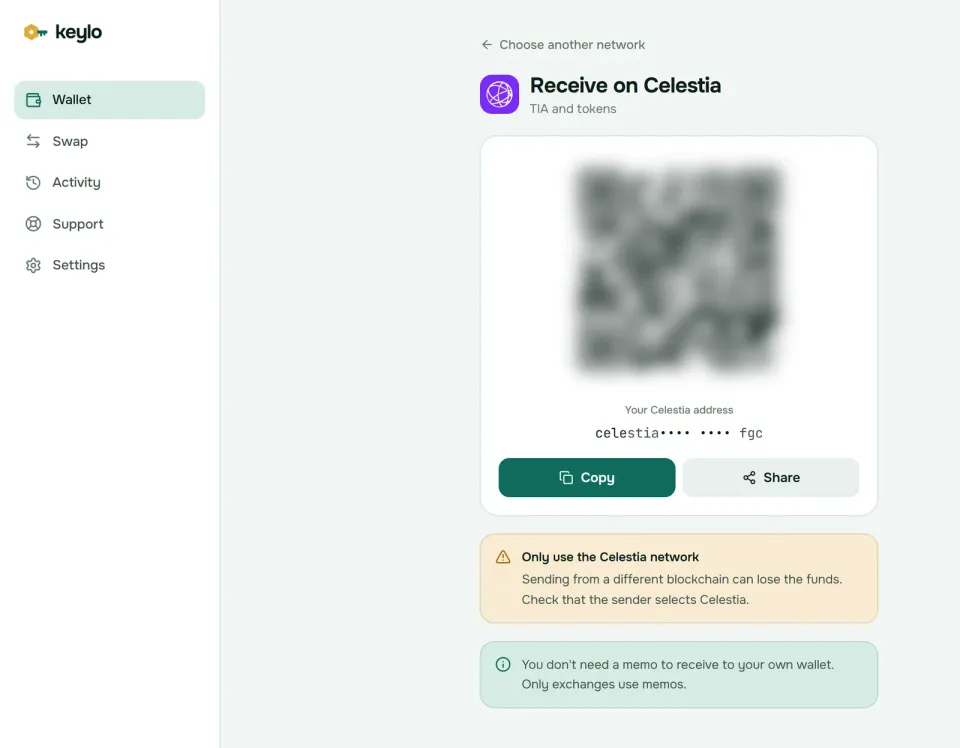
The screen also warns you to use only the Celestia network, and it notes that your own wallet never needs a memo to receive. For a big first withdrawal, try a small amount first.
Sending TIA and when to add a memo#
Tap Send and choose TIA.
Fill in To by pasting or scanning. Keylo checks that the address starts with
celestia1and that its checksum is valid.For an exchange deposit, paste the exchange's memo into Memo. For a friend or your own wallet, leave it empty.
Type an amount or tap Max. Max keeps back the network fee.
Tap Review, choose Slow, Normal or Fast, and check the network, recipient, memo and fee.
Tap Send. Keylo signs in your browser, shows "On its way" and then "Sent", and gives you a View on Mintscan link.
The memo tells an exchange which customer a deposit belongs to. Exchanges often receive TIA for everyone at one address. Without the memo, your TIA arrives but sits uncredited until support traces it, and some exchanges won't. If you leave the field empty, Keylo's review asks whether you're sending to an exchange.
Keylo also simulates the transfer before you sign, so problems show up on the review screen. A validator address (celestiavaloper1...) is turned away with a pointer to staking. A cosmos1 or osmo1 address is rejected, because a Celestia send reaches only celestia1 addresses. Part of a balance that's still vesting can't be sent, and Keylo says so.
Celestia network fees#
Every transaction pays gas times a gas price, in utia. A plain TIA transfer uses about 65,000 to 80,000 gas. Even with the safety margin Keylo adds to the gas limit, that comes to well under 0.001 TIA. Staking, unstaking and claiming cost a little more, but still a small fraction of a TIA.
Rollups pay on a different scale. A blob transaction's gas grows with every byte it publishes, so blobspace, not transfers, produces most of Celestia's fee demand. None of that touches an ordinary send.
Keylo prices Celestia gas at 0.004 utia per unit, or at the node's own floor if that is higher. Slow pays that price, and Normal and Fast add 25% and 75%. Cosmos chains don't refund unused gas, so the quoted fee is what you pay. Normal sends carry no Keylo fee.
Staking TIA: commission, rewards and the 14-day unbonding#
Staking bonds your TIA to a validator without moving it out of your wallet. Here's how it works in Keylo:
Open Celestia and tap Stake. The "Stake TIA" page shows your Available, Staked, Rewards and Unstaking balances.
Scroll or search the validator list. Each row shows voting power and commission.
Pick one, enter an amount, keep a little TIA back for fees, and choose Review.
Read the summary and fee, then Confirm.
Later, use Claim rewards, Move stake or Unstake from the same page.
Why every validator charges at least 20%#
Celestia has raised its minimum validator commission twice. CIP-41 lifted it from 5% to 10% alongside the Matcha upgrade. Then CIP-44 lifted it to 20%, moving every validator below that up automatically. On October 24, 2026, the chain's minimum was 20%.
So no validator keeps less than a fifth of your rewards, and some keep far more: one active validator charged 100% on October 24, 2026, which leaves its delegators nothing. Keylo warns you when a validator keeps more than 20%, which on Celestia means anyone above the floor. Compare commission first, then uptime and voting record on Mintscan. Remember your validator also votes your stake unless you vote yourself, and Keylo has no voting screen.
What staking TIA earns#
Matcha cut new issuance to 2.5% a year, and the yearly decline continues toward 1.5%: the chain reported 2.32% on October 24, 2026. That day, about 464 million of the 1.18 billion TIA in existence was staked, roughly 39%. After the 2% community pool tax, issuance spread over that stake works out to about 5.7% a year before commission, and about 4.5% after a 20% cut. Treat those numbers as a rough guide, since they move with issuance and the staked share.
Rewards accrue every block. Claiming costs a fee, so let them build first. Unstaking or moving stake also claims that validator's rewards automatically.
The unbonding period: 14 days and 1 hour#
Unstaked TIA waits 14 days and 1 hour before you can spend it. Celestia used to require 21 days. Matcha shortened it through CIP-37, and the extra hour keeps unbonding slightly longer than the 14-day trust window that IBC light clients rely on.
During unbonding, the TIA earns nothing and can't move, then returns on its own. Keylo shows the date each unstake finishes. Moving stake to another validator is instant, but stake you just moved can't move again until that period passes.
Slashing is mild on Celestia. Double-signing costs a validator, and its delegators, 2% of their stake. Downtime isn't slashed at all. A validator that drops out of the active set stops earning, though, so moving away from it is worth a minute.
Celestia scams and mistakes to avoid#
Fake staker airdrops. Several projects have rewarded TIA stakers with airdrops, so fake claim pages are a common lure. A real airdrop never asks for your recovery phrase.
Spam tokens. Tokens with web links in their names can turn up in your balance. Leave them alone and don't open the link.
Phishing support. Direct messages from "Celestia support" or "Keylo support" offering help are scams. Keylo staff never ask for your phrase or password. Reach the team through the Keylo help page and read about Keylo's security settings.
Wrong network. TIA withdrawn as an IBC voucher on Osmosis lands on Osmosis, not at
celestia1.Unstaking too late. If you'll need the TIA by a certain date, start unstaking at least 14 days and 1 hour ahead.
A quick check before your first real transfer:
The phrase is written down, and Keylo confirmed three of the words.
Some unstaked TIA stays in the wallet for fees.
The withdrawal network says Celestia.
Exchange deposits carry the exact memo.
You tried a small amount before the full one.
Your phrase also covers the Cosmos Hub and Osmosis, and the Keylo networks list shows the rest.
Stake TIA from a wallet that's yours alone
Keylo encrypts your recovery phrase on your device and never sees it. Receive, send and stake TIA from any browser.
Celestia wallet FAQ#
What is the best Celestia wallet for TIA?
Pick by what you'll do with it. To vote, move TIA over IBC or use rollup apps, a Cosmos wallet such as Keplr fits. To hold, send and stake TIA from a browser with nothing to install, Keylo works. For a large long-term stake, add a hardware wallet. Any of them can share one recovery phrase on the standard Cosmos path.
How long does it take to unstake TIA?
14 days and 1 hour. During that time the TIA earns no rewards and can't be moved, then it returns to your available balance on its own. The period used to be 21 days until the Matcha upgrade shortened it through CIP-37. If you only want a different validator, Move stake switches instantly without unbonding.
How much can I earn staking TIA?
Roughly 4.5% a year after commission, as of October 2026, though it moves around. Issuance was 2.32% a year and falling, and about 39% of all TIA was staked, which put rewards near 5.7% before commission. Every validator keeps at least 20% of that. Check a validator's commission before you delegate, because it's the biggest lever you control.
Why do all Celestia validators charge 20% commission?
Because the network requires it. CIP-44 raised Celestia's minimum validator commission from 10% to 20%, and validators below the new floor were moved up automatically. As of October 24, 2026, the on-chain minimum is 20%, so a validator at 20% is as cheap as Celestia allows. Look for validators at or near that floor.
Do I need a memo to send TIA to an exchange?
Usually, yes. Exchanges that pool deposits at one address use the memo to credit your account, so copy it exactly into the Memo field. Without it, the TIA still arrives but may take a support request to credit. Transfers to personal wallets, including your own Keylo wallet, need no memo at all.
How much does it cost to send TIA?
Very little. A plain TIA transfer uses about 65,000 to 80,000 gas, and at current gas prices the fee is well under 0.001 TIA. Keylo shows Slow, Normal and Fast options with their exact cost before you sign. Rollups pay much more for blobspace, but that's a separate kind of transaction from your transfers.
Can I lose staked TIA?
Only through slashing, and on Celestia it's limited. If your validator double-signs, its stake and yours lose 2%. Downtime isn't slashed, although a jailed validator stops earning until it returns. Your staked TIA never leaves your address, and only you can unstake it. Spreading stake across two or three validators limits the damage from any one mistake.