A Plasma wallet holds the keys to your address on Plasma, a blockchain built almost entirely around one job: moving dollar stablecoins, above all Tether's USDT. On Plasma that USDT arrives as USDT0, and the chain's own coin, XPL, pays for gas. Your address is the same 0x address you'd use on Ethereum.
The most common surprise is the fee. Plasma is famous for free USDT transfers, yet a regular wallet still pays a small gas fee in XPL. That fee is tiny, but if your XPL balance is zero, your USDT0 can't move. The rest of this page explains why, and how to set things up so it never happens. Figures are as of October 2026.
Plasma at a glance#
Item | Plasma |
|---|---|
What it is | EVM-compatible layer 1 for stablecoin payments, mainnet beta since September 25, 2025 |
Native coin | XPL (18 decimals), used for gas |
Main stablecoin | USDT0, Tether's USDT on Plasma (6 decimals) |
Address format |
|
Chain ID | 9745 |
Consensus | PlasmaBFT (a pipelined Fast HotStuff design) with a Reth execution layer |
Blocks | About one per second; final within a few seconds |
Typical fee | Far below one cent, paid in XPL |
Explorer | |
In Keylo | Send, receive, popular tokens such as USDT0 plus any you add, activity for transfers sent from Keylo, speed-up, swap and bridge through LI.FI, Plasma Testnet. No staking or dapp connections |
How a Plasma wallet works#
Plasma copies Ethereum's account model, so any wallet that handles Ethereum keys can handle Plasma too. The wallet stores your private key. The chain stores your balances. Signing a transaction with the key is what moves them.
Your Plasma wallet address#
Your Plasma wallet address is the 0x address your recovery phrase already produces on Ethereum, Arbitrum or any other EVM network. Keylo derives it on m/44'/60'/0'/0/0, the same path MetaMask uses for its first account, and shows one shared address for all EVM networks.
Same address doesn't mean same balance. USDT on Ethereum sits on Ethereum until you bridge it, even though the characters match. Plasma has no activation deposit, no memo and no minimum balance, so anyone can pay you the moment you share the address.
USDT0 and XPL#
USDT0 is an omnichain version of Tether's USDT that moves between chains through LayerZero, so there's no pile of wrapped copies. On Plasma, the official contract is 0xB8CE59FC3717ada4C02eaDF9682A9e934F625ebb, listed in the USDT0 deployment docs. About 725 million USDT0 sat on Plasma on October 24, 2026.
XPL is the gas coin. Every transaction is priced in XPL, even when someone else pays the bill for you. Plasma's documentation also describes a future feature where apps can register stablecoins as gas, but as of October 2026 that sits on the roadmap, not on mainnet.
Are USDT transfers on Plasma really free?#
Sometimes. Plasma runs a service that sponsors simple USDT0 transfers: you sign an authorization, and a relayer submits it and pays the gas. That's how apps like Plasma One can advertise free transfers. The relayer launched inside Plasma's own products, and as of September 2026 an RPC provider's review of the network couldn't confirm that outside wallets can use it.
Everything else pays gas the normal way, in XPL. That includes swaps, approvals, contract calls and any transfer sent from a wallet that doesn't use the relayer. Keylo is one of those wallets: it sends USDT0 as a standard token transfer and pays the fee from your XPL.
The good news is how small that fee is. On October 24, 2026, Plasma's base fee was about 10 wei and most transactions paid a few thousand wei per unit of gas. A USDT0 transfer uses roughly 40,000 to 65,000 gas, so it cost far less than a millionth of an XPL. Plasma's own fee documentation says most standard transactions cost under one cent.
How to choose a Plasma wallet#
Plasma speaks the same language as Ethereum, so the field is wide. These are the main types:
Payment apps. Plasma One is Plasma's own stablecoin app, with a Visa card and $0 transfers on the network. Plasma says you hold the balance yourself. It suits spending dollars more than holding other tokens.
Browser extension and mobile EVM wallets. Plasma's documentation says standard wallets such as MetaMask, Trust Wallet and Rabby work once you add the network (chain ID 9745). These connect to Plasma DeFi apps.
Hardware wallets. A device keeps the key offline and pairs with an extension wallet. Good for large stablecoin balances you rarely touch.
Exchange accounts. The exchange holds the keys. Convenient for buying, but you depend on its withdrawal rules.
Web wallets. These open in a browser tab with nothing to install. Keylo is one, and since it has no store app or extension, you can save it to your home screen instead.
For Plasma in particular, check three things. The wallet should already know the network, so you don't paste RPC URLs. It should show token contract addresses, so you can tell real USDT0 from a copy. And it should tell you plainly when you lack XPL for gas, instead of failing on chain.
Keylo fits people who want to hold and send USDT0 and XPL and move value between Plasma and other networks from one recovery phrase. It doesn't fit people who want Plasma's yield apps, because Keylo can't connect to dapps.
How to create a Plasma wallet in Keylo#
Keylo runs in a browser on phone or desktop, and Plasma is already on its network list, so there's no chain ID to type.
Visit the Keylo sign-up page and fill in your full name, email, phone number and password. Tick the terms box, then press Create account.
If a "Check your inbox" screen shows up, open the email and confirm your address.
On "Set up your wallet", pick Create a new wallet. The browser makes a 12-word recovery phrase, encrypts it with a key derived from your password (Argon2id, then AES-256-GCM) and sends Keylo only the locked copy.
Tap Plasma in your asset list. You'll see XPL, any USDT0, and your
0xaddress.Write the phrase down: Settings, then Recovery phrase, enter your password, tap Show my phrase, copy the words onto paper, tap I wrote them down and confirm the three words Keylo asks for.
While you're in Settings, set up Two-factor authentication and an Anti-phishing code.
Treat that paper as the real wallet. Resetting your Keylo password by email can't decrypt anything, so the phrase is the only way back in.
Importing a phrase from MetaMask#
Choose Import a recovery phrase on the setup screen and type your 12 or 24 words. Keylo uses the standard EVM path, so the first MetaMask account appears with the same address and the same Plasma balance. Extra accounts created in MetaMask sit on other paths and won't show up in Keylo, but their funds stay where they are.
Practice on Plasma Testnet#
Under Settings, then Networks, switch on Testnet mode. Keylo adds Plasma Testnet (chain ID 9746), where XPL has no value. Plasma's docs list faucets for free test XPL. Testnet balances look real, so glance at the network name before you share anything.
Get a Plasma address for your USDT0
Sign up with email and a password. Keylo builds the wallet in your browser and gives you one 0x address for Plasma and every other EVM network.
How to receive USDT0 and XPL on Plasma#
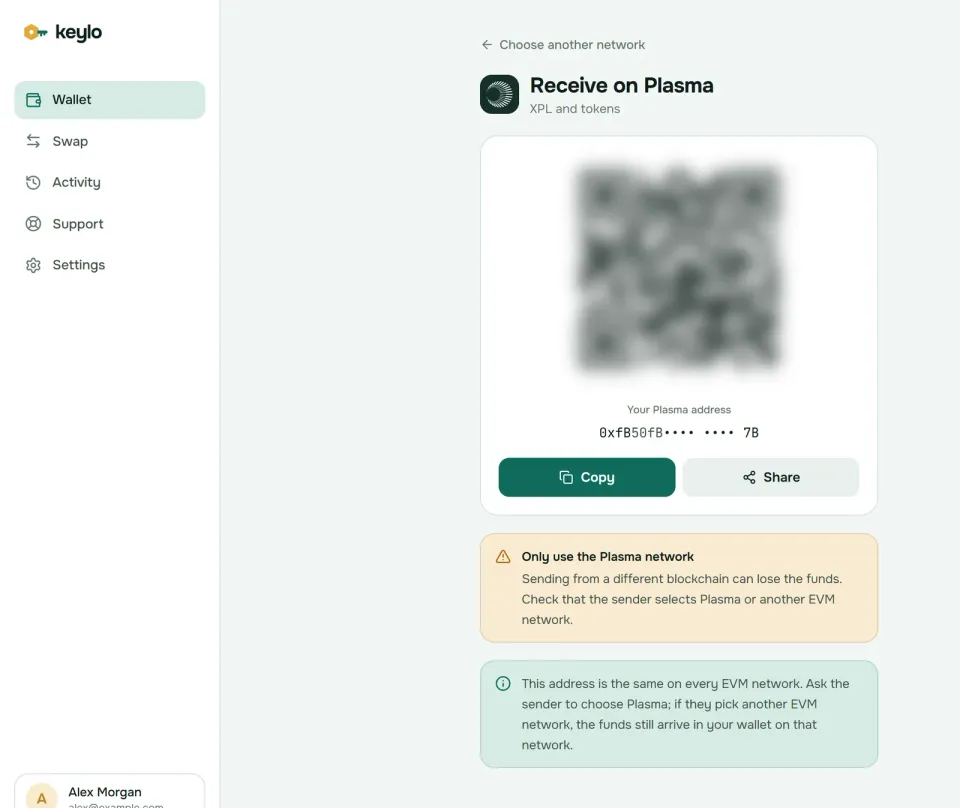
Tap Receive and choose Plasma. The screen says "Receive on Plasma" and shows your address with a QR code.
Tap Copy or Share, or let the sender scan the code.
On an exchange, open the USDT withdrawal page and choose Plasma as the network. Bitfinex and KuCoin, for example, added Plasma for USDT in September 2025.
Look for the deposit in your Plasma balance. Keylo's Plasma activity lists only what you send, so confirm incoming USDT0 on PlasmaScan, linked beside your address. Plasma confirms in a second or two; the exchange's own checks usually take longer.
USDT exists on more than a dozen networks, and exchanges list several of them side by side. Pick Ethereum and your USDT lands on Ethereum at the same 0x address. Pick Tron and the exchange wants a Tron address starting with T, which is a different address in Keylo. Only the Plasma option puts USDT0 on Plasma.
If you're new to the chain, ask for a little XPL before any stablecoins. Buy a small amount on an exchange that lists XPL on the Plasma network, or have a friend send some. Then your first USDT0 can move as soon as it arrives.
How to send USDT0 or XPL on Plasma#
Tap Send and choose USDT0 or XPL on Plasma.
Paste or scan the recipient in To. Keylo checks the address format and its checksum, and it tells you when a Solana, Bitcoin or Tron address has slipped in.
Type an amount or tap Max. For USDT0, Max sends the whole token balance, because the fee comes from XPL. For XPL, Max holds back enough for the fee.
Tap Review and choose Slow, Normal or Fast. On Plasma all three usually cost next to nothing.
Check the network, the recipient and the fee in XPL, then tap Send.
The status moves from "On its way" to "Sent", with a link to PlasmaScan.
What Keylo checks before you sign#
Keylo simulates each Plasma transfer before you sign. A transfer that would fail stops on the review screen instead of on chain. You'll also see these messages:
"You need some XPL on Plasma to pay the network fee." You tried to send USDT0 with an empty XPL balance.
A contract as recipient. Keylo warns that tokens sent to a contract that doesn't expect them are usually lost.
The token's own address. Pasting the USDT0 contract as the recipient is blocked, because funds sent there are usually gone.
If a transfer ever sits pending, the finished screen offers Speed up, which sends it again with a higher fee. Before paying a merchant or an exchange, confirm they accept USDT0 on Plasma, not only USDT on Tron or Ethereum.
Plasma gas fees explained#
Plasma uses Ethereum's EIP-1559 transaction format. Each block has a base fee that moves with demand, and the network burns it. On top of that, you can add a priority tip for the validator.
In October 2026 the base fee sat close to zero. On October 24, it was about 10 wei per unit of gas, and suggested tips were around a thousand wei. Those are billionths of a billionth of an XPL, so the cost in dollars rounds to zero.
Action | What you pay (as of October 2026) |
|---|---|
Send XPL | 21,000 gas at a few thousand wei each: effectively zero |
Send USDT0 from Keylo | 40,000 to 60,000 gas, paid in XPL: effectively zero, but XPL must be above zero |
Sponsored USDT0 transfer in a supporting app | Nothing, the relayer pays |
Swap or bridge | Network fees plus the route's own fees, all listed in the quote |
Slow, Normal and Fast in Keylo adjust the tip. With one-second blocks the difference is hard to notice. Keylo adds no fee of its own to a normal send.
Swap and bridge USDT0 to and from Plasma#
Keylo gets Plasma routes from LI.FI, which compares decentralized exchanges on Plasma and bridges to other networks. Two moves cover most needs: bringing stablecoins in from another chain, and turning a little USDT0 into XPL so you always have gas.
Tap Swap. In You pay, choose the token and network you're starting from, such as USDT on Arbitrum.
In You receive, choose Plasma and USDT0 or XPL. You can search by name or paste a contract address.
Compare the routes. Each one shows the amount, the time, the fees and the least you'll get.
Open the details for every step, Minimum you receive and Delivered to, which is your own address on Plasma.
Confirm, then follow the progress screen until the funds land.
The default slippage limit is 0.5%, so the trade won't fill at a much worse price than quoted. A bridge either delivers or returns the funds, sometimes as a different token that still lands in your wallet. Any Keylo service fee shows as its own line in the quote, and the swap and bridge page explains routes and refunds.
Bridge some XPL along with your first stablecoins, or make XPL the first thing you receive. Otherwise you'll have USDT0 on Plasma and nothing to pay its gas.
What Keylo doesn't do on Plasma#
Keylo covers holding, sending and moving value on Plasma. These things it doesn't do:
No free sponsored transfers. Keylo doesn't use Plasma's relayer, so its USDT0 sends pay a tiny XPL fee.
No dapp connections. There's no browser extension and no WalletConnect, so Plasma lending and yield apps are out of reach. Use an extension wallet for those.
No staking. Keylo stakes only on Cosmos SDK chains. As of September 2026, Plasma's validators were a small set chosen by the team, and Plasma's tokenomics page still described delegation for holders as planned.
No hardware wallets, NFTs or card purchases. Buy XPL or USDT on an exchange and withdraw on the Plasma network.
Keylo is non-custodial, so a lost password plus a lost phrase means nobody can open the wallet, including Keylo. The networks page lists every chain Keylo supports.
Plasma scams and mistakes to avoid#
A chain built for dollars attracts people who want to steal dollars. Most Plasma losses come from fake tokens and bad signatures, not from the network itself.
Fake USDT0. Anyone can deploy a token named USDT or USDT0 with Tether's logo. Only the contract address proves it's real, so compare it with
0xB8CE59FC3717ada4C02eaDF9682A9e934F625ebb.Gas-free bait. Sites that promise free transfers or bonus yield and then ask you to approve a token or sign a permit are drainers. Keylo can't sign requests from websites, which removes that risk while you use it.
XPL airdrop claims. Claim links in direct messages, search ads or token names lead to fake sites. A real claim never needs your recovery phrase.
The wrong withdrawal network. USDT sent on Tron or BNB Smart Chain won't appear on Plasma. Check the network label every time.
Fake support. Keylo staff never ask for your phrase or password. Get help through Keylo support, and read how Keylo protects your wallet.
Run through this before your first big transfer:
Your phrase is on paper, and you've confirmed it in Keylo.
Your Plasma wallet holds some XPL, not only USDT0.
The exchange withdrawal network says Plasma.
The token contract is the official USDT0 one.
You sent a small test before the full amount.
USDT also lives on other networks you might use. The Tron wallet guide, the Ethereum wallet guide and the Arbitrum wallet guide cover them.
Keep your stablecoins in a wallet only you control
Keylo encrypts your recovery phrase on your device and never sees it. Send USDT0, top up XPL and bridge from one place.
Plasma wallet FAQ#
Are USDT transfers on Plasma really free?
Only through apps that use Plasma's sponsored relayer, such as Plasma One. There, you sign an authorization and the relayer pays the gas. Ordinary wallet transactions, including every transfer from Keylo, pay gas in XPL. That fee is tiny, far below a cent as of October 2026, but your XPL balance must be above zero or the transfer can't go through.
Do I need XPL to send USDT0 on Plasma?
In most wallets, yes. XPL is Plasma's gas coin, and a standard token transfer pays its fee in XPL. Keylo stops a USDT0 send when your XPL balance can't cover the fee and tells you so. A very small amount works for a long time, because a transfer cost far less than a millionth of an XPL on October 24, 2026.
What is USDT0 on Plasma?
USDT0 is the form of Tether's USDT that moves between supported chains through LayerZero. On Plasma it's the main stablecoin, at contract 0xB8CE59FC3717ada4C02eaDF9682A9e934F625ebb with 6 decimals. It behaves like any token at your 0x address. Check the contract before accepting a payment, because copies with the same name and logo exist.
Is my Plasma address the same as my Ethereum address?
Yes. Plasma uses Ethereum's account format, so one recovery phrase gives the same 0x address on Plasma, Ethereum and other EVM networks. The balances are separate, though. USDT sent on Ethereum stays on Ethereum. In Keylo you'll find it under the Ethereum network, and you can bridge it to Plasma from the Swap screen.
How do I withdraw USDT to Plasma from an exchange?
Open the USDT withdrawal page, paste your Plasma address and choose Plasma as the network. Bitfinex and KuCoin, for example, added Plasma for USDT in September 2025. If your exchange doesn't list it, withdraw on another network you can use, such as Arbitrum, then bridge to Plasma. Send a small test first when the label is unfamiliar.
Is there a Plasma wallet app or extension?
Plasma One is Plasma's own phone app, built for spending stablecoins with a Visa card. For holding XPL and using Plasma apps, extension and mobile wallets such as MetaMask or Rabby work once you add the network. Keylo is a web wallet instead: nothing to install, and you can add it to your home screen. It holds and sends USDT0 and XPL but can't connect to apps.
How do I add Plasma to MetaMask?
Add a custom network with chain ID 9745, XPL as the currency and PlasmaScan as the explorer, using the RPC details on Plasma's connect page. The testnet uses chain ID 9746. Your MetaMask address is the same on Plasma. In Keylo there's nothing to add, because both networks are built in.
Can I stake XPL?
Not in Keylo, which stakes only on Cosmos SDK chains. On Plasma itself, a small validator set chosen by the team secured the network as of September 2026, and delegation for ordinary holders hadn't launched. Treat any site offering XPL staking rewards today with suspicion, and never send XPL to someone promising to stake it for you.
What happens if I send USDT to the wrong network?
It depends on where it went. If it reached your own 0x address on another EVM network, it's safe there and you can bridge it over. If it went to an exchange address on a network the exchange doesn't support, only the exchange can recover it, if at all. Transfers on Plasma itself are final once confirmed.