A Sonic wallet holds S, the native coin of the Sonic network, plus any tokens you keep there, all on a standard 0x address. Sonic is the EVM chain that Sonic Labs, formerly the Fantom Foundation, built to replace Fantom Opera. S replaced FTM one for one, and a transfer costs a tiny fraction of a cent.
Most problems on Sonic come from its history. Fantom Opera was still running in October 2026, it uses the same kind of address, and exchanges and old tutorials still mention it. If you keep the two chains apart, Sonic is simple to use. Figures below are as of October 2026.
Sonic at a glance#
Item | Sonic |
|---|---|
Native coin | S (18 decimals), the 1:1 successor to FTM |
Address format |
|
Chain ID | 146 (Fantom Opera, a different chain, is 250) |
Typical fee | About 0.001 S for a plain S transfer, well under a cent |
Blocks | About 2 seconds apart, final once confirmed |
Token standard | ERC-20 |
Stablecoin | USDC issued directly on Sonic by Circle |
Explorer | |
In Keylo | Send, receive, ERC-20 tokens, speed-up, swap and bridge through LI.FI, with Activity for sends made in Keylo. No staking, dapp connections, NFT view or Sonic testnet |
How a Sonic wallet works#
Your coins live on the Sonic blockchain, not in the app. The wallet keeps the private key that signs transfers, so anyone with that key or its recovery phrase controls the funds.
Your Sonic wallet address#
Sonic runs the Ethereum Virtual Machine, so your address is an ordinary 0x address. It's the same one you have on Ethereum, Base or any other EVM chain, because it comes from the same key. Keylo derives it on m/44'/60'/0'/0/0, the default path MetaMask and Rabby use for their first account.
Sharing the address doesn't mean sharing balances, because S sits only on Sonic. There's no activation deposit, no memo and no minimum balance, so an address can receive S the moment you share it.
Sonic, Fantom Opera and the FTM upgrade#
Sonic Labs launched Sonic on December 18, 2024 as Opera's replacement. FTM holders upgrade to S at a 1:1 rate. For FTM on Opera, that happens through the MySonic upgrade portal. ERC-20 FTM on Ethereum crosses through the Sonic Gateway instead.
But Opera didn't switch off. In April 2026 Sonic Labs set a shutdown for June 30, 2026, then reversed it on June 23. That post said Opera would stay live until at least the end of 2026, with the upgrade bridge funded regularly until then. Treat it as a reprieve with an end date, check the portal for the current status, and upgrade soon.
Keylo supports Sonic but not Opera. FTM sitting at your address on Opera is still yours, but Keylo won't display it. To upgrade it, import your phrase into an EVM wallet that connects to the portal, such as MetaMask, and keep a little FTM on Opera for gas.
How to choose a Sonic wallet#
Sonic is a standard EVM chain, so the real question is what you want to do on it.
Extension and mobile wallets. MetaMask and Rabby are browser extensions and Trust Wallet is a mobile app, and Sonic's docs list all three. They connect to Sonic apps such as the MySonic staking and upgrade pages.
Hardware wallets. A device such as a Ledger keeps the key offline and pairs with one of the wallets above. It's the safer home for a large S balance.
Exchange accounts. Convenient for buying S, but the exchange holds the keys.
Web wallets. Keylo runs in a browser tab with nothing to install.
Look for a wallet that lists Sonic by name with chain ID 146, so you never type RPC details from a random tutorial. It should also warn you before you send to a contract and show token contract addresses, not just logos.
Keylo is a good fit for holding S and USDC, sending them, and swapping or bridging from the same recovery phrase as your other coins. It's the wrong tool for staking S, farming on Sonic DEXs or upgrading Opera FTM, because each of those needs a wallet that connects to apps.
How to add Sonic to MetaMask or Trust Wallet#
Trust Wallet's own blog says Sonic is built in: update the app, open Manage crypto, pick Sonic in the network selector and switch on S. In MetaMask, Rabby or any wallet that accepts a custom network, use the values from Sonic's wallet docs: network name Sonic, RPC URL https://rpc.soniclabs.com, chain ID 146, currency symbol S and explorer https://sonicscan.org. Copy them from that page, never from a direct message or an ad.
How to create a Sonic wallet in Keylo#
You need a modern browser on a phone or computer. Sonic is already in Keylo's network list, so you don't add anything by hand.
Go to the sign-up page and fill in Full name, Email, Phone number and Password, plus Confirm password. Accept the terms and tap Create account.
If Keylo asks you to check your inbox, open the email and confirm.
On "Set up your wallet", choose Create a new wallet. Your browser makes a 12-word recovery phrase, encrypts it with a key derived from your password (Argon2id, then AES-256-GCM) and sends only that encrypted copy to Keylo.
Pick Sonic from your asset list. Your
0xaddress and S balance show there.Save the phrase. Open Settings, then Recovery phrase, type your password, and write the 12 words on paper. Keylo then asks you to confirm a few of them.
While you're in Settings, switch on Two-factor authentication and choose an Anti-phishing code.
Write the words down before you fund the address. Keylo can't decrypt your wallet, and resetting your password won't bring it back. The phrase is the only way in.
Bringing a wallet you used on Fantom#
Choose Import a recovery phrase and enter your 12 or 24 words. A MetaMask or Rabby phrase shows your first account's address, the one you used on Fantom, with its Sonic balance. Accounts you added later in those apps use other paths and won't appear, but nothing happens to their funds.
Keylo doesn't include a Sonic testnet, so practice with real but tiny amounts. Before you move a large sum, send a small test first. With fees this low, it costs next to nothing.
Get a Sonic address in about a minute
Register with email and a password. Keylo builds the wallet in your browser and gives you one 0x address for Sonic and every other EVM network.
How to receive S on Sonic#
Tap Receive and choose Sonic. The screen reads "Receive on Sonic" and shows a QR code over your address.
Tap Copy or Share, or let the sender scan the code.
On an exchange, choose Sonic as the withdrawal network. Don't choose Fantom, FTM or Opera.
Watch your S balance. A Sonic transfer usually lands within seconds, though exchanges often add their own processing time. Keylo's Activity on Sonic lists only what you send from Keylo, so look up incoming transfers on Sonicscan.
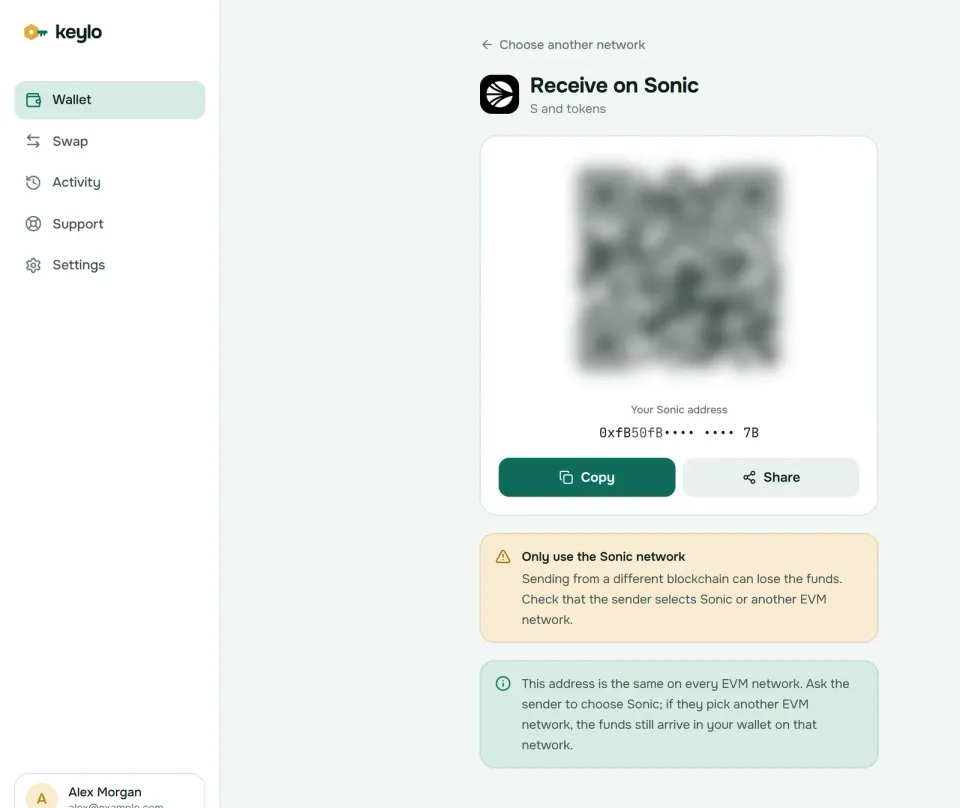
Keylo's Receive screen reminds you that this address is the same on every EVM network. If a sender picks Ethereum or Base by mistake, the coins still reach you on that network, and you'll see them under it in Keylo. Fantom Opera is the exception, since Keylo doesn't support it.
How to send S and Sonic tokens#
Tap Send and choose S, or a token on Sonic such as USDC.
Paste the recipient's address into To or scan their QR code. Keylo checks the format and the checksum.
Type an amount, or tap Max to send all your S except what the fee needs.
Tap Review and pick a fee level: Slow, Normal or Fast, each with its cost.
Read the review screen. It lists the network, the whole recipient address and the fee in S.
Tap Send. Keylo signs in your browser. The status moves from "On its way" to "Sent", with a link to the explorer.
Checks Keylo runs before you sign#
Keylo simulates each Sonic transfer first, so a send that would fail stops on the review screen instead of wasting gas. It also flags common slips:
No S for gas. A USDC send with an empty S balance shows "You need some S on Sonic to pay the network fee."
A smart contract as recipient. Keylo warns you, because tokens sent to a contract that can't handle them are usually gone.
A token's own contract. Sending a token to its own contract address gets blocked.
An address from another chain. A Solana or Bitcoin address won't pass the format check.
Sonic transfers rarely wait, but if one stays pending, the done screen offers Speed up, which resends it with a higher fee.
Sonic network fees and FeeM#
Sonic prices gas like Ethereum, with a base fee and an optional tip, both paid in S. The difference is the floor. As of October 2026 the base fee sits at its 50 gwei minimum almost all the time, and nodes quote 55 gwei to leave a margin. Sonic Labs' gas pricing docs say a tip of 1 wei is enough, because blocks are rarely full.
A plain S transfer uses 21,000 gas, so at 50 to 55 gwei it costs about 0.001 S. With S near $0.05 on October 24, 2026, that's well under a tenth of a cent. Token transfers and swaps use more gas, but still cost very little. Because the tip barely matters, Keylo's three fee levels often cost about the same.
Where the money goes is unusual, however. Sonic doesn't burn the base fee. Instead, 90% of all fees go to the Fee Monetization (FeeM) treasury for app developers, and validators get the other 10%. So FeeM changes who earns from your transaction, not what you pay. Keylo adds no fee of its own to a normal send.
Tokens on Sonic: USDC, wrapped S and others#
Sonic tokens use the ERC-20 standard and pay their gas in S, so keep a little S next to anything else you hold. Keylo checks for common tokens such as USDC on its own. For anything else, add the contract under Settings, Networks, Custom tokens.
A token's name proves nothing, because anyone can deploy a coin called USDC. Circle's USDC on Sonic is 0x29219dd400f2Bf60E5a23d13Be72B486D4038894. Compare that address before you accept or send USDC, especially to an exchange.
Wrapped S (wS) is S packaged as an ERC-20 for apps that need one, and liquid staking tokens such as stS represent staked S. Keylo can hold and send them like any token once you add them. Before you add one, check its contract on Sonicscan or the project's own site.
Swap and bridge from your Sonic wallet#
Sonic Labs runs its own bridge to Ethereum, the Sonic Gateway. It batches transfers into "heartbeats", about every 10 minutes toward Sonic and about hourly back to Ethereum. You can pay a Fast Lane fee to trigger one early, and then you claim the funds on the other side. USDC moves through Circle's CCTP. If the Gateway or Sonic stays down for 14 straight days, a fail-safe lets you recover bridged funds on Ethereum.
The Gateway is a website you connect a wallet to, so you can't use it from Keylo. Keylo gets routes from LI.FI instead, which compares DEXs on Sonic and bridges to other chains:
Tap Swap. Under You pay, choose S or a Sonic token and enter an amount.
Under You receive, pick the network and token you want. Search by name or paste a contract.
Compare the routes by amount, time and fees.
Open the details to see every step, the Minimum you receive and Delivered to, which is your own address on the destination chain.
Confirm and watch the tracking screen until the funds land.
Keylo's default slippage limit is 0.5%, so a swap won't fill if the price moves further than that. A bridge either delivers or returns your funds, sometimes as a different token that still arrives in your wallet. Any Keylo service fee shows as a separate line in the quote. The swap and bridge page explains routes and refunds in more detail.
What Keylo doesn't do on Sonic#
No staking. Delegating S happens on MySonic, and withdrawing staked S takes 14 days. Keylo stakes only on Cosmos SDK chains, so use a wallet that connects to MySonic for this.
No dapp connections. There's no browser extension and no WalletConnect, so Sonic DEXs, lending apps, the Gateway and the upgrade portal are out of reach from Keylo.
No Fantom Opera. Keylo can't show FTM on Opera or upgrade it.
No NFTs, hardware wallets or card purchases. Buy S on an exchange and withdraw it on the Sonic network.
Keylo is non-custodial too. Lose both your password and your recovery phrase, and nobody can open the wallet, including Keylo. The list of supported networks shows where else your phrase works.
Sonic scams and mistakes to avoid#
Fake upgrade portals. Search ads and direct messages push lookalike "FTM migration" sites. The real portal is
my.soniclabs.com/upgrade. Type it yourself, and never enter a recovery phrase to upgrade anything.The wrong chain. Fantom and Sonic share addresses but not coins. Sonic SVM is something else again: a Solana-based project with its own SONIC token. None of it is S on Sonic.
Approval drainers. Fake airdrop and points sites ask you to approve tokens or sign messages, then empty the wallet. Keylo can't sign website requests at all, which shuts that door.
Address poisoning. Scammers send dust from addresses that match the start and end of ones you use. So copy addresses from the source, never from your history.
Fake support. Keylo staff never ask for your phrase or password. Reach the team through the Keylo help center, and set up the protections described on the Keylo security page.
Before your first real Sonic transfer:
The phrase is on paper and you've confirmed it in Keylo.
You hold a little S for gas.
The exchange's withdrawal network says Sonic, not Fantom.
You compared the address in full, start to end.
A small test arrived before you sent the rest.
The same phrase also works on chains where Sonic users often bridge. See the Ethereum wallet guide, the Avalanche wallet guide and the Berachain wallet guide.
Keep S in a wallet only you control
Keylo encrypts your recovery phrase on your device and never sees it. Send, swap and bridge S from one screen.
Sonic wallet FAQ#
Is Sonic the same as Fantom?
No. Sonic is a new chain that Sonic Labs, formerly the Fantom Foundation, launched in December 2024 to replace Fantom Opera. S replaced FTM at a 1:1 rate. The two chains use the same address format, but they keep separate balances and have different chain IDs: 146 for Sonic and 250 for Opera. A Sonic wallet shows S, not FTM on Opera.
Can I still upgrade FTM to S?
Yes, as of October 2026. Connect an EVM wallet to the official portal at my.soniclabs.com/upgrade, with a little FTM on Opera for gas. ERC-20 FTM on Ethereum goes through the Sonic Gateway. In June 2026 Sonic Labs said Opera would run until at least the end of 2026, after earlier planning a June shutdown, so upgrade soon. Keylo can't do this step.
Is my Sonic address the same as my Ethereum address?
Yes. Sonic uses Ethereum's address format, so one key gives you the same 0x address on both, and on every other EVM chain. The balances differ, though. S exists only on Sonic, and ETH stays on Ethereum until you bridge it. In Keylo, open Sonic in your asset list to see the S balance at that address.
How much does it cost to send S?
Very little. As of October 2026, Sonic's base fee sits at its 50 gwei minimum and nodes quote 55 gwei. A plain transfer uses 21,000 gas, so it costs about 0.001 S, a tiny fraction of a cent. Token transfers and swaps cost more gas but stay cheap. Keylo shows the exact fee before you sign and adds none to normal sends.
Which network do I choose to withdraw S from an exchange?
Choose Sonic. Some exchanges still show Fantom or FTM as separate networks, and those send to Fantom Opera, a different chain. Paste your Keylo 0x address, send a small test first, and check that it shows up under Sonic. If the exchange only offers S on another chain, such as Ethereum, you'll receive a token there instead.
Can I stake S without leaving Keylo?
No. Keylo offers staking only on Cosmos SDK chains. On Sonic you can hold, send, receive, swap and bridge S and tokens. To stake, delegate to a validator on MySonic with a wallet that connects to it. Withdrawing staked S takes 14 days. Liquid staking tokens such as stS are ordinary ERC-20s, so you can hold them once you add them.
What is the difference between Sonic and Sonic SVM?
They are unrelated projects that share a name. Sonic is the EVM chain from Sonic Labs, the Fantom successor, with S as its coin and chain ID 146. Sonic SVM is a Solana-based project with its own SONIC token. So if an exchange lists SONIC, it isn't S: they are different coins on different chains, with different addresses.
How do I bridge from Ethereum to Sonic?
The Sonic Gateway is the official route. It batches transfers and processes them about every 10 minutes toward Sonic, unless you pay a Fast Lane fee, and then you claim on Sonic. In Keylo, open Swap, pick a token on Ethereum under You pay and S or USDC on Sonic under You receive. LI.FI finds the route and shows every fee first.