An ApeChain wallet is an ordinary EVM wallet set up for ApeChain, the network built around ApeCoin and the Bored Ape community. Your address is the same 0x address you use on Ethereum. The difference is the fuel: ApeChain charges every fee in APE, and only APE that already sits on ApeChain counts.
That one rule explains most of the trouble. APE lives on at least eight networks, so an exchange withdrawal can land on Ethereum or BNB Chain and leave you with APE you can't spend on ApeChain. Figures below are as of October 2026.
ApeChain at a glance#
Item | ApeChain |
|---|---|
Network type | Arbitrum Orbit layer 3: it settles on Arbitrum One, which settles on Ethereum |
Gas token | APE, native on ApeChain |
Chain ID | 33139 |
Address format |
|
Typical fee | About 0.002 APE for an APE transfer and a little more for a token, far under one cent |
Block time | As short as 0.25 seconds |
Token standard | ERC-20, with WAPE as the wrapped form of APE |
Stablecoin of choice | USDC (Stargate's bridged USDC.e), which replaced apeUSD at the end of July 2026 |
Explorer | |
In Keylo | Send, receive, full activity history, automatic token detection, a read-only NFT view, speed-up, swap and bridge through LI.FI. No NFT transfers, staking, dapp connections or testnet |
How an ApeChain wallet works#
ApeChain copies Ethereum's account model, so one recovery phrase produces the same address here as on Ethereum, Arbitrum or Base. Keylo derives it on m/44'/60'/0'/0/0, the path MetaMask uses for its first account. Nothing needs activating, and there's no memo or minimum balance.
Your ApeChain wallet address and its separate balances#
APE is a LayerZero omnichain token. ApeChain's APE token page lists it on ApeChain, Ethereum, Arbitrum, BNB Chain, Solana, HyperEVM, Monad and Robinhood Chain. A transfer between them debits APE on one side and credits the same amount on the other.
Your single 0x address holds a separate APE balance on each of those EVM networks. Only one of them pays ApeChain gas:
APE on ApeChain is the native coin, the way ETH is on Ethereum. It pays every fee.
APE on Ethereum or Arbitrum is an ERC-20 token. Moving it costs ETH, and it does nothing for ApeChain fees.
APE on BNB Chain is a BEP-20 token that needs BNB to move.
Keylo shows each network as its own line, so you can see which APE you hold where.
What being a layer 3 means for you#
ApeChain is an Arbitrum Orbit chain. Instead of writing its data to Ethereum, it hands batches to a data committee and settles on Arbitrum One, which keeps fees tiny. The cost shows up when you leave. The canonical route back to Arbitrum waits out a challenge period of a little over six days, so most people exit through faster bridges instead.
How to choose an ApeChain wallet#
Any EVM wallet can hold APE on ApeChain once it knows the network, so the choice depends on what you want to do there.
Browser extension and mobile wallets. MetaMask is a browser extension and mobile app, and ApeChain's docs walk you through adding the network to it. Rabby is a browser extension for EVM networks. Either one can connect to Camelot, NFT marketplaces and other ApeChain apps.
App sign-up wallets. Glyph, built by Yuga Labs, gives you a wallet when you sign up inside ApeChain apps. It's handy for those apps, but read how it handles keys before you store much there.
Hardware wallets. Trezor lists ApeChain among its supported networks. A device suits a large APE balance you rarely touch.
Exchange accounts. The exchange holds your keys. Binance.US, for example, lets you deposit and withdraw APE over ApeChain, but you still need a wallet of your own to use the chain.
Web wallets. These run in a browser tab and need no install. Keylo is one of them: it isn't an extension, but you can add it to your phone's home screen.
Look for a wallet that already knows chain ID 33139, labels native APE apart from ERC-20 APE and shows token contracts. If you trade NFTs, it should also let you review and revoke approvals.
Keylo fits people who want to hold APE and USDC on ApeChain, send them, see their NFTs, and swap or bridge between ApeChain and other networks from one phrase. It's the wrong tool for NFT trading, Camelot pools or the Otherside, because Keylo can't connect to apps or move NFTs.
How to create an ApeChain wallet in Keylo#
Keylo runs in a phone or desktop browser, with ApeChain already in its network list.
Open the Keylo sign-up page. Enter your full name, email, phone number and a password twice, tick the terms box and tap Create account.
If you see "Check your inbox", open the email from Keylo and confirm your address.
On "Set up your wallet", pick Create a new wallet. Your browser generates a 12-word recovery phrase, then locks it with a key made from your password (Argon2id, then AES-256-GCM). Keylo's server stores only that locked copy.
Tap ApeChain in your asset list to see your
0xaddress and your APE balance, which starts at zero.Copy the phrase onto paper. In Settings, open Recovery phrase, type your password, write the 12 words down in order and confirm a few of them when asked.
While you're in Settings, switch on Two-factor authentication and choose an Anti-phishing code.
Do step 5 before you deposit anything. A password reset can't open the wallet; only your paper phrase can.
Importing a MetaMask wallet you used on ApeChain#
Pick Import a recovery phrase instead and enter your words (12, 15, 18, 21 or 24). Because Keylo follows the standard EVM path, your first MetaMask account shows up with the same address and the same ApeChain balance. Extra accounts you added in MetaMask live on other paths, so they won't appear, though their funds stay safe there.
Keylo has no ApeChain testnet, so it can't show Curtis, ApeChain's test network. For practice, send yourself a small real amount: at current fees a test transfer costs a tiny fraction of a cent.
Get your ApeChain address in a minute
Sign up with email and a password. Keylo builds the wallet in your browser, with one 0x address for ApeChain and every other EVM network.
How to receive APE on ApeChain#
Tap Receive and choose ApeChain. You'll see "Receive on ApeChain", a QR code and "Your ApeChain address".
Tap Copy or Share, or let the sender scan the code.
On an exchange, choose ApeChain as the withdrawal network if it's offered. Support varies by exchange, and APE often appears on several networks, so read the list carefully.
Watch Activity in Keylo, which on ApeChain lists incoming transfers as well as your own sends. ApeChain blocks arrive in well under a second, but exchanges add their own processing time.
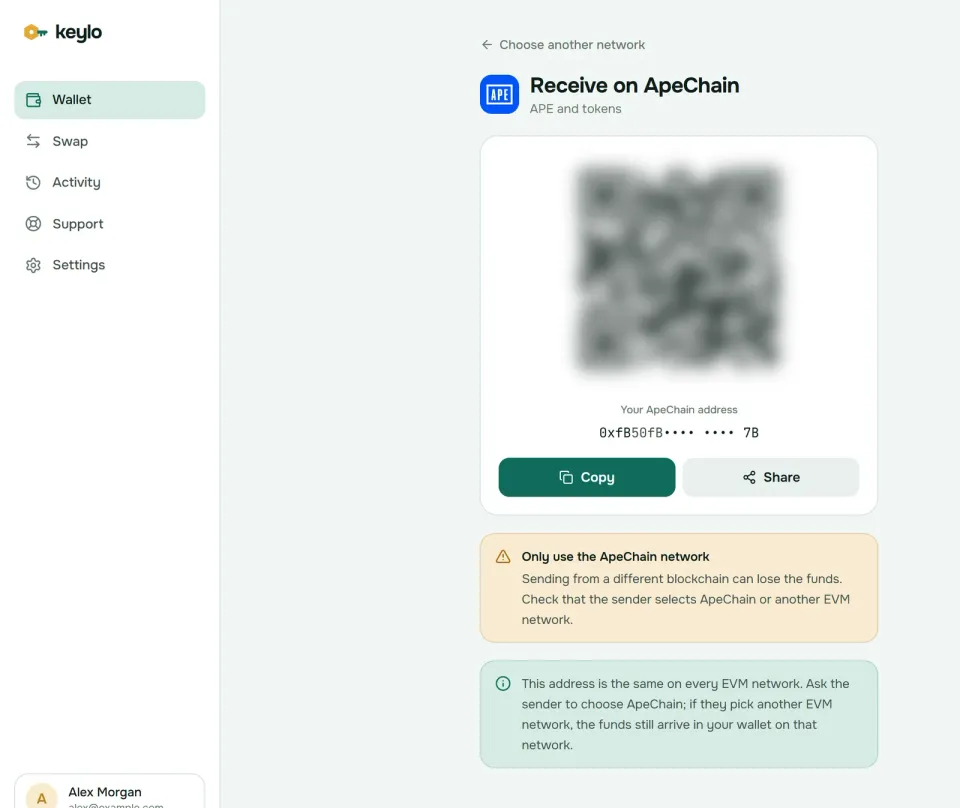
Keylo's Receive screen also reminds you that this address is the same on every EVM network. If an exchange sends APE on Ethereum instead, nothing is lost. It sits under Ethereum in Keylo as an ERC-20 token, and you can bridge it across.
If your exchange doesn't list ApeChain, withdraw APE or USDC on a network it supports, then bridge to native APE with Keylo's swap screen. Check the total cost first, because Ethereum gas can outweigh a small amount.
How to send APE and tokens on ApeChain#
Tap Send and choose APE or a token on ApeChain.
In To, paste the address or scan a QR code. Keylo checks the format and the checksum.
Type an amount or tap Max. For APE, Max holds back enough to cover the fee.
Tap Review and pick Slow, Normal or Fast.
Read the review screen: network, the full recipient address and the fee in APE.
Tap Send. Keylo signs in your browser, shows "On its way" and then "Sent", with a View on Apescan link.
What Keylo checks before you sign#
Keylo test-runs the transfer first, so a send that would fail stops on the review screen instead of costing you a fee. It also flags these mistakes:
A contract as recipient. Marketplaces, pools and the WAPE contract are contracts. Keylo warns that tokens sent to a contract that doesn't expect them are usually lost.
The token's own contract. Keylo blocks a send to the address of the token you're sending, a common copy-paste slip.
An address from another chain. A Solana or Bitcoin address gets a clear error instead of a transaction.
No APE for gas. A token transfer with an empty APE balance stops before you sign.
ENS names work as recipients only on Ethereum in Keylo, so paste the 0x address on ApeChain. Before you send APE to an exchange, check that its deposit page lists ApeChain for APE specifically, because an exchange that credits APE on Ethereum may not credit the ApeChain version. The same goes for bridged USDC.e.
ApeChain gas fees#
Each ApeChain transaction pays for execution plus a small share for posting data, all in APE. Like other Arbitrum chains, ApeChain folds the data part into the gas estimate rather than showing a separate line.
The numbers look odd at first. On October 24, 2026, Apescan's gas tracker showed a base fee near 102 gwei, which sounds high if you're used to Ethereum layer 2s. But it's priced in APE, and APE traded around $0.13 that day. A token transfer came to roughly 0.0035 APE, less than a tenth of a cent, and a swap about 0.035 APE.
ApeChain's network suggested a priority tip of zero the same day, so Keylo's Slow, Normal and Fast options cost about the same. Most transfers land within a second or two whichever you choose. If one ever stays pending, open it and use Speed up, which resends it with a higher fee. Keylo adds nothing to an ordinary send.
Tokens on ApeChain: WAPE, USDC and the end of apeUSD#
ApeChain tokens follow the ERC-20 standard, and every one of them needs APE for gas. Keylo reads ApeChain's explorer index, so every token your address holds appears under ApeChain on its own, with no contract to paste.
WAPE is wrapped APE, an ERC-20 copy backed one to one by native APE. Apps like Camelot use it in pools, but you never need it to pay fees.
USDC became ApeChain's stablecoin of choice at the end of July 2026, when ApeCoin asked apeUSD holders to swap into it on Camelot. On ApeChain it's Stargate's bridged USDC, shown as USDC.e or USDCe, at
0xF1815bd50389c46847f0Bda824eC8da914045D14. Check that contract before you accept a payment in it.apeUSD and apeETH were the yield-bearing tokens ApeChain launched with in October 2024, and their balances grew by rebasing. If you still hold either one, it shows in your ApeChain list, so look for a swap route out.
ApeChain also has plenty of memecoins, many launched in minutes. Keylo lists every token at your address, so junk that strangers send you shows up too. A name and logo prove nothing: compare the contract with the project's official channels first.
How to bridge to and from ApeChain#
You have two kinds of route. ApeChain's own Ape Portal offers the canonical bridge plus faster routes. The canonical exit is slow: its FAQ says withdrawals can take up to seven days. Fast-bridge withdrawals usually take a few minutes. As of October 2026 the Portal charges 0.12% plus $0.20 on bridge routes, and nothing extra on canonical routes.
Keylo gets quotes from LI.FI, which compares bridges and exchanges and pays you out on the far side from liquidity. That skips the challenge period.
Tap Swap. Under You pay, choose APE or a token on the network you're coming from.
Under You receive, choose ApeChain and APE, or another token.
Compare the routes. Each shows the amount, the tool, the estimated time, the fees and the least you'll get.
Open the details and check every step, Minimum you receive and Delivered to, which names your own ApeChain address.
Confirm and follow the progress screen until the funds land.
The default slippage is 0.5%, and any Keylo service fee appears as its own line in the quote. A bridge either delivers or returns your funds, sometimes as a different token that still arrives in your wallet. The swap and bridge page explains routes and refunds.
Make native APE the output of your first bridge, because bridging only USDC leaves you with no gas to move it.
What Keylo doesn't do on ApeChain#
ApeChain revolves around NFTs and community apps, so these limits show up quickly.
No NFT transfers. Keylo shows the NFTs at your ApeChain address in a read-only view, but it can't send, list or mint them. To move or trade one, you'll need another wallet.
No app connections. There's no browser extension and no WalletConnect, so you can't use Camelot, marketplaces or the Otherside from Keylo. Keylo's own swap screen handles swaps and bridges.
No staking. Keylo stakes only on Cosmos SDK chains, so it can't stake APE.
No testnet, no hardware wallets and no card purchases. Buy APE on an exchange, then withdraw it on ApeChain or bridge it in.
Keylo is non-custodial too. If you lose both your password and your recovery phrase, nobody can restore the wallet, Keylo included. See every supported network on the Keylo networks page.
ApeChain scams and risks to check#
Most losses on ApeChain come from what people sign and where they send, not from the chain breaking.
Old marketplace approvals. In late September 2026, an attacker abused old approvals to Limit Break's Payment Processor, the contract behind Magic Eden listings, to take NFTs and WETH. Limit Break paused the newer version, but it couldn't be paused on ApeChain at the time. If you ever listed NFTs from another wallet, revoke those approvals there. Keylo can't sign listings or approvals for websites.
APE on the wrong chain. Choose ApeChain on withdrawals, and remember that ERC-20 APE on Ethereum can't pay ApeChain gas.
Copycat tokens and mints. Fake memecoins and lookalike collections appear within hours of a real one. Check contracts on Apescan.
Fake support and airdrops. Real claims never ask for a recovery phrase. Keylo staff never ask for yours either; reach them through the Keylo support page and read how Keylo secures your keys.
Know the trust model too. L2BEAT doesn't place ApeChain in any rollup stage. A seven-member committee (five must sign) holds the data, one sequencer orders transactions, and a 3-of-6 multisig can upgrade core contracts without delay. Fine for spending money, but think twice about large long-term savings.
Before your first real ApeChain transfer:
Your phrase is on paper and you've confirmed it in Keylo.
You hold a little native APE on ApeChain.
The withdrawal network says ApeChain, not Ethereum or BNB Chain.
The token contract matches the one the recipient expects.
You sent a small test amount first.
The same address works on Arbitrum and Ethereum too. The Arbitrum wallet guide and the Ethereum wallet guide cover those networks.
Keep your APE in a wallet only you control
Keylo encrypts your recovery phrase on your own device and never sees it. Send, swap and bridge APE from one place.
ApeChain wallet FAQ#
Do I need ETH to use ApeChain?
No. Every fee on ApeChain is paid in native APE, including fees for moving USDC, WETH or WAPE. You need ETH only on the networks around it, for example to move ERC-20 APE on Ethereum or Arbitrum before you bridge it across. Keep a few native APE in your ApeChain wallet and it will cover a great many transfers at October 2026 prices.
Is APE on ApeChain the same as APE on Ethereum?
It's the same token, issued across chains through LayerZero, but each network keeps its own balance. On ApeChain, APE is the native gas coin. On Ethereum and Arbitrum it's an ERC-20 token that needs ETH to move, and on BNB Chain it's a BEP-20 token. Pick the network you need when withdrawing, or bridge between them.
How do I add ApeChain to my wallet?
In Keylo there's nothing to add: ApeChain is already in the network list, and your address appears as soon as you create or import a wallet. In an extension wallet such as MetaMask, add a network with chain ID 33139 and APE as the currency, using the details from ApeChain's official docs or Chainlist rather than a random website.
How much does it cost to send APE on ApeChain?
Very little. On October 24, 2026, Apescan estimated about 0.0035 APE for a token transfer, under a tenth of a cent with APE near $0.13. A plain APE transfer uses even less. The base fee in gwei looks high only because it's priced in APE. Keylo shows the exact fee before you sign and adds no charge of its own.
How long does it take to withdraw from ApeChain?
Through ApeChain's canonical bridge, up to about seven days, because the layer 3 waits out a challenge period before releasing funds. Fast bridges usually finish in a few minutes, since they pay you from their own liquidity. The routes Keylo finds through LI.FI work that way, and each quote shows its own time estimate before you confirm.
What happened to apeUSD on ApeChain?
At the end of July 2026, ApeCoin made USDC the chain's stablecoin of choice in place of apeUSD and asked holders to swap into USDC on Camelot. If you still hold apeUSD, Keylo shows it in your ApeChain token list without any setup. Try Keylo's swap screen first, and if no route appears, use a wallet connected to Camelot to move into USDC.
Can I see my ApeChain NFTs in Keylo?
Yes, in a read-only view. Keylo reads ApeChain's explorer index and shows the NFTs at your address, but it can't send, list or mint them on any network. They live on the chain, not in the app, so they stay safe whichever wallet you use. To trade or transfer one, import your phrase into a wallet that connects to ApeChain marketplaces, and revoke old approvals there.
Is ApeChain safe to use?
ApeChain works fine for everyday transfers, but it relies on more trust than Ethereum itself. L2BEAT places it outside its rollup stages, because a small committee holds the data, a single operator sequences transactions and a multisig can upgrade contracts instantly. For larger long-term savings, a network with stronger guarantees makes more sense, with only spending money kept on ApeChain.