A Scroll wallet is any Ethereum-style wallet that holds the key to your address on Scroll, a zero-knowledge rollup built to run Ethereum bytecode as closely as possible. Your Scroll address is the 0x address you already have on Ethereum, and every fee is paid in ETH. On October 24, 2026, a plain ETH transfer on Scroll cost about $0.0006.
Two Scroll quirks catch people out. Almost all of that fee is an L1 data fee for posting your transaction to Ethereum, charged on top of the usual gas. Withdrawals through the native bridge also end with a claim you sign on Ethereum. Both are simple once you know them, and the dated figures below show where they stand in October 2026.
Scroll at a glance#
Item | Scroll |
|---|---|
Network type | ZK rollup on Ethereum, with a bytecode-compatible zkEVM |
Chain ID | 534352 |
Gas token | ETH (SCR is a governance token and can't pay gas) |
Address format |
|
Fee parts | A tiny L2 execution fee plus an L1 data fee |
Typical fee | About $0.0006 for an ETH transfer, under $0.001 for USDC (October 24, 2026) |
Withdrawal to Ethereum | After the batch is proven and finalized, then a claim on Ethereum |
Token standard | ERC-20; USDC on Scroll is bridged, not issued natively by Circle |
Explorer | |
In Keylo | Send, receive, automatic token detection, full history, a read-only Collectibles view, speed-up, swap and bridge through LI.FI. Fee quotes leave out the L1 data fee. No Scroll testnet, no dapp connections |
What makes a Scroll wallet different#
To a wallet, Scroll looks like Ethereum with a different chain ID. That's by design, and it makes the few differences easy to miss.
Ethereum bytecode, proven with zero knowledge#
Scroll set out to match Ethereum at the bytecode level, so contracts and tools built for Ethereum run on Scroll unchanged. Each batch of transactions comes with a validity proof that a contract on Ethereum checks. Since 2025 those proofs come from a prover built on OpenVM, and Scroll upgraded OpenVM to version 2.0 in September 2026.
Because proofs replace fraud challenges, Scroll has no week-long withdrawal window like an optimistic rollup. A withdrawal waits only for its batch to be proven and finalized on Ethereum.
Your Scroll wallet address#
Your Scroll wallet address comes from your recovery phrase on Ethereum's standard path, m/44'/60'/0'/0/0. It's the same address MetaMask shows for its first account, and Keylo uses it for every EVM network. But balances still live per network. ETH at your address on Ethereum doesn't appear on Scroll until you bridge it.
Scroll has no activation deposit, memo or minimum balance. It asks for one thing: a little ETH to pay gas.
How to choose a Scroll wallet#
Every mainstream EVM wallet can add Scroll, so the useful question is what you'll do there.
Extension and mobile wallets. MetaMask (extension and mobile) and Rabby (extension) work with Scroll and connect to its DeFi apps and lending markets.
Hardware wallets. A Ledger or similar device keeps the key offline and signs through a software wallet, so it suits long-term holdings.
App deposit addresses. Some services run on Scroll. Scroll's own blog describes ether.fi Cash, a crypto card, as powered by Scroll. An address an app gives you belongs to that app, not to your wallet.
Web wallets. These run in a browser tab with nothing to install. Keylo is one.
A good Scroll wallet accounts for the L1 data fee when it shows a fee and when it calculates a maximum send. It lets you add tokens by contract address. And it labels Scroll clearly, so you never confuse it with another zkEVM.
Where Keylo fits, and where it doesn't#
Keylo suits holding ETH, stablecoins and SCR on Scroll, sending them, and moving value to other networks from the same recovery phrase. Know its limits here first:
Keylo can't connect to dapps. It has no browser extension and no WalletConnect.
Its fee quote on Scroll covers only the execution part, not the L1 data fee, and Max doesn't hold that fee back. Details are in the sending section.
It shows NFTs in a read-only Collectibles section but can't send them.
It stakes only on Cosmos SDK chains, so no staking on Scroll.
It has no hardware wallet support and no card purchases.
It has no Scroll testnet, so you can't rehearse on Scroll Sepolia in Keylo.
For dapps, import the same phrase into an extension wallet and keep Keylo for everyday transfers.
Setting up a Scroll wallet in Keylo#
Scroll is already on Keylo's network list. You don't add a custom RPC.
Visit the Keylo sign-up page. Type your full name, email and phone number, choose a password, repeat it, agree to the terms and hit Create account.
When Keylo says "Check your inbox", click the link in the email.
At "Set up your wallet", choose Create a new wallet. Your browser creates a 12-word phrase and encrypts it with your password. Keylo stores the encrypted result and has no way to open it.
Find Scroll in your asset list and open it. Your
0xaddress and ETH balance appear at the top.Back up the words. Open Settings, choose Recovery phrase, enter your password, and write the 12 words on paper. Then confirm the ones Keylo asks for.
In the same menu, set up Two-factor authentication and an Anti-phishing code.
If you forget your password later, resetting it restores your login but not the wallet's contents. You'll need the paper phrase for that.
Importing a phrase from another wallet#
Pick Import a recovery phrase and enter 12 or 24 words. If your old wallet uses the standard path for its first account, the same Scroll address and balance appear. Extra accounts from that wallet use other indexes and won't show in Keylo, but nothing happens to their funds.
Keylo has no Scroll testnet, so make your first real transfer a small one.
Get a Scroll address in a minute
Sign up with email and a password. Keylo builds your wallet in the browser, with one 0x address for Scroll and every other EVM network.
Receiving ETH and USDC on Scroll#
Tap Receive, then choose Scroll. The screen reads "Receive on Scroll", with your QR code underneath.
Use Copy or Share, or hold up the QR code for the sender.
On an exchange, choose Scroll as the withdrawal network by name. Don't pick a generic "zkEVM" option without checking which chain it is.
Watch the Scroll page in Keylo. The deposit appears in your activity once it confirms, with a link to Scrollscan.
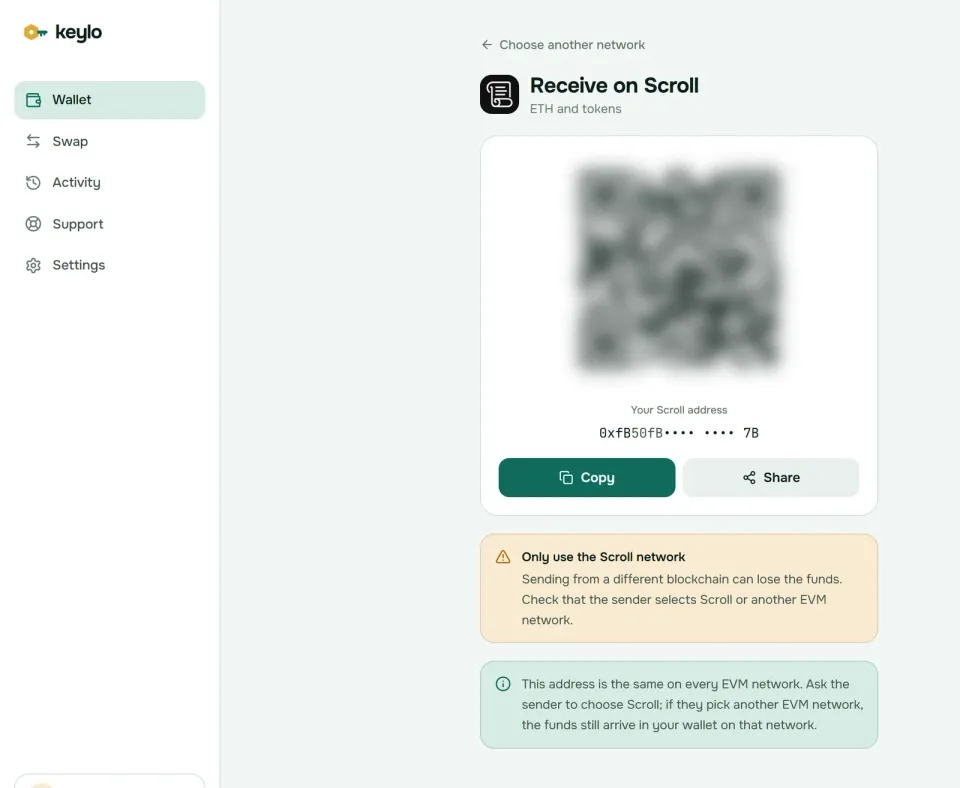
A note on that screen explains that your address is the same on every EVM network. So a sender who picks Ethereum, Base or another supported network by mistake still pays you, just on that network. You'll see it under that network in Keylo, and you can bridge it to Scroll from there.
Sending ETH and tokens on Scroll#
Tap Send and pick ETH or a token on Scroll.
Paste the address into To, or scan a QR code. Keylo validates the checksum and tells you if the recipient is a contract.
Type the amount. For ETH, skip Max on Scroll and leave a little behind, as explained below.
Tap Review, then pick Slow, Normal or Fast.
Check the network, the recipient and the fee, then tap Send.
Keylo signs the transfer in your browser. You'll see "On its way", then "Sent", with a View on Scrollscan link.
Keylo also blocks a token sent to that token's own contract, and it refuses addresses from non-EVM chains. If the token contract would reject a transfer, Keylo's simulation catches it before you sign. If a transfer ever sits pending, Speed up resends it with a higher fee.
Leave a little ETH behind#
On Scroll, the L1 data fee comes out of your balance on top of the execution gas. Keylo's fee quote here shows only the execution part, so the real cost is higher than the figure on the review screen, though still a fraction of a cent. Max has the same gap: it holds back the execution fee but not the data fee, so a Max send of ETH can fail.
So type the amount yourself and leave a small buffer behind. About 0.00001 ETH covers dozens of plain transfers at October 2026 prices. Keep a similar buffer when you send tokens, because their data fee also comes out of your ETH.
ENS names work in Keylo only for sends on Ethereum. On Scroll, paste the 0x address.
Scroll network gas fees: why the L1 data fee is most of it#
Every Scroll transaction pays two fees in ETH, and Scroll's fee documentation spells out both. The L2 execution fee is gas used times the L2 gas price, as on Ethereum before EIP-1559. The L1 data fee pays for committing your transaction's data to Ethereum in blobs. A contract on Scroll tracks Ethereum's blob and gas prices, so that part follows real costs.
On October 24, 2026, the L2 gas price was about 0.00012 gwei. A plain ETH transfer's execution part came to roughly 0.0000000025 ETH, a fraction of a hundredth of a cent. Its L1 data fee was about 0.00000024 ETH, close to $0.0006 with ETH near $2,360. In other words, the data fee was about 99% of the total.
The Feynman upgrade reworked Scroll's fee parameters in August 2025, and Galileo brought a fairer formula for the data fee in December 2025. For you, the upshot is simple: your fee depends mostly on the size of your transaction and on Ethereum's blob prices, not on how busy Scroll is.
That's also why the Slow, Normal and Fast choices in Keylo barely change your cost on Scroll. They only adjust the execution part, which Keylo shows, while the data fee comes on top. A busy day on Ethereum moves the total more than any speed setting does. Keylo adds no fee of its own to a send.
SCR, USDC and other tokens on Scroll#
Tokens on Scroll follow ERC-20. Keylo reads your holdings from Scroll's explorer index, so the tokens at your address appear without any setup. If one is ever missing, add it under Settings, Networks, Custom tokens with its contract address, symbol and decimals.
Token contracts on Scroll also have their own addresses, separate from Ethereum. These were checked on chain on October 24, 2026:
SCR
0xd29687c813D741E2F938F4aC377128810E217b1blaunched in 2024 as Scroll's governance token. It can't pay gas.USDC
0x06eFdBFf2a14a7c8E15944D1F4A48F9F95F663A4is USDC bridged from Ethereum through Scroll's USDC gateway. As of October 2026, Circle doesn't list Scroll among its native USDC networks.USDT
0xf55BEC9cafDbE8730f096Aa55dad6D22d44099Dfis the Tether USD contract on Scroll.
Because USDC on Scroll is bridged, an exchange may credit it only on certain networks. Check the exchange's Scroll deposit page before you send USDC there, or bridge it to a network where the exchange accepts it.
Keylo's Scroll page also shows a read-only Collectibles list of the NFTs your address holds. You can look at them, but you can't send or mint them in Keylo.
Bridging to and from Scroll#
Scroll's native bridge has no challenge period. A withdrawal enters a queue on Scroll, and once the batch holding it is proven and finalized on Ethereum, you claim it with a second transaction on Ethereum. On October 24, 2026, Scroll's latest finalized block trailed the chain by one to two hours. The claim costs mainnet gas, which can be a large share of a small withdrawal.
Keylo's routes usually skip the claim. Keylo gets them from LI.FI, which compares bridges and decentralized exchanges, and liquidity bridges pay you from their own funds on the other side, usually within minutes.
Tap Swap. Under You pay, pick the network and token you're starting from, such as ETH on Scroll.
Under You receive, choose where the funds should go and in what token. You can search or paste a contract.
Look through the routes, each with its amount, time and fees.
Open the details, then check the steps, Minimum you receive and Delivered to. That last line is your own address on the destination network.
Confirm and let the tracking screen follow it to the end.
The default slippage limit is 0.5%. A LI.FI bridge either finishes or refunds you, at times in a different token that still lands in your wallet. If Keylo takes a service fee on a route, the quote shows it as its own line. The swap and bridge page has the details.
Is Scroll safe? Trust, scams and mistakes#
Scroll's proofs mean Ethereum won't accept a state that wasn't executed correctly. However, upgrade control matters too. Scroll reached Stage 1 in 2025, then on June 1, 2026 replaced its independent 9-of-12 Security Council with a 3-of-4 team multisig. L2BEAT moved it back to Stage 0 because the contracts can now be upgraded instantly by that team. A single operator also orders transactions, though users can force inclusion through Ethereum if batches stall for 7 days.
That trade-off may be fine for everyday amounts. For savings, weigh it first.
The losses people actually suffer on Scroll tend to be these:
Fake SCR claims. Scroll's points era left a trail of airdrop sites. A real claim never asks for your recovery phrase.
Spam tokens. Tokens with a web link in their name lead to wallet drainers. Keylo lists every token at your address on Scroll, so these can show up in your asset list too. Ignore anything you didn't expect.
The wrong zkEVM. Several networks call themselves a zkEVM. Pick Scroll by name.
Emptying the account. Trying to send every last bit of ETH can fail on the L1 data fee. Leave a little behind.
Address poisoning. Lookalike addresses send dust so you copy them from history. Copy from the source instead.
Fake support. Keylo staff never ask for a phrase or password. Contact Keylo support, and read how Keylo keeps your keys on your device.
Five checks before your first real transfer:
Your phrase is on paper and confirmed in Keylo.
You hold ETH on Scroll for gas.
The exchange's network field says Scroll.
The token contract matches what the recipient expects.
A small test arrived before the large amount.
Keylo is non-custodial: if the password and the phrase are both gone, no one can restore the wallet, Keylo included. See every network Keylo supports, or compare Scroll with the Linea wallet guide, the Arbitrum wallet guide and the Ethereum wallet guide.
Hold ETH on Scroll in a wallet only you control
Keylo encrypts your recovery phrase in your browser and never sees it. Send, swap and bridge from one screen.
Scroll wallet FAQ#
Do I pay Scroll fees in SCR?
No. Every Scroll fee is paid in ETH, both the small execution part and the larger L1 data fee. SCR launched in 2024 as Scroll's governance token. You can hold and send it in Keylo like any ERC-20, but it can't cover gas. Keep a little ETH on Scroll so you can move SCR, USDC or anything else.
What is the L1 data fee on Scroll?
It's the part of your fee that pays for posting your transaction's data to Ethereum. Scroll charges it in ETH on top of the execution fee, and it follows Ethereum's blob prices. On October 24, 2026, it was about 99% of a plain ETH transfer's total, roughly $0.0006. Bigger transactions carry bigger data fees.
Why can't I send my whole ETH balance on Scroll?
Because the L1 data fee comes out of your balance in addition to the execution gas. Keylo's Max on Scroll reserves only the execution part, so a Max send of ETH can leave too little for the data fee and fail. Type the amount yourself and leave a small buffer, about 0.00001 ETH at October 2026 prices.
How long does it take to withdraw from Scroll to Ethereum?
With the native bridge, a withdrawal becomes claimable once its batch is proven and finalized on Ethereum. On October 24, 2026, finalization trailed the chain by one to two hours, and it varies. You then claim the funds on Ethereum and pay mainnet gas. Bridge routes found through LI.FI in Keylo usually deliver within minutes, with no separate claim.
Is USDC on Scroll native?
Not as of October 2026. USDC on Scroll, at 0x06eFdBFf2a14a7c8E15944D1F4A48F9F95F663A4, is bridged from Ethereum through Scroll's USDC gateway, and Circle doesn't list Scroll among its native USDC networks. It still aims to track one dollar. Before depositing it to an exchange, check that the exchange accepts USDC on Scroll specifically.
Is Scroll a ZK rollup or an optimistic rollup?
Scroll is a ZK rollup. Each batch carries a validity proof that Ethereum verifies, so an invalid state can't be accepted and withdrawals skip the week-long challenge window that optimistic rollups use. Scroll still relies on one sequencer for ordering and, since June 2026, a 3-of-4 team multisig for upgrades, which is why L2BEAT rates it Stage 0.
Is my Scroll address the same as my Ethereum address?
Yes. Scroll uses Ethereum's account model, so the same recovery phrase gives the same 0x address on Scroll, Ethereum and every other EVM network. The balances are separate, though. ETH on Ethereum stays there until you bridge it. If someone sends to your address on the wrong EVM network, the funds wait for you on that network.
Can I connect Keylo to Scroll DeFi apps?
No. Keylo has no browser extension and doesn't support WalletConnect, so it can't connect to Scroll's lending markets, exchanges or bridge site. You can still swap and bridge inside Keylo using LI.FI routes. To use Scroll apps directly, import the same phrase into an extension wallet such as MetaMask or Rabby.