A Linea wallet holds the key to your address on Linea, the zero-knowledge rollup that Consensys built on Ethereum. Consensys also makes MetaMask, which is why so many people first meet Linea as a network already sitting in their MetaMask list. Linea uses the same 0x address you have on Ethereum, and you pay gas in ETH.
You don't need MetaMask to use it, though. Any EVM wallet works, including a web wallet like Keylo, and your MetaMask recovery phrase moves with you. What needs care is the bridge: withdrawals to Ethereum take hours and finish with a claim you sign on Ethereum. Every figure below was checked on October 24, 2026.
Linea at a glance#
Item | Linea |
|---|---|
Network type | zkEVM rollup on Ethereum, built by Consensys |
Chain ID | 59144 |
Gas token | ETH (LINEA can't pay fees and has no governance role) |
Address format |
|
Typical fee | About $0.002 for an ETH transfer and $0.004 for USDC (October 24, 2026) |
Confirmation | About a second on Linea; final on Ethereum after about 2 hours (median) |
Withdrawal to Ethereum | About 2 to 12 hours on the native bridge, then a manual claim |
Token standard | ERC-20, with native USDC from Circle |
Explorer | Lineascan, plus a Blockscout explorer |
In Keylo | Send, receive, popular tokens found automatically (others by contract), Activity for sends made in Keylo, speed-up, swap and bridge through LI.FI, Linea Sepolia Testnet. No NFT view or dapp connections |
Linea, Consensys and MetaMask#
Linea is a separate network from Ethereum, run by its own sequencer and secured by zero-knowledge proofs that an Ethereum contract checks. The MetaMask link is about ownership and convenience. Linea's docs say MetaMask shows Linea among its enabled networks by default, on both the extension and the mobile app.
That convenience has a side effect: some people end up with funds on Linea without ever choosing it, for example after a campaign or a bridge. If that's you, nothing is locked to MetaMask. Linea accounts are standard Ethereum accounts, so the same recovery phrase opens the same Linea address in any EVM wallet.
Your Linea wallet address#
Your Linea wallet address is the 0x address your phrase produces on Ethereum's standard path, m/44'/60'/0'/0/0. MetaMask uses that path for its first account, and Keylo uses it for every EVM network. So ETH at your address on Linea and ETH at that same address on Ethereum are two separate balances. Neither appears on the other network until it's bridged.
Linea needs no activation deposit, no memo and no minimum balance. The one thing it needs is a little ETH for gas.
Picking a Linea wallet: apps, extensions and web wallets#
Because Linea is EVM-equivalent, the choice is less about compatibility and more about what you plan to do there.
MetaMask. The browser extension and mobile app list Linea by default and connect to Linea's apps. It's the natural pick if you use Linea DeFi.
Other extension wallets. Multi-chain EVM extensions such as Rabby also support Linea and connect to its apps.
Hardware wallets. A Ledger or similar device keeps the key offline and pairs with a software wallet. That's sensible for larger balances.
Web wallets. These run in a browser tab with nothing to install. Keylo is one, and it treats Linea as one network among many under a single phrase.
Whatever you choose, look for three Linea details. The wallet should show the full fee in ETH before you sign. It should let you resend a stuck transaction with a higher fee, for a reason explained in the sending section. And it should show token contract addresses, since names and logos prove nothing.
Where Keylo falls short on Linea#
Keylo has no browser extension and doesn't support WalletConnect, so it can't sign in to Linea apps, quest sites or the native bridge page. It has no NFT view on Linea and can't send NFTs. It doesn't stake, except on Cosmos SDK chains, and you can't buy crypto with a card in it or connect a hardware wallet. If those matter, keep MetaMask for them and use Keylo for holding, sending and moving funds between networks.
Create a Linea wallet in Keylo#
Linea is already on Keylo's network list, so you skip the RPC and chain ID steps.
Go to create a Keylo account. Enter your full name, email, phone number and a password twice, tick the terms box and press Create account.
Confirm your email if Keylo asks you to check your inbox.
On "Set up your wallet", choose Create a new wallet. Keylo builds a 12-word phrase in your browser and encrypts it there with your password. The server keeps only that encrypted copy and can't read it.
Open Linea from the asset list to see your address and balance.
Write the phrase down. In Settings, open Recovery phrase, type your password, copy the words onto paper and confirm the ones Keylo asks for.
Also in Settings, switch on Two-factor authentication and choose an Anti-phishing code.
Keep that paper safe. A forgotten password can be reset, but the reset can't decrypt the wallet, so the phrase is how you restore it.
Moving over from MetaMask#
Choose Import a recovery phrase instead and type your MetaMask words. Keylo derives the same first account, so your Linea address and balance appear as they do in MetaMask. Account 2 and later sit on other indexes and won't be in Keylo. They're still safe in MetaMask, and you can send their funds to your first address.
Practice on Linea Sepolia#
Under Settings, then Networks, turn on Testnet mode. Keylo adds Linea Sepolia Testnet, where ETH is free and worthless. Fund it from a public Linea Sepolia faucet and try a send before you touch real money.
Open your Linea address in a minute
Sign up with email and a password, or import your MetaMask phrase. Keylo keeps the wallet encrypted in your browser.
How to receive ETH and tokens on Linea#
Tap Receive and pick Linea. Keylo shows "Receive on Linea", a QR code and "Your Linea address".
Give the address to the sender with Copy or Share, or let them scan the code.
Withdrawing from an exchange? Pick Linea itself in the network list, not Ethereum and not a different zkEVM.
Your Linea balance updates once the deposit confirms. Keylo's Activity list on Linea shows only transfers sent from Keylo, so to see the incoming one, tap the link icon next to your address. It opens your address on Lineascan.
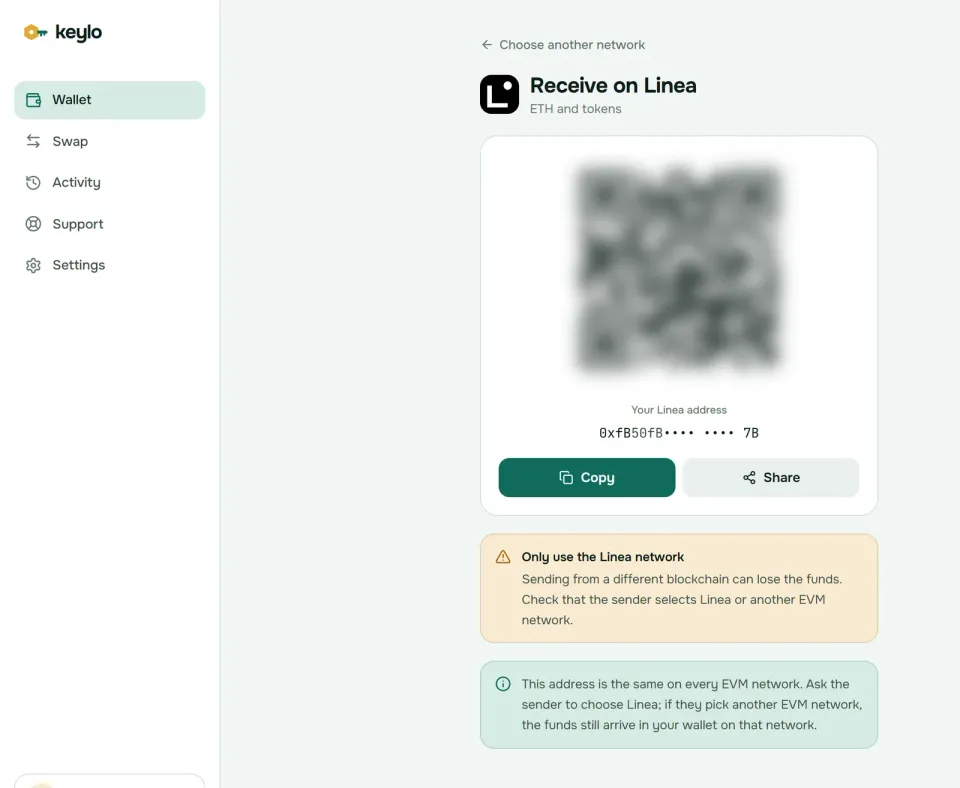
Keylo's Receive screen also warns you to use only the Linea network, or another EVM network. A transfer sent on the wrong EVM chain isn't lost, because your address exists there too. It simply lands on that chain, and you'll find it under that network in Keylo.
How to send ETH and tokens on Linea#
Tap Send and choose ETH or a token on Linea.
Paste or scan the recipient into To. Keylo checks the address and its checksum, and warns you if it belongs to a contract.
Enter an amount or tap Max. For ETH, Max leaves enough behind for gas.
Tap Review and choose Slow, Normal or Fast, each with its cost.
Check the network, recipient and fee, then tap Send.
The status changes from "On its way" to "Sent". The View on Etherscan link opens the transfer on Lineascan, which Etherscan runs.
Why a Linea transaction gets stuck#
Linea's sequencer fills blocks in order of priority fee, highest first. Transactions from one account, however, must still go in nonce order. So if an earlier transfer from your address went out with too low a fee, every later one waits behind it, whatever it pays.
The fix is to raise the first one. While a transfer is pending, Keylo offers Speed up ("Speed up this transaction"), which resends it with a higher fee. Wait for it to confirm before you queue more sends.
On Linea, paste a 0x address as the recipient. Keylo resolves ENS names only for sends on Ethereum.
Linea gas fees explained#
Linea uses Ethereum's EIP-1559 format: gas used times base fee plus priority fee, paid in ETH. The base fee sits at a tiny fixed level, 7 wei on October 24, 2026. Almost everything you pay is the priority fee.
That priority fee does two jobs. It covers a fixed infrastructure charge, and it covers the cost of posting your transaction's data to Ethereum as blobs. So the more bytes your transaction takes up, the higher its minimum priority fee. A plain transfer is cheap, while a large contract call costs more. Linea's gas documentation gives the full formula.
On October 24, 2026, Linea's own estimate method, linea_estimateGas, priced a plain ETH transfer at about 0.0000008 ETH. That's roughly $0.002 with ETH near $2,360, and a USDC transfer came to about $0.004. Wallets that price with the standard gas methods, Keylo included, quote a little more: about 0.000001 ETH for the same transfer that day. Both stay well under a cent, and Keylo adds nothing to a normal send.
You never need LINEA for gas. Fees go into a revenue vault, and that vault funds the burn described next.
The LINEA token, the dual burn and USDC#
LINEA is the token of the Linea network, launched in 2025 with a genesis supply of 72,009,990,000. According to Linea's tokenomics page, it has no governance rights and you don't need it to use the network. Most of the supply went to an ecosystem fund and to users through airdrops. Consensys holds 15%, locked for five years.
The burn is what ties LINEA to ETH. After infrastructure costs are paid, 20% of surplus fee revenue is burned as ETH. The other 80% is converted to LINEA and burned on Ethereum. Your own transfers feed that burn, but nothing about it changes what you pay or hold.
These are the Linea contracts most people need, checked on chain on October 24, 2026:
LINEA
0x1789e0043623282D5DCc7F213d703C6D8BAfBB04, the same address on Linea and Ethereum.USDC
0x176211869cA2b568f2A7D4EE941E073a821EE1ff, Circle's native USDC.
USDC on Linea started as Circle's bridged standard and became native in 2025, without holders swapping anything. Because of that, Linea doesn't leave you with two USDC versions to tell apart. Keylo checks for common tokens such as USDC, USDT and WETH. If LINEA or another token doesn't appear, add it under Settings, Networks, Custom tokens with Add token: the contract address, the symbol and the decimals (18 for LINEA).
Linea bridge: deposits, withdrawals and claims#
Linea's own bridge app offers two routes. The native bridge moves funds through Linea's canonical contracts. An "All bridges" tab, powered by LI.FI, compares third-party bridges, and Linea's docs call it the best option for most users. Keylo uses LI.FI too, so you get the same kind of routes without connecting a wallet to a website.
How the native bridge works#
Deposits from Ethereum take about 20 minutes. A postman service claims them on Linea for you, and Linea sponsors that fee for most transfers.
Withdrawals are slower. Your funds can be claimed only after the batch holding them reaches hard finality on Ethereum, which the finality docs put at about 2 hours in the median and never over 16 hours in normal conditions. Linea quotes 2 to 12 hours end to end. Then you sign a claim on Ethereum and pay mainnet gas. Linea also adds a 0.001 ETH anti-DDoS fee to native-bridge withdrawals. USDC goes through Circle's CCTP instead and needs a manual claim in both directions.
Linea now stakes part of the surplus ETH in its bridge on Ethereum through Lido, a phased program it calls Yield Boost. You still get 1:1 ETH on Linea, and withdrawals normally come from a reserve kept liquid for that purpose.
Bridge from your Linea wallet in Keylo#
Tap Swap and choose ETH or a token on Linea under You pay, or on the network you're coming from.
Under You receive, set the destination network and token. Search by name or paste a contract address.
Pick a route from the list. Each one shows the amount you'd get, the time and the fees.
Open the details and check every step, Minimum you receive and Delivered to, your own address on the other network.
Confirm, then watch the tracking screen until the funds arrive.
Slippage defaults to 0.5%. A LI.FI bridge either completes or sends the money back, now and then as another token that still arrives in your wallet. A Keylo service fee, when a route has one, appears as a separate line. More on routes and refunds is on the swap and bridge page.
Linea safety: scams, mistakes and trust#
L2BEAT rated Linea Stage 0 in October 2026. A 5-of-9 Security Council can upgrade it without delay, and users can't yet force transactions past the sequencer. Zero-knowledge proofs still stop anyone from inventing an invalid state, so the risk sits in upgrades and liveness, not in faked balances.
Most money lost on Linea goes to the usual traps, sharpened by years of points campaigns:
Fake airdrop and LXP claim sites. Linea's airdrop rewarded activity, including Linea Voyage XP, so "claim" pages still circulate. None of them needs your phrase.
Old token approvals. Quest and campaign sites often asked for unlimited approvals. Review and revoke them in a wallet that connects to apps, because Keylo can't.
Copycat LINEA tokens. Compare the contract with the one above before you trade or accept anything.
Address poisoning. Lookalike addresses send you dust so they show up in your history. Copy addresses from the source each time.
Fake support. Keylo staff never ask for your phrase or password. Reach them through Keylo support, and read how Keylo protects your keys.
Before your first real transfer:
Your phrase is written down and confirmed in Keylo.
You hold ETH on Linea for gas.
The exchange or bridge network says Linea.
You checked the token contract on Lineascan.
You sent a small test first.
Keylo is non-custodial, so a lost password and a lost phrase together can't be recovered by anyone. The full network list shows where else that phrase works. The Ethereum wallet guide, the ZKsync wallet guide and the Base wallet guide cover three of them.
Keep your Linea ETH under your own key
Import your MetaMask phrase or create a new wallet. Keylo encrypts it in your browser and never sees it.
Linea wallet FAQ#
Is Linea part of MetaMask?
No, but they come from the same company. Consensys builds both Linea and MetaMask, and MetaMask shows Linea among its default networks. Linea itself is an independent Ethereum layer 2 that any EVM wallet can use. Your Linea address isn't tied to MetaMask: the same recovery phrase opens the same Linea account in other wallets, including Keylo.
Can I use my MetaMask recovery phrase in another Linea wallet?
Yes. Linea uses standard Ethereum accounts, so importing the phrase into Keylo or another EVM wallet gives you the same first address and the same Linea balance. Keylo derives only that first account. Accounts you added later in MetaMask use other indexes, so move their funds to your first address or keep using MetaMask for them.
Do I need the LINEA token to pay gas?
No. Every Linea fee is paid in ETH. LINEA has no gas role and no governance rights. It exists to reward users and builders, and part of Linea's surplus fee revenue buys and burns it. Keep a small ETH balance on Linea so you can move LINEA, USDC or anything else you hold there.
How long does it take to withdraw from Linea to Ethereum?
On the native bridge, about 2 to 12 hours. The withdrawal becomes claimable once its batch reaches hard finality on Ethereum, which takes about 2 hours in the median and should stay under 16 hours. You then claim it on Ethereum and pay mainnet gas. Third-party bridges, including the LI.FI routes in Keylo, usually finish in minutes.
Why do I have to claim my Linea withdrawal?
Withdrawals from Linea to Ethereum, and any USDC transfer through Circle's CCTP, use manual claiming. The bridge records your withdrawal, and once Ethereum has verified the proof, you send a second transaction on Ethereum to release the funds. Deposits from Ethereum to Linea are claimed for you by Linea's postman service, so they need only one transaction.
How much are Linea gas fees?
Very low as of October 2026. On October 24, Linea's estimate method priced an ETH transfer at about $0.002 and a USDC transfer at about $0.004. The base fee stays at a tiny fixed level, and most of the cost is a priority fee that reflects how much data your transaction posts to Ethereum. Keylo shows the fee for each speed before you sign.
Why is my Linea transaction stuck pending?
Usually an earlier transaction from the same address is waiting with a low fee. Linea orders blocks by priority fee, but one account's transactions must still go in nonce order, so later sends queue behind the stuck one. In Keylo, open the pending transfer and use Speed up to resend it with a higher fee. Then wait for it to confirm.
Is USDC on Linea native or bridged?
Native. Circle lists Linea among its native USDC networks, at contract 0x176211869cA2b568f2A7D4EE941E073a821EE1ff. It began as Circle's bridged standard and was upgraded to native in 2025, without holders swapping anything. USDC moving to or from Linea through the native bridge uses Circle's CCTP, which burns it on one chain and mints it on the other.
Is there a Linea wallet app?
You don't need a Linea-specific app. According to Linea's docs, MetaMask's mobile app lists Linea by default, and any EVM wallet app can add it with chain ID 59144. Keylo has no app-store app: it runs in your phone's browser and can be added to the home screen like one, showing the same Linea address as MetaMask's first account.
What is a Linea wallet checker?
Usually a site that looks up an address's Linea activity or its LINEA airdrop allocation. You don't need one to see your own funds: paste your address into Lineascan, or open Linea in Keylo. Be wary of checkers that ask you to connect a wallet or sign a message, because fake claim pages work that way. Looking up an address never needs a signature.