A Kava wallet is really two accounts under one recovery phrase. Kava runs a Cosmos chain and an Ethereum-style chain side by side, so KAVA can sit at a kava1 address on the Cosmos side or at a 0x address on Kava EVM. Both use the same validators and the same coin, but they're separate balances.
Each side also has its own job. You stake KAVA and receive exchange deposits with memos on the Cosmos side, while USDt and other ERC-20 tokens live on Kava EVM. Giving a sender the wrong address is the mistake to avoid, so this page shows which one to use and when. Figures are as of October 24, 2026, read from the chain where possible.
Kava at a glance#
Item | Kava (Cosmos side) | Kava EVM |
|---|---|---|
Name in Keylo | Kava | Kava EVM |
Address |
|
|
Derivation path |
|
|
Chain ID |
| 2222 |
Fee coin | KAVA (1 KAVA = 1,000,000 ukava) | KAVA, shown with 18 decimals |
Typical transfer fee in Keylo | About 0.003 to 0.005 KAVA | About 0.00002 KAVA at 1 gwei |
Memos | Yes | No |
Tokens | Native Cosmos and IBC tokens | ERC-20 tokens such as USDt |
Staking | Yes, 21-day unbonding | No |
Explorer | ||
In Keylo | Send, receive, memos, tokens, full history, staking | Send, receive, ERC-20 tokens you add, history of sends made in Keylo, speed-up |
Both sides share one chain and one set of blocks, about 5.7 seconds apart. Keylo offers no swaps or bridges on either.
How a Kava wallet works#
Kava's Cosmos side handles staking, governance and IBC transfers to other Cosmos chains. Kava EVM runs Ethereum smart contracts, so Ethereum tools and token standards work there. The chain keeps both ledgers, and your wallet holds the keys that sign for each one.
Your two Kava wallet addresses#
Keylo derives your kava1 address on coin type 459, the path Keplr and Trust Wallet use for Kava. Then it derives your 0x address on coin type 60, the same path as MetaMask and every other EVM network in Keylo. Different paths mean different keys, so you get two accounts with two balances.
Kava's own help center describes the same split: MetaMask and Keplr don't share a derivation path, so one phrase gives different addresses in each. In Keylo, open Kava for the kava1 account and Kava EVM for the 0x account.
The kava1 form of your 0x address#
There's one more twist. Every 0x account on Kava also has a kava1 spelling, which you can see by looking up the 0x address on Mintscan. It's the same account written another way, not the kava1 address Keylo shows under Kava.
Kava's help center uses that spelling to get KAVA from an exchange into a MetaMask account, because many exchanges only send on the Cosmos side. KAVA sent to it shows up in the EVM balance, so in Keylo it appears under Kava EVM.
How to choose a Kava wallet#
Most wallets cover only one side of Kava, which is worth knowing before you pick.
Cosmos wallets. Keplr (browser extension and mobile app) and Trust Wallet (mobile) handle the
kava1side, including staking. Kava's help center lists both, along with Ledger.EVM wallets. MetaMask and OKX Wallet work on Kava EVM, chain ID 2222. They see your
0xbalance and ERC-20 tokens but can't stake.Hardware wallets. A Ledger keeps keys offline and pairs with Keplr or MetaMask, which suits large balances.
Exchange accounts. The exchange holds the keys. Many also credit KAVA only on the Cosmos network.
Web wallets. Keylo runs in a browser tab and shows both sides from one phrase, with no network to add by hand.
A good Kava wallet labels the two networks clearly and refuses an address from the wrong side. It should also offer a memo field for exchange deposits and let you add an ERC-20 token by contract address.
Keylo suits people who want to hold, send and stake KAVA and keep USDt on Kava EVM in one place. It's the wrong tool for Kava DeFi apps or Kava's own web tools, because Keylo can't connect to websites.
How to create a Kava wallet in Keylo#
Open the sign-up page and enter Full name, Email, Phone number, Password and Confirm password. Tick the terms box and tap Create account.
If you see "Check your inbox", confirm your email from the message Keylo sends.
Choose Create a new wallet on the "Set up your wallet" screen. Your browser creates a 12-word phrase, then encrypts it with a key derived from your password (Argon2id, then AES-256-GCM). The server keeps only that encrypted copy.
Find Kava in your asset list for the
kava1address, and Kava EVM for the0xaddress.Back up the phrase under Settings, Recovery phrase. Enter your password, write the 12 words down by hand and confirm the ones Keylo asks for.
Turn on Two-factor authentication and set an Anti-phishing code in the same menu.
Those 12 words are the only way back into both halves of your Kava wallet. A password reset reopens your Keylo login but can't decrypt the wallet, so keep the paper safe.
Importing from Keplr, Trust Wallet or MetaMask#
Choose Import a recovery phrase and enter your 12 or 24 words. A Keplr or Trust Wallet phrase brings back the same kava1 account and its delegations under Kava. A MetaMask phrase brings back the same 0x account under Kava EVM. Keplr can also create Kava accounts on coin type 118. If yours used that path, the kava1 address in Keylo will differ, but those funds stay reachable in Keplr.
Keylo has no Kava testnet, so start with a small transfer.
Get both Kava addresses in a minute
Sign up with email and a password. Keylo creates your kava1 and 0x accounts in your browser from a single recovery phrase.
How to receive KAVA and USDt on the right side#
The sender's network decides which address you give. Ask first, then copy the matching one.
Tap Receive and choose Kava for the Cosmos side, or Kava EVM for the EVM side.
Then check the heading. It reads "Receive on Kava" or "Receive on Kava EVM", above a QR code and your address.
Tap Copy or Share, or let the sender scan the code.
On an exchange, pick the network that matches: Kava (Cosmos) for a
kava1address, Kava EVM for a0xaddress.Wait for the deposit. On Kava it appears in the activity list, with a Mintscan link. Keylo's Kava EVM activity shows only transfers you send, so watch the balance there or look up your
0xaddress on Kavascan.
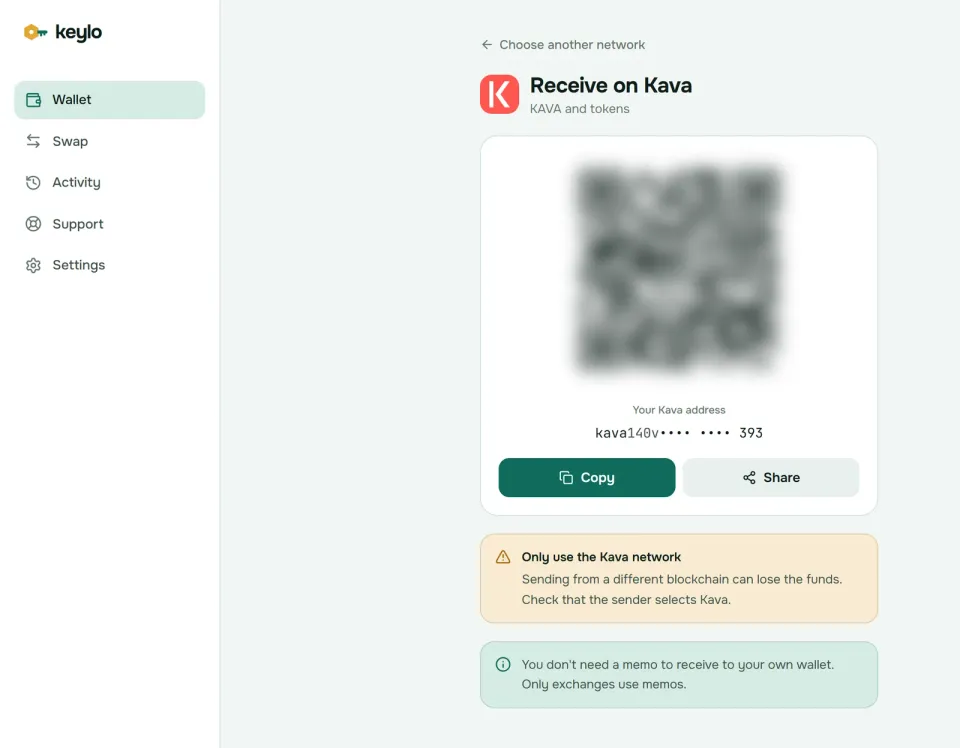
Your own kava1 address never needs a memo, and Keylo's Receive screen says so. On Kava EVM, the screen notes that your 0x address is the same on every EVM network. If a sender picks Ethereum or BNB Smart Chain by mistake, the funds land on that network instead, under its own entry in Keylo.
Adding USDt on Kava EVM#
Tether issues USDt on Kava as an ERC-20 token on Kava EVM. Tether's list of supported networks gives the contract as 0x919C1c267BC06a7039e03fcc2eF738525769109c, and the token uses 6 decimals.
Keylo doesn't detect Kava EVM tokens on its own, so add USDt once. In Settings, find Custom tokens under Networks and tap Add token. Choose Kava EVM as the network, paste the contract above, and enter USDt with 6 decimals. Before you send USDt to an exchange, confirm it accepts USDt on Kava EVM specifically.
How to send KAVA from either side#
Open Kava or Kava EVM, whichever holds the coins, and tap Send.
Paste or scan the recipient into To. Kava accepts only
kava1addresses, and Kava EVM only0xaddresses.Enter an amount or tap Max. Max keeps back enough KAVA for the fee, so the send doesn't fail.
On Kava, paste the exchange's memo into Memo. Kava EVM has no memo field, so skip this step there.
Tap Review, choose Slow, Normal or Fast, then check the network, recipient and fee.
Tap Send. The status changes from "On its way" to "Sent", with a link to the explorer.
What Keylo checks before you sign#
Keylo test-runs every transfer, so problems show up before any fee is spent. On the Kava side, a 0x address in To gets a message that it looks like an EVM address, not Kava. Leave Memo empty and Keylo reminds you that most exchanges need one.
On Kava EVM, Keylo warns when the recipient is a smart contract and blocks sends to the token's own contract. Sending USDt with no KAVA for gas shows "You need some KAVA on Kava EVM to pay the network fee." A transfer that sits pending gets a Speed up button.
Exchanges are the place to be careful. Kava's help center has warned that you can't withdraw directly from an EVM wallet to an exchange, and many exchanges still credit only Cosmos-side deposits. Send to exchanges from your kava1 account unless yours clearly lists Kava EVM.
Kava network fees on both sides#
Both sides charge fees in KAVA, but they price them differently.
On the Cosmos side, you pay a gas limit times a price in ukava. A plain transfer uses about 75,000 gas. Keylo prices gas from at least 0.025 ukava and adds a safety margin to its gas estimate. That makes a typical transfer about 0.003 KAVA on Slow and 0.005 KAVA on Fast. You pay for the full limit, whether or not the transaction uses it all.
On Kava EVM, fees work like Ethereum's. A plain KAVA transfer uses 21,000 gas, and the gas price was 1 gwei on October 24, 2026, so it costs about 0.000021 KAVA. A USDt transfer uses two to three times as much gas, still a tiny fraction of a cent.
Keylo adds nothing to normal sends. The one rule that costs people money is gas: an account holding only USDt can't move it. So keep a little KAVA on whichever side you use.
How to stake KAVA in Keylo#
Staking happens only on the Cosmos side of your Kava wallet, so the KAVA has to sit in the kava1 account under Kava.
Open Kava and tap Stake. The "Stake KAVA" page shows Available, Staked, Rewards and Unstaking.
Pick a validator. Keylo lists active validators that aren't jailed, with voting power and commission. Kava's minimum commission is 5%, and anything above 20% shows in a warning color.
Enter an amount or tap Max, then Review to see the fee and the 21-day unstaking reminder.
Tap Confirm, and your browser then signs the delegation.
Return later to Move or Unstake a delegation, or collect with the Claim ... KAVA in rewards button that appears once rewards accrue.
Keep a few KAVA unstaked for fees, because each claim, move or unstake costs a little.
Where Kava staking rewards come from#
Kava no longer mints new KAVA: the chain's inflation reads zero as of October 2026. Stakers get paid from the community pool instead of fresh coins, at a fixed rate of about 10 million KAVA a year. Spread over the roughly 127 million KAVA staked, the chain reports annual rewards of about 7.9%, before validator commission. That rate falls as more KAVA joins staking and rises as stake leaves.
Unbonding and slashing on Kava#
Unstaked KAVA spends 21 days unbonding. It earns nothing and can't move during that time, then it returns to your balance automatically. Moving stake to another validator is instant, but the moved KAVA must wait 21 days before it can move again.
As of October 2026, Kava has 49 active validators and room for 100. A validator that double-signs loses 5% of its stake, and its delegators share that cut. One that signs fewer than 5% of the last 10,000 blocks, about 16 hours, loses 0.01% and is jailed for at least 10 minutes. Mintscan shows each validator's uptime and history.
Moving KAVA between Kava and Kava EVM#
Keylo has no button that converts between the two sides, but one direction is easy.
Cosmos side to Kava EVM. Look up your Keylo 0x address on Mintscan to find its kava1 spelling. Then send KAVA from your Kava account to that kava1 address, and it appears under Kava EVM. Kava's help center warns that only KAVA should go this way, never ERC-20 or IBC tokens, so test with a small amount first.
Kava EVM to the Cosmos side. Kava's web app has a tool for this, but it needs a connected EVM wallet and a Cosmos wallet, which Keylo can't do. Instead, use an exchange that accepts Kava EVM deposits and withdraws on the Cosmos network. Alternatively, import your phrase into MetaMask and Keplr and follow Kava's transfer guide.
What Keylo doesn't do on Kava#
No conversion between sides. Keylo shows Kava and Kava EVM as two networks and moves coins only within each one.
No swaps or bridges. Keylo's swap and bridge routes don't cover Kava or Kava EVM. Trade KAVA on an exchange that supports the Kava network you hold it on.
No staking from Kava EVM. Only the
kava1account can delegate.No dapp connections. There's no browser extension and no WalletConnect, so Kava's web app and Kava EVM DeFi sites won't connect.
No NFT view, hardware wallets or card purchases. Buy KAVA on an exchange and withdraw it on the network you want.
Keylo is also non-custodial. Lose both your password and your recovery phrase, and nobody can open the wallet, Keylo included. The full network list shows what else your phrase covers.
Kava scams and mistakes to avoid#
Kava losses tend to start with a wrong address or a fake token, not with the chain.
The wrong side. Giving a
0xaddress for a Cosmos-side withdrawal, or the reverse, is the classic Kava mistake. Read the network name on every withdrawal form.Fake USDt. Anyone can deploy a token called USDt on Kava EVM. Only the contract
0x919C1c267BC06a7039e03fcc2eF738525769109cis Tether's.A missing memo. Exchange deposits on the Cosmos side usually need the memo the exchange gives you.
Tokens sent to a kava1 spelling of an EVM account. Kava says to send only KAVA that way.
Airdrop and support scams. Claim sites that ask you to connect a wallet or type your phrase are drainers. Keylo staff never ask for your phrase or password, so reach the team through the Keylo support page and read about Keylo's security settings.
Run through this list before your first real Kava transfer:
Your recovery phrase is written down and confirmed in Keylo.
You know which side the sender uses, and you copied the matching address.
You keep a little KAVA on each side you use, for fees.
You added the exchange memo on Cosmos-side deposits.
You sent a small test amount first.
Kava EVM shares your 0x address with Ethereum, which the Ethereum wallet guide covers. For more Cosmos chains, see the Cosmos Hub wallet guide and the Terra wallet guide.
Keep KAVA and USDt in a wallet only you control
Keylo encrypts your recovery phrase on your device and never sees it. Hold both Kava accounts, send with memos and stake from your browser.
Kava wallet FAQ#
Why does my Kava wallet show two addresses?
Kava runs two environments on one chain. The Cosmos side uses kava1 addresses, which Keylo derives on coin type 459 like Keplr. Kava EVM uses 0x addresses, which Keylo derives like MetaMask and shares with every EVM network. Different paths mean two separate accounts with their own balances, both controlled by your one recovery phrase.
Which Kava wallet address should I give an exchange?
It depends on the network the exchange uses. Many send KAVA on the Cosmos side, so give your kava1 address from the Kava entry in Keylo, and add a memo when depositing to the exchange. If the withdrawal form says Kava EVM and asks for a 0x address, give the address from the Kava EVM entry instead.
I sent KAVA to my 0x address. Where is it?
Look at the Kava EVM balance in Keylo, not Kava. Deposits to your 0x address on Kava EVM land there, and so does KAVA sent on the Cosmos side to the kava1 spelling of that 0x account. Keylo's Kava EVM activity won't list the deposit, so check Kavascan for the transaction. If the exchange used Ethereum or BNB Smart Chain instead, look under that network.
Can I stake KAVA held on Kava EVM?
Not from Keylo. Staking happens on the Cosmos side, so the KAVA must sit in your kava1 account under Kava. Move it there first, for example by depositing to an exchange that accepts Kava EVM and withdrawing on the Cosmos network. Then open Kava, tap Stake and choose a validator.
How long does it take to unstake KAVA?
21 days, as of October 2026. Unstaked KAVA earns no rewards and can't move during that time, then it returns to your kava1 balance by itself. If you only want a different validator, move your stake instead. That's instant, although the moved KAVA can't move again for 21 days.
Where do Kava staking rewards come from?
Kava stopped minting new KAVA, and its chain inflation reads zero. Stakers are paid from the community pool at a fixed rate of about 10 million KAVA a year. With roughly 127 million KAVA staked in October 2026, that works out to about 7.9% a year before validator commission. The rate moves as the total stake changes.
How do I receive USDt on Kava?
Give the sender your 0x address from the Kava EVM entry and ask them to send USDt on Kava EVM. Then add the token in Keylo under Custom tokens with Tether's contract, 0x919C1c267BC06a7039e03fcc2eF738525769109c, and 6 decimals. Keep a little KAVA on Kava EVM as well, because you need it to pay gas when you send the USDt on.
Can I import my Keplr or MetaMask wallet into Keylo?
Yes. Choose Import a recovery phrase and enter the 12 or 24 words. A Keplr or Trust Wallet phrase usually shows the same kava1 account and delegations under Kava, and a MetaMask phrase shows the same 0x account under Kava EVM. Leap closed its apps by May 28, 2026, but it never held its users' coins, so a Leap phrase still works elsewhere.