A Kaia wallet is any wallet that holds the keys to your address on Kaia, the EVM-compatible chain that used to be Klaytn. It stores KAIA, the coin that pays gas, plus tokens like Tether's USDT, and it uses the same 0x address format as Ethereum. "Kaia Wallet" is also the name of the network's official wallet, which was called Kaikas before the rename.
Kaia is quick and cheap: blocks arrive every second, they're final as soon as they land, and a transfer costs a fraction of a cent. The confusing parts are history and labels, because the network changed its name. Some exchanges still say KLAY, there are two kinds of USDT, and Kaia accounts can change their keys, which Ethereum accounts can't. Figures below are as of October 2026.
Kaia at a glance#
Item | Kaia |
|---|---|
What it is | EVM-compatible layer 1, the continuation of Klaytn after its 2024 merger with Finschia |
Native coin | KAIA (formerly KLAY), 1 KAIA = 10^18 kei |
Address format |
|
Chain ID | 8217, unchanged from Klaytn |
Consensus | Optimized Istanbul BFT with a randomly chosen committee |
Blocks | About 1 second, final immediately |
Typical fee | About 0.0006 KAIA for a KAIA transfer at a 25 Gkei base fee |
Token standard | KIP-7, compatible with ERC-20 |
Explorer | |
In Keylo | Send, receive, popular tokens plus any you add, activity for transfers sent from Keylo, speed-up, swap and bridge through LI.FI. No testnet, staking or dapp connections |
How a Kaia wallet works#
Kaia follows Ethereum closely, but its history and its account model add a few twists.
From Klaytn to Kaia#
Kaia began as two separate projects. Klaytn grew out of Kakao in South Korea, and Finschia carried on the former LINE Blockchain. Their communities voted to merge in 2024, so Kaia launched as a hard fork of Klaytn. The chain kept running, and the chain ID stayed 8217.
KLAY holders didn't have to do anything, because Kaia's FAQ says KLAY balances were automatically reflected as KAIA at one to one. Any site telling you to "swap KLAY to KAIA" today is a scam.
Finschia holders did have to act. The Kaia Portal swap paid about 148.08 KAIA per FNSA and closed when the Finschia chain shut down on September 30, 2025. For FNSA that was never swapped, Kaia's docs now describe a claim tool called Kaiabridge, which works with MetaMask or Kaia Wallet after you import the old Finschia key.
Kaia Wallet and Kaikas#
Kaikas, Klaytn's browser extension, became Kaia Wallet. It runs in Chrome, Kaia's wallet list also shows a mobile version, and it connects to Kaia apps. If you searched for that exact product, Kaia's wallet documentation is the official starting point. Otherwise, any wallet that supports the network can hold KAIA.
Your Kaia wallet address#
Your Kaia address looks exactly like an Ethereum one, and in Keylo it is the same string you use on every EVM network. Keylo derives it on m/44'/60'/0'/0/0, the path MetaMask uses for its first account. The balance on Kaia is still separate from the balance at that address on Ethereum or BNB Smart Chain.
Accounts whose key can change#
Here Kaia differs from Ethereum. Kaia's account documentation says an account can change the key pair it's linked to. It can switch to a new key, require several keys (multisig), or split roles so one key sends transactions and another changes settings.
That design helps after a leaked key, because you can swap in a fresh one. However, it also means an address isn't always controlled by the key your phrase produces. If you once updated an account key in a Kaia-native wallet, your original phrase may no longer sign for that address in any wallet, Keylo included.
Keylo uses plain Ethereum-style accounts and never sends account updates. So if KaiaScan shows an account update on your address that you didn't make, treat the key as stolen and move whatever is left.
How to choose a Kaia wallet#
Wallets for Kaia fall into a few groups.
Kaia-native wallets. Kaia Wallet, the former Kaikas, is made for the network. It understands Kaia's own transaction types and connects to Kaia apps.
General EVM wallets. MetaMask and similar wallets work after you add the network with chain ID 8217. They connect to Kaia DeFi but only use Ethereum-style transactions.
Wallets inside LINE. LINE's Mini DApps and Dapp Portal give LINE users a wallet inside the messenger. They're built for those apps.
Hardware wallets keep the key offline for large holdings.
Web wallets run in a browser tab. Keylo is one of them; it has no store listing, but it can sit on your home screen like an app.
Whichever you choose, check where the wallet derives keys. A wallet made for Kaia may not use Ethereum's path, and the same phrase can then produce a different address in each wallet.
Keylo suits people who want KAIA and Kaia stablecoins next to their other networks, with swaps and bridges built in. It's the wrong tool for Mini DApps or Kaia DeFi, because Keylo doesn't connect to dapps.
How to create a Kaia wallet in Keylo#
Kaia comes preloaded in Keylo, so there's no RPC address or chain ID to enter.
Head to the Keylo sign-up form. Give your full name, email, phone number and a password typed twice, accept the terms and choose Create account.
A "Check your inbox" message means Keylo wants you to confirm your email first. Click the link it sent.
Choose Create a new wallet on "Set up your wallet". Your browser creates the 12-word phrase and encrypts it with your password (Argon2id, then AES-256-GCM) before anything reaches Keylo's servers.
Find Kaia in the asset list and open it to see KAIA, your tokens and the
0xaddress.Go to Settings, Recovery phrase. After your password, tap Show my phrase, write the 12 words on paper in order, tap I wrote them down and confirm the three words requested.
Finish with Two-factor authentication and an Anti-phishing code, both in Settings.
Keylo never holds your phrase, so it can't restore the wallet for you. A password reset gets you back into the account, but only the phrase can decrypt the wallet.
Importing an existing wallet#
Pick Import a recovery phrase and enter your 12 or 24 words. A phrase from MetaMask shows the same first address and the same Kaia balance. A phrase from a Kaia-native wallet may show a different address if that wallet used another path. Nothing is lost in that case: the funds stay at the old address, and you can send them to Keylo from the old wallet.
Get your Kaia address in a minute
Create a Keylo account with email and a password. The wallet is built in your browser, with one 0x address for Kaia and every other EVM network.
How to deposit KAIA and USDT into your Kaia wallet#
Tap Receive and pick Kaia. You'll see "Receive on Kaia", a QR code and "Your Kaia address".
Use Copy or Share, or hold up the code for the sender to scan.
On the exchange, choose the Kaia network. Kaia's own guide for Binance shows the coin as "Kaia (KLAY)", and other exchanges also kept the old name for a while.
Your KAIA balance updates when the deposit lands. Keylo's Kaia activity records only sends made in Keylo, so open KaiaScan from your address card to see incoming transfers.
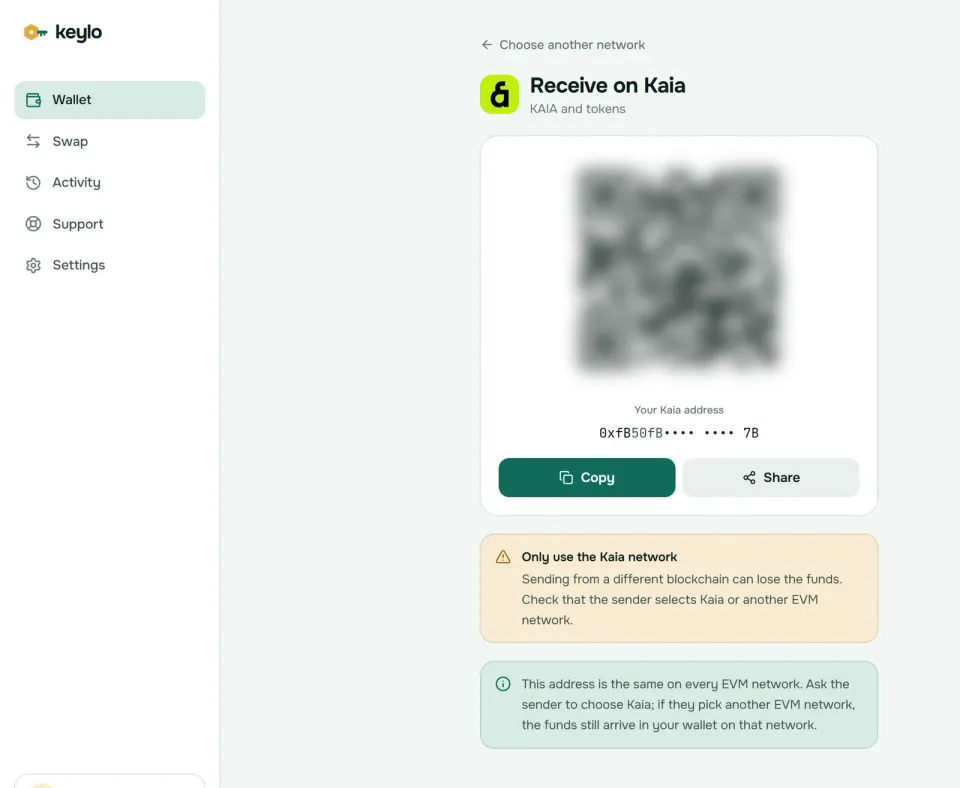
Your address is identical on every EVM network, so an exchange that sends on BNB Smart Chain instead pays you there, not on Kaia. Choose the network by name, not by how the address looks.
If a withdrawal seems stuck, check the exchange's notices, because exchanges sometimes pause a network during upgrades.
How to send or withdraw KAIA and tokens#
Tap Send and choose KAIA or a Kaia token.
Put the recipient in To by pasting or scanning. Keylo checks the format and checksum and flags addresses from other kinds of network.
Enter an amount, or use Max. Max on KAIA leaves enough for the fee; Max on a token sends all of it, because gas comes from KAIA.
Tap Review and pick Slow, Normal or Fast, each with its cost.
Read the review screen: network, the full recipient address and the fee in KAIA. Then tap Send.
You'll see "On its way" and then "Sent", with a link to KaiaScan.
Kaia transaction types you'll see on KaiaScan#
Kaia has its own transaction types next to Ethereum's, such as fee-delegated transfers, where an app pays the gas, and account updates. Fee delegation is why some Kaia apps feel free, but it only works inside apps that set it up. Keylo always sends the Ethereum type and pays the fee from your KAIA.
Keylo also simulates each send first. If the token contract would reject it, or your KAIA can't cover gas, you see the reason before signing. It warns about contract recipients and blocks sends to a token's own contract.
Kaia gas fees explained#
Kaia counts gas in kei, its smallest unit. One Gkei is a billion kei, and one KAIA is 10^18 kei, the same scale as wei, gwei and ETH. The fee is gas used times the effective gas price.
Since the Magma upgrade, the base fee moves with demand, but governance keeps it between a floor and a ceiling. The Kore upgrade that followed burns most of each block's gas fee, which offsets new KAIA issuance. The Kaia hard fork then added an optional priority tip, which the network suggests at zero when it isn't congested. Kaia's fee documentation has the formulas.
On October 24, 2026, the base fee was 25 Gkei and the suggested tip was zero. At KAIA's price that day, about 3.6 cents, fees looked like this:
Action | Gas | Cost (October 24, 2026) |
|---|---|---|
Send KAIA | 21,000 | About 0.0006 KAIA, well under a hundredth of a cent |
Send USDT or another token | About 44,000 | About 0.0012 KAIA |
Swap or bridge | Varies | Network fees plus route fees, all shown in the quote |
Because the base fee rarely leaves its floor, Slow, Normal and Fast in Keylo usually cost almost the same. A stuck transaction is rare with one-second blocks, but if one happens, Speed up on the finished screen resends it with a higher fee. Keylo adds nothing to a normal send.
Tokens and stablecoins on Kaia#
Kaia's token standard, KIP-7, is compatible with ERC-20, so tokens behave as they do on Ethereum and sit at your 0x address.
Tether issued USDT natively on Kaia in May 2025, with LINE NEXT bringing it into Mini DApps and LINE's wallet. Tether's own list of supported networks gives the Kaia contract as 0xd077a400968890eacc75cdc901f0356c943e4fdb, which KaiaScan shows as USD₮. A second token named USDT, which isn't on Tether's list, lives at 0x9025095263d1E548dc890A7589A4C78038aC40ab with a far smaller supply.
Keylo checks your address for a short built-in list of popular tokens, but on Kaia its USDT entry is that second contract, not Tether's, as of October 2026. To see Tether's USDT, add 0xd077a400968890eacc75cdc901f0356c943e4fdb under Settings, Networks, Custom tokens with 6 decimals. Add any other missing token the same way, using a contract you've checked on KaiaScan.
Swap and bridge from your Kaia wallet#
Keylo finds Kaia routes through LI.FI, which checks decentralized exchanges on Kaia and bridges to other networks. You might trade KAIA for USDT, or move stablecoins between Kaia and Ethereum, Arbitrum or BNB Smart Chain.
Tap Swap. Set You pay to KAIA or a Kaia token and type an amount.
Set You receive to the token and network you want.
Compare routes by amount, time and fees.
Open a route to see each step, every fee, Minimum you receive and Delivered to, your own address on the receiving network.
Approve and confirm, then watch the tracker until the funds arrive.
Liquidity can be thin for small tokens, so compare Minimum you receive with the expected amount. The default slippage limit is 0.5%. A bridge either delivers or returns your funds, sometimes as a different token that still reaches your wallet. Keylo lists any service fee of its own as a separate line. The swap and bridge page explains routes and refunds.
What Keylo doesn't do on Kaia#
No dapp connections. Without a browser extension or WalletConnect, Keylo can't open LINE Mini DApps, the Dapp Portal, Kaiabridge or Kaia DeFi. Use Kaia Wallet or another connecting wallet there.
No Kaia-specific transactions. Keylo can't delegate fees, update account keys or sign Kaia's other special types.
No staking. Keylo offers staking only on Cosmos SDK chains.
No testnet. Keylo has no Kaia testnet, so practice with a small mainnet amount.
No NFTs, hardware wallets or card purchases. Buy KAIA on an exchange, then withdraw on the Kaia network.
Keylo is non-custodial: lose both the password and the phrase and the wallet can't be opened, by you or by Keylo. Every supported network is on the networks page.
Kaia scams and mistakes to avoid#
Kaia reaches millions of LINE and Kakao users who are new to crypto, and scammers follow them.
Fake conversion sites. KLAY became KAIA automatically. For FNSA, the only official route is Kaiabridge, reached from Kaia's own docs. Any other site asking you to "convert" or "claim" old tokens is a drainer.
Compromised official accounts. In February 2026, Kaia warned that its @buildonkaia account on X had been taken over. Even posts from real-looking accounts can carry drainer links.
Fake Mini DApps and bots. Lookalike apps and chat bots ask you to connect, approve a token or sign. Keylo can't sign website requests, but other wallets can.
Surprise account updates. If anything asks you to sign an account update you didn't plan, refuse. It can hand control of your address to someone else.
Fake support. Keylo staff never ask for your phrase or password. Reach the team on the Keylo support page and read how Keylo protects your wallet.
Before your first real transfer:
Your phrase is on paper, and Keylo has confirmed it.
You hold a little KAIA for gas.
The exchange network says Kaia, or Kaia (KLAY), not BNB Smart Chain or Ethereum.
The USDT contract matches the one the recipient expects.
A small test went through first.
The same Keylo phrase covers other networks popular in Asia. See the Ronin wallet guide, the BNB Smart Chain wallet guide and the Ethereum wallet guide.
Hold KAIA and USDT in a wallet only you control
Keylo encrypts your recovery phrase on your device and never sees it. Send, swap and bridge from one place.
Kaia wallet FAQ#
Is Kaia the same as Klaytn?
Kaia is the Klaytn network after a 2024 hard fork that merged it with Finschia. The chain kept running with the same chain ID, 8217, and the same addresses. KLAY balances became KAIA one to one without any action from holders. Some exchanges and older apps still show the Klaytn name or the KLAY ticker for the same network.
Is Kaia Wallet the same as Kaikas?
Yes. Kaikas, the browser extension built for Klaytn, was renamed Kaia Wallet when the network rebranded. It's a Chrome extension for KAIA and Kaia tokens, Kaia lists a mobile version too, and it can connect to Kaia apps. Keylo is a separate web wallet. You can keep KAIA in either, and both can send to the other on the Kaia network.
Can I still convert FNSA to KAIA?
Not through the original swap, which closed on September 30, 2025, when the Finschia chain shut down. Kaia's docs now describe Kaiabridge for unclaimed FNSA: you import your Finschia key into MetaMask or Kaia Wallet, connect to the tool and claim KAIA at about 148 per FNSA. Keylo can't connect to it. Reach Kaiabridge only through Kaia's docs, because fake conversion sites target late holders.
Is there native USDT on Kaia?
Yes. Tether launched native USDT on Kaia in May 2025, and its contract is 0xd077a400968890eacc75cdc901f0356c943e4fdb according to Tether's list of supported networks. A second token named USDT exists at another address, and that's the one Keylo's built-in list finds. Add Tether's contract (6 decimals) under Custom tokens to see it, and keep some KAIA to pay gas.
How much are gas fees on Kaia?
Very low. On October 24, 2026, the base fee was 25 Gkei with no suggested tip, so a KAIA transfer cost about 0.0006 KAIA and a token transfer about 0.0012 KAIA, both tiny fractions of a cent. Governance keeps the base fee within set bounds, and most of each block's fees are burned. Keylo shows the exact fee before you sign.
Why does my Kaia address look different in another wallet?
Most likely the wallets derive keys on different paths. Keylo uses Ethereum's standard path, so MetaMask phrases match, but a wallet built for Kaia may use its own. A second reason is unique to Kaia: if the account key was ever updated, the address no longer follows the phrase. In both cases, the funds stay at the original address.
Do LINE Mini DApps work with Keylo?
No. Mini DApps run inside LINE and connect to their own wallets, and Keylo can't connect to apps. You can still move tokens between the two. If a Mini DApp wallet shows you a Kaia 0x address, Keylo can send KAIA or USDT to it on the Kaia network, and if that wallet allows withdrawals, you can send back to Keylo.
How fast are Kaia transactions?
Kaia makes a block about every second, and each block is final as soon as the validator committee reaches consensus. There are no reorganizations to wait out, so a send from Keylo usually shows "Sent" within a few seconds. Exchanges may still hold a deposit for their own checks before crediting it.
How do I recover a Kaia wallet if I forgot the password?
In a self-custody wallet, the password only opens the app on one device. The recovery phrase is what restores the wallet. In most wallet apps you choose the restore or import option, enter your phrase and set a new password. In Keylo, an email password reset gets you back into the account, and you restore the wallet itself with your phrase. Without the phrase, nobody can recover it.
Can I send from a Kaia wallet to GCash or Coins.ph?
Not to a peso balance directly, because Kaia transfers go to blockchain addresses. To cash out, send KAIA or USDT on the Kaia network to an exchange or app that shows a Kaia deposit address for that exact token. Sell there, then withdraw pesos. If the deposit page lists only other networks, swap or bridge to one of them in Keylo first.