A ZKsync wallet is a wallet that holds the key to your account on ZKsync Era, the zero-knowledge rollup Matter Labs runs on top of Ethereum. Your personal 0x address is the one you already use on Ethereum, and every fee is paid in ETH. So day to day, it feels like any other Ethereum network.
The differences show up at the edges. ZKsync Era builds account abstraction into the protocol, so smart accounts and contracts follow their own address rules. Fees are charged up front and partly refunded. And a withdrawal to Ethereum through the official bridge now takes at least a day. All numbers here were checked on October 24, 2026.
ZKsync Era at a glance#
Item | ZKsync Era |
|---|---|
Network type | ZK rollup on the ZK Stack, built by Matter Labs |
Chain ID | 324 |
Gas token | ETH, with unused gas refunded after each transaction |
Address format |
|
Typical fee | About one cent for an ETH transfer (October 24, 2026) |
Withdrawal to Ethereum | At least a day through the official bridge, then a finalize step on Ethereum |
Token standard | ERC-20, including ZK, native USDC and bridged USDC.e |
Explorer | ZKsync Explorer (Etherscan's old Era explorer now forwards here) |
In Keylo | Send, receive, ERC-20 tokens, a read-only Collectibles view, history, speed-up, swap and bridge through LI.FI, ZKsync Sepolia Testnet. No dapp connections |
How a ZKsync wallet differs from an Ethereum wallet#
Era runs Ethereum-style accounts and smart contracts, but it isn't a copy of Ethereum. Three differences matter if you hold money there.
Native account abstraction#
On Ethereum, a normal account and a smart contract wallet are separate things. ZKsync Era treats every account, even a plain one, like a smart contract account. Every account can also use a paymaster, which is a contract that pays gas for you or accepts another token. The ZKsync docs on native account abstraction explain the design.
Most of this stays out of sight, because a plain wallet like Keylo signs ordinary transactions and pays gas in ETH. It starts to matter when you meet wallets that are built on the feature.
Same personal address, different contract addresses#
The address your recovery phrase produces is identical on Ethereum and ZKsync Era. Keylo derives it on m/44'/60'/0'/0/0, the path MetaMask uses for its first account, and the same address serves every EVM network in Keylo.
Contracts, however, work differently. Era splits each account's nonce into a deployment nonce and a transaction nonce, and it calculates contract addresses its own way. So a Safe multisig or smart wallet at one address on Ethereum or Base doesn't automatically exist at that address on Era. Before you pay a contract, ask its owner to confirm it's deployed on ZKsync Era.
ZKsync Era is not ZKsync Lite#
ZKsync Lite was the original 2020 network, built only for payments. It stopped producing blocks on May 4, 2026, and its old wallet site, wallet.zksync.io, no longer loads. Balances left on Lite still belong to their owners and can be claimed to Ethereum at lite.zksync.io. When anyone says ZKsync today, they mean Era. If an exchange or bridge still lists Lite, skip it.
Choosing a ZKsync wallet: compatible types#
Any EVM wallet that knows chain ID 324 can hold funds on Era. They come in a few kinds.
Extension and mobile wallets. MetaMask (browser extension and mobile app) and Rabby (browser extension) both appear in ZKsync's own wallet list. They connect to Era's apps.
Smart account wallets. Some wallets use Era's account abstraction directly, for example accounts built with ZKsync SSO that sign in with a passkey instead of a recovery phrase. Your address there is a contract, not one derived from a phrase.
Hardware wallets. A device keeps the key offline and pairs with a software wallet. That suits savings you rarely touch.
Web wallets. These run in a browser tab with nothing to install. Keylo is one.
When you compare them, check three ZKsync details. The wallet should label Era clearly and never steer you to Lite. It should show the fee before you sign. And it should tell you when a recipient is a contract, because contract addresses don't carry over from Ethereum.
Keylo fits people who want to hold ETH, stablecoins and ZK on Era, send them, and move value between networks from one recovery phrase. It's the wrong pick if you mainly want Era's DeFi apps, because Keylo can't connect to them.
How to set up a ZKsync wallet in Keylo#
ZKsync Era is already in Keylo's network list, so there's no RPC or chain ID to add.
On Keylo's sign-up page, fill in Full name, Email, Phone number, Password and Confirm password, accept the terms and press Create account.
If you see "Check your inbox", open the email and confirm your address.
Under "Set up your wallet", pick Create a new wallet. The 12-word phrase is generated inside your browser and locked with your password before anything is saved, so Keylo's server only ever holds an encrypted copy.
Open ZKsync Era in your asset list. You'll see your
0xaddress, your ETH balance and recent activity.Save the phrase. Go to Settings, then Recovery phrase, enter your password, copy the 12 words onto paper and confirm a few of them when asked.
While you're in Settings, turn on Two-factor authentication and set an Anti-phishing code.
That paper copy matters because it is your real backup. A password reset gets you back into your account, but it can't decrypt the wallet. Only the phrase can restore it.
Bringing a wallet from MetaMask or Rabby#
Choose Import a recovery phrase and enter the 12 or 24 words. Your first MetaMask or Rabby account should appear with the same address and the same Era balance. Accounts you added later sit on other indexes and won't show up in Keylo, though their funds stay where they are.
Smart accounts need a different route, though. If your Era funds live in a contract wallet or a passkey account, a phrase import only gives you the plain account that phrase controls, which may be empty. Send the funds from the smart wallet to your Keylo address instead.
Testing on ZKsync Sepolia#
Switch on Testnet mode in Settings, under Networks, and Keylo adds ZKsync Sepolia Testnet. Test ETH there is worthless, so you can watch gas estimates and refunds without risk. Get some from a public ZKsync Sepolia faucet.
Get your ZKsync Era address in a minute
Sign up with email and a password. Keylo creates the wallet in your browser, with one 0x address for ZKsync Era and every other EVM network.
Receiving ETH and USDC on ZKsync Era#
Tap Receive and choose ZKsync Era. The screen says "Receive on ZKsync Era" above a QR code.
Copy the address, share it, or let the sender scan the code.
On an exchange, choose ZKsync Era as the withdrawal network, and check that it supports the exact token you're moving.
Watch the ZKsync Era page in Keylo. A deposit usually shows up within seconds of being sent, with a link to the ZKsync Explorer.
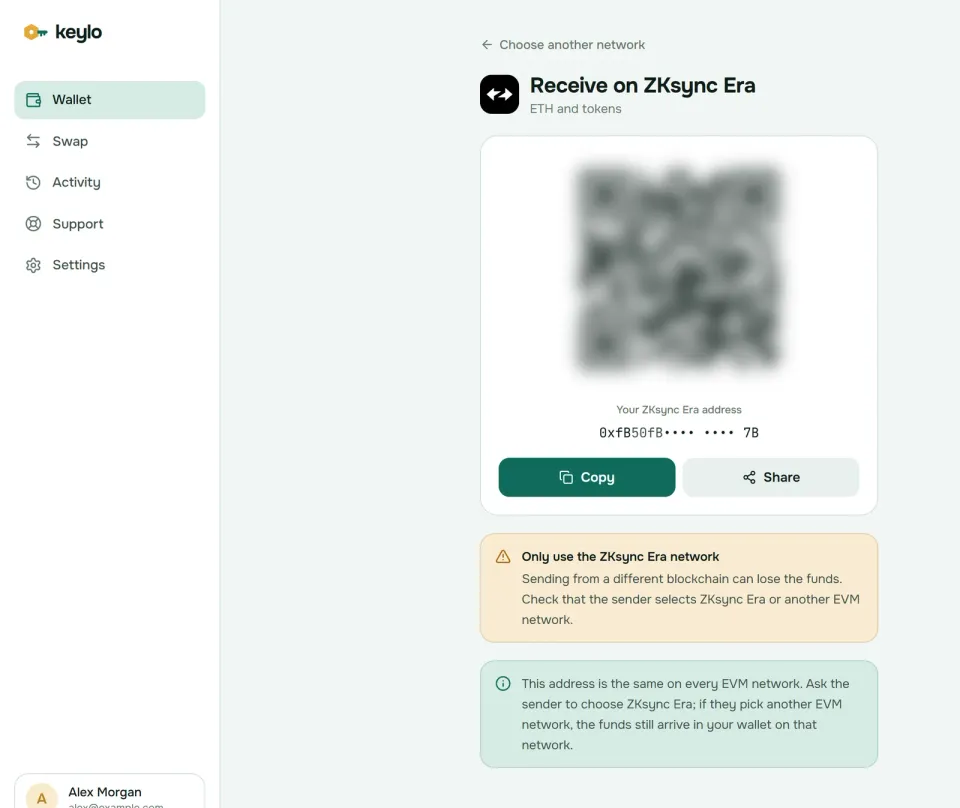
Under the QR code, Keylo notes that the address works on every EVM network. If a sender picks Ethereum, Arbitrum or another network Keylo supports, the money still arrives, just on that network. Open it in Keylo, then bridge the funds to Era.
Sending from your ZKsync wallet#
Tap Send and choose ETH or a token on ZKsync Era.
Paste the recipient into To, or scan their QR code. Keylo checks the format and the checksum.
Type an amount or press Max. For ETH, Max holds back enough for the fee.
Press Review and pick Slow, Normal or Fast. On Era they usually cost about the same, because there's rarely a queue.
Read the review screen: network, recipient and fee. Then press Send.
Keylo signs in your browser. The status moves from "On its way" to "Sent", with a View on ZKsync Explorer link.
Keylo simulates the transfer before you sign and stops it if it would fail. It flags a recipient that is a smart contract, blocks sends to a token's own contract, and rejects addresses from non-EVM networks. If you try to move a token with no ETH for gas, it tells you that you need some ETH on ZKsync Era to pay the network fee.
ENS names work as recipients only when you send on Ethereum in Keylo. On Era, paste the 0x address.
ZKsync fees: refunds, pubdata and paymasters#
Every Era fee is paid in ETH. It covers two costs: running and proving your transaction, and publishing the state changes it makes to Ethereum. That second part, called pubdata, is why fees drift a little with Ethereum's blob prices even when Era is quiet.
Era can't know in advance how much of each resource a transaction will use. So it charges for the worst case, then refunds the unused part when the transaction ends. On October 24, 2026, plain ETH transfers on Era reserved roughly 190,000 to 230,000 gas and used 86,000 to 106,000, at 0.045 gwei. The final fee was roughly 0.000004 to 0.000005 ETH, about one cent with ETH near $2,370.
That's why the explorer often shows a lower fee than the one you approved. Keylo's estimate is based on the full gas limit, so the real charge usually comes in under it. Keylo adds nothing of its own to a normal send. The ZKsync fee documentation has the formula.
Paymasters are also unusual. An app can pay your gas, or let you pay it in a token such as USDC. That only happens inside apps built for it. A transfer from Keylo always uses your own ETH.
Tokens on ZKsync Era: ZK, USDC and USDC.e#
Era tokens are ERC-20s, so they behave like tokens on Ethereum. Tokens your address already holds usually appear in Keylo by themselves. If one doesn't, add it by contract address under Settings, Networks, Custom tokens.
Because Era calculates contract addresses differently, a token's address on Era usually differs from its Ethereum one. Compare against these, checked on chain on October 24, 2026:
ZK
0x5A7d6b2F92C77FAD6CCaBd7EE0624E64907Eaf3Eis ZKsync's governance token. Holders vote on upgrades, and it can't pay gas for a normal send.USDC
0x1d17CBcF0D6D143135aE902365D2E5e2A16538D4is Circle's native USDC, the one on Circle's own address list.USDC.e
0x3355df6D4c9C3035724Fd0e3914dE96A5a83aaf4is older USDC bridged from Ethereum. Circle doesn't issue it.USDT
0x493257fD37EDB34451f62EDf8D2a0C418852bA4Cis the USDT contract on Era.
USDC and USDC.e both aim for one dollar, but they're separate contracts. Before depositing USDC.e to an exchange, check that it credits that version on Era, or swap it to native USDC first.
The ZKsync Era page in Keylo also has a read-only Collectibles section. It lists NFTs your address holds, but you can't send or mint them from Keylo.
Bridging to Era and withdrawing to Ethereum#
The official ZKsync bridge has no week-long challenge period, because validity proofs replace it. It still isn't quick on the way out. A withdrawal waits for its batch to be proven, then sits through an execution delay. Governance raised that delay from three hours to one day on October 8, 2026, under proposal ZIP-17, according to L2BEAT. On October 24, Era's newest finalized block was about 25 hours old.
After the delay, you finalize the withdrawal with a transaction on Ethereum and pay mainnet gas for it. Keylo's swap screen avoids both steps by asking LI.FI, which compares bridges and decentralized exchanges, for a route. Liquidity bridges pay you on the other side from their own funds, usually within minutes.
Tap Swap. Under You pay, choose ETH or a token on ZKsync Era, or on the network you're leaving.
Under You receive, pick the network and token you want, by name or by pasting a contract.
Then compare the routes by amount, time and fees.
Open the details. Check each step, Minimum you receive and Delivered to, which shows your own address on the destination network.
Confirm, then follow the progress screen until the funds land.
Default slippage is 0.5%. If a route can't finish, the bridge returns the funds instead, occasionally as another token that still reaches your wallet. When Keylo charges a service fee on a route, the quote lists it separately. The swap and bridge page explains routes and refunds.
What Keylo doesn't do on ZKsync Era#
No dapp connections. Keylo has no browser extension and no WalletConnect, so it can't sign in to Era's DeFi apps or the official bridge portal.
No paymasters or smart accounts. Keylo uses a plain account and pays its own gas in ETH.
No NFT transfers. Collectibles are view-only.
No staking of ETH or ZK. Keylo stakes only on Cosmos SDK chains.
No hardware wallets or card purchases. Buy ETH on an exchange and withdraw it on ZKsync Era.
Keylo never holds your keys. But that also means nobody, Keylo included, can rescue a wallet whose password and recovery phrase are both lost. The list of supported networks shows everywhere else your phrase works.
ZKsync scams and mistakes to avoid#
Some of the costliest errors on Era come from its own rules, so start there.
Paying a contract that doesn't exist on Era. A multisig or smart wallet address copied from Ethereum may hold no code on Era. Confirm the deployment, then send a small test.
Fake ZK claims. The 2024 airdrop spawned a long tail of "ZK rewards" and "claim" pages. A real claim never asks for your recovery phrase or a blanket token approval.
Spam tokens with links. Tokens you never bought, with a website in their name, lead to drainer sites. Leave them alone, because the link is the trap.
Address poisoning. Scammers send zero-value transfers from lookalike addresses so they appear in your history. Copy addresses from the original source, never from past activity.
Old Etherscan bookmarks. Etherscan no longer runs an Era explorer, and its old address forwards to the ZKsync Explorer. Use that one, which Keylo links from every transaction.
Fake support. Keylo staff never ask for your phrase or password. Use the Keylo support page, and read how Keylo secures your wallet.
Before your first real transfer:
The phrase is on paper, and you've confirmed it in Keylo.
You hold a little ETH on ZKsync Era, not only tokens.
The exchange network says ZKsync Era, not Lite.
Any contract recipient is confirmed as deployed on Era.
A small test went through first.
Abstract runs on the same ZK Stack, so the Abstract wallet guide will feel familiar. The Ethereum wallet guide and the Linea wallet guide cover two more networks where your Keylo address already works.
Keep ETH and USDC on ZKsync Era under your own key
Keylo encrypts your recovery phrase in your browser and never sees it. Send, swap and bridge from one wallet.
ZKsync wallet FAQ#
Is my ZKsync address the same as my Ethereum address?
Your personal address is. The same recovery phrase and path give the same 0x address on Ethereum, ZKsync Era and every other EVM network, although each network keeps its own balance. Contract addresses are different. Era computes them with its own rules, so a multisig, smart wallet or token contract from Ethereum usually sits at another address on Era, or isn't there at all.
Why was my ZKsync fee lower than the estimate?
Era charges for the most gas a transaction could need, then refunds what it didn't use once it finishes. On October 24, 2026, typical ETH transfers reserved around 200,000 gas and used about 86,000 to 106,000, so the final fee was roughly half the reserve or less. Keylo's estimate follows the full gas limit, which is why the explorer often shows a smaller number.
How long does a ZKsync withdrawal to Ethereum take?
Through the official bridge, at least a day as of October 2026. The batch must be proven, then wait out an execution delay that governance raised from three hours to one day on October 8, 2026. After that you finalize on Ethereum and pay mainnet gas. Bridge routes in Keylo's swap screen usually arrive within minutes, because the bridge pays you from its own liquidity.
What happened to ZKsync Lite and wallet.zksync.io?
ZKsync Lite, the original 2020 payments network, stopped producing blocks on May 4, 2026, and its old wallet site, wallet.zksync.io, no longer loads. ZKsync says balances left there still belong to their owners, who can claim them to Ethereum through the portal at lite.zksync.io. Era wasn't affected. Keylo doesn't support Lite, so choose ZKsync Era wherever you see both.
Do I need the ZK token to pay fees on ZKsync?
No. Fees on ZKsync Era are paid in ETH. ZK is the governance token that holders use to vote on upgrades and treasury decisions. Some apps use paymasters to let you pay gas in other tokens, but that's a feature of those apps, not of plain transfers. In Keylo, keep a little ETH on Era so you can move ZK, USDC or anything else.
Can I import a smart account or passkey wallet into Keylo?
Not directly. Keylo imports recovery phrases of 12 to 24 words and derives the plain account each phrase controls. A smart account on Era is a contract with its own address, and a passkey account has no phrase at all. If your funds sit in one of those, open that wallet and send them to your Keylo address on ZKsync Era instead.
Where can I check ZKsync Era transactions now that Etherscan dropped it?
Use the ZKsync Explorer at explorer.zksync.io. Etherscan no longer runs a ZKsync Era explorer, and its old Era address now forwards to the ZKsync Explorer, which shows blocks, transactions and contracts. Keylo's links already point there: after a send, the status screen offers View on ZKsync Explorer, and the ZKsync Era page links your address too.
Can I use ZKsync dapps with Keylo?
No. Keylo has no browser extension and doesn't support WalletConnect, so it can't connect to Era's exchanges, lending markets or bridge portal. You can still swap and bridge inside Keylo through LI.FI routes. If you want to use Era apps directly, an extension wallet such as MetaMask or Rabby is the better fit, and the same phrase works there.