A Sui wallet holds the private key for a Sui address and signs the transactions that move what that address owns: SUI, USDC and any other coin on the network. Sui looks a lot like Ethereum at first glance, because addresses start with 0x, but underneath it works differently. Every coin you hold is an object with an owner, and every transaction pays gas in SUI.
That design keeps fees tiny and finality quick. It also sets a few traps: addresses that look like Aptos ones, spam objects that land uninvited, and fees that include a refundable storage charge. Figures below are as of October 2026.
Sui at a glance#
Item | Sui |
|---|---|
Native coin | SUI (1 SUI = 1,000,000,000 MIST) |
Address format |
|
Typical fee | About 0.0011 SUI for a plain SUI transfer, most of it storage, as of October 24, 2026 |
Gas price | Reference gas price set once per epoch (about a day); 100 MIST per unit on October 24, 2026 |
Speed | Mysticeti consensus commits in about half a second in benchmarks; transfers usually show as final within seconds |
Token standard |
|
Stablecoins | Native USDC from Circle; bridged wUSDC is a different token |
Explorer | |
In Keylo | Send, receive, Sui tokens, history, bridge or swap into Sui through LI.FI, Sui Testnet. No staking, NFT view, gasless sends or dapp connections |
How a Sui wallet works#
Most chains keep one balance per account. Sui keeps objects instead: a SUI coin, a USDC coin and an NFT are each an object that records its owner, and only the owner's signature can move it.
Your Sui wallet address#
Your address is a 32-byte hash of your public key and its signature scheme, written as 0x followed by 64 hexadecimal characters. An Ethereum address has only 40 characters after the 0x, so length is the quickest way to tell them apart.
Aptos addresses are the trap. They have exactly the same shape as Sui addresses, and no wallet can tell from the characters alone which chain one belongs to. Keylo labels each address with its network, so always copy from the Sui entry when someone needs your Sui wallet address.
Keylo derives your Sui key on m/44'/784'/0'/0'/0' with the Ed25519 scheme. That is the default path in Mysten Labs' own Sui SDK, so a phrase from Slush normally opens the same first account.
Coins, objects and address balances#
You might own several separate SUI coins that add up to your balance. Wallets merge and split them for you when you send. Since May 20, 2026, Sui also keeps a plain balance per address for each coin type, alongside coin objects. Keylo counts both, so the number you see covers everything your address holds.
A new Sui address needs no activation and no minimum balance. Anyone can send to it straight away, and you only need SUI once you want to move something out.
How to choose a Sui wallet: extension, app or web#
Sui wallets fall into a few groups.
Sui-first wallets. Slush is the wallet built by Mysten Labs, the team behind Sui. It replaced Sui Wallet and Stashed in April 2025 and runs as a Chrome extension, an iOS and Android app, and a web app. It includes staking and swaps, and besides a recovery phrase it offers zkLogin sign-in with Google, Apple, Facebook or Twitch.
Hardware wallets. A dedicated device keeps the key away from your computer. Check that the model supports Sui before you buy it for this chain.
Exchange accounts. The exchange holds the keys and decides when you can withdraw.
Web wallets. These run in a browser tab with nothing to install. Keylo is one of them.
Multichain wallets differ in how far they support Sui: Phantom's developer docs, for example, say its Sui support has been deprecated. Whichever you choose, a good Sui wallet shows each token's full coin type, tells you the real fee before you sign and uses the standard derivation path, so you can switch apps later.
Keylo fits people who want SUI and USDC next to their other coins under one recovery phrase, and who mainly hold, receive, send and bridge in. It suits people who use Sui DeFi, games or NFT marketplaces less well, because Keylo can't connect to Sui apps.
How to create a Sui wallet in Keylo#
Keylo runs in the browser on a phone or a computer, and you can pin it to your home screen so it opens like an app.
On the sign-up page, fill in your full name, email, phone number and a password, then tap Create account.
If Keylo asks you to check your inbox, confirm your email.
On "Set up your wallet", choose Create a new wallet. Your browser generates a 12-word recovery phrase and encrypts it with a key derived from your password, using Argon2id and AES-256-GCM. Keylo's server only ever receives the encrypted copy.
Open Sui in your asset list. Its page shows "Your Sui address", all 64 characters, with a copy button.
Save the phrase. In Settings, open Recovery phrase, type your password, write the 12 words on paper and confirm three of them when asked.
Still in Settings, set up Two-factor authentication and an Anti-phishing code.
Nobody at Keylo can restore a lost wallet. Resetting your password by email gives you back the account, not the wallet; the recovery phrase is the only way back in.
Importing a wallet from Slush or another Sui app#
Choose Import a recovery phrase and type the 12 or 24 words. If your old wallet used the standard path for its first account, the same Sui address and balance appear. Extra accounts you added later sit on other paths, and an account opened through zkLogin (Google, Apple and similar sign-ins) has no recovery phrase at all. Neither will show up in Keylo, but the funds stay reachable in the original wallet.
Practice on Sui Testnet#
Open Settings, then Networks, and switch on Testnet mode. Keylo adds Sui Testnet and links to the official Sui faucet, where test SUI is free and worthless. Testnet addresses look exactly like mainnet ones, so check the network name before you share one.
Get your Sui address in a minute
Sign up with email and a password. Keylo creates the wallet in your browser, with a Sui address and addresses on every other supported network.
How to receive SUI and USDC#
Tap Receive and pick Sui. The screen reads "Receive on Sui" and shows a QR code above "Your Sui address".
Tap Copy or Share, or let the sender scan the code.
On an exchange, choose Sui as the withdrawal network, for USDC as well as for SUI.
Watch the Sui activity list. Transfers usually appear within seconds, each with a link to Suiscan.
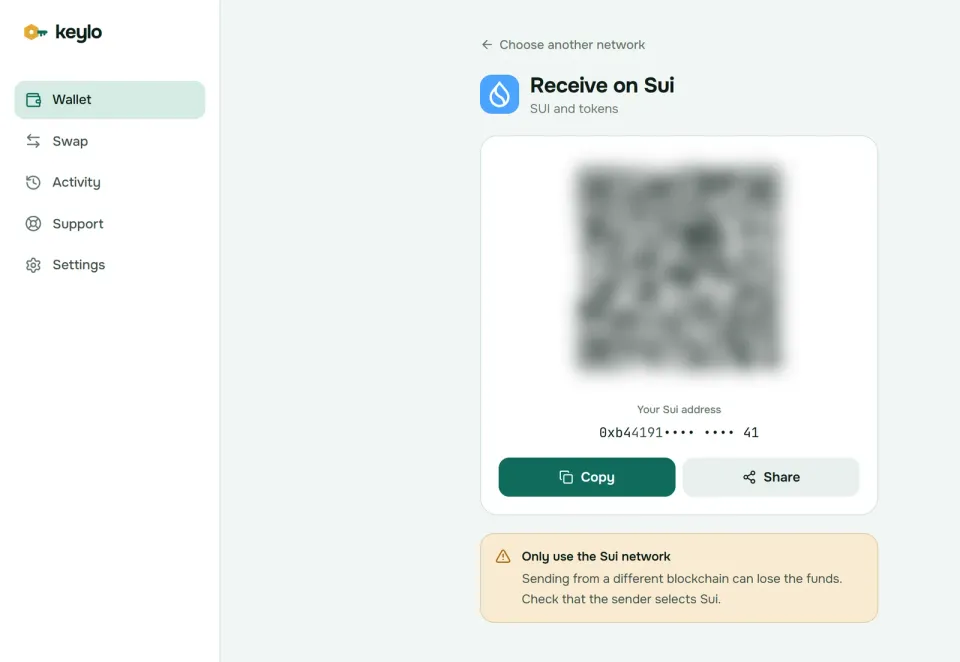
One Sui address receives SUI and every Sui token, so there's nothing to set up before a new coin arrives. Keylo finds tokens your address holds and lists them under Sui. If one is missing, add its coin type under Custom tokens in Settings.
Before a large withdrawal, check the address on the exchange page: an Aptos address passes Sui's format check but sends your coins to the wrong chain.
How to send SUI and Sui tokens#
Tap Send and pick SUI or a token on Sui.
In To, paste or scan the recipient's address. Keylo accepts only
0xplus 64 hex characters, and it flags a 40-character address as an EVM one.Enter an amount, or tap Max to send all your SUI except the fee.
Tap Review. Sui sets one gas price per epoch, so Keylo shows a single fee instead of Slow, Normal and Fast.
Check the network, the full recipient address with its first and last six characters in bold, and the fee in SUI and dollars.
Tap Send. The status reads "On its way", then "Sent", with a View on Suiscan link.
What Keylo checks before you sign#
Keylo builds each Sui transfer in your browser, lets the network fill in gas and object versions, then compares the result with what it built. If the recipient, amount or fee differs, it refuses to sign. It also simulates the transfer, so these problems show up on the review screen instead of costing gas:
No SUI at all. Sending a token with an empty SUI balance shows "You need some SUI on Sui to pay the network fee."
Wrong kind of address. Anything that isn't 64 hex characters after
0xis rejected. An Aptos address can't be caught this way, so compare it with the source.
Sui transfers are final, and nobody can reverse them. Keylo's Sui send screen has no memo field, so if an exchange ever asks for one with a Sui deposit, use another wallet for it.
Sui gas fees and the storage rebate#
Every Sui transaction pays two kinds of gas, both in SUI. Computation covers the work validators do: units used times the reference gas price, which validators set at the start of each epoch. Storage covers the bytes your transaction writes on chain, priced by a separate storage price that governance changes rarely.
The storage part comes with a refund. When a transaction deletes or shrinks an object, it gets back 99% of the storage fee originally paid for it, and the last 1% stays in Sui's storage fund. Wallets therefore show a net fee: computation plus storage minus rebate.
On October 24, 2026, the reference gas price was 100 MIST per unit. A plain SUI transfer used about 0.0001 SUI of computation and about 0.001 SUI of storage, because it creates a new coin object for the recipient. That deposit stays with the coin, and 99% of it goes back to whoever later merges or deletes it.
Action | Typical cost (as of October 24, 2026) |
|---|---|
Send SUI to any address | About 0.0011 SUI |
Send USDC to an address | About 0.0014 SUI, still paid in SUI |
Merge many small coins | Can come out near zero or even return SUI, thanks to rebates |
Bridge or swap into Sui | The fee on the network you pay from, plus the route's fees, all in the quote |
Keylo simulates each transfer and shows that net figure in SUI and dollars before you sign, and adds no fee of its own. Keylo can't speed up a Sui transfer after sending it, but with one gas price per epoch there's rarely a reason to. The Sui gas documentation has the full formula.
Gasless stablecoin transfers#
Since May 2026, Sui lets wallets send USDC and a few other approved stablecoins with no gas at all, if the transfer is at least 0.01 and does nothing else. Each wallet has to build these gasless transfers in a special way. Keylo doesn't yet, so every Keylo transfer on Sui, USDC included, pays normal gas in SUI.
Bridging and swapping into Sui#
Keylo gets Sui routes from LI.FI, which compares bridges and decentralized exchanges. On Sui the direction matters: Keylo can bring funds into Sui, but it can't start a swap or bridge from Sui yet.
Tap Swap. Under You pay, choose a coin on an EVM network such as ETH on Base, or SOL or USDC on Solana.
Under You receive, pick Sui, then SUI, USDC or another token. You can search by name or paste a coin type.
Compare the routes by amount, time and fees.
Open the details and check every step, Minimum you receive and Delivered to, which shows your own Sui address.
Confirm and follow the transfer on the tracking screen until it lands.
Default slippage is 0.5%. A route either delivers or returns your funds, sometimes as a different token that still arrives in your wallet. Any Keylo service fee appears as its own line in the quote. The swap and bridge page explains routes and refunds.
Picking SUI as what you receive is a good first move, because it gives you gas on arrival. If you bridge only USDC, send a little SUI too, or you'll hold tokens you can't move.
What Keylo doesn't do on Sui#
No swapping or bridging out of Sui. You can't swap SUI for USDC on Sui in Keylo, or move funds from Sui to another chain. Send them to an exchange, or import your phrase into a wallet with built-in swaps, such as Slush.
No staking. Keylo stakes only on Cosmos SDK chains. To delegate SUI to a validator, use a wallet with native staking.
No dapp connections. There's no browser extension and no WalletConnect, so Sui DeFi, games and marketplaces are out of reach. In return, Keylo only signs transfers and swaps you start yourself.
No NFTs. Keylo has no NFT view on Sui and can't send NFTs or other non-coin objects.
No gasless sends, hardware wallets or card purchases. Buy SUI on an exchange and withdraw it on the Sui network.
Keylo is also non-custodial. Lose both your password and your recovery phrase, and nobody can open the wallet, Keylo included. The list of supported networks shows everything else your phrase covers.
Sui wallet scams and mistakes to avoid#
Sending objects to strangers costs almost nothing on Sui, so scams often start inside your own wallet.
Spam coins and NFTs. Mysten Labs warned about spam coins dropped into Sui wallets within weeks of mainnet's 2023 launch. Their names or images often carry a website that promises a reward. Keylo lists the coins your address holds under whatever name their creators chose, so treat anything you didn't expect as junk and never visit the link.
Drainer sites. Fake airdrop pages ask you to connect a wallet and approve a transaction, then empty it. Keylo can't connect to websites, but your phrase in another wallet can, so never approve a claim you didn't seek out.
Lookalike tokens. The coin type identifies a token, not its symbol. Circle's USDC on Sui is
0xdba34672e30cb065b1f93e3ab55318768fd6fef66c15942c9f7cb846e2f900e7::usdc::USDC. The older bridged wUSDC is a separate coin that Circle doesn't redeem.Address mix-ups. Your Sui, Aptos and EVM addresses all start with
0x. Copy from the right network in Keylo and compare the middle characters, not just the ends.Fake support. Keylo staff never ask for your recovery phrase or password. Reach the team through Keylo support, and see how Keylo secures your account for two-factor and anti-phishing settings.
Before your first real Sui transfer, run through this list:
Your recovery phrase is on paper, and you've confirmed it in Keylo.
You hold at least a little SUI for gas.
The exchange's withdrawal network says Sui.
The address has 64 characters after
0xand came from the Sui entry.You sent a small test amount before a large one.
Aptos shares Sui's Move roots and its address shape, and Solana is a common place to bridge from. The Aptos wallet guide and the Solana wallet guide cover both.
Hold SUI and USDC in a wallet only you control
Keylo encrypts your recovery phrase on your device and never sees it. Bridge into Sui and send from one place.
Sui wallet FAQ#
What is the best Sui wallet?
It depends on what you'll do on Sui. For DeFi, games, staking or NFTs, a Sui-first wallet such as Slush, from Mysten Labs, connects to apps and stakes. For holding and sending SUI and USDC next to other chains with nothing to install, a web wallet like Keylo works. Large long-term balances belong on a hardware wallet that supports Sui.
Is Slush the official Sui wallet?
Slush is the wallet built by Mysten Labs, the company that created Sui, and Sui's own site suggests most people start with it. It replaced the old Sui Wallet and Stashed in April 2025, and existing accounts and addresses carried over unchanged. You don't have to use it, though: any wallet that supports Sui, Keylo included, can hold SUI at your address.
Is my Sui address the same as my Ethereum or Aptos address?
No. A Sui address has 64 hex characters after 0x and comes from an Ed25519 key on Sui's own path, while Ethereum addresses have 40. Aptos addresses have the same 64-character shape, but they're derived differently and belong to a separate chain. Keylo shows all three as different addresses, each labeled with its network.
Can I import my Slush recovery phrase into Keylo?
Yes, if your Slush account uses a recovery phrase. Choose Import a recovery phrase and enter the 12 or 24 words. Keylo uses m/44'/784'/0'/0'/0', the default path in Mysten Labs' Sui SDK, so your first account should match. Extra accounts and zkLogin accounts (Google, Apple and similar sign-ins) won't appear, but they stay safe in Slush.
Do I need SUI to send USDC on Sui?
In Keylo, yes. Every Keylo transfer on Sui pays gas in SUI, so keep a small amount next to your stablecoins. Sui itself added gasless transfers for USDC and a few other approved stablecoins in May 2026, but each wallet has to support them, and Keylo doesn't yet. A few hundredths of a SUI covers many transfers.
How much does it cost to send SUI?
About 0.0011 SUI for a plain transfer as of October 24, 2026, when the reference gas price was 100 MIST. Roughly 0.0001 SUI of that is computation and the rest is storage for the coin object the recipient receives. Keylo simulates the transfer and shows the exact net fee in SUI and dollars before you sign.
What is the Sui storage rebate?
Every transaction that writes data pays a storage fee into Sui's storage fund. When a later transaction deletes or shrinks that data, 99% of the original fee comes back to whoever pays for that transaction. That's why merging many small coins can cost almost nothing, and why part of what you pay to send SUI is really a deposit.
Can I stake SUI in a web wallet?
Not in Keylo, which offers staking only on Cosmos SDK chains. On Sui it holds, receives and sends SUI and Sui tokens, and it can bridge funds in from EVM networks or Solana. To delegate SUI to a validator, import your phrase into a wallet with native Sui staking, such as Slush.